Paper Cutter,Laser Positioning Paper Cutter,Paper Cutter Guillotine with Safety Blade Lock 12” 10 Sheet Capacity, Paper Trimmer with Metal Base Paper Cutting Board for Home, Office,School



Key features
- •★【Safety First】:Paper cutter with a safe protective board,cutting is safer to cutting off.,The paper trimmer safety guard with an automatic rebound design, keeps fingers safely away from the blade arm which is self-supporting and covered maximally to prevent accidental injuries; a safety latch is also equipped to keep the blade hooked in place when not in use
- •★【Accurate Cuts】: Paper cutter designed for accuracy, infrared tailoring assists with measuring,with an alignment grid for precision. Dual scale ruler, with marks in inches and centimeters , regardless of which system you prefer.
- •★【Durable Material】:This paper trimmer is made of durable metal base and sharp guillotine blade, ensuring accurate, straight and steady cutting. NOKAPIN stands behind this high-quality trimmer with a limited 10-years.
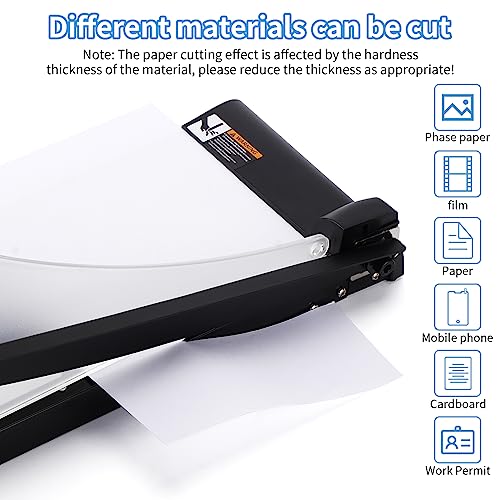
- •★【High-Performance Guillotine Trimmer】:Paper cutter with thick and sharp stainless steel blades will stay sharper longer,the newly designed paper cutter, with upgraded steel structure and unique alignment grid design, is more durable and reliable than other paper cutters.paper cutter is very suitable for cutting paper, photos, pictures, labels, cards and more paper products.
- •★【Multifunctional Paper Trimmer】: Paper cutter designed with a safety guard, safety latch, and anti-slip rubber pads; this professional paper trimmer can cut through 10 sheet capacity (20-16 lb) at a time,Cutting arm's easy grip handle stays comfortable in your hand during extended use.
Paper Cutter,Laser Positioning Paper Cutter,Paper Cutter Guillotine with Safety Blade Lock 12” 10 Sheet Capacity, Paper Trimmer with Metal Base Paper Cutting Board for Home, Office,School
List Price: $34.90$31.41DEALYou Save: $3.49 (10%)
Free shippingFree Returns – 30 daysFree Order CancellationSecure Payment2–3 Days DeliveryGet It August 10, 2026In Stock (1)No marketing spamNo account requiredFulfilment by FedEx / Amazon / UPS / ShipwirePayPal / Card Buyer Protection
Customer Reviews
Reviews sourced from verified Amazon purchasers4.1
out of 5
Based on 10 reviews
5★
30%
4★
70%
3★
0%
2★
0%
1★
0%
Okay for home use, but falls short in the office.
Francis Monroe✓ Verified Purchase•September 24, 2023
I regularly use paper cutters in the office. They are a must-have for administrative tasks. This paper cutter is equipped with an adjustable laser for precision cutting. However, the quality and craftsmanship didn't measure up to my expectations. Relative to the price, I like the features, and it works. Nevertheless, I wouldn't recommend it for an active office environment. Otherwise, it is suitable for home use.
Nice paper cutter, useless laser...
MOCTODNOZAMA✓ Verified Purchase•September 12, 2023
The media could not be loaded. THE GOOD:
--------------
* 12" paper cutter with blade lock.
* 10 sheet capacity.
* Pretty good build quality for the price you're paying.
* The blade lines up to the edge of the base, which means the left side of the paper will end up flush with the edge of the base, and the right side will fall off.
THE BAD:
------------
* Laser feature seems like a gimmick. There isn't any sold advice in the brochure, nor in their demo videos on how to accurately set the laser. But as I tinkered with, I realized it's not dependable, and more like a gimmick. You're better off just eyeballing the edge of the base, which is where the blade will cut. Overall, I'll go 4-Stars.
--------------
* 12" paper cutter with blade lock.
* 10 sheet capacity.
* Pretty good build quality for the price you're paying.
* The blade lines up to the edge of the base, which means the left side of the paper will end up flush with the edge of the base, and the right side will fall off.
THE BAD:
------------
* Laser feature seems like a gimmick. There isn't any sold advice in the brochure, nor in their demo videos on how to accurately set the laser. But as I tinkered with, I realized it's not dependable, and more like a gimmick. You're better off just eyeballing the edge of the base, which is where the blade will cut. Overall, I'll go 4-Stars.
Sharp cutter but came with no setup instructions
Nancy Wheeler✓ Verified Purchase•September 11, 2023
This paper cutter is sharp and has a small enough footprint to easily fit on a desk or worktable. It has a finger guard as well as a laser to help show where the cut will be. Unfortunately, there are no instructions that came with this cutter. It took a bit of time to figure out how to calibrate the laser and how to install the finger guard.
There is a plastic shield that snaps into place to protect your fingers when cutting. You must raise the cutting handle and feed the short end of the finger guard into position first and then the other side will slide into place. Make sure that the handle is below the top of the finger guard. The finger guard is made so that it will rise when you lift the handle so that all of the area under the cutting blade is blocked from your left hand.
This paper cutter has a laser that shines on the paper to show you where the blade is going to cut. This must be calibrated to work properly. The laser is adjusted by using an Allen wrench which is stored in a compartment on the bottom of the paper cutter. The laser must be adjusted so that it will shine straight down the cutting edge. If the paper is not lying flat, it will distort the line of the laser.
One of the problems I experienced was that when the finger guard is in place, it refracts the laser and distorts the line. You will need to have a white piece of paper handy to use when calibrating the position of the laser. There are two holes that have calibration screws. One of them is adjusted using the Allen key and stays in place well, the other one is adjusted with your finger and can be easily bumped and knocked out of place. It takes a bit of experimentation to get the laser to shoot straight. I recommend that you calibrate the laser first and then put the finger guard in place afterward.
The deck has markings for various sizes of paper as well as angled cuts. These are very helpful, but the measurements are all in metric. There is one line for 8 ½" x 11" paper, but it is only for the 11-inch horizontal line. The deck is not big enough to show the 8 ½" dimension.
The laser is turned on and off with a push button and requires two AAA batteries to operate. I recommend that you calibrate the laser first and then put the finger guard in place afterward.
There is a plastic shield that snaps into place to protect your fingers when cutting. You must raise the cutting handle and feed the short end of the finger guard into position first and then the other side will slide into place. Make sure that the handle is below the top of the finger guard. The finger guard is made so that it will rise when you lift the handle so that all of the area under the cutting blade is blocked from your left hand.
This paper cutter has a laser that shines on the paper to show you where the blade is going to cut. This must be calibrated to work properly. The laser is adjusted by using an Allen wrench which is stored in a compartment on the bottom of the paper cutter. The laser must be adjusted so that it will shine straight down the cutting edge. If the paper is not lying flat, it will distort the line of the laser.
One of the problems I experienced was that when the finger guard is in place, it refracts the laser and distorts the line. You will need to have a white piece of paper handy to use when calibrating the position of the laser. There are two holes that have calibration screws. One of them is adjusted using the Allen key and stays in place well, the other one is adjusted with your finger and can be easily bumped and knocked out of place. It takes a bit of experimentation to get the laser to shoot straight. I recommend that you calibrate the laser first and then put the finger guard in place afterward.
The deck has markings for various sizes of paper as well as angled cuts. These are very helpful, but the measurements are all in metric. There is one line for 8 ½" x 11" paper, but it is only for the 11-inch horizontal line. The deck is not big enough to show the 8 ½" dimension.
The laser is turned on and off with a push button and requires two AAA batteries to operate. I recommend that you calibrate the laser first and then put the finger guard in place afterward.
Not Industrial
Amazon Customer✓ Verified Purchase•September 4, 2023
This is a home use cutter. You're not gonna be cutting tons of paper with this as it limits out at 10 sheets per. However, it is a nice home use one. Cuts pretty consistently, and doesn't take up as much space on your desk. The laser is something unique that I don't think most will appreciate until they get a long piece of paper that covers the sides. Then it would come in handy, however, you will need to ensure paper is held down during cutting as the line will move if paper pops up and you could get a bad cut. It's a decent limited use cutter and I would recommend ðŸ‘
Arts and Crafts cutter
Vede✓ Verified Purchase•August 30, 2023
I would look at this more of an arts and crafts cutter that permits you to cut large pieces in an exact straight line. It doesn't work well as a commercial paper chopper because it can't even cut through novels and books. I see this more of a project based tool rather than commercial grade.
Page 1 of 2