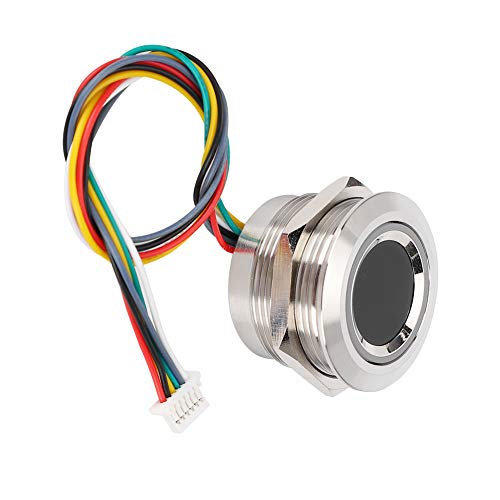
JIANBOLAND USB Fingerprint Reader Fingerprint for Windows10/11, Windows Hello Automatic Driver Installation with 5ft Extension Cable-Windows Password Free Operation


Key features
- •USB Fingerprint Key Reader-Login on your computer using Microsoft's built-in Windows Hello login feature with just your fingerprint, no need to remember usernames and passwords.
- •Microsoft Certification: The Windows System Biometric Framework, Windowslello Fingerprint Support, You Can Directly Set The Fingerprint Login Option In Windows. Support Win 10 /Win11 32/64 Bit, Log In In A Faster And Safer Way.
- •Plug and Play - No Driver Installation Required; In Most Cases When The USB Fingerprint Reader Is Plugged In The Computer Will Be Automatically Recognized, If It Is Not Recognized, Please Manually Update The Driver or Restart The Computer (In Case of Networking)-Depending on Whether Your Windows System Is Genuine or Not
- •Up to 10 different fingerprints can be stored for multiple users to use the same computer; while exceeding industry standards for False Rejection Rate (0.1%) and False Acceptance Rate (0.001%) Recognition speed <0.5S
- •After-sales service: JIANBOLAND provides worry-free after-sales service 30 days free return, we will reply to any of your questions within 24 hours-5FT/1.5M USB extension cable design more convenient for desktop use
BrandJIAN BOLAND
CategoryBiometrics
JIANBOLAND USB Fingerprint Reader Fingerprint for Windows10/11, Windows Hello Automatic Driver Installation with 5ft Extension Cable-Windows Password Free Operation
List Price: $45.38$40.84DEALYou Save: $4.54 (10%)
Free shippingFree Returns – 30 daysFree Order CancellationSecure Payment2–3 Days DeliveryGet It October 24, 2026In Stock (1)No marketing spamNo account requiredFulfilment by FedEx / Amazon / UPS / ShipwirePayPal / Card Buyer Protection
Customer Reviews
Reviews sourced from verified Amazon purchasers3.8
out of 5
Based on 10 reviews
5★
50%
4★
50%
3★
0%
2★
0%
1★
0%
Plug and Play on Windows 10
Scott✓ Verified Purchase•September 18, 2023
I got this to replace another USB dongle fingerprint scanner that has been giving me issues. I plugged it in and Windows 10 installed it without issue. I then programmed a couple of my fingers to use the scanner. It worked but took a few swipes to get it to unlock my computer. After some trial and error on programming my fingerprints I found if you just do a quick swipe for each input when programming it that it does a lot better. This is because it is a swipe style reader and not a touch reader. It comes with a fairly long cord so I was able to plug it into the top of my desktop computer under my desk and route it to my keyboard tray for easier use. I used some double side tape to hold it in place. If you are going to mount it then I suggest you mount it first then program it as this is what I had to do to get a consistent reading. It performed as expected so I give it 4 stars.
USB fingerprint reader
Hippy01✓ Verified Purchase•August 26, 2023
The fingerprint reader matches its description. I set this reader up with Windows 10 and also shared the fingerprint reader with a Windows virtual machine (VM). I was pleased the the reader was detected by Windows on the VM and was able to setup Windows "Hello" for login and authentication using the fingerprint reader. I frequently work remotely and my employer has a lot of authentication and security measures that involve re-authentication throughout the day. The fingerprint reader makes this a bit less painful. I am a bit disappointed in that the reader does take several finger scans before it recognizes my fingerprint, but I have never had the reader complete fail to authenticate my finger. As a comparison, my built in laptop reader generally takes only 1 try to recognize my finger.
Works great
David✓ Verified Purchase•July 24, 2023
Works great with Windows Hello. Easy setup and detects fingerprint well.
Definitely makes the Windows log-in process much easier and faster.
Dominick Critelli✓ Verified Purchase•June 14, 2023
Logging in is much faster and easier. Sometimes, it doesn't recognize the fingerprints, but then Windows reverts to using a PIN. The device certainly is a timesaver for the majority of logins. It had a quick and easy set-up and began working immediately after I programmed in the fingerprints.
Easy installation but finicky reader
vigil12✓ Verified Purchase•June 11, 2023
The installation was indeed plug & play on my Window 11 desktop. See the attached screenshot of how the reader shows up in the device list. Configuration was also straightforward, using the Settings | Accounts options in Windows and choosing to login with Windows Hello, then scanning your finger multiple times to save its definition.
I'm still using it, but the fingerprint reader does not consistently register my scan. It behaves in a very finicky way, and will sometimes accept, sometimes reject the same finger. When this happens, I need to enter my login PIN, and when it happens multiple times, it takes away the advantage of using Windows Hello and fingerprint authentication.
I have two other computing devices which offer built-in scanners, and neither of them display the same issue. Hence, I'm guessing the finicky behavior is from this external scanner. It works, but I'm taking away a star because of this inconsistency.
I'm still using it, but the fingerprint reader does not consistently register my scan. It behaves in a very finicky way, and will sometimes accept, sometimes reject the same finger. When this happens, I need to enter my login PIN, and when it happens multiple times, it takes away the advantage of using Windows Hello and fingerprint authentication.
I have two other computing devices which offer built-in scanners, and neither of them display the same issue. Hence, I'm guessing the finicky behavior is from this external scanner. It works, but I'm taking away a star because of this inconsistency.
Page 1 of 2