ATSC Digital TV Converter Box Dongle with TV Tuner, TV Recording, USB Multimedia Function, 1080P HDMI Output, Clear QAM by Mediasonic HomeWorx (HW135STB)




Key features
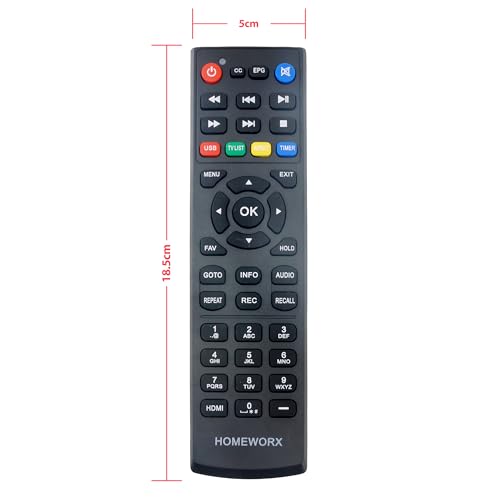
- •New 2024 Version from Mediasonic Store. The new improvements included LARGE Remote Control, 3 ft HDMI Cable, Display Panel, Clear QAM, Support hard drive up to 4TB*, reception sensitivity, and 12 hr. AM / PM feature.
- •Clear QAM function can be used with cable provider to watch unscrambled cable channels.
- •IR Receiver with Display Panel to show Channel number and Sub-Channel
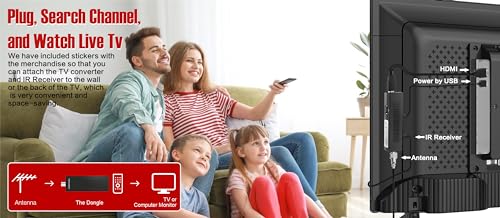
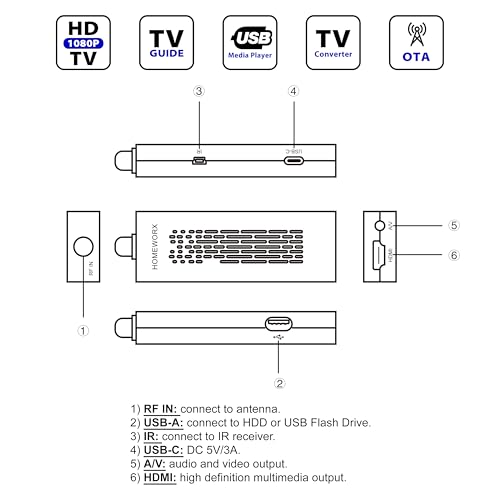
- •Powered by TV's USB port (USB Type A) or 5V USB Charger. USB-C (Type C) power connector on the main unit provides fallibility for user to change longer USB cable and adapt different type of 5V USB Charger
- •Receive Over-The-Air ATSC Digital Broadcast to your Analog and Digital TV, Projector, and Computer Monitor.
- •Record and Pause Live TV: You won't miss your favorite show. (Requires USB 2.0 or USB 3.0 external hard drive up to 4TB connect to this unit; USB flash drive is not recommended) (Recording may require connecting to 5V / 2A charger to provide sufficient power to power USB external hard drive.
ATSC Digital TV Converter Box Dongle with TV Tuner, TV Recording, USB Multimedia Function, 1080P HDMI Output, Clear QAM by Mediasonic HomeWorx (HW135STB)
List Price: $52.36$47.12DEALYou Save: $5.24 (10%)
Free shippingFree Returns – 30 daysFree Order CancellationSecure Payment2–3 Days DeliveryGet It October 28, 2026In Stock (1)No marketing spamNo account requiredFulfilment by FedEx / Amazon / UPS / ShipwirePayPal / Card Buyer Protection
Customer Reviews
Reviews sourced from verified Amazon purchasers4.1
out of 5
Based on 10 reviews
5★
40%
4★
60%
3★
0%
2★
0%
1★
0%
Full of features for the price. 5V power supply and AAA remote batteries not included.
Dan✓ Verified Purchase•April 17, 2024
I like using the Mediasonic Homeworx interface for aiming antennas. Just press INFO twice while on a channel and it will display the signal strength as a percentage. It also includes a manual channel search. This is the usual Homeworx experience in more of a stick form. I got this to use in a portable setup, but it is clear that its intended use is as a dongle behind a TV.
No power supply is included. The intention is that your TV's USB port will provide enough power, but if you plan to use the DVR function you will most likely need to add a charger that can supply 2A. The remote requires two AAA batteries and those also are not included. The remote is a bit bigger than my other Mediasonic box remote. The buttons are bigger and easier to read, but CH +.- and Vol +/- are no longer labeled. The box has its own internal volume control that you can use instead of the TVs. The remote weighs almost nothing, but the texture of the plastic and buttons give it a quality feel. All cables included are 3ft or just over. The wired IR receiver displays the channel. When the unit is turned off, it displays the time along with a bright red standby LED. I could not find an option in the menu to turn it off.
The tuner pulls in stations as well as my other devices. If EPG information is included in the signal, an electronic program guide for that channel can be displayed. The manufacturer says that a USB stick is not ideal for DVR function, but that is what I used for testing. No special formatting was used. I just plugged it in and the device created a folder called HBPVR for my recordings. Recordings are in .mts format and are named according to channel, date, and time. I was able to move the flash drive over to my PC and play the file without any issues. You can pause live TV for up to a half hour.
The multimedia menu allows you to access content from a flash drive. The music player is basic, but works well. It does not show any visualizations or screen savers while playing music. You can set up a slide show of the photos. Adjustments for time to display each photo and transitions are in the setup menus. The video player can play a wide range of formats: avi, mpg, dat, vob, mkv, mjpg. You also access the PVR from this menu.
Overall I like these Mediasonic Homeworx devices for aiming antennas and portable setups. For my actual daily TV watching at home I use more polished and much more expensive options. If you want a PVR at a very low price though, you can't go wrong with these boxes. Whether this dongle or the standard box is right for you will depend on your application.
No power supply is included. The intention is that your TV's USB port will provide enough power, but if you plan to use the DVR function you will most likely need to add a charger that can supply 2A. The remote requires two AAA batteries and those also are not included. The remote is a bit bigger than my other Mediasonic box remote. The buttons are bigger and easier to read, but CH +.- and Vol +/- are no longer labeled. The box has its own internal volume control that you can use instead of the TVs. The remote weighs almost nothing, but the texture of the plastic and buttons give it a quality feel. All cables included are 3ft or just over. The wired IR receiver displays the channel. When the unit is turned off, it displays the time along with a bright red standby LED. I could not find an option in the menu to turn it off.
The tuner pulls in stations as well as my other devices. If EPG information is included in the signal, an electronic program guide for that channel can be displayed. The manufacturer says that a USB stick is not ideal for DVR function, but that is what I used for testing. No special formatting was used. I just plugged it in and the device created a folder called HBPVR for my recordings. Recordings are in .mts format and are named according to channel, date, and time. I was able to move the flash drive over to my PC and play the file without any issues. You can pause live TV for up to a half hour.
The multimedia menu allows you to access content from a flash drive. The music player is basic, but works well. It does not show any visualizations or screen savers while playing music. You can set up a slide show of the photos. Adjustments for time to display each photo and transitions are in the setup menus. The video player can play a wide range of formats: avi, mpg, dat, vob, mkv, mjpg. You also access the PVR from this menu.
Overall I like these Mediasonic Homeworx devices for aiming antennas and portable setups. For my actual daily TV watching at home I use more polished and much more expensive options. If you want a PVR at a very low price though, you can't go wrong with these boxes. Whether this dongle or the standard box is right for you will depend on your application.
Works as Advertised, Could Use Some Improvements
AdamMB91✓ Verified Purchase•March 12, 2024
The device came with a remote, an IR receiver, HDMI cable, USB cable for charging, and a set of AV cables. You will need 3x AAA batteries for the remote and a 5V USB power block. Initial setup is easy by following on screen instructions to scan for OTA and cable channels.
I'm using it to receive OTA channels for a smart screen that did not have a built in TV tuner. It works well enough, and it picked up all the expected channels. The device itself is a little slow, but not unexpected given the price range. The only major issues is that the remote is not well labelled, and you will be somewhat lost if you do not read the manual.
I'm using it to receive OTA channels for a smart screen that did not have a built in TV tuner. It works well enough, and it picked up all the expected channels. The device itself is a little slow, but not unexpected given the price range. The only major issues is that the remote is not well labelled, and you will be somewhat lost if you do not read the manual.
Works great, with a little worr
Cindy Brisson✓ Verified Purchase•March 11, 2024
I purchased this device to replace the absolute junk TV tuner on my Hitachi Roku TV set. If that's all I got from this tuner it would have been worth the money. Of course, once you have access to a feature, it becomes a 'must have'. This is where the work came in. The tuner was intermittent in DVR operation. In fact once I plugged in a SSD for recording things went real wonkey. I'd turn the tuner off at night only to find it on in the morning. Recording only worked once in a while. Fast forward/reverse buttons didn't work. As I increased the power supply first from using the TV to a 1 Amp supply, then to a 2 Amp supply things started working much better. The next issue was that recording wasn't dependable. I had less than a 500GB SSdrive, I attributed the problems to that. I increased the drive to try to record a whole hour but it was a mechanical hard drive and that caused it's own problems.
The last change was to install a fast 1TB SSD. This is working pretty well. The functions I've tried so far are doing what they are supposed to.
The last change was to install a fast 1TB SSD. This is working pretty well. The functions I've tried so far are doing what they are supposed to.
No batteries or wall charger.
RanJay✓ Verified Purchase•March 8, 2024
This review is for: 2024 Newest Digital TV Converter Box Dongle, ATSC Digital Converter Box with TV Tuner, TV Recording, USB Multimedia Function, 1080P HDMI Output, Clear QAM by Mediasonic HomeWorx (HW135STB)
I almost gave this 5 stars, but it only got 4 because it lacked batteries for the remote control, and the wall charger. It came with a USB power cord, but you have to supply your own wall charger. However, if your TV has a USB port on it, and it is unused, you can plug the TV Tuner into that for power.
When I did the TV channel scan, it was quick. It only took a few minutes.
The video quality is quite good. I am using an OTA antenna mounted on the roof of my house.
There is no built in SSD or hard drive for recording TV episodes. You have to supply your own.
The remote control works quite well and the receiver picks up the signal even if the remote is not pointed directly at the receiver. As long as there is nothing between the remote and receiver to block the signal.
The instruction manual is a tad hard to read as the print is small, but is legible.
The manual makes no reference to what size or type of SSD or HDD drive to attach for time shifting and recording. Or what format is needed of the drive. I inserted a 16GB flash drive formatted as FAT32 for testing purposes. It worked, but I don't believe flash drives are good for this purpose. There is an option under the menu USB>PVR Configure to format the drive.
For time shifting, you press pause/play button once to pause the program, then press pause/play again to get to the time shift line. There you can use the fast forward and rewind functions of that current TV program. However, it seems the fast forward button simply jumps to the end.
To record a live program, just hit the REC button and it starts recording. To stop recording, press the stop button and a menu pops up asking if you want to stop recording. Getting to recorded programs is not simple. You have to go through a few different menus to get to your recordings.
Recording from the EPG requires pressing the EPG button to get to the program guide. You can then select a program in the list and press the OK button to bring up the schedule menu for recording future TV shows.
I cut the cord a while ago, and this is ideal for cord cutters. I'll be connecting this to my gaming computer in my office, which has three screens. I'll be able to watch TV on one of those screens while game working, surfing or gaming.
I'm pretty pleased with this TV tuner. I'll put it through the pacers and update this review if I feel I need to add, remove or update anything.
I almost gave this 5 stars, but it only got 4 because it lacked batteries for the remote control, and the wall charger. It came with a USB power cord, but you have to supply your own wall charger. However, if your TV has a USB port on it, and it is unused, you can plug the TV Tuner into that for power.
When I did the TV channel scan, it was quick. It only took a few minutes.
The video quality is quite good. I am using an OTA antenna mounted on the roof of my house.
There is no built in SSD or hard drive for recording TV episodes. You have to supply your own.
The remote control works quite well and the receiver picks up the signal even if the remote is not pointed directly at the receiver. As long as there is nothing between the remote and receiver to block the signal.
The instruction manual is a tad hard to read as the print is small, but is legible.
The manual makes no reference to what size or type of SSD or HDD drive to attach for time shifting and recording. Or what format is needed of the drive. I inserted a 16GB flash drive formatted as FAT32 for testing purposes. It worked, but I don't believe flash drives are good for this purpose. There is an option under the menu USB>PVR Configure to format the drive.
For time shifting, you press pause/play button once to pause the program, then press pause/play again to get to the time shift line. There you can use the fast forward and rewind functions of that current TV program. However, it seems the fast forward button simply jumps to the end.
To record a live program, just hit the REC button and it starts recording. To stop recording, press the stop button and a menu pops up asking if you want to stop recording. Getting to recorded programs is not simple. You have to go through a few different menus to get to your recordings.
Recording from the EPG requires pressing the EPG button to get to the program guide. You can then select a program in the list and press the OK button to bring up the schedule menu for recording future TV shows.
I cut the cord a while ago, and this is ideal for cord cutters. I'll be connecting this to my gaming computer in my office, which has three screens. I'll be able to watch TV on one of those screens while game working, surfing or gaming.
I'm pretty pleased with this TV tuner. I'll put it through the pacers and update this review if I feel I need to add, remove or update anything.
Works for TV
brock✓ Verified Purchase•March 3, 2024
This reminds me a lot of old-style cable interfaces from the early 2000s. It does work though.
Note that this is just the tuner/converter/reader box - it doesn't come with a digital TV antenna (you'll need that in addition to this). This is essentially just reads the signal gathered by the antenna and translates it for your TV. Most nicer TVs have this already, but I have a cheap Vizio TV that doesn't have a TV Tuner.
This does have additional features on top of that. You can plug in a hard drive to the USB port and play files off it (the supported types are in the picture). It also allows you to use this like a DVR - it can pause/play live TV or even record it (though I don't know if you can access the files from a computer or such).
This device comes with both HDMI and the old red/yellow/white RCA cables. It has a co-ax connection for your antenna input, an old mini-USB slot for the IR dongle, USB-C for power, and the USB port for a hard drive.
After connecting the antenna and IR dongle and plugging it into your TV you will need to change your input to this device. You then use the device remote (not your normal TV one).
The first time you turn it on it prompts for your country and timezone and such and then scans for channels. Be sure you get your country right or you may not get any channels (or may be missing some). It did take until about 2/3 through the scanning process before mine found any channels, so be patient with it - and make sure your antenna is in a high place with a relatively unobstructed view.
One thing to be aware of is video quality. Mine was set by default to 1080i. I had to go to the settings and change it to 1080p (which looks much better). Be aware though that a lot of channels are still a bit blocky - many are aired in 720p or 1080i, so it looks like old cable/TV quality, not crisp HD quality. This is the fault of the station and limitations on the airwave bandwidth, so it's not this device's fault.
The remote has a channel list button and you can also set up favorites or recall your last channel (standard stuff). The IR dongle has a little display that shows the channel/sub channel you're on too, which is nice. It's also unobtrusive, so you can fit this all behind the TV and just have the dongle poking out a bit.
All in all this is a nice way to add over-the-air linear TV while also getting some DVR functionality. Much easier than a TV capture card and Plex or such, but if you already have a smart TV or attached computer then streaming will have better quality.
Note that this is just the tuner/converter/reader box - it doesn't come with a digital TV antenna (you'll need that in addition to this). This is essentially just reads the signal gathered by the antenna and translates it for your TV. Most nicer TVs have this already, but I have a cheap Vizio TV that doesn't have a TV Tuner.
This does have additional features on top of that. You can plug in a hard drive to the USB port and play files off it (the supported types are in the picture). It also allows you to use this like a DVR - it can pause/play live TV or even record it (though I don't know if you can access the files from a computer or such).
This device comes with both HDMI and the old red/yellow/white RCA cables. It has a co-ax connection for your antenna input, an old mini-USB slot for the IR dongle, USB-C for power, and the USB port for a hard drive.
After connecting the antenna and IR dongle and plugging it into your TV you will need to change your input to this device. You then use the device remote (not your normal TV one).
The first time you turn it on it prompts for your country and timezone and such and then scans for channels. Be sure you get your country right or you may not get any channels (or may be missing some). It did take until about 2/3 through the scanning process before mine found any channels, so be patient with it - and make sure your antenna is in a high place with a relatively unobstructed view.
One thing to be aware of is video quality. Mine was set by default to 1080i. I had to go to the settings and change it to 1080p (which looks much better). Be aware though that a lot of channels are still a bit blocky - many are aired in 720p or 1080i, so it looks like old cable/TV quality, not crisp HD quality. This is the fault of the station and limitations on the airwave bandwidth, so it's not this device's fault.
The remote has a channel list button and you can also set up favorites or recall your last channel (standard stuff). The IR dongle has a little display that shows the channel/sub channel you're on too, which is nice. It's also unobtrusive, so you can fit this all behind the TV and just have the dongle poking out a bit.
All in all this is a nice way to add over-the-air linear TV while also getting some DVR functionality. Much easier than a TV capture card and Plex or such, but if you already have a smart TV or attached computer then streaming will have better quality.
Page 1 of 2
Related products


Aluratek Digital TV Converter Box with Digital Video Recorder (ADTB01F), Black
List: $80.49$72.44DEAL