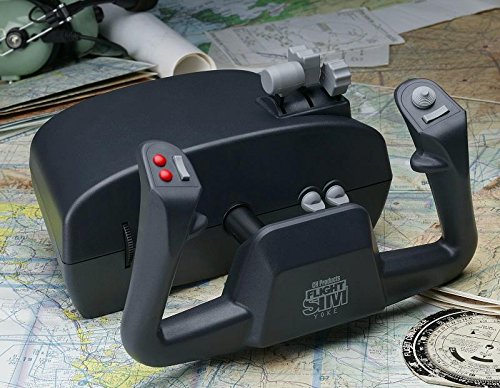
CH Products Flight Sim Yoke USB ( 200-615 ), Black


Key features
- •5 Axis and 20 Buttons: X & Y axis on the grips for aileron and elevator, Z, R & U axis in the levers for Throttle, prop, mixture
- •Four traditional push buttons, 2 bi-directional flip switches, 2 bi-directional rocker switches and 1 eight-way POV hat switch
- •Total of 144 programmable functions with optional PC programming software (included)
- •Plug and Play driverless USB installation for both PC and Macintosh
- •Compatible with Windows 98, 2000, XP, Vista, 7, 8, 10 and Mac OSX
CH Products Flight Sim Yoke USB ( 200-615 ), Black
List Price: $268.78$241.90DEALYou Save: $26.88 (10%)
Free shippingFree Returns – 30 daysFree Order CancellationSecure Payment2–3 Days DeliveryGet It October 25, 2026In Stock (6)No marketing spamNo account requiredFulfilment by FedEx / Amazon / UPS / ShipwirePayPal / Card Buyer Protection
Customer Reviews
Reviews sourced from verified Amazon purchasers4.0
out of 5
Based on 20 reviews
5★
75%
4★
25%
3★
0%
2★
0%
1★
0%
Feels good
David C. Wells•August 18, 2017
Nice controller works like the plane I fly
Landed a real 757
Eddie Sitt•July 24, 2017
Wait a minute. You know Ritchie? He loved playing with this and the Microsoft simulator. He actually learned how to really fly a plane from this. No joke
Good practice tool for instrument training.
DM•June 26, 2017
The feel and function is about what I expect from info level equipment. Functional but trim adjustments are very touchy. It's perfect fortIFR practice and good enough to land. Aileron trim would be nice.
Everything I expected. I have over 7000 hrs in ...
Robert C.•April 16, 2017
Everything I expected. I have over 7000 hrs in a DC-3 and I can practice approaches with ease.
Great beginner's yoke, easy to use.
D•April 13, 2017
Simple, inexpensive flight yoke. Good for a beginner. I like that the prop/throttle/mixture levers are integrated (saving space.)
I purchased with the corresponding flight pedals. Easily recognized by X-Plane flight simulator, so no install/setup required (other than to program your buttons to your liking.) Make sure your table is at least 1 inch thick, otherwise, it may be a challenge to get a good grip with the mounting clamps.
I purchased with the corresponding flight pedals. Easily recognized by X-Plane flight simulator, so no install/setup required (other than to program your buttons to your liking.) Make sure your table is at least 1 inch thick, otherwise, it may be a challenge to get a good grip with the mounting clamps.
Page 1 of 4