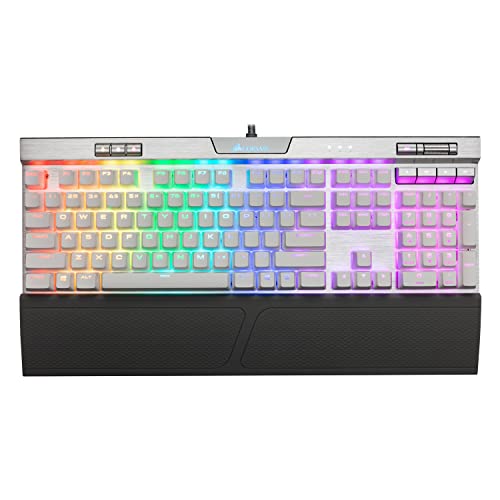
Corsair K70 RGB MK.2 SE Mechanical RAPIDFIRE Gaming Keyboard - USB Passthrough & Media Controls - PBT Double-Shot Keycaps - Cherry MX Speed - RGB LED Backlit - White


Key features
- •Get the RAPIDFIRE advantage CHERRY MX Speed mechanical key switches provide the reliability and accuracy you demand, with blistering fast 1.2mm actuation
- •Aircraft grade silver anodized brushed aluminum frame, built to withstand a lifetime of gaming
- •White PBT double shot keycaps for superior durability, look and feel
- •8MB profile storage with hardware macro and lighting playback allow access to up to three stored profiles on the go, independent of external software
- •CORSAIR iCUE software enables vivid dynamic lighting control, sophisticated macro programming and full system lighting synchronization across compatible CORSAIR peripherals, coolers, fans and more
Corsair K70 RGB MK.2 SE Mechanical RAPIDFIRE Gaming Keyboard - USB Passthrough & Media Controls - PBT Double-Shot Keycaps - Cherry MX Speed - RGB LED Backlit - White
List Price: $261.89$235.70DEALYou Save: $26.19 (10%)
Free shippingFree Returns – 30 daysFree Order CancellationSecure Payment2–3 Days DeliveryGet It October 24, 2026In Stock (2)No marketing spamNo account requiredFulfilment by FedEx / Amazon / UPS / ShipwirePayPal / Card Buyer Protection
Customer Reviews
Reviews sourced from verified Amazon purchasers4.7
out of 5
Based on 10 reviews
5★
50%
4★
50%
3★
0%
2★
0%
1★
0%
Green LED's for a few keys are out
Chris✓ Verified Purchase•August 10, 2023
Not too terribly a big deal as I use this for work, but I noticed that a few of the green LED's are not working. Also not as responsive as I was hoping for, but it's still a nice keyboard.
I like it
Rawilburn✓ Verified Purchase•July 17, 2023
I bought the Mk2 the first time and while I like it a lot this is more my speed. Super fast and dependable. I'm a keyboard wizard and I found my staff.
Awesome keyboard, tragic software
Richard✓ Verified Purchase•July 16, 2023
I love the keyboard itself. It's a bit louder than I'd like, but it's not supposed to be quiet-key essay writer anyway. For gaming, it's superb. Excellent board for the price, even still in 2023 (keyboards don't really age-out anyway).
Feel is excellent, the extra AWSD keyset it comes with is a must to slap on, and the functionality is fantastic. Great LED customization options, and the lights are vibrant and bright, even during the day.
My only complaint is with the god awful Corsair CUE software. It crashes *constantly* and always has major issues. Just killing the program and rebooting it clears things up, but it is very annoying having it crash and freeze so often. So, the software gets like a 1/5, but the keyboard itself gets top 5/5 marks.
Feel is excellent, the extra AWSD keyset it comes with is a must to slap on, and the functionality is fantastic. Great LED customization options, and the lights are vibrant and bright, even during the day.
My only complaint is with the god awful Corsair CUE software. It crashes *constantly* and always has major issues. Just killing the program and rebooting it clears things up, but it is very annoying having it crash and freeze so often. So, the software gets like a 1/5, but the keyboard itself gets top 5/5 marks.
Corsair, still my preferred keyboard! A second-day, honest review.
Eddie B.✓ Verified Purchase•July 12, 2023
I'm a hardcore gamer and software developer. I put a ton of mileage on my computer hardware, using it all for both work and play. I play on both Windows 10 and Linux Manjaro. For the past few years, I had the Corsair Strafe RGB with the silent mechanical keys. I absolutely loved that keyboard. Sadly, the W and E keys started ghosting, so I went on the hunt for a replacement. I've owned every major keyboard in the gaming market in the last 10~ years. Corsair obviously, but also Logitech, a Razer Blackwidow, Saitek Eclipse III. I just think Corsair is ahead of the game and more innovative in the keyboard department, so I looked for another Corsair. I also wanted something compatible with my existing color profiles on both Windows and Linux. I ran across this one on Amazon. The limited edition is quite like none I seen before, and I just had to have it.
I ordered, and I love this thing so far. The pluses; I absolutely love the brushed aluminum body of this keyboard. I'm just absolutely crazy for it! I've just never seen anything like it, and it's such a modern step away from the atypical boring plastic, black keyboards. It almost makes the rest of my computer hardware look extremely dated. The backlit keys reflect off of the brushed aluminum as well, instantly noticeable and awesome vs. my old Strafe. The keyboards got some weight to it, which is great. It doesn't move or wobble around at all. Again compared to my old Strafe RGB, I also think the LED's a bit brighter on this one, they just stand out and look nicer. I love the media buttons. There's also a button to quickly switch color profiles on the whim.
Performance wide, it is a phenomenal keyboard. You really don't have to type hard on this thing at all, the keys hold up firmly. The keys are extremely responsive and sensitive (which I like). It's great for both gaming and writing code. The keys hold up well resting your fingers on them as well. I've messed up code before doing that! Some other pluses. I love the braided USB cable, as well as the font and styling of the letters and special characters on the keyboard. It's all nice and sleek, while still being highly readable.
Cons; not many, but I have to mention them. This keyboard is definitely on the noisy side. To be blunt, it's loud! It doesn't bother me as the user, but if I heard someone within earshot of it, I'd probably get really tired of hearing it after a while. I really wish Corsair would find ways to implement the silent mechanical keys on all models. That to me, was extremely innovative on the Strafe RGB. I've heard of some people actually liking the noise. I'm someone who writes code 8 hours a day and then games on this thing. The noise can bit a bit much, at least for work. It also makes the keyboard, to me, feel a bit too old school (more below).
Next thing, ergonomics. It's a fine and comfortable keyboard for the most part, but I wish they would have done a little more in this department. The keyboard only tilts backwards. I wish these keyboards had adjustable legs in all corners. To prevent carpel tunnel and strain, it's better to have opposite of a keyboard that tips forward in stead. The wrist pad is also nothing special, probably the weakest part of the keyboard in an otherwise perfect design.
Back to the old school comment. I've been playing computers for, heck, 25 years now, since I was a kid. The keyboard, it sounds and feels very "old school" to me. In all honestly, feels like my keyboard from my Gateway 2000 I had back in the late 90's! I think it's be funny to do a blind test between this and a vintage PC keyboard. I'm not saying that's a bad thing whatsoever, but it does feel again, like it was a step back from the innovative silent keys on the strafe.
I think that's about it. If will update my review as I go along. Despite my cons, I absolutely love this keyboard and highly recommend it for both work and play. It just looks amazing, it's highly response, it doesn't move or slide around. I got nothing bad to say about the performance as well as aesthetics. My star docked was over the loudness and step back to an old-school "feeling" keyboard. I am largely comparing and contrasting it to the Strafe RGB. I also know that Corsair still offers the silent mechanical keyboards. But part of me just wishes that was adapted on all models. Still, love the keyboard, I'd definitely grab up the limited editions while they're hot!
I ordered, and I love this thing so far. The pluses; I absolutely love the brushed aluminum body of this keyboard. I'm just absolutely crazy for it! I've just never seen anything like it, and it's such a modern step away from the atypical boring plastic, black keyboards. It almost makes the rest of my computer hardware look extremely dated. The backlit keys reflect off of the brushed aluminum as well, instantly noticeable and awesome vs. my old Strafe. The keyboards got some weight to it, which is great. It doesn't move or wobble around at all. Again compared to my old Strafe RGB, I also think the LED's a bit brighter on this one, they just stand out and look nicer. I love the media buttons. There's also a button to quickly switch color profiles on the whim.
Performance wide, it is a phenomenal keyboard. You really don't have to type hard on this thing at all, the keys hold up firmly. The keys are extremely responsive and sensitive (which I like). It's great for both gaming and writing code. The keys hold up well resting your fingers on them as well. I've messed up code before doing that! Some other pluses. I love the braided USB cable, as well as the font and styling of the letters and special characters on the keyboard. It's all nice and sleek, while still being highly readable.
Cons; not many, but I have to mention them. This keyboard is definitely on the noisy side. To be blunt, it's loud! It doesn't bother me as the user, but if I heard someone within earshot of it, I'd probably get really tired of hearing it after a while. I really wish Corsair would find ways to implement the silent mechanical keys on all models. That to me, was extremely innovative on the Strafe RGB. I've heard of some people actually liking the noise. I'm someone who writes code 8 hours a day and then games on this thing. The noise can bit a bit much, at least for work. It also makes the keyboard, to me, feel a bit too old school (more below).
Next thing, ergonomics. It's a fine and comfortable keyboard for the most part, but I wish they would have done a little more in this department. The keyboard only tilts backwards. I wish these keyboards had adjustable legs in all corners. To prevent carpel tunnel and strain, it's better to have opposite of a keyboard that tips forward in stead. The wrist pad is also nothing special, probably the weakest part of the keyboard in an otherwise perfect design.
Back to the old school comment. I've been playing computers for, heck, 25 years now, since I was a kid. The keyboard, it sounds and feels very "old school" to me. In all honestly, feels like my keyboard from my Gateway 2000 I had back in the late 90's! I think it's be funny to do a blind test between this and a vintage PC keyboard. I'm not saying that's a bad thing whatsoever, but it does feel again, like it was a step back from the innovative silent keys on the strafe.
I think that's about it. If will update my review as I go along. Despite my cons, I absolutely love this keyboard and highly recommend it for both work and play. It just looks amazing, it's highly response, it doesn't move or slide around. I got nothing bad to say about the performance as well as aesthetics. My star docked was over the loudness and step back to an old-school "feeling" keyboard. I am largely comparing and contrasting it to the Strafe RGB. I also know that Corsair still offers the silent mechanical keyboards. But part of me just wishes that was adapted on all models. Still, love the keyboard, I'd definitely grab up the limited editions while they're hot!
Needs USB 3.0
Diane✓ Verified Purchase•June 6, 2023
I'm going to start by telling you that I'm not a gamer, but I prefer gaming PC hardware because it tends to be more customizable, have more options available/larger selection, and lasts a lot longer. I am a developer and work in the IT department of a large organization, spending over 50 hours per week at my computer typing code, documentation, emails, etc., so my machine is important to me.
I needed a new keyboard and just wanted RGB so I went on a hunt and asked some gamer friends for recommendations on what to look for. Based on my "likes" for keyboard feel, they recommended the Cherry Red switches (in addition to a few others). I was able to test some at a local PC store and decided that the Cherry MX Red from Corsair was by far my favorite. Then off to Amazon for the right options/layout and price. I prefer a keyboard with a bit more angle and a deeper key. As non-gamer, I didn't need the customizable hot keys, but I absolutely insist on a separate number pad for when I'm doing calculations. that led me to this layout (non mini, non low profile, no gamer keys off to the left).
This keyboard feels great. I actually find that I make fewer typos when using it than on my prior keyboard. It's amazing with the right amount of give and take in a key will do for you.
I will say that the keys are a little more sensitive than I'm used to so I occasionally get a double hit on a key or if I'm resting my left hand while I type some right hand letters, a left hand key might slip in the mix. I'll get used to it over time but it is something to note. The included wrist rest is a must to get the right angle on the keys, and I wish the back prop supports were a bit longer, but I'll make it work.
The RGB lighting effects are amazing, even without the proprietary software. It worked plug and play out of the box, but the description is wrong - it says you only need USB 2.0. You need at least one 3.0 port for the keyboard itself, but the passthrough USB can be 3.0 or 2.0.
I love that it came with a few replacement/alternate keys for the main gaming keys (wasd and fderqw) that are textured plus a key remover. You won't need the key remover, though - I had 4 keys that had popped off in transit and I had to replace them. No damage but I had to pop them back on.
The volume control wheel is more helpful than I would have thought, and it's even intelligent enough to adjust the volume on the remote machine when connected and using an RDP session but adjust the local machine settings if you minimize the RDP session and return to your local workstation.
I've only used this for about half a workday so far and already I'm in love. I would absolutely buy this keyboard again and am considering getting a full set of replacement keys for when I eventually wear the paint off these (as I tend to do, no idea how!)
Long story long, this is a great RGB keyboard with a smooth keystroke and just enough click to let you know it's mechanical. Corsair got this one right.
I needed a new keyboard and just wanted RGB so I went on a hunt and asked some gamer friends for recommendations on what to look for. Based on my "likes" for keyboard feel, they recommended the Cherry Red switches (in addition to a few others). I was able to test some at a local PC store and decided that the Cherry MX Red from Corsair was by far my favorite. Then off to Amazon for the right options/layout and price. I prefer a keyboard with a bit more angle and a deeper key. As non-gamer, I didn't need the customizable hot keys, but I absolutely insist on a separate number pad for when I'm doing calculations. that led me to this layout (non mini, non low profile, no gamer keys off to the left).
This keyboard feels great. I actually find that I make fewer typos when using it than on my prior keyboard. It's amazing with the right amount of give and take in a key will do for you.
I will say that the keys are a little more sensitive than I'm used to so I occasionally get a double hit on a key or if I'm resting my left hand while I type some right hand letters, a left hand key might slip in the mix. I'll get used to it over time but it is something to note. The included wrist rest is a must to get the right angle on the keys, and I wish the back prop supports were a bit longer, but I'll make it work.
The RGB lighting effects are amazing, even without the proprietary software. It worked plug and play out of the box, but the description is wrong - it says you only need USB 2.0. You need at least one 3.0 port for the keyboard itself, but the passthrough USB can be 3.0 or 2.0.
I love that it came with a few replacement/alternate keys for the main gaming keys (wasd and fderqw) that are textured plus a key remover. You won't need the key remover, though - I had 4 keys that had popped off in transit and I had to replace them. No damage but I had to pop them back on.
The volume control wheel is more helpful than I would have thought, and it's even intelligent enough to adjust the volume on the remote machine when connected and using an RDP session but adjust the local machine settings if you minimize the RDP session and return to your local workstation.
I've only used this for about half a workday so far and already I'm in love. I would absolutely buy this keyboard again and am considering getting a full set of replacement keys for when I eventually wear the paint off these (as I tend to do, no idea how!)
Long story long, this is a great RGB keyboard with a smooth keystroke and just enough click to let you know it's mechanical. Corsair got this one right.
Page 1 of 2