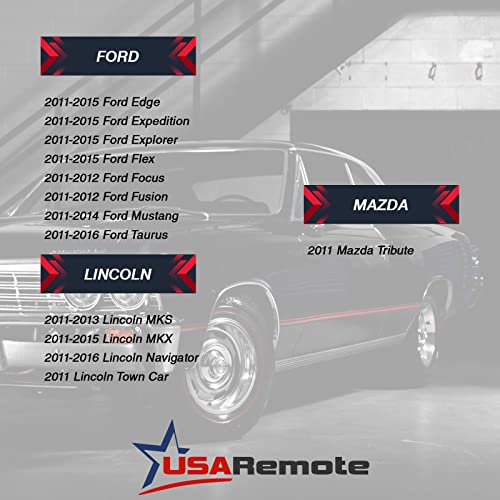
Car Key Fob Keyless Entry Remote Start fits Ford, Lincoln, Mercury, Mazda (CWTWB1U793 5-btn) - Guaranteed to Program




Key features
- •fits Ford, Lincoln, Mercury, Mazda - Guaranteed to Program
- •Replacement for P/N: CWTWB1U793
- •User programmable with provided step-by-step instructions 2 original keys required to use supplied instructions. If you only have 1 key then you will need to get this key programmed by a locksmith or dealership.
- •Complete electronic assembly with battery
- •Durable long lasting construction, easy to use
Car Key Fob Keyless Entry Remote Start fits Ford, Lincoln, Mercury, Mazda (CWTWB1U793 5-btn) - Guaranteed to Program
List Price: $34.82$31.34DEALYou Save: $3.48 (10%)
Free shippingFree Returns – 30 daysFree Order CancellationSecure Payment2–3 Days DeliveryGet It October 26, 2026In Stock (2)No marketing spamNo account requiredFulfilment by FedEx / Amazon / UPS / ShipwirePayPal / Card Buyer Protection
Customer Reviews
Reviews sourced from verified Amazon purchasers3.9
out of 5
Based on 10 reviews
5★
70%
4★
30%
3★
0%
2★
0%
1★
0%
well made
Buyer from VA✓ Verified Purchase•September 26, 2023
very well made worked perfect to replace my factory keys
Remote fob needs extra programming
RevRun Regan✓ Verified Purchase•September 19, 2023
Took it to get programmed and it works to start my 2011 F250 but remote doesn't work initially. Thankfully, I read on a review the instructions to make it work. Here are the instructions, copied from a review by "Amanda".
This programming will only let the key unlock and start the car, but the FOB buttons won't work initially. To program the FOB buttons, you get in the vehicle and close all the doors. Then you open the drivers door and leave it open. Hit the unlock button on the drivers door while it is open. Now take your new key and put it in the ignition. Turn the key to on and back off 8 times quickly (do not start the vehicle). On the 8th time, leave the key in the on position and you will hear all of the door locks cycle. Then within 10 seconds, while the key is still in the ignition and in the on position, hit the lock button on the FOB. The door locks should cycle again which means it was programmed successfully. You can turn the key to the off position and it should be fully functional, including remote start!
This programming will only let the key unlock and start the car, but the FOB buttons won't work initially. To program the FOB buttons, you get in the vehicle and close all the doors. Then you open the drivers door and leave it open. Hit the unlock button on the drivers door while it is open. Now take your new key and put it in the ignition. Turn the key to on and back off 8 times quickly (do not start the vehicle). On the 8th time, leave the key in the on position and you will hear all of the door locks cycle. Then within 10 seconds, while the key is still in the ignition and in the on position, hit the lock button on the FOB. The door locks should cycle again which means it was programmed successfully. You can turn the key to the off position and it should be fully functional, including remote start!
Had to code the fob to lock/unlock and key to start
Michael L. Rowan✓ Verified Purchase•September 16, 2023
Thanks to BryMom for part 1
To program my 2004 Expedition to use this key, I had to use 2 methods, as you have to program both the key to work in the ignition and the buttons on the remote to Lock/Unlock your doors.
First, to program the key to start your Truck / Car, you need 2 working keys that both will start your vehicle. My owners manual described this process. You have to put the first key in the ignition and turn it to the On position for 4-10 seconds. Turn to Off position and remove key. Put in second key and turn to On position for 6-10 seconds. At this point it should show your code to open the doors if you have the 5 digit key pad on the drivers door. Turn to Off position and remove key. Put in the New key (needs to be cut first) and turn to On position. This will program the new key to start your vehicle. It should store up to 8 keys.
Now at this point, my Truck would start and run, and unlock the doors with the key. But it would not remotely unlock the doors.
Second, to program the remote buttons to Lock/Unlock the doors, my Truck required this procedure.
1. Prepare Vehicle
CLOSE and UNLOCK vehicle using power door locks.
2. Enter Vehicle Programming Mode
INSERT key into Ignition and TURN from OFF to RUN 8 times within 10 seconds, with the 8th time ending in RUN. Door locks will cycle to confirm Programming Mode.
3. Program Remote
Within 20 seconds press any button on first keyless remote fob. Door locks will cycle to confirm programming.
(Repeat immediately for any additional remotes to be programmed.)
4. Exit Programming Mode
Turn ignition to OFF. Locks will again cycle to indicate end of programming mode.
5. Test Remotes
Test all remotes. Programming is now complete.
Now I could Lock and Unlock and Remote Start my truck from the buttons on the key.
Make sure to Up Vote this so that others can see now to make this key work.
To program my 2004 Expedition to use this key, I had to use 2 methods, as you have to program both the key to work in the ignition and the buttons on the remote to Lock/Unlock your doors.
First, to program the key to start your Truck / Car, you need 2 working keys that both will start your vehicle. My owners manual described this process. You have to put the first key in the ignition and turn it to the On position for 4-10 seconds. Turn to Off position and remove key. Put in second key and turn to On position for 6-10 seconds. At this point it should show your code to open the doors if you have the 5 digit key pad on the drivers door. Turn to Off position and remove key. Put in the New key (needs to be cut first) and turn to On position. This will program the new key to start your vehicle. It should store up to 8 keys.
Now at this point, my Truck would start and run, and unlock the doors with the key. But it would not remotely unlock the doors.
Second, to program the remote buttons to Lock/Unlock the doors, my Truck required this procedure.
1. Prepare Vehicle
CLOSE and UNLOCK vehicle using power door locks.
2. Enter Vehicle Programming Mode
INSERT key into Ignition and TURN from OFF to RUN 8 times within 10 seconds, with the 8th time ending in RUN. Door locks will cycle to confirm Programming Mode.
3. Program Remote
Within 20 seconds press any button on first keyless remote fob. Door locks will cycle to confirm programming.
(Repeat immediately for any additional remotes to be programmed.)
4. Exit Programming Mode
Turn ignition to OFF. Locks will again cycle to indicate end of programming mode.
5. Test Remotes
Test all remotes. Programming is now complete.
Now I could Lock and Unlock and Remote Start my truck from the buttons on the key.
Make sure to Up Vote this so that others can see now to make this key work.
Works and here is how I programmed
BryMom✓ Verified Purchase•August 31, 2023
I purchased this for my 2013 F150.
To program my Truck to use this key, I had to use 2 methods, as you have to program both the key to work in the ignition and the buttons on the remote to Lock/Unlock your doors.
First, to program the key to start your Truck / Car, you need 2 working keys that both will start your vehicle. My owners manual described this process. You have to put the first key in the ignition and turn it to the On position for 4-10 seconds. Turn to Off position and remove key. Put in second key and turn to On position for 6-10 seconds. At this point it should show your code to open the doors if you have the 5 digit key pad on the drivers door. Turn to Off position and remove key. Put in the New key (needs to be cut first) and turn to On position. This will program the new key to start your vehicle. It should store up to 8 keys.
Now at this point, my Truck would start and run, and unlock the doors with the key. But it would not remotely unlock the doors.
Second, to program the remote buttons to Lock/Unlock the doors, my Truck required this procedure. Your vehicle could vary slightly. I don't know if the owners manual described this, but I found the instructions online. You get in the vehicle and shut all doors. Then open the drivers door and hit the unlock button on the door. Then put a key into the ignition and turn it from Off to On 8 times fairly quickly. On is the position right before you "start" the vehicle. You stop at the On position. The doors will lock and unlock when it is ready. Then you have 10 seconds to hit the Lock or Unlock button on the remote you want to program.
Now I could Lock and Unlock and Remote Start my truck from the buttons on the key.
Make sure to Up Vote this so that others can see now to make this key work.
To program my Truck to use this key, I had to use 2 methods, as you have to program both the key to work in the ignition and the buttons on the remote to Lock/Unlock your doors.
First, to program the key to start your Truck / Car, you need 2 working keys that both will start your vehicle. My owners manual described this process. You have to put the first key in the ignition and turn it to the On position for 4-10 seconds. Turn to Off position and remove key. Put in second key and turn to On position for 6-10 seconds. At this point it should show your code to open the doors if you have the 5 digit key pad on the drivers door. Turn to Off position and remove key. Put in the New key (needs to be cut first) and turn to On position. This will program the new key to start your vehicle. It should store up to 8 keys.
Now at this point, my Truck would start and run, and unlock the doors with the key. But it would not remotely unlock the doors.
Second, to program the remote buttons to Lock/Unlock the doors, my Truck required this procedure. Your vehicle could vary slightly. I don't know if the owners manual described this, but I found the instructions online. You get in the vehicle and shut all doors. Then open the drivers door and hit the unlock button on the door. Then put a key into the ignition and turn it from Off to On 8 times fairly quickly. On is the position right before you "start" the vehicle. You stop at the On position. The doors will lock and unlock when it is ready. Then you have 10 seconds to hit the Lock or Unlock button on the remote you want to program.
Now I could Lock and Unlock and Remote Start my truck from the buttons on the key.
Make sure to Up Vote this so that others can see now to make this key work.
Great product
Jojopete✓ Verified Purchase•August 9, 2023
I like the information that came along with the key I was able to use the information and get the key cut and program in one day
Page 1 of 2