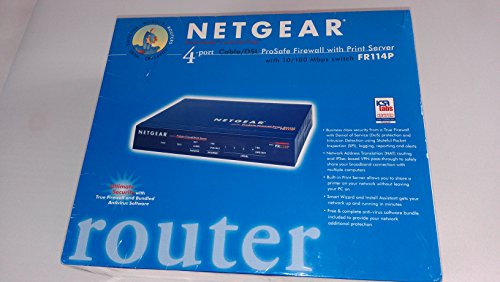
Netgear FR114P Firewall Cable/DSL Router with Print Server


Key features
- •True Firewall with Stateful Packet Inspection (SPI) and Intrusion Detection
- •Denial of Service (DoS) attack protection and VPN pass-through
- •Built-in Print Server and Network Address Translation (NAT) Routing
- •Easy-to-Use Smart Wizard and Install Assistant
- •Free, complete antivirus PC software bundle
BrandNETGEAR
CategoryPrint Servers
Netgear FR114P Firewall Cable/DSL Router with Print Server
List Price: $68.58$61.72DEALYou Save: $6.86 (10%)
Free shippingFree Returns – 30 daysFree Order CancellationSecure Payment2–3 Days DeliveryGet It October 25, 2026In Stock (2)No marketing spamNo account requiredFulfilment by FedEx / Amazon / UPS / ShipwirePayPal / Card Buyer Protection
Customer Reviews
Reviews sourced from verified Amazon purchasers3.3
out of 5
Based on 10 reviews
5★
70%
4★
30%
3★
0%
2★
0%
1★
0%
Software included
Van Peters✓ Verified Purchase•December 15, 2023
Great physical firewall
A pleasure to use for 2 years now, but it's getting old
J. Klebba✓ Verified Purchase•December 15, 2023
It runs well right out of the box, has a friendly online menu and is fairly speedy. Matter of fact, when a family member got a laptop I replaced it with a Netgear WGT624SC wireless router, but the slowdown in throughput was so severe that I put the FR114P back on as the router and used the wireless box downstream as an access point instead. I have never had to reboot it except for when NG issues a firmware update. With two teenaged kids the web blocking served me well, but it's limited to keywords in the URL and not page content.
However the FR114P is getting a bit long in the tooth: I haven't used the print server in a year or so since there is no USB support for my newer printer, the firmware updates aren't coming quickly anymore, and it does not support multifunction printer/scanners. If all you want is a packet-pusher, though, it does the job well.
However the FR114P is getting a bit long in the tooth: I haven't used the print server in a year or so since there is no USB support for my newer printer, the firmware updates aren't coming quickly anymore, and it does not support multifunction printer/scanners. If all you want is a packet-pusher, though, it does the job well.
FR114P
Lloyd Smith✓ Verified Purchase•December 12, 2023
Very satisfied with product, works great, was shipped fast. What more could one want. Will definately use Amazon for future purchases.
Thanks
Thanks
Just plug it in and it works
Christopher P. Becker✓ Verified Purchase•December 2, 2023
Finally! Something high-tech that basically installs itself. No hassle. No user-hostile experience. Why did I buy this? I had two LinkSys routers at home over three years and finally got fed up! With any network hiccup, I'd have to reboot the LinkSys routers and sometimes re-install the configuration software.
I tried another router with the same user-hostile experience. I bought this product -- the Netgear FR114P -- based on reviews. I wanted "plug-and-play" or as close as I could get. I didn't want the hassle of installing software that ultimately fought with me. Yes, I can read and follow directions. But for Pete's sake, humans played golf on the moon 35 years ago. Why can't they invent a router that just plain works out of the box?
I plugged the router into my network and had all my home PCs online in just a few minutes. It comes with software, but not necessary for basic functions.
For the money, this was bargain for the trouble it saves in installation.
I tried another router with the same user-hostile experience. I bought this product -- the Netgear FR114P -- based on reviews. I wanted "plug-and-play" or as close as I could get. I didn't want the hassle of installing software that ultimately fought with me. Yes, I can read and follow directions. But for Pete's sake, humans played golf on the moon 35 years ago. Why can't they invent a router that just plain works out of the box?
I plugged the router into my network and had all my home PCs online in just a few minutes. It comes with software, but not necessary for basic functions.
For the money, this was bargain for the trouble it saves in installation.
FR114P - Excellent!
Phil✓ Verified Purchase•December 1, 2023
This router rocks. Setup was as easy as any other router I've used.... I have SWBell PPPOE DSL and after typing in my name and password, it worked right away.
I have a 1996 HP 820Cse printer, and it works perfectly with the printer port - even turning itself on when a job comes from the router. Although, after using the setup disk to install the FR114P Printer port, I could not find the printer by browsing the LAN network. I had to add the printer as a local printer and the FR114P printer port showed up in the drop down list (Win XP). On my wife's XP system, installing the printer port from the Netgear disk continued to installing the printer without a problem (go figure - two identical XP systems).
If you buy this router just add the printer port with the driver disk and then cancel when the network printer installer comes up (if it doesn't find it). Then just add the printer as a local printer and in the drop down list of ports (LPT1, LPT2, etc) will be the FR114P.
I paid for a full security test on dslreports.com and tried a few others.... the FR114P got a perfect score evertime on every security test I tried....I've been using routers for 3 years at home (D-Link, Linksys, Firebox, UGate-UMAX) and I've very happy with this one.
No problems at all so far.....
:)
I have a 1996 HP 820Cse printer, and it works perfectly with the printer port - even turning itself on when a job comes from the router. Although, after using the setup disk to install the FR114P Printer port, I could not find the printer by browsing the LAN network. I had to add the printer as a local printer and the FR114P printer port showed up in the drop down list (Win XP). On my wife's XP system, installing the printer port from the Netgear disk continued to installing the printer without a problem (go figure - two identical XP systems).
If you buy this router just add the printer port with the driver disk and then cancel when the network printer installer comes up (if it doesn't find it). Then just add the printer as a local printer and in the drop down list of ports (LPT1, LPT2, etc) will be the FR114P.
I paid for a full security test on dslreports.com and tried a few others.... the FR114P got a perfect score evertime on every security test I tried....I've been using routers for 3 years at home (D-Link, Linksys, Firebox, UGate-UMAX) and I've very happy with this one.
No problems at all so far.....
:)
Page 1 of 2