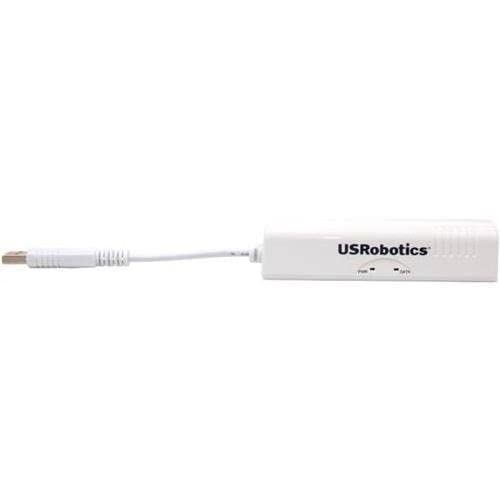
U.S. Robotics USR5637 56K USB Controller Dial-Up External Fax Modem with Voice






Key features
- •Controller-based modem integrates powerful communications processing functions into the modem itself, for assured performance without sapping processing power.
- •Windows Server 2012 R2/Win 10 /Win 10 64 bit/Server 2012/Win 8/Server 2011/Win 7/Server 2008/Vista/Server 2003/XP/2000 Mac 10.4-10.12
- •Linux 2.4.20 kernel or higher (Unimodem TSP/TAPI compliant)
- •Intel Pentium III 600 MHz or equivalent, 128 MB RAM, 5 MB hard drive space
U.S. Robotics USR5637 56K USB Controller Dial-Up External Fax Modem with Voice
List Price: $189.00$170.10DEALYou Save: $18.90 (10%)
Free shippingFree Returns – 30 daysFree Order CancellationSecure Payment2–3 Days DeliveryGet It October 24, 2026In Stock (14)No marketing spamNo account requiredFulfilment by FedEx / Amazon / UPS / ShipwirePayPal / Card Buyer Protection
Customer Reviews
Reviews sourced from verified Amazon purchasers4.1
out of 5
Based on 10 reviews
5★
50%
4★
50%
3★
0%
2★
0%
1★
0%
Some issues installing on Win 7 but all's well that ends well.
L. Anderson•February 22, 2017
I have been working with computers since the days before USB modems were the only way to connect to BBSs. I chose this USB hardware fax modem because it is cross platform (Linux/Mac/Windows). However, I had some difficulting installing it. For one thing, the CD does not clearly indicate which setup files are needed for installing on Windows 7. Furthermore, once modem drivers finally installed, it was not clear that there is no dial tone thru the computer speakers (or anywhere else for that matter) so there is no feedback to tell whether line is busy etc. Or at least there was not in my case. In fact, the QuickInstall instructions that come with the modem do not even mention that this is a fax modem and I began to doubt that I had actually purchased a fax modem.
All attempts to fax simply resulted in redial attempts. It is possible that the other line was busy, or out of paper, but it would have had to be very tricky timing because right in the middle of testing I successfully faxed to the same destination using a USRobotics Win Modem using the same phone line and recipient. In the end I had success by:
1) Downloading the latest driver file & two most recent Firmware updates from USRobotics website
2) Reflashing the firmware. Twice (tried to flash with latest firmware first but was unable to do so until I flashed with penultimate firmware -- both available from USRobotics.
3) I called USRobotics tech support which was very helpful and reassured me that no dial tone is ever heard, and gave me a test number to fax to which worked fine. I then resent the same fax I was trying to send earlier successfully (the recipient is now the proud owner of two copies -- one from the USR Win Modem and one from my Hardware Modem!).
I deducted one point simply for the clunky and confusing installation process, but have to admit the tech support was top notch and restored my faith in this company. Would have given 4.5 if possible. I hope this helps someone minimize impact from whatever gremlins were preventing my initial efforts from finding success. I suspect the earlier problem may have been a combination of some incompatibility between the CD drivers and firmware on the modem and possible as yet undetermined user error (I did wait long enough to have the modem redial several times automatically so I don't think it was impatience on my part).
I will update this review if issues return.
All attempts to fax simply resulted in redial attempts. It is possible that the other line was busy, or out of paper, but it would have had to be very tricky timing because right in the middle of testing I successfully faxed to the same destination using a USRobotics Win Modem using the same phone line and recipient. In the end I had success by:
1) Downloading the latest driver file & two most recent Firmware updates from USRobotics website
2) Reflashing the firmware. Twice (tried to flash with latest firmware first but was unable to do so until I flashed with penultimate firmware -- both available from USRobotics.
3) I called USRobotics tech support which was very helpful and reassured me that no dial tone is ever heard, and gave me a test number to fax to which worked fine. I then resent the same fax I was trying to send earlier successfully (the recipient is now the proud owner of two copies -- one from the USR Win Modem and one from my Hardware Modem!).
I deducted one point simply for the clunky and confusing installation process, but have to admit the tech support was top notch and restored my faith in this company. Would have given 4.5 if possible. I hope this helps someone minimize impact from whatever gremlins were preventing my initial efforts from finding success. I suspect the earlier problem may have been a combination of some incompatibility between the CD drivers and firmware on the modem and possible as yet undetermined user error (I did wait long enough to have the modem redial several times automatically so I don't think it was impatience on my part).
I will update this review if issues return.
A Real Hardware Modem
Kindle Customer•November 12, 2016
This is a Real Hardware Modem within a USB form without requiring an external power source.
For Linux, recompile your kernel for including USB Modem CDC ACM support; or navigate to Device Drivers > USB support > USB Modem (CDC ACM) support. If you're using a binary Linux distribution, you may need to additionally load the cdc-acm.ko driver/module.
PROS
1) A real hardware modem, not a win-modem or soft-modem.
2) No external power source, requiring to be left on 24/7.
CONS
1) No speaker or audio while connecting. I, as likely most, enjoy hearing the modem link-up with the remote ISP and then silencing the speaker after a successful link-up. Without hearing the negotiating, it's difficult to know if a successful connection is being made or has been made without watching the terminal.
2) Could have been neat to have a few more blinking lights and toggle switches, but I'm not at all complaining with the current package.
For Linux, recompile your kernel for including USB Modem CDC ACM support; or navigate to Device Drivers > USB support > USB Modem (CDC ACM) support. If you're using a binary Linux distribution, you may need to additionally load the cdc-acm.ko driver/module.
PROS
1) A real hardware modem, not a win-modem or soft-modem.
2) No external power source, requiring to be left on 24/7.
CONS
1) No speaker or audio while connecting. I, as likely most, enjoy hearing the modem link-up with the remote ISP and then silencing the speaker after a successful link-up. Without hearing the negotiating, it's difficult to know if a successful connection is being made or has been made without watching the terminal.
2) Could have been neat to have a few more blinking lights and toggle switches, but I'm not at all complaining with the current package.
Mac OS X (10.11) El Capitan on a new iMac
Azazello•February 22, 2016
WARNING! I have learned a very important lesson from a first failed attempt to install the modem.
I am a veteran Mac user and while I was following the driver installation instructions (needs to be dowloaded from the US Robotics Support because the newer generation iMacs"”21" iMac with Retina display running OSX 10.11.3 "El Capitan""”do not have a CD-DVD ROM drive) the modem was not recognized by OS X and the Network driver was not displayed in the configuration. Even US Robotics Phone Support Staff could not help and recommended to return the "defective" modem.
The problem was solved after the second, replacement modem has failed installation and US Robotics Tech Support suggested to change the USB port"”I first protested that it was already tried with the previous failed installation but complied and THIS TIME when attaching the modem to the extreme right (fourth) USB port the driver _has_ recognized the modem. The likely explanation for the first failure was that although the modem was not attached to a USB hub but was adjacent to a USB port that was a hub and on the first installation attempt when I switched the USB port I have simply switched the USB hub cable and the modem's cable and according to US Robotics tech support the iMac has two _pairs_ of USB ports and that the adjacency of a hub was the likely culprit. Caveat emptor!
I am a veteran Mac user and while I was following the driver installation instructions (needs to be dowloaded from the US Robotics Support because the newer generation iMacs"”21" iMac with Retina display running OSX 10.11.3 "El Capitan""”do not have a CD-DVD ROM drive) the modem was not recognized by OS X and the Network driver was not displayed in the configuration. Even US Robotics Phone Support Staff could not help and recommended to return the "defective" modem.
The problem was solved after the second, replacement modem has failed installation and US Robotics Tech Support suggested to change the USB port"”I first protested that it was already tried with the previous failed installation but complied and THIS TIME when attaching the modem to the extreme right (fourth) USB port the driver _has_ recognized the modem. The likely explanation for the first failure was that although the modem was not attached to a USB hub but was adjacent to a USB port that was a hub and on the first installation attempt when I switched the USB port I have simply switched the USB hub cable and the modem's cable and according to US Robotics tech support the iMac has two _pairs_ of USB ports and that the adjacency of a hub was the likely culprit. Caveat emptor!
Works fine otherwise from what I can see
gadgetgeek•September 10, 2015
ONLY one complaint. The instructions of just plug it in for Linux, are a bit just plain WRONG. There are at least three software packages which must be configured to use the modem, and at least SOME mention of that fact deserves to be made in the manual; and at least SOME mention of the default ppp software most used should be make in the US Robotics manual. Works fine otherwise from what I can see.
NICE! GOOD QUALITY, BUT EXPENSIVE
bSMy84•April 30, 2015
Very good modem, though a bit expensive for what it is. The only complaint I have is with the fax software itself which is a bit skimpy as far as keeping track of what's sent or received and when, etc. In fact, there's no record of anything sent or received. That said, I use it with my iMac running 10.8.5, and the faxing software may be by Apple: a carryover from the earlier days when Macs included a built-in modem and ability to fax directly to and from the computer. Nowadays it seems that one has to pay one way or another to send or receive a fax, while with this modem and app I don't, but I'm probably one of the decreasing number who still has a landline.
Page 1 of 2