NETGEAR N450-100NAS (8x4) WiFi DOCSIS 3.0 Cable Modem Router (N450) Certified for Xfinity from Comcast, Spectrum, Cox, Cablevision & More
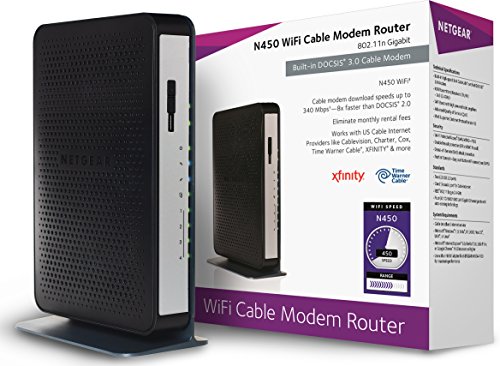
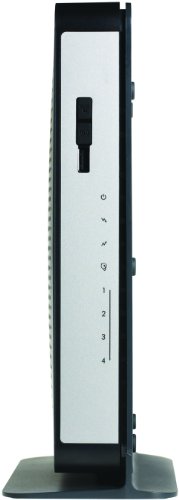
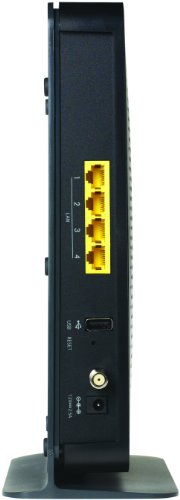


Key features
- •ELIMINATE MONTHLY CABLE MODEM RENTAL FEES - Up to $156 per year
- •Two-in One DOCSIS 3.0 Cable Modem + WiFi Router with 4 Gigabit Ethernet ports and 2 USB 2.0 ports
- •Up to 340Mbps modem speed and N450 (2.4GHz) WiFi speed. 8x4 channel bonding. Use with an N900 adapter like NETGEAR WNDA4100 for maximum performance
- •DOCSIS 3.0 unleashes 8x faster download speeds than DOCSIS 2.0
- •Ideal for streaming HD videos, faster downloads, and high-speed online gaming
- •Required for the fastest cable Internet speed tiers
- •Cable modem plus N450 WiFi router
- •Cable Internet download speeds up to 340 Mbps
- •N450—Up to 450Mbps @ 2.4GHz
- •Excellent range & coverage
- •Up to 340 Mbps download speed for streaming HD videos, faster downloads, and high-speed online gaming
- •Compatible with U.S. Cable Internet Providers (ISPs) like Cablevision, Charter, Cox, Time Warner Cable, XFINITY and more
- •Fast self-activation for XFINITY customers—get connected without a service call
- •Built-in DOCSIS 3.0 modem—8 times faster than DOCSIS 2.0
- •Saves money over time—No monthly equipment charges from your Internet service provider
- •Gigabit Ethernet ports—Fastest wired speeds to connect your router, computer and other devices
- •N450 WiFi Cable Modem Router
- •Ethernet cable
- •Quick install guide
- •Power adapter
- •Cable broadband Internet service
- •Microsoft Windows 7, Windows 8, Vista, XP, 2000, Mac OS or other operating systems running a TCP/IP network
- •Microsoft Internet Explorer 5.0, Firefox 2.0, Safari 1.4, or Google Chrome 11.0 browsers or higher
- •Does not support bundled voice service from Cable Service Providers
NETGEAR N450-100NAS (8x4) WiFi DOCSIS 3.0 Cable Modem Router (N450) Certified for Xfinity from Comcast, Spectrum, Cox, Cablevision & More
List Price: $64.22$57.80DEALYou Save: $6.42 (10%)
Free shippingFree Returns – 30 daysFree Order CancellationSecure Payment2–3 Days DeliveryGet It October 24, 2026In Stock (1)No marketing spamNo account requiredFulfilment by FedEx / Amazon / UPS / ShipwirePayPal / Card Buyer Protection
Customer Reviews
Reviews sourced from verified Amazon purchasers3.4
out of 5
Based on 10 reviews
5★
10%
4★
10%
3★
20%
2★
10%
1★
50%
Good for the price. Requires restarts.
Harry Potter•January 20, 2018
Purchased the refurbished unit and it worked fine with Xfinity on first attempt. However, the performance degrades over time (both modem and the wifi router performance) and it requires frequent restarts (once every 2-3 days). Tried setting up automatic restarts using the UI and by trying to write some scripts etc and none of that worked very well. Finally, when my christmas lights came down, I just used the (indoor)timer I had used to light up the tree, to schedule a restart. The (christmas light) timer/plug has been setup to restart the modem every night and keep it down for about 30 minutes (my timer does not have a setting for less than 30 minutes). Appears to be working fine now and get about 30-40 Mbps download speeds on a 60 Mbps Xfinity cable connection, which is pretty good for a 2.4 Ghz router in a crowded sub-urban area. I have this modem connected to another 5 GHz wifi router as well, and that router gives me about 40-55 Mbps download speeds.
Starts to break down after a couple of months.
David M.•January 17, 2018
Worked really well for the first couple months, and it was amazing, it saved me a lot of money.
I've had it now for a year and six months and there wifi speeds have been going way down. It doesn't even reach 3/4 of the speed I get on router. Not even half... I pay for 150 mbs and I max about 45 mbs now on wireless.
I have done my research and concluded it's this products fault. I have contacted xfinity many times and they fix my extremely slow speeds (basically bumping me from 20 to 40ish mbs). I however am still at that bottleneck of sub 45. When I first got this modem I got the same speed as wired and it was amazing. Sadly not anymore.
stars for the beginning and loss of stars for the rest of the times.
I've had it now for a year and six months and there wifi speeds have been going way down. It doesn't even reach 3/4 of the speed I get on router. Not even half... I pay for 150 mbs and I max about 45 mbs now on wireless.
I have done my research and concluded it's this products fault. I have contacted xfinity many times and they fix my extremely slow speeds (basically bumping me from 20 to 40ish mbs). I however am still at that bottleneck of sub 45. When I first got this modem I got the same speed as wired and it was amazing. Sadly not anymore.
stars for the beginning and loss of stars for the rest of the times.
Netgear N450 Cable Modem Router
Able Allan•August 15, 2017
The N4500 is not as easy to set up as my former C3700 cable modem router. The N450 required me to learn what many of the screens did and controlled. After a few days of learning, struggling and pulling hair at times going through the learning curve the cable modem router works just fine. I now know more about routers, IP address, and MAC addresses than ever before and I am very comfortable to know I have more control over the safety of my home network of four computers, two smart TVs, two smart Blu-Rays, A BOSE home theatre system, two tablets and two iPhones and a WII Game Consol. The N450 connected easily with the Netgear NAS and soon I will connect the exterior security camera system to the Netgear NAS. I am now set up for the next generation with DOCSIS 3.0 technology.
Works with Grande comm in Texas
Scott B•March 6, 2017
Works with Grande communications in Austin, Tex. Setup was fast. Just needed to call Grande and give them the MAC. Easy!
UPDATED: I have to power reset this thing every 2 to 3 days. The wired connection is fine, the wireless link to my cell phone seems to drop off every few days. I tried to update the firmware, but their firmware software doesn't work with this model. There's also a lack of documentation (the USB port on the unit is kinda silly and barely works... and its very clunky when it does). If there are any vendors out there watching this, I'd like to know HOW to update the firmware on it. .. (I"m very nerdy, been dealing with wireless routers and firmware a long time. It reminds me of Linksys in 2002).
UPDATED: I have to power reset this thing every 2 to 3 days. The wired connection is fine, the wireless link to my cell phone seems to drop off every few days. I tried to update the firmware, but their firmware software doesn't work with this model. There's also a lack of documentation (the USB port on the unit is kinda silly and barely works... and its very clunky when it does). If there are any vendors out there watching this, I'd like to know HOW to update the firmware on it. .. (I"m very nerdy, been dealing with wireless routers and firmware a long time. It reminds me of Linksys in 2002).
I wish I had not bought this one and wasted almost $100 + a year of suffering as bonus
Amazon Customer•December 16, 2016
I brought this modem+router in Nov-2015. Have used it for over a year. As any one else would, I wanted to get rid of comcast modem+router so that I don't have to pay $10 every month and the cost would be paid off in less than a year. Initially I did not realize this but, this modem+router has caused a lot of issues. I wish I had not bought this one and wasted almost $100 + a year of suffering as bonus.
I have about 5 devices that connect to wifi. Mac, Windows PC, 2 iPhones (6 and 7). And kindle. And all of them face same problem. So its not the devices with issues. Its the router itself.
1) If you do a skype call or streaming or any other internet based voice or video call, you will end up in restarting it in about 1 hour or less.
2) I complained comcast about the very low speed issue. So Comcast made me do speed test [...]hen I did the speed test via wifi connection it was 20 MBPS and variating. Then I connected the mac via ethernet cable. Speed test was 112 MBPS. Its the router that gobbles up every thing. And this was not the case when I was using model+router provided by comcast. Connection was stable and speed was very good.
3) Finally, restarting always solves the issue but you have this dis connectivity every now and then.
Hope this saves others from suffering.
I have about 5 devices that connect to wifi. Mac, Windows PC, 2 iPhones (6 and 7). And kindle. And all of them face same problem. So its not the devices with issues. Its the router itself.
1) If you do a skype call or streaming or any other internet based voice or video call, you will end up in restarting it in about 1 hour or less.
2) I complained comcast about the very low speed issue. So Comcast made me do speed test [...]hen I did the speed test via wifi connection it was 20 MBPS and variating. Then I connected the mac via ethernet cable. Speed test was 112 MBPS. Its the router that gobbles up every thing. And this was not the case when I was using model+router provided by comcast. Connection was stable and speed was very good.
3) Finally, restarting always solves the issue but you have this dis connectivity every now and then.
Hope this saves others from suffering.
Page 1 of 2


