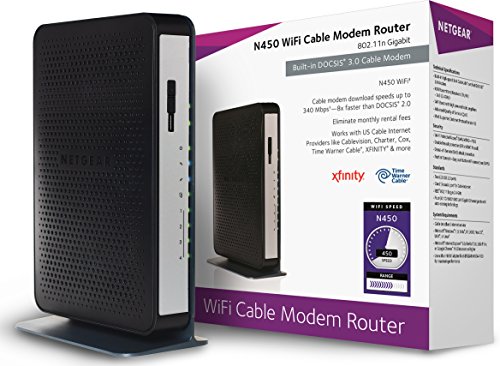
Linksys (CM3016) Docsis 3.0 16x4 Cable Modem



Key features
- •High Speed Cable Modem only, does not include telephone/voice ports
- •Experience high-speed Wi-Fi speeds from your existing ISP plans up to 250 Mbps. Ideal for HD media streaming, simultaneous online gaming, web surfing and more
- •Certified by all major cable providers
- •Features Intel Puma 6 chipset to achieve high-speed downstream and upstream performance
- •Able to handle high-bandwidth transfer rates over your existing cable lines
Linksys (CM3016) Docsis 3.0 16x4 Cable Modem
List Price: $54.98$49.48DEALYou Save: $5.50 (10%)
Free shippingFree Returns – 30 daysFree Order CancellationSecure Payment2–3 Days DeliveryGet It October 24, 2026In Stock (4)No marketing spamNo account requiredFulfilment by FedEx / Amazon / UPS / ShipwirePayPal / Card Buyer Protection
Customer Reviews
Reviews sourced from verified Amazon purchasers4.2
out of 5
Based on 10 reviews
5★
80%
4★
10%
3★
0%
2★
0%
1★
10%
so great! The MODEM has a large
T. Wright✓ Verified Purchase•January 29, 2018
So far, so great! The MODEM has a large, well-ventilated case, which seems to eliminate the need for a cooling fan. While other reviews mention having heat issues, doing a big file download and streaming some HD TV simultaneously produced almost no heat at all from the top of this unit.
As far as performance goes, I have the "Up to 100 Mbps" service from Spectrum. Speed tests consistently show 115 Mbps download, and 11.3 upload. I don't know how much of this is "raw" speed vs MODEM enhanced, but I'm happy with it. FWIW, I do know that my old TWC/Spectrum service with the same MODEM and cabling was "Up to 15 Mbps", and it generally tested at 25 up and 2.5 down. Based on this, and if my math is correct, my "raw" speed is about 70 Mbps with a 45 Mbps improvement by the MODEM.
As far as performance goes, I have the "Up to 100 Mbps" service from Spectrum. Speed tests consistently show 115 Mbps download, and 11.3 upload. I don't know how much of this is "raw" speed vs MODEM enhanced, but I'm happy with it. FWIW, I do know that my old TWC/Spectrum service with the same MODEM and cabling was "Up to 15 Mbps", and it generally tested at 25 up and 2.5 down. Based on this, and if my math is correct, my "raw" speed is about 70 Mbps with a 45 Mbps improvement by the MODEM.
No Way to Check Modem Performance or Status
DucMan750✓ Verified Purchase•November 4, 2017
UPDATE - My internet connection performance hasn't improved and has actually been worse than when using cable company provided equipment. I posted a review on Linksys website and ironically, they state my review didn't meet minimum requirements so I will update this review and post on other sites. Steer clear of this modem or any of the other Linksys cable modems.
Setup was quick and easy with just a phone call to Internet Service Provider (ISP). Problem is, you can't access the web-based GUI to see how the modem is performing. The Linksys Data sheet clearly states there's a Web-based GUI interface but I spent almost an hour with Linksys tech support going round and round on how to access the modem. IMHO, that's false advertising. For some strange reason they feel my ISP should have access to the GUI but I can't, even though I purchased the product. My ISP states, Linksys needs to provide information and Linksys is pointing back to my ISP. I've had Linksys products in the past and moved to Netgear because of the poor service provided by their tech support. I should've known better. Nothing has changed. I can't tell how this modem is performing, how many channels are in use or their signal strength. A quick speed test shows 30mb down, 11mb up (wireless) and 60mb down, 5mb up (wired). I have 100mb service from my ISP. Only reason it didn't get 1 star is because of the ease in setting it up.
Setup was quick and easy with just a phone call to Internet Service Provider (ISP). Problem is, you can't access the web-based GUI to see how the modem is performing. The Linksys Data sheet clearly states there's a Web-based GUI interface but I spent almost an hour with Linksys tech support going round and round on how to access the modem. IMHO, that's false advertising. For some strange reason they feel my ISP should have access to the GUI but I can't, even though I purchased the product. My ISP states, Linksys needs to provide information and Linksys is pointing back to my ISP. I've had Linksys products in the past and moved to Netgear because of the poor service provided by their tech support. I should've known better. Nothing has changed. I can't tell how this modem is performing, how many channels are in use or their signal strength. A quick speed test shows 30mb down, 11mb up (wireless) and 60mb down, 5mb up (wired). I have 100mb service from my ISP. Only reason it didn't get 1 star is because of the ease in setting it up.
Works with Spectrum Cable until they seem to go out....
Charles In Sumter✓ Verified Purchase•September 24, 2017
I don't have a lot of technical information about how well this modem works with Spectrum over my last modem, but it does work better. I still have issues with Spectrum and the internet suddenly going out and in at night, but I don't think the modem is at issue.
I can recommend it!
I can recommend it!
Small, but Mighty Modem!
SHOCKPROOF✓ Verified Purchase•July 4, 2017
Great compact Modem!
Over heating issue: Make sure the modem is in a ventilated area and away from the sun or any heat producing appliances.
Cox subscribers needs to call Cox to activate your modem.
1. You'll need to install everything first (Follow the simple instruction that came with it).
2. When done with the installation, turn on your computer, router(if any) & modem.
3. Have Your Cox info ready: Name, Telephone No associated with your account, Account Number & your 4 Digit PIN.
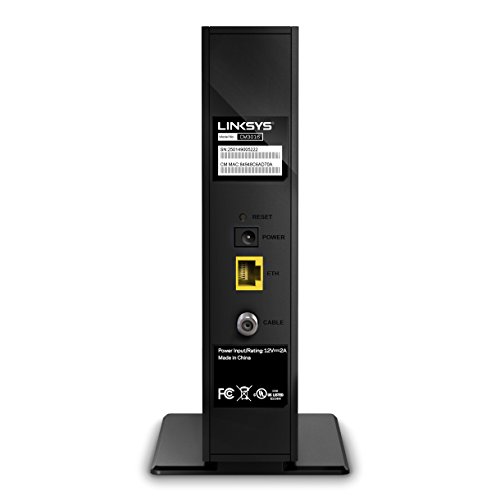
4. Write down your Modem's: Serial No. & MAC No. (You'll find these numbers at the back of your modem)
4. Then, Call Cox or use Chat on the Cox App and they'll activate your device.
That's it! If
If you know how to take care of this modem, it will last for a long time.
Update: (7/10/17)
So far so good. No issue.
Over heating issue: Make sure the modem is in a ventilated area and away from the sun or any heat producing appliances.
Cox subscribers needs to call Cox to activate your modem.
1. You'll need to install everything first (Follow the simple instruction that came with it).
2. When done with the installation, turn on your computer, router(if any) & modem.
3. Have Your Cox info ready: Name, Telephone No associated with your account, Account Number & your 4 Digit PIN.
4. Write down your Modem's: Serial No. & MAC No. (You'll find these numbers at the back of your modem)
4. Then, Call Cox or use Chat on the Cox App and they'll activate your device.
That's it! If
If you know how to take care of this modem, it will last for a long time.
Update: (7/10/17)
So far so good. No issue.
Smoking speeds compared to ISP provided modem!
Kevin Y.✓ Verified Purchase•April 2, 2017
My speeds literally quadrupled after installing this modem. If you live in the south and use the provided "top of the line" modem from Comcast your speeds can greatly vary between 15mbps-60mbps. I was paying for 75mbps for the longest and never knew why my speeds would barely reach 20mbps. After going through multiple modems from Comcast I decided to use my own. GREAT SCOTT am I happy I did! My speeds are just shy of 90mbps now (89.6). Alas, all the users in the house are happy, and buffering, again, is a thing of the past. Oh and my router is the Apple 2tb Time Capsule. I know it's not the fastest on the market, but still he throughput is still very acceptable.
Page 1 of 2