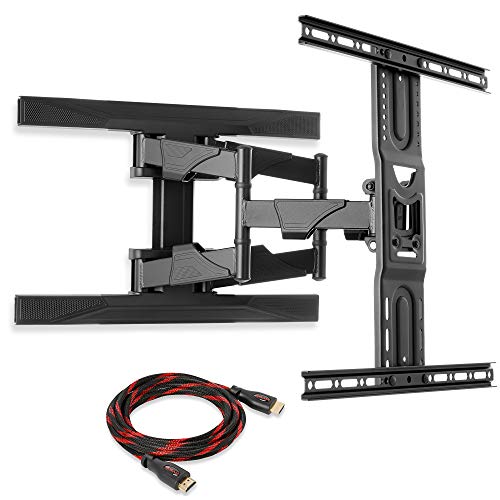
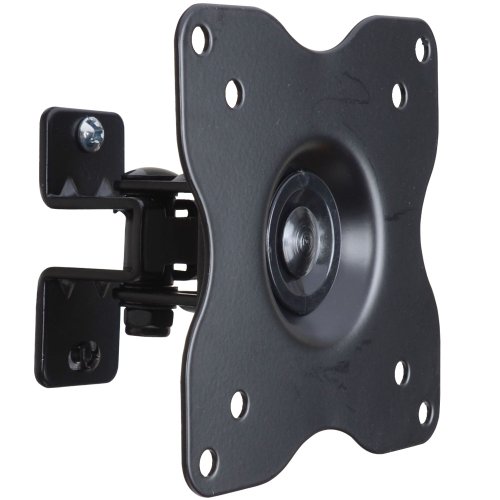
VideoSecu ML411B Adjustable Tilt Swivel Rotation TV Wall Mount Bracket for 19" to 42" LCD LED TV and Monitor (Max 44 lbs, VESA 100/75) Black 1FF


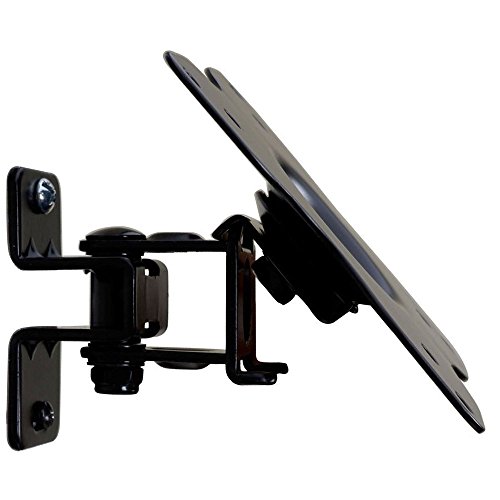
Key features
- •Compatible with VESA 75x75/100x100mm; Loading capacity 44 lb
- •Removable TV plate designed for single-person installation
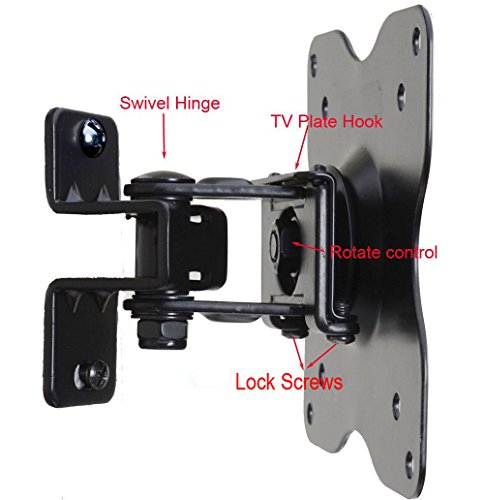
- •Tilt +/- 5 degrees up/down, +/- 60 degrees swivel for viewing angle adjustment; 360 degrees rotation for level adjustment
- •Fits 19", 20", 22", 23", 24", 26" 27" 30" 32" TVs, some up to 47 inch TVs with VESA 100 mounting hole patterns( check VESA and weight )
- •Common mounting hardware and user manual included
VideoSecu ML411B Adjustable Tilt Swivel Rotation TV Wall Mount Bracket for 19" to 42" LCD LED TV and Monitor (Max 44 lbs, VESA 100/75) Black 1FF
List Price: $27.14$24.43DEALYou Save: $2.71 (10%)
Free shippingFree Returns – 30 daysFree Order CancellationSecure Payment2–3 Days DeliveryGet It June 25, 2026In Stock (1)No marketing spamNo account requiredFulfilment by FedEx / Amazon / UPS / ShipwirePayPal / Card Buyer Protection
Customer Reviews
Reviews sourced from verified Amazon purchasers4.3
out of 5
Based on 10 reviews
5★
50%
4★
50%
3★
0%
2★
0%
1★
0%
A great way to mount monitors to DJ lighting stands.
Amazon Customer✓ Verified Purchase•August 7, 2023
These mounting brackets are an excellent way to attach up to a 32" monitor to a DJ lighting stand.
I used two ADJ O-clamps to perform this task. You'll need to drill out the single hole at the bottom part of the bracket so it accepts the bolt form the O-clamp. the other end's hole is perfect. Just make sure you use the O-clamp's washer, but you'll need a nut of the same threading as the wing-nut, because the wingnut's wings won't move pass the bolt which holds the wall bracket to the pivoting joint that connects to the vesa plate.
The only reason for a 4 star rating was the fact you have to use a tension knob to secure the vesa plate to the pivoting head. This means that if you accidentally over loosen the tension knob, your monitor could fall off the seemly if you're not holding the monitor when it happens.
My solution for adding safety to the assembly is to use a DJ safety cable, which you would slip through the D shaped protrusion of the vesa plate, and then wrap it several times around the pivoting head's bolt, back through the D protrusion of the vesa plate, and once around the DJ lighting stand, making sure the cable is snuggly secured between the two O-clamps, and then use the safety clip to close the loop. This will also make it less likely someone could just flip the O-clamps open, and have a monitor go crashing to the floor, or walk off with the monitor.
I'm using these to setup a multi-monitor solution for my streaming studio. Being legally blind, I have to use a minimum of 32" monitor to see the chat, and video software, and with the desk, as huge as it is, being too small, mounting the 32" monitors to the DJ lighting stands was the safest, and best rout. They're set either side of a 46" games monitor.
The construction of the brackets seem fairly sturdy, and definitely sufficient for up to a 32" monitor, maybe more if the monitor is at, or slightly less than 20 pounds, but be safe, and stick to the factory specified limitations for screen size.
I found it easier to attach the vesa plate to the monitor first, but you might want a bit of take to hold the threaded bolt inside the D protrusion of the vesa plate, so you can thread on the tension knob, while connecting the vesa plate to the end of the pivoting head of the wall bracket. The tricky bit's going to come when you go to attach the wall plate to the wall. If you do the wall mount first, you're likely going to need assistance connecting the monitor, and vesa plate to the rest of the assembly. Same for if you put the whole assembly to the wall, and then the monitor to the vesa plate.
I used two ADJ O-clamps to perform this task. You'll need to drill out the single hole at the bottom part of the bracket so it accepts the bolt form the O-clamp. the other end's hole is perfect. Just make sure you use the O-clamp's washer, but you'll need a nut of the same threading as the wing-nut, because the wingnut's wings won't move pass the bolt which holds the wall bracket to the pivoting joint that connects to the vesa plate.
The only reason for a 4 star rating was the fact you have to use a tension knob to secure the vesa plate to the pivoting head. This means that if you accidentally over loosen the tension knob, your monitor could fall off the seemly if you're not holding the monitor when it happens.
My solution for adding safety to the assembly is to use a DJ safety cable, which you would slip through the D shaped protrusion of the vesa plate, and then wrap it several times around the pivoting head's bolt, back through the D protrusion of the vesa plate, and once around the DJ lighting stand, making sure the cable is snuggly secured between the two O-clamps, and then use the safety clip to close the loop. This will also make it less likely someone could just flip the O-clamps open, and have a monitor go crashing to the floor, or walk off with the monitor.
I'm using these to setup a multi-monitor solution for my streaming studio. Being legally blind, I have to use a minimum of 32" monitor to see the chat, and video software, and with the desk, as huge as it is, being too small, mounting the 32" monitors to the DJ lighting stands was the safest, and best rout. They're set either side of a 46" games monitor.
The construction of the brackets seem fairly sturdy, and definitely sufficient for up to a 32" monitor, maybe more if the monitor is at, or slightly less than 20 pounds, but be safe, and stick to the factory specified limitations for screen size.
I found it easier to attach the vesa plate to the monitor first, but you might want a bit of take to hold the threaded bolt inside the D protrusion of the vesa plate, so you can thread on the tension knob, while connecting the vesa plate to the end of the pivoting head of the wall bracket. The tricky bit's going to come when you go to attach the wall plate to the wall. If you do the wall mount first, you're likely going to need assistance connecting the monitor, and vesa plate to the rest of the assembly. Same for if you put the whole assembly to the wall, and then the monitor to the vesa plate.
maybe get a mount that is flusher so it will look like the TV is mounted to the wall instead of ...
Mavoo's Computing Services✓ Verified Purchase•August 5, 2023
Decent mount. Made out of thick material enough to hold weight. Comes with mounting hardware to mount to wall and attach TV.
A couple peeves.
-The bolt/nut holding the 'wall mount' to the 'TV mount' (the vertical bolt in the product pic) was torqued on so tight, that I had to get a 'regular' full size wrench to break it loose, still with difficulty (I'm not a little guy by any means)
-The bolt/nut that attaches the tilt/rotation part on the TV mount - I wasn't able to tighten it enough the first time around. I had tightened it up enough (so I though) but once the TV was in the mount hanging on the wall and you grab the corner of the TV it would rotate.
-Wish mount wasn't so deep. Mounted a 24" TV and the TV sticks out from the wall by about 3 inches. Doesn't seem much but for me the TV is mounted on a wall parallel to the doorway so it looks a bit funky.
OVERALL:
-Good heavy duty(ish) mount especially for the price
-If you are mounting to a wall parallel to a doorway, maybe get a mount that is flusher so it will look like the TV is mounted to the wall instead of sticking out of it.
-Like this mount - would buy another especially if I'm mounting to a wall that is perpendicular to a doorway. The standoff from the wall to the TV is a good thing when you have to access the ports behind the TV or have thick cables/power cord.
A couple peeves.
-The bolt/nut holding the 'wall mount' to the 'TV mount' (the vertical bolt in the product pic) was torqued on so tight, that I had to get a 'regular' full size wrench to break it loose, still with difficulty (I'm not a little guy by any means)
-The bolt/nut that attaches the tilt/rotation part on the TV mount - I wasn't able to tighten it enough the first time around. I had tightened it up enough (so I though) but once the TV was in the mount hanging on the wall and you grab the corner of the TV it would rotate.
-Wish mount wasn't so deep. Mounted a 24" TV and the TV sticks out from the wall by about 3 inches. Doesn't seem much but for me the TV is mounted on a wall parallel to the doorway so it looks a bit funky.
OVERALL:
-Good heavy duty(ish) mount especially for the price
-If you are mounting to a wall parallel to a doorway, maybe get a mount that is flusher so it will look like the TV is mounted to the wall instead of sticking out of it.
-Like this mount - would buy another especially if I'm mounting to a wall that is perpendicular to a doorway. The standoff from the wall to the TV is a good thing when you have to access the ports behind the TV or have thick cables/power cord.
Why couldn't I find this mount in stores? High value for the functionality!
C. Gervais✓ Verified Purchase•August 3, 2023
After browsing all of the usual stores I was floored by the asking prices for such a conceptually simple accessory. This really frosted me and I used a number of colorful adjectives in very public places to express my feelings. Then I decided to take a shot with looking online for a flat panel mount and ended up here on Amazon. Prices varied but were definitely less expensive than the brick and mortar establishments. Anyhow when I came across this particular mount I did a double and then triple take after reading the description and price. While I did keep looking at other options this really was the hands down choice for my needs (mounting a 24" LED HDTV).
As others who reviewed this item have already mentioned, the included instructions could be much clearer. To be honest, I would actually go so far as to say that they're almost useless (at least insofar as mounting to wood studs is concerned). That's the bad news.
The good news is that you need only toss the instructions aside after a quick glance and installation is a breeze. I had no problems with my VESA 100x100 plate and putting up the wall bracket. Seriously, it took me longer to find the stud and measure/mark the wall bracket location than it did to actually mount the TV start to finish (all done without assistance). It really calls into question why/how the Best Buys, etc. of the world are charging in the neighborhood of $200 to do this for folks. Let me say this, even if you're level of mechanical ability is limited, you can do this with the right tools (stud finder, drill, screwdriver, socket set, etc.). Obviously, an extra pair of hands might prove useful but my 24" TV is 9-10 pounds so that's worth keeping in mind.
I do have a couple of other complaints which relate to the actual shipping of my unit. First off, I purchased the mount with a number of other items and was supposed to get free shipping according to Amazon because I had spent so much money. As it turned out, apparently the company that shipped me the mount never got that piece of information from Amazon and I was actually charged more for shipping than I actually paid for the hardware. To add injury to insult they actually shipped this item in a PAPER envelope which was torn in a number of places by the time it got to me (as you would probably imagine). Just something to keep in mind.
Overall, I think that this is a pretty nice piece of hardware and all things considered I would definitely but this same mount again. I guess that's about it. Happy mounting!
As others who reviewed this item have already mentioned, the included instructions could be much clearer. To be honest, I would actually go so far as to say that they're almost useless (at least insofar as mounting to wood studs is concerned). That's the bad news.
The good news is that you need only toss the instructions aside after a quick glance and installation is a breeze. I had no problems with my VESA 100x100 plate and putting up the wall bracket. Seriously, it took me longer to find the stud and measure/mark the wall bracket location than it did to actually mount the TV start to finish (all done without assistance). It really calls into question why/how the Best Buys, etc. of the world are charging in the neighborhood of $200 to do this for folks. Let me say this, even if you're level of mechanical ability is limited, you can do this with the right tools (stud finder, drill, screwdriver, socket set, etc.). Obviously, an extra pair of hands might prove useful but my 24" TV is 9-10 pounds so that's worth keeping in mind.
I do have a couple of other complaints which relate to the actual shipping of my unit. First off, I purchased the mount with a number of other items and was supposed to get free shipping according to Amazon because I had spent so much money. As it turned out, apparently the company that shipped me the mount never got that piece of information from Amazon and I was actually charged more for shipping than I actually paid for the hardware. To add injury to insult they actually shipped this item in a PAPER envelope which was torn in a number of places by the time it got to me (as you would probably imagine). Just something to keep in mind.
Overall, I think that this is a pretty nice piece of hardware and all things considered I would definitely but this same mount again. I guess that's about it. Happy mounting!
It's pretty intuitive - The holes on the plate line up ...
Rick Dalven✓ Verified Purchase•July 28, 2023
Does exactly what I want. Mounted a Samsung 32", which is very light weight.
Addressing some of the other comments:
- The box has instructions, but, they're not needed. It's pretty intuitive
- The holes on the plate line up perfectly on my TV, VESA 100. The mounting plate also accommodates VESA 75, although I didn't actually measure the holes - no need
- the bracket comes fully assembled, nothing to figure out
- use common sense when attaching to the wall. The large screws provided are for stud mounting, not for use with the wall anchors; I used heavy duty screw in type dry wall mounts since the TV is very light. I didn't like where the stud lined up..
- take the TV attachment plate off the wall mount first and attach it to the television; just remove the two lock screws on the bottom of the bracket
- this is a one person job; the bracket is designed so the TV, once the mounting plate is installed, simply rests on the wall bracket and is fully secure; simply tilt the TV a bit and line up the hooks and set in place. Install the lock screws after the TV is mounted; no need to have someone hold it in place.
- as to getting to the lock nut for rotation to tighten - yeah, a bit difficult, but you can always rotate the TV where you want, and easily remove from the wall mount bracket to tighten the nut and re-mount the TV; do it before you install the lock screws.I didn't have a need to adjust or tighten the nut.
The "down" sides;
the TV does extend 3" from the wall, Others have mentioned this, but not an issue for me.
And, I can't figure out how the up/down tilt works - I see no way for the bracket to adjust for this even thou it's mentioned in the advertising and the instructions to provide a 15 degree tilt angle.
All in all, I'm very pleased, especially for $10.
Installation took 10 minutes, most of that, measuring where I wanted to install on the wall.
Addressing some of the other comments:
- The box has instructions, but, they're not needed. It's pretty intuitive
- The holes on the plate line up perfectly on my TV, VESA 100. The mounting plate also accommodates VESA 75, although I didn't actually measure the holes - no need
- the bracket comes fully assembled, nothing to figure out
- use common sense when attaching to the wall. The large screws provided are for stud mounting, not for use with the wall anchors; I used heavy duty screw in type dry wall mounts since the TV is very light. I didn't like where the stud lined up..
- take the TV attachment plate off the wall mount first and attach it to the television; just remove the two lock screws on the bottom of the bracket
- this is a one person job; the bracket is designed so the TV, once the mounting plate is installed, simply rests on the wall bracket and is fully secure; simply tilt the TV a bit and line up the hooks and set in place. Install the lock screws after the TV is mounted; no need to have someone hold it in place.
- as to getting to the lock nut for rotation to tighten - yeah, a bit difficult, but you can always rotate the TV where you want, and easily remove from the wall mount bracket to tighten the nut and re-mount the TV; do it before you install the lock screws.I didn't have a need to adjust or tighten the nut.
The "down" sides;
the TV does extend 3" from the wall, Others have mentioned this, but not an issue for me.
And, I can't figure out how the up/down tilt works - I see no way for the bracket to adjust for this even thou it's mentioned in the advertising and the instructions to provide a 15 degree tilt angle.
All in all, I'm very pleased, especially for $10.
Installation took 10 minutes, most of that, measuring where I wanted to install on the wall.
Dismantled
ashain✓ Verified Purchase•July 18, 2023
This item was one of three TV wall mounted brackets which were purchased for parts, understanding physics, reverse engineering, modified, and modularized. My project was successful because VideoSecu makes a fine product. Five-star rating.
Page 1 of 2