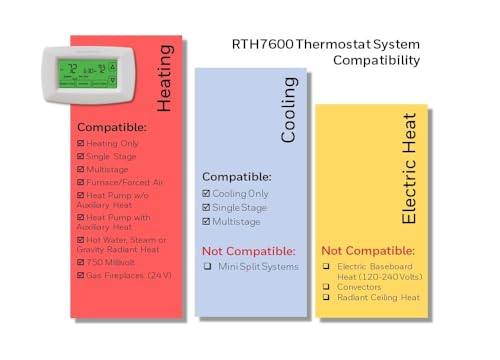
Honeywell Home RTH7600D 7-Day Programmable Touchscreen Thermostat, White




Key features
- •7-Day menu-driven programming with 4 periods per day
- •Large backlit touchscreen display shows current room temperature and set point simultaneously
- •Smart Response Technology allows the thermostat to learn the amount of time a system needs to reach a desired temperature and adjusts accordingly
- •Auto change from heat to cool
- •Includes change reminders for filters and low batteries
Honeywell Home RTH7600D 7-Day Programmable Touchscreen Thermostat, White
List Price: $93.82$84.44DEALYou Save: $9.38 (10%)
Free shippingFree Returns – 30 daysFree Order CancellationSecure Payment2–3 Days DeliveryGet It October 24, 2026In Stock (14)No marketing spamNo account requiredFulfilment by FedEx / Amazon / UPS / ShipwirePayPal / Card Buyer Protection
Customer Reviews
Reviews sourced from verified Amazon purchasers4.4
out of 5
Based on 10 reviews
5★
60%
4★
40%
3★
0%
2★
0%
1★
0%
Great, but needs a setting to control the Auto feature better
MarkieMark✓ Verified Purchase•July 29, 2023
All around great product and i can recommend. There are very few thermostats with an Auto heat/cool so i appreciate that feature in this one. Only issue is it keeps a three degree spread between the heat and cool and that is too much, and they do not let you adjust that. That is super bad. They should just let you set what number you want between zero and 3, or whatever, and they could have just added that to the advanced settings. Still, when the night temp drops occasionally in the summer it catches it and turns on the heat and stops my house from becoming an icebox. Its a tad chilly because its now heating 3 degrees below what it had been set on when it was in cooling mode, but at least its heating and house is not super cold when the temps flip. Overall this thermostat is great and i recommend
Not a Smart Unit, But Works as Designed - Set it and Forget it!!
Alegius Technologies✓ Verified Purchase•July 26, 2023
Programmable Thermostat - Configure it, Set It, Forget It. Simple, Does what it's Designed to Do. That's All We Ask For!!
BUY WITH CONFIDENCE-GREAT DEAL!!!
BUY WITH CONFIDENCE-GREAT DEAL!!!
Full featured but not perfect
Wayne✓ Verified Purchase•July 15, 2023
About a year earlier, I purchased and installed a Lux TX9000TS Touchscreen 7-Day Programmable Thermostat . It's a good thermostat and has many similar features. My house has two zones with central heat and air conditioning, and I felt that the Honeywell was better suited to my second zone. While both are good thermostats, there are some notable differences.
Both thermostats are described in detail by their respective manufacturers, and both offer flexibility with the ability to program four temperature settings for each day of the week. Both have touch screen displays that can show comprehensive information and allow you to change settings with relative degrees of ease. Both fall short in some areas, and both exceed the other in some ways.
An important feature for any thermostat is ease of use, the ability for a user to change the temperature without reading a user manual, and the ability to program the thermostat without a confusing array of steps. Traditional thermostats have a single knob or lever that allows a user to point a line or arrow to a specific temperature. Ironically, both of these thermostats have situations where even raising or lowering the temperature by a few degrees can be a show stopper for an untrained user.
The Lux model has a clean and concise user interface. It has a pleasant looking blue LCD touch screen with larger numbers and less crowding. It has a separate button for back lighting. It displays the current temperature, and touching the temperature lets you see the set point and up and down arrows to override it. The problem with that is that despite its elegant appearance, not seeing the set temperature leaves untrained users at a loss. When I was out of town, another resident of the home had a party and nobody there could figure out how to start the air conditioning. The temperature had been left on hold. Since the button for the light is not on the touch screen itself, it's easy to miss by somebody searching the screen for it.
By contrast, the Honeywell has a busier screen with more information. It displays both the room temperature and the set temperature. The up and down arrows are always visible. Touching the screen once lights up the unit. The down side to the latter feature is that the first press of any button will not perform its function until the unit lights up. That's potentially confusing, but not a show stopper. The feature on the Lux is preferable for somebody who knows how to use it, but the Honeywell is better for typical users.
One of the reasons I bought this unit is that it works with heat and air conditioning and does not need to be switched from one to the other. As the seasons cool down, the local temperature drops down to the mid to low 50s, Fahrenheit. But I still get days when the afternoon sun will raise the temperature of some rooms to over 80 degrees. If the air conditioner is needed in the evening, the room is comfortable on its own at bed time, and the heat is needed in the morning, the Honeywell seems to make the most sense. The catch, however, it the notion of the set temperature. If you want AC to go on when the temperature is above 80 and you want heat to go on when the temperature is above 66, the thermostat can handle it fine. If the temperature is outside of that range, it's clear which set point is relevant.
UPDATE:
But if the temperature is within that range, there are two concurrent set points, but only one is shown. If the last function was heat, then the up and down arrows show the heat set point and let you change it. Likewise for AC. But if you want to change the "other" set point, (for example, you have a hot day followed by a cold night, but not cold enough for the heat to go on) the arrows alone won't help. When you press an arrow, the set point temperature will flash, and will have the word "heat" or "cool" under it. The word "system" will also flash on the bottom left corner. If you press "system" while it is flashing, it will toggle the heat/cool set points that the arrows are adjusting. That was far from obvious and the user manual didn't help. Almost all users would be at a loss to change the temperature for whichever was not the last function used.
END UPDATE.
Both thermostats work well and are generally easy to use if you read the manual. Many one-time settings for the Honeywell require cycling through cryptic code numbers and setting a value for each of them, making things easy with a manual but impossible without one. On the Honeywell, setting the year, month and date will allow the unit to know the day of the week. But the date is never displayed on the screen in general use, which raises the question of why you are not simply asked to specify the current weekday at setup time. Knowing the date allow the thermostat to keep track of daylight saving time, so it's ultimately for a purpose. But having a simple way of displaying (and changing) the date would have made sense. Setting things on the Lux is generally easier overall, but on a day to day basis, the goal is to rarely need any user interaction.
Both thermostats keep track of filter usage, but the Lux keeps track of the number of hours that the system was in use. It also give the user more information about recent energy usage in general. The Honeywell keeps track of the number of days of use between filter changes. I believe that means the number of hours/24 rather than on how many days the filter was used. Seeing a message saying "Filter usage count 288 hours" is less ambiguous than one saying "filter 12 days."
From a functional standpoint, both thermostats work well. If you've read the manuals, chances are that you will do well with either. The Honeywell has a more nicely presented professional looking manual, but it also needs one more than the Lux. Both have annoying quirks, and both have strengths over the other. In an environment with seasonal changes and big temperature swings, having a thermostat like the Honeywell can be an advantage. It has Smart Response technology to keep track of how long it takes to get the room to the set temperature so it can get there at the set time, rather than merely going on at the set time and taking however long it takes. That could be an advantage depending on how long your system takes to heat or cool, and depending on temperature range settings.
Either one of these thermostats could work quite well, but the Honeywell is theoretically closer to the ultimate goal of "set it and forget it."
Both thermostats are described in detail by their respective manufacturers, and both offer flexibility with the ability to program four temperature settings for each day of the week. Both have touch screen displays that can show comprehensive information and allow you to change settings with relative degrees of ease. Both fall short in some areas, and both exceed the other in some ways.
An important feature for any thermostat is ease of use, the ability for a user to change the temperature without reading a user manual, and the ability to program the thermostat without a confusing array of steps. Traditional thermostats have a single knob or lever that allows a user to point a line or arrow to a specific temperature. Ironically, both of these thermostats have situations where even raising or lowering the temperature by a few degrees can be a show stopper for an untrained user.
The Lux model has a clean and concise user interface. It has a pleasant looking blue LCD touch screen with larger numbers and less crowding. It has a separate button for back lighting. It displays the current temperature, and touching the temperature lets you see the set point and up and down arrows to override it. The problem with that is that despite its elegant appearance, not seeing the set temperature leaves untrained users at a loss. When I was out of town, another resident of the home had a party and nobody there could figure out how to start the air conditioning. The temperature had been left on hold. Since the button for the light is not on the touch screen itself, it's easy to miss by somebody searching the screen for it.
By contrast, the Honeywell has a busier screen with more information. It displays both the room temperature and the set temperature. The up and down arrows are always visible. Touching the screen once lights up the unit. The down side to the latter feature is that the first press of any button will not perform its function until the unit lights up. That's potentially confusing, but not a show stopper. The feature on the Lux is preferable for somebody who knows how to use it, but the Honeywell is better for typical users.
One of the reasons I bought this unit is that it works with heat and air conditioning and does not need to be switched from one to the other. As the seasons cool down, the local temperature drops down to the mid to low 50s, Fahrenheit. But I still get days when the afternoon sun will raise the temperature of some rooms to over 80 degrees. If the air conditioner is needed in the evening, the room is comfortable on its own at bed time, and the heat is needed in the morning, the Honeywell seems to make the most sense. The catch, however, it the notion of the set temperature. If you want AC to go on when the temperature is above 80 and you want heat to go on when the temperature is above 66, the thermostat can handle it fine. If the temperature is outside of that range, it's clear which set point is relevant.
UPDATE:
But if the temperature is within that range, there are two concurrent set points, but only one is shown. If the last function was heat, then the up and down arrows show the heat set point and let you change it. Likewise for AC. But if you want to change the "other" set point, (for example, you have a hot day followed by a cold night, but not cold enough for the heat to go on) the arrows alone won't help. When you press an arrow, the set point temperature will flash, and will have the word "heat" or "cool" under it. The word "system" will also flash on the bottom left corner. If you press "system" while it is flashing, it will toggle the heat/cool set points that the arrows are adjusting. That was far from obvious and the user manual didn't help. Almost all users would be at a loss to change the temperature for whichever was not the last function used.
END UPDATE.
Both thermostats work well and are generally easy to use if you read the manual. Many one-time settings for the Honeywell require cycling through cryptic code numbers and setting a value for each of them, making things easy with a manual but impossible without one. On the Honeywell, setting the year, month and date will allow the unit to know the day of the week. But the date is never displayed on the screen in general use, which raises the question of why you are not simply asked to specify the current weekday at setup time. Knowing the date allow the thermostat to keep track of daylight saving time, so it's ultimately for a purpose. But having a simple way of displaying (and changing) the date would have made sense. Setting things on the Lux is generally easier overall, but on a day to day basis, the goal is to rarely need any user interaction.
Both thermostats keep track of filter usage, but the Lux keeps track of the number of hours that the system was in use. It also give the user more information about recent energy usage in general. The Honeywell keeps track of the number of days of use between filter changes. I believe that means the number of hours/24 rather than on how many days the filter was used. Seeing a message saying "Filter usage count 288 hours" is less ambiguous than one saying "filter 12 days."
From a functional standpoint, both thermostats work well. If you've read the manuals, chances are that you will do well with either. The Honeywell has a more nicely presented professional looking manual, but it also needs one more than the Lux. Both have annoying quirks, and both have strengths over the other. In an environment with seasonal changes and big temperature swings, having a thermostat like the Honeywell can be an advantage. It has Smart Response technology to keep track of how long it takes to get the room to the set temperature so it can get there at the set time, rather than merely going on at the set time and taking however long it takes. That could be an advantage depending on how long your system takes to heat or cool, and depending on temperature range settings.
Either one of these thermostats could work quite well, but the Honeywell is theoretically closer to the ultimate goal of "set it and forget it."
A pleasant surprise
Neil A. Chesanow✓ Verified Purchase•July 13, 2023
I read every single review before buying this thermostat. The reviews made the smoke come out of my ears. A majority of buyers like this product. But a significant minority didn't.
Among the complaints I noted:
-- 1. You need to touch a button on the touchscreen to activate the back light, but this also activates whatever button you touch, whether you wanted to do that or not
-- 2. Programming is indirect; you must use -- and therefore memorize, or use the manual as a reference for -- numerical codes to perform various functions.
-- 3. The touchscreen is not responsive.
-- 4. The touchscreen back light does not stay on for a sufficiently long period of time.
-- 5. If left in default mode, the thermostat will start an hour or two early before the time programmed for a specified temperature to be reached.
One thing to keep in mind is that the copious reviews of this popular product go back a good many years. In the interim, Honeywell may have upgraded the software or firmware, so that different reviewers often seem like they are talking about entirely different products.
As a prelude, a note about me: I can't figure out most of the features on my non-smart cellphone. Enough said.
Despite the fact that installation looks simple for do-it-yourselfers, I am of the pay-a-pro-to-do-it tribe. I was displeased to see that the old Honeywell vertically oriented manual thermostat that this new baby was replacing left unsightly marks on the wall not entirely covered by this new, horizontally oriented thermostat.
If this sounds like you, be prepared.
I must say that the very large number of negative reviews put me in a fearful state of mind. But this Honeywell worked exactly as described. So let me address the negative comments that caused me so much pre-purchase grief:
1. The touch of the touchscreen is my favorite feature on this thermostat. My primary experience with touchscreens is in grocery stores and bank ATMs. You have to give those touchscreen buttons a good assertive push.
Not so with this Honeywell touchscreen. The merest touch sparks it to life. It's stupidly satisfying.
Nothing other than the back light is activated by touching a button that activates the touch screen. You need to touch any button again to get that button to do what it is programmed to do. They are two distinct movements.
2. Numerical codes no longer exist. Programming is straightforward. It isn't intuitive in the least. You are presented with clearly labeled buttons.
3. This model thermostat has been around for several years. Perhaps its parts were upgraded without fanfare. But this is honestly the most responsive touch screen I have ever used. I actually only have to touch it, as opposed to the aggressive finger jabs ATM machines force me to use. Here, it's light-light touch-touch-done in about 5 seconds. You actually experience a ridiculous moment of pleasure that finally something works properly.
4. I'm sorry, I was too lazy to time it (I do have a life), but the touch screen light seems to stay on a good amount of time. I programmed an entire week day by day with no problem, although admittedly it wasn't in the dead of night, when some people apparently program their thermostats.
Okay, I felt guilty, so I programmed the thing in pitch blackness. Well, except for the back light. No problemo. I will need to think of some totally dark situations when my thermostat needs programming so I can tax this cool feature to the limit, as we men are programmed to do.
5. If you leave this thermostat in default mode, if you specify that you want the house to be 72 degrees at 7 am, it may very well start your cooling system an hour or two earlier.
From the manufacturer's perspective, this is a prime selling point of this thermostat: that it knows to start cooling your place earlier than you indicated to get the temperature to the degree that you indicated by the indicated time.
This is actually not a defect. It's the single biggest feature of this device. If you don't like automation, you can turn it off. (Keep in mind that if you specify 72 degrees at 7 am, and the thermostat turns on your air conditioner at 7 am, your place may be 10 degrees hotter, which will take longer to achieve your desired temperature. If you have a good commute to work and are on a stopwatch from the moment you wake till the moment you leave, that's a factor.)
If you don't know how to turn off this feature, Honeywell has very good technical support.
There is no such thing as a non-ugly thermostat. This is pretty ugly too. Compared to the others, though, it's a lot less ugly.
Life is a compromise.
Among the complaints I noted:
-- 1. You need to touch a button on the touchscreen to activate the back light, but this also activates whatever button you touch, whether you wanted to do that or not
-- 2. Programming is indirect; you must use -- and therefore memorize, or use the manual as a reference for -- numerical codes to perform various functions.
-- 3. The touchscreen is not responsive.
-- 4. The touchscreen back light does not stay on for a sufficiently long period of time.
-- 5. If left in default mode, the thermostat will start an hour or two early before the time programmed for a specified temperature to be reached.
One thing to keep in mind is that the copious reviews of this popular product go back a good many years. In the interim, Honeywell may have upgraded the software or firmware, so that different reviewers often seem like they are talking about entirely different products.
As a prelude, a note about me: I can't figure out most of the features on my non-smart cellphone. Enough said.
Despite the fact that installation looks simple for do-it-yourselfers, I am of the pay-a-pro-to-do-it tribe. I was displeased to see that the old Honeywell vertically oriented manual thermostat that this new baby was replacing left unsightly marks on the wall not entirely covered by this new, horizontally oriented thermostat.
If this sounds like you, be prepared.
I must say that the very large number of negative reviews put me in a fearful state of mind. But this Honeywell worked exactly as described. So let me address the negative comments that caused me so much pre-purchase grief:
1. The touch of the touchscreen is my favorite feature on this thermostat. My primary experience with touchscreens is in grocery stores and bank ATMs. You have to give those touchscreen buttons a good assertive push.
Not so with this Honeywell touchscreen. The merest touch sparks it to life. It's stupidly satisfying.
Nothing other than the back light is activated by touching a button that activates the touch screen. You need to touch any button again to get that button to do what it is programmed to do. They are two distinct movements.
2. Numerical codes no longer exist. Programming is straightforward. It isn't intuitive in the least. You are presented with clearly labeled buttons.
3. This model thermostat has been around for several years. Perhaps its parts were upgraded without fanfare. But this is honestly the most responsive touch screen I have ever used. I actually only have to touch it, as opposed to the aggressive finger jabs ATM machines force me to use. Here, it's light-light touch-touch-done in about 5 seconds. You actually experience a ridiculous moment of pleasure that finally something works properly.
4. I'm sorry, I was too lazy to time it (I do have a life), but the touch screen light seems to stay on a good amount of time. I programmed an entire week day by day with no problem, although admittedly it wasn't in the dead of night, when some people apparently program their thermostats.
Okay, I felt guilty, so I programmed the thing in pitch blackness. Well, except for the back light. No problemo. I will need to think of some totally dark situations when my thermostat needs programming so I can tax this cool feature to the limit, as we men are programmed to do.
5. If you leave this thermostat in default mode, if you specify that you want the house to be 72 degrees at 7 am, it may very well start your cooling system an hour or two earlier.
From the manufacturer's perspective, this is a prime selling point of this thermostat: that it knows to start cooling your place earlier than you indicated to get the temperature to the degree that you indicated by the indicated time.
This is actually not a defect. It's the single biggest feature of this device. If you don't like automation, you can turn it off. (Keep in mind that if you specify 72 degrees at 7 am, and the thermostat turns on your air conditioner at 7 am, your place may be 10 degrees hotter, which will take longer to achieve your desired temperature. If you have a good commute to work and are on a stopwatch from the moment you wake till the moment you leave, that's a factor.)
If you don't know how to turn off this feature, Honeywell has very good technical support.
There is no such thing as a non-ugly thermostat. This is pretty ugly too. Compared to the others, though, it's a lot less ugly.
Life is a compromise.
Easily programs to your system.
Awohali✓ Verified Purchase•June 30, 2023
Very easy to program for my peticular system, just followed the push button instructions, programmed for heat pump with emergency heating in about 30 seconds, simple.
Works great and it is accurate temperature reading. This replaced,a old two bulb mercury switch setup. Recommend!
Works great and it is accurate temperature reading. This replaced,a old two bulb mercury switch setup. Recommend!
Page 1 of 2