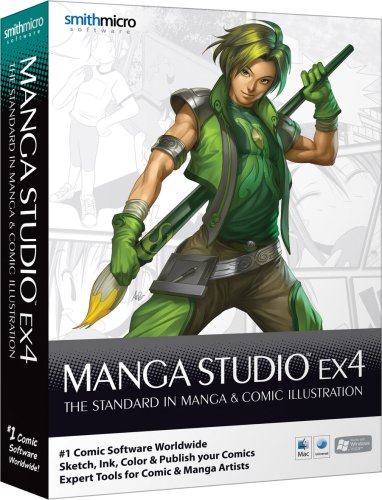
Manga Studio EX 4
Key features
- •Manga Studio EX 4 is full of powerful, cutting edge features for Manga and Comic artists:
- •Thousands of screen tones, professional coloring tools, advanced vector tools and image filters, and more
- •Resize with no loss in quality by converting your bitmap drawings to resolution-independent vector images
- •Draw naturally with a pen tablet and recreate the sensation of drawing on paper offering an incredibly natural drawing experience
- •Export from Manga Studio EX 4 to a wide variety of Mac and Windows formats such as BMP, JPEG, PNG, PSD, TGA, EPS, TIFF, PDF and PICT
CategoryElectronics Features
Manga Studio EX 4
List Price: $96.60$86.94DEALYou Save: $9.66 (10%)
Free shippingFree Returns – 30 daysFree Order CancellationSecure Payment2–3 Days DeliveryGet It October 25, 2026In Stock (2)No marketing spamNo account requiredFulfilment by FedEx / Amazon / UPS / ShipwirePayPal / Card Buyer Protection
Customer Reviews
Reviews sourced from verified Amazon purchasers4.0
out of 5
Based on 10 reviews
5★
90%
4★
10%
3★
0%
2★
0%
1★
0%
So far, so good (Install work around guide included in review)
Chelsie Jamerson✓ Verified Purchase•October 21, 2016
Before buying this product I was debating whether to get Photoshop (or whatever they call it now in 2016) but I see they have moved to some sort of subscription model? Yeah...no. It's not like I can't afford it but why commit to spend like $10/month when I can pay once and be done? lol I was debating purchasing Manga Studio EX 4 because of the many reviews basically saying "I'm having issues installing the software" however I decided to take a chance for the price. The disc has it's own setup wizard thing and I think that's what is not working. Don't worry I'll share what I did (which wasn't really THAT hard)
Step 1: Put in installation disc (I have a PC so I out that disc in)
Step 2: Manually navigate to the CD's location from my computer
Step 3: Find the folder named "Manga Studio_EX" and open it
Step 4: Look for "Setup_vista" (355KB)
Step 5: Install the stuff from the disc
Step 6: Once installs are complete you will be asked to put your serial number in (serial number will be on the back of the paper cover of one of the discs) *NOTE* "O's" (aka the letter) might actually be "0's (aka the number)
There is also a FREE update on this software available on their website (if you are into that type of thing) ) As of this review I have successfully installed the software. Considering I'm not familiar with the software there obviously will be a learning curve so I'm off to look at some tutorials. However considering the many options I see available along with a few reviewers kind enough to post artwork on their review...I think it's safe to say I will get my money's worth once I take me time to learn how to work this. Hope this was helpful.
Step 1: Put in installation disc (I have a PC so I out that disc in)
Step 2: Manually navigate to the CD's location from my computer
Step 3: Find the folder named "Manga Studio_EX" and open it
Step 4: Look for "Setup_vista" (355KB)
Step 5: Install the stuff from the disc
Step 6: Once installs are complete you will be asked to put your serial number in (serial number will be on the back of the paper cover of one of the discs) *NOTE* "O's" (aka the letter) might actually be "0's (aka the number)
There is also a FREE update on this software available on their website (if you are into that type of thing) ) As of this review I have successfully installed the software. Considering I'm not familiar with the software there obviously will be a learning curve so I'm off to look at some tutorials. However considering the many options I see available along with a few reviewers kind enough to post artwork on their review...I think it's safe to say I will get my money's worth once I take me time to learn how to work this. Hope this was helpful.
Better than Manga Studio 5.0.5 EX
AiijuinGraphics✓ Verified Purchase•June 16, 2016
Installed quickly and without the verification problems that I have from my Manga Studio Ex 5 (which I have all sorts of issues with). There's a lot more options on the Ex 4, plus I bought it for $11 USD, so I really can't beat that.
Absolutely Fantastic
TypicalT612✓ Verified Purchase•May 4, 2016
I LOVE this program. For years I've used Photoshop Elements with my Wacom Tablet, but wasn't getting the results I wanted. I became less confident in my skills as a digital artist because of it. I found out about Manga Studio EX when I saw another digital artist who I admire using it and thought, "Okay, so these are the same people who made Anime Studio. I guess I'll give it a whirl and see what I think". So I purchased EX 4 a few months ago, installed it on my 64-bit Windows 10 PC as soon as I got it (yes, it works perfectly on Windows 10), and it's been working wonders ever since. I love how this program's drawing tools replicate real medium so closely. With Photoshop Elements, you basically only had the option for a really hard brush or a really soft brush. You could dink with the settings a bit, make brushes in different shapes, but that was about it. Now with Manga Studio EX, I can finally get the results I'm looking for. It has great tools that can be adjusted depending on the style you're going for. I've made art that I never could have imagined making prior to purchasing this software. I'm so glad I bought it. The only thing that disappoints me about this program is the fact that I can't figure out how to export as a transparent .png file, but I can get around that by exporting as a .pse file and saving as a transparent .png from Photoshop Elements. (The only thing that program is really good for now, ha ha.)
I've realized I've missed out on some really cool features Manga Studio EX 5 has to offer because I purchased this version instead due to the price. (MSEX4 was about $35 at that time and MSEX5 was around $199, so...) If SmithMicro releases a Manga Studio EX 6, I'll definitely have to buy it so I won't miss out on anything else the developers decide to add.
Overall, I'm super glad that I bought this software. I don't know what I'd be doing now in terms of art if I didn't. Would definitely recommend to a friend.
I've realized I've missed out on some really cool features Manga Studio EX 5 has to offer because I purchased this version instead due to the price. (MSEX4 was about $35 at that time and MSEX5 was around $199, so...) If SmithMicro releases a Manga Studio EX 6, I'll definitely have to buy it so I won't miss out on anything else the developers decide to add.
Overall, I'm super glad that I bought this software. I don't know what I'd be doing now in terms of art if I didn't. Would definitely recommend to a friend.
Time Saver of a Program
Quill✓ Verified Purchase•April 12, 2016
Years ago I received Manga Studio Debut as a gift and I never found another program that worked as nice or as well as that one had. So I was amazed to find the EX 4 version was so cheap and had to buy it. I always wanted the EX version over the Debut just for the small little things that it could do better or that the Debut was missing. Things such as the eyedropper tool and the blurring option. Haven't delved too much into all of the things the program can do mostly because of lack of time. However, I do have to say that my favorite feature so far, other than the eyedropper tool and the blurring feature, would have to be the symmetry ruler. I never knew how easy drawing could be and how much of a time saver just a simple ruler was, until I purchased EX 4. It makes drawing faces, bodies, eyes and most clothing so much easier. It also helps a lot with coloring too, because it used to take me hours to finish a drawing just because of the shear amount of time I'd spent coloring it in and having to go back over and make sure everything was in the lines. With the symmetry ruler, it's so much easier. Coloring in and making corrections is so simple. Only thing I wish is that the symmetry ruler could work when the airbrush was in use. Other than that, I love the product and am glad I made the purchase.
Manga Studio is Awesome! No Problems!
Michael Polzer✓ Verified Purchase•January 3, 2016
I wanted to try this program because I saw videos that made me wanna try it, but reading the reviews on here I was kinda worried. Now I got it and I love it! It's awesome! Someone on here said it would take 2 hours to download, mine downloaded in less than 10 minutes, someone said it didn't come with a box, mine came with a box, someone said the serial number doesn't work, mine worked, but I did get the Zero's and O's mixed up at first so try both if you're having trouble. This software works perfectly with my Wacom, and it's just like drawing on paper, and the effects and tools make coloring and shading so much easier. I'm using it now to bring my girlfriend's manga to life. But I will say it takes a little time to learn everything, so watch a few videos to get started.
Page 1 of 2