Silverstone Grandia Series HTPC Case with Aluminum FP Micro-ATX, 2X Hot-Swap Drive Bay, 3x120mm Golf Bladed Fan, USB 3.0 x2 and 11-Inch Expansion Card GD06B (Black)
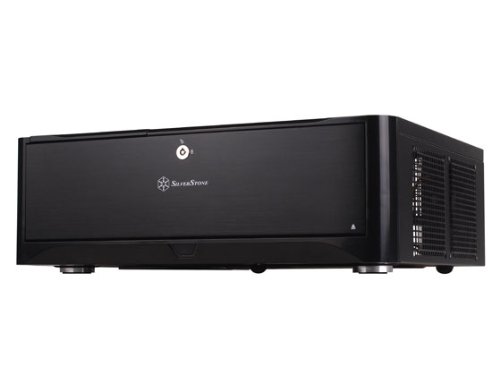
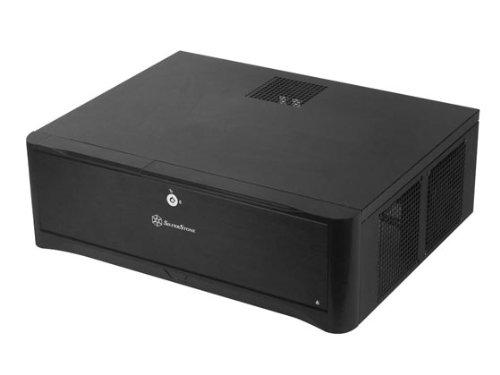


Key features
- •Three silent 120mm fans included,support expansion cards up to 11 inches,2x hot swap drive bay
- •Positive air pressure design
- •Incredible 340mm depth to fit comfortably inside home theater cabinet
- •Support 4 x 3.5" hard drives and 2.5" hard drive or SSD (Solid-state drive)
- •Includes two front USB 3.0 ports
Silverstone Grandia Series HTPC Case with Aluminum FP Micro-ATX, 2X Hot-Swap Drive Bay, 3x120mm Golf Bladed Fan, USB 3.0 x2 and 11-Inch Expansion Card GD06B (Black)
List Price: $260.18$234.16DEALYou Save: $26.02 (10%)
Free shippingFree Returns – 30 daysFree Order CancellationSecure Payment2–3 Days DeliveryGet It October 29, 2026In Stock (1)No marketing spamNo account requiredFulfilment by FedEx / Amazon / UPS / ShipwirePayPal / Card Buyer Protection
Customer Reviews
Reviews sourced from verified Amazon purchasers4.2
out of 5
Based on 10 reviews
5★
70%
4★
30%
3★
0%
2★
0%
1★
0%
Looks good in my HT rack. Update
Philip Arcario✓ Verified Purchase•August 19, 2023
OKAY UPDATE ON THE BUILD IS AT THE BOTTOM OF THIS REVIEW.
I just had this delivered. This is the first part of the review. I unboxed it. Put it on my home theater rack. I have a 3 piece rack. Two towers left and right they have 20 inch wide 18 inch deep shelf. The center part of my rack hold the tv it has 2 drawers and 2 wide deep shelfs . This unit needed the 23 inch wide shelf that is 24 inches deep the ones under my tv. It seems well made. I read the manual. This unit needs a manual to build your pc. The inside is not standard rack htpc case. The manual is a p.i.t.a. it has 6 or 7 languages on each page for each step. It is not printed on the best paper and is hard to read. I have one real complaint the lid which needs 2 screws to remove should have used 2 thumbscrews or at least give me a few thumbscrews with the unit just on case I want that option.
This is all I got right now. waiting on parts below.
I ordered an Intel i7 3770t cpu from another seller.
A special heat sink from prolimatech the Samuel 17 from another seller.
An intel mobo from amazon. the one with thunderbolt. TO UPDATE THIS IS THE MOBO AN INTEL [...]
I ordered a few 180gb intel ssds from amazon. SSDSC2CT180A3K5
I ordered a Sapphire hd7750 Ultimate GPU fanless from amazon
I ordered Some samsung ram 4x 4gb sticks Model MV-3V4G3/US from another seller.
I ordered a seasonic fanless psu from another seller. 400 WATT MODEL
I ordered a samsung blu ray player from amazon SHB123L/RSBP
I ordered some scythe 120mm 500rpm fans from amazon SY1225SL12SL
I also grabbed windows 7 professional oem from amazon.
A card reader from rosewill.
last a dvr/tv tuner from another seller.
This will be a hi end HTPC.
This is a money is not the object build with quiet being first priority
I will detail the build once all parts come in.
______________________________________________________________________________________________________________________________________________
My build is complete
The good news first;
FIRST OFF THE BUILD IS ALL THAT I COULD HOPE FOR AND A TOTAL SUCCESS.
Second it was hard very hard to get the blu ray drive to work properly. I read the instructions a few times and I knew I need to slide a small plastic part about one inch on a rod designed to allow this to happen. I could not do it. I took the entire face plate apart (overkill).
I did need to remove the dvd/bluray drop down plate . once i did this I could slide the plastic push plate 1 inch this lined it up to the push button of the samsung bluray player. next the depth of the blu ray player must be perfect (under 1/16 of an inch) if you have the blu ray player to close to the face plate the plastic button gets pushed by the part you slld to line up with it. Of course if you set the player to far from the face plate you won't trigger it by pushing the button. Last but not least you need to screw the player in so it never moves over time. there are 4 screws to do this. of course if you did it just a tiny bit wrong you have to take it apart and adjust it. All of this added hours to the build.
One other problem I like to use grills on the inside of all my fans. one fan had no clearance in one corner to allow a standard grill.
(one of the blu ray players screws) I needed to use a screen mesh type fan that I have reviewed on the 18th of JUlY
The rest was easy.
My goal is a powerful quiet htpc that will run handbrake, play a blu ray ,stream netfilx, youtube, record tv , store a lot of info .
The cpu works really well it never goes over 42 watts.
my fans all run in the 300 to 550 rpm range.
I can't get the machine to go hotter then 62c.
the only noise it makes is the blu ray player during a quiet part of a movie
My WEI numbers are
cpu 7.7
ram 7.8
2d video 7.4
3d video 7.4
ssd 7.9
my geekbench 64 bit score is 14400
now if you want better gaming get yourself an hd7850 msi makes one amazon sells it. you would be able to drive a 1080p screen to pretty much max settings on most all games. Since I wanted quiet and don't game much the sapphire hd7750 is pretty good for me.____
______________________________________________________________________________________________________________________________________________________________________________________________________________________________________________________
CPU = INTEL 3770T LOW POWER FAST you could use the it3770k for gaming [...]
MOBO = [...]
Ram = [...]
power supply seasonic 400watt fanless [...]
gpu sapphire hd 7750 ultimate [...]
you could use the msi r7950 for gaming h[...]
i ended up with a crucial m4 512gb in this machine
[...]
but the ones below are fine.
ssds i like crucial m4 [...]
I like samsung 256gb [...]
i like intel 180gb [...]
I just had this delivered. This is the first part of the review. I unboxed it. Put it on my home theater rack. I have a 3 piece rack. Two towers left and right they have 20 inch wide 18 inch deep shelf. The center part of my rack hold the tv it has 2 drawers and 2 wide deep shelfs . This unit needed the 23 inch wide shelf that is 24 inches deep the ones under my tv. It seems well made. I read the manual. This unit needs a manual to build your pc. The inside is not standard rack htpc case. The manual is a p.i.t.a. it has 6 or 7 languages on each page for each step. It is not printed on the best paper and is hard to read. I have one real complaint the lid which needs 2 screws to remove should have used 2 thumbscrews or at least give me a few thumbscrews with the unit just on case I want that option.
This is all I got right now. waiting on parts below.
I ordered an Intel i7 3770t cpu from another seller.
A special heat sink from prolimatech the Samuel 17 from another seller.
An intel mobo from amazon. the one with thunderbolt. TO UPDATE THIS IS THE MOBO AN INTEL [...]
I ordered a few 180gb intel ssds from amazon. SSDSC2CT180A3K5
I ordered a Sapphire hd7750 Ultimate GPU fanless from amazon
I ordered Some samsung ram 4x 4gb sticks Model MV-3V4G3/US from another seller.
I ordered a seasonic fanless psu from another seller. 400 WATT MODEL
I ordered a samsung blu ray player from amazon SHB123L/RSBP
I ordered some scythe 120mm 500rpm fans from amazon SY1225SL12SL
I also grabbed windows 7 professional oem from amazon.
A card reader from rosewill.
last a dvr/tv tuner from another seller.
This will be a hi end HTPC.
This is a money is not the object build with quiet being first priority
I will detail the build once all parts come in.
______________________________________________________________________________________________________________________________________________
My build is complete
The good news first;
FIRST OFF THE BUILD IS ALL THAT I COULD HOPE FOR AND A TOTAL SUCCESS.
Second it was hard very hard to get the blu ray drive to work properly. I read the instructions a few times and I knew I need to slide a small plastic part about one inch on a rod designed to allow this to happen. I could not do it. I took the entire face plate apart (overkill).
I did need to remove the dvd/bluray drop down plate . once i did this I could slide the plastic push plate 1 inch this lined it up to the push button of the samsung bluray player. next the depth of the blu ray player must be perfect (under 1/16 of an inch) if you have the blu ray player to close to the face plate the plastic button gets pushed by the part you slld to line up with it. Of course if you set the player to far from the face plate you won't trigger it by pushing the button. Last but not least you need to screw the player in so it never moves over time. there are 4 screws to do this. of course if you did it just a tiny bit wrong you have to take it apart and adjust it. All of this added hours to the build.
One other problem I like to use grills on the inside of all my fans. one fan had no clearance in one corner to allow a standard grill.
(one of the blu ray players screws) I needed to use a screen mesh type fan that I have reviewed on the 18th of JUlY
The rest was easy.
My goal is a powerful quiet htpc that will run handbrake, play a blu ray ,stream netfilx, youtube, record tv , store a lot of info .
The cpu works really well it never goes over 42 watts.
my fans all run in the 300 to 550 rpm range.
I can't get the machine to go hotter then 62c.
the only noise it makes is the blu ray player during a quiet part of a movie
My WEI numbers are
cpu 7.7
ram 7.8
2d video 7.4
3d video 7.4
ssd 7.9
my geekbench 64 bit score is 14400
now if you want better gaming get yourself an hd7850 msi makes one amazon sells it. you would be able to drive a 1080p screen to pretty much max settings on most all games. Since I wanted quiet and don't game much the sapphire hd7750 is pretty good for me.____
______________________________________________________________________________________________________________________________________________________________________________________________________________________________________________________
CPU = INTEL 3770T LOW POWER FAST you could use the it3770k for gaming [...]
MOBO = [...]
Ram = [...]
power supply seasonic 400watt fanless [...]
gpu sapphire hd 7750 ultimate [...]
you could use the msi r7950 for gaming h[...]
i ended up with a crucial m4 512gb in this machine
[...]
but the ones below are fine.
ssds i like crucial m4 [...]
I like samsung 256gb [...]
i like intel 180gb [...]
A challenge but the final product is worth it
AaronR✓ Verified Purchase•August 6, 2023
This box was a challenge. It is definitely not the easiest system I built. However, the final product is what ultimately counts and it looks great and that is why I gave it 5 stars.
My setup:
Asus Gryphon Z87 MB
Intel i7 LGA1150
G.Skill DD3 1866 8mb x 2
Zalman cnps8900 low profile CPU cooler
BluRay Drive
Corsair HX620W Modular PS
Silverstone 3 dial FP33 rear fan controller
SSD drive
Tips:
1. Keep track of all the screws and where they go. There are several different size/threaded screws for the DVD drive support and hard drive bays. I think Silverstone could have standardized the screws a bit more.
2. Plan your system components ahead of time. This box is tight.
Power Supply: The biggest problem is the power supply. I used a standard ATX PS I had lying around. It was a Corsair modular HX620W. When selecting a PS, make sure it conforms to the standard ATX spec of 15cm deep and the modular cables come out the bottom of the PS (more on that below). I understand the 14cm Silverstone PS needs to be inverted so the fan is up. I like the fact that my Corsair fan faces down and I think this makes more sense with the case design since the PS fan opening is on the bottom. If you get a standard ATX PS, make sure the modular cables come out of the bottom of the PS (closest to the fan). Go to Newegg and look at where the cables come out of the Corsair PS I used so you can compare it to ones you may select. This is important since there is no clearance at the top part of the power supply due to the swappable drive bays. UPDATE 2/14: The PS I used is discontinued and hard to find. However, in the comments section of this review there is a comparison image of my PS and a SeaSonic that looks like it would work fine.
CPU Cooler. There is very little space between the CPU and the disk drive. You can either use the standard Intel cooler or a low profile cooler. Or you can forgo the DVD drive and use a taller cooler. I like the Zalman cnps8900 but like most low profile coolers, you need access to both sides of the MB to install it. If you go this route, don't install your MB into the case before you install the CPU and a low profile fan.
Cable Management. This is challenging. The only real usable space for the cables is in between the DVD drive and hot swappable drives. If you are using anything other than the integrated graphics and want video cards or other cards, be prepared for an even bigger cable management challenge. It will also be a space challenge to use anything other than a 2.5" drive in this case (excluding the swappable drive bays).
I think Silverstone could have made the front panel cables a lot shorter. They are far too long even if the MB connections were at the very back of the case. I didn't deduct a star because you are going to have a mass of cables in between the drive bays anyway.
Fans. The stock fans at full speed were louder than I wanted. The 3-fan Silverstone Fan controller with rear dials fixed that. This makes the cases nearly quiet.
3. Order of operations. There are probably many ways to do this but after I tested the MB, I took both bays out of the case and installed PS first. Outside the case, I installed the CPU and fan. Then installed the MB/CPU/Fan assembly in the case. Then the DVD drive. Then I did a lot of cable tying. I screwed the SSD to the underside of the swappable bay outside the case with cables facing the motherboard. I plugged in the SATA cables to the MB before I installed the swappable bay drive.
4. LED. The blue LED is bright on the front of the case. Before you install anything, you may want to dip the 3 LEDs in flat black paint to dim them down for typical HTPC installations. The last thing I want to see is neon bright blue LEDs in my home theater room. Accessing the LEDs and the plastic on/off button housing is easy with nothing in it. It was a couple of screws and it pulled out from inside the case. You do not want to decide to do this after you build your system.
5. Door. I would have preferred a smaller Silverstone front logo and I probably could have done without the front lock. However, you don't need to engage the lock for the door to stay up. There is a magnetic catch. I also like the fact that there is some resistance in the mechanism so you don't have the door just flop down when you press on it. It has a subtle glide to it. I like that Silverstone thought of that.
In the final analysis, it was definitely a challenge to build due to size constraints. However, the final product looks great and I'm glad I got it.
My setup:
Asus Gryphon Z87 MB
Intel i7 LGA1150
G.Skill DD3 1866 8mb x 2
Zalman cnps8900 low profile CPU cooler
BluRay Drive
Corsair HX620W Modular PS
Silverstone 3 dial FP33 rear fan controller
SSD drive
Tips:
1. Keep track of all the screws and where they go. There are several different size/threaded screws for the DVD drive support and hard drive bays. I think Silverstone could have standardized the screws a bit more.
2. Plan your system components ahead of time. This box is tight.
Power Supply: The biggest problem is the power supply. I used a standard ATX PS I had lying around. It was a Corsair modular HX620W. When selecting a PS, make sure it conforms to the standard ATX spec of 15cm deep and the modular cables come out the bottom of the PS (more on that below). I understand the 14cm Silverstone PS needs to be inverted so the fan is up. I like the fact that my Corsair fan faces down and I think this makes more sense with the case design since the PS fan opening is on the bottom. If you get a standard ATX PS, make sure the modular cables come out of the bottom of the PS (closest to the fan). Go to Newegg and look at where the cables come out of the Corsair PS I used so you can compare it to ones you may select. This is important since there is no clearance at the top part of the power supply due to the swappable drive bays. UPDATE 2/14: The PS I used is discontinued and hard to find. However, in the comments section of this review there is a comparison image of my PS and a SeaSonic that looks like it would work fine.
CPU Cooler. There is very little space between the CPU and the disk drive. You can either use the standard Intel cooler or a low profile cooler. Or you can forgo the DVD drive and use a taller cooler. I like the Zalman cnps8900 but like most low profile coolers, you need access to both sides of the MB to install it. If you go this route, don't install your MB into the case before you install the CPU and a low profile fan.
Cable Management. This is challenging. The only real usable space for the cables is in between the DVD drive and hot swappable drives. If you are using anything other than the integrated graphics and want video cards or other cards, be prepared for an even bigger cable management challenge. It will also be a space challenge to use anything other than a 2.5" drive in this case (excluding the swappable drive bays).
I think Silverstone could have made the front panel cables a lot shorter. They are far too long even if the MB connections were at the very back of the case. I didn't deduct a star because you are going to have a mass of cables in between the drive bays anyway.
Fans. The stock fans at full speed were louder than I wanted. The 3-fan Silverstone Fan controller with rear dials fixed that. This makes the cases nearly quiet.
3. Order of operations. There are probably many ways to do this but after I tested the MB, I took both bays out of the case and installed PS first. Outside the case, I installed the CPU and fan. Then installed the MB/CPU/Fan assembly in the case. Then the DVD drive. Then I did a lot of cable tying. I screwed the SSD to the underside of the swappable bay outside the case with cables facing the motherboard. I plugged in the SATA cables to the MB before I installed the swappable bay drive.
4. LED. The blue LED is bright on the front of the case. Before you install anything, you may want to dip the 3 LEDs in flat black paint to dim them down for typical HTPC installations. The last thing I want to see is neon bright blue LEDs in my home theater room. Accessing the LEDs and the plastic on/off button housing is easy with nothing in it. It was a couple of screws and it pulled out from inside the case. You do not want to decide to do this after you build your system.
5. Door. I would have preferred a smaller Silverstone front logo and I probably could have done without the front lock. However, you don't need to engage the lock for the door to stay up. There is a magnetic catch. I also like the fact that there is some resistance in the mechanism so you don't have the door just flop down when you press on it. It has a subtle glide to it. I like that Silverstone thought of that.
In the final analysis, it was definitely a challenge to build due to size constraints. However, the final product looks great and I'm glad I got it.
It's great - almost worth the price
Our Big Active Family✓ Verified Purchase•July 30, 2023
Well first of all - this is a very slick looking case. I think it's a bit bigger than I would like, but my computer components pretty much dictated I go with one of these larger models. But it does not disappoint in outward appearance. The polished black look could be confused for a nice stereo and the minimalist front design (2 switches, 4 inputs, a light and the CD portion) is very smooth. Appearance-wise. This is a great case.
I did notice that when I screwed in, and then unscrewed the power supply. The black paint had already chipped away. That makes me wonder how this will hold up to scratching and general wear and tear and if it will still look so pretty in the next few months, but for now it's slick.
I really appreciate how much work went into making sure that this box will hold as many components as possible while still keeping the functionality of a nice computer case. The three fans is a very nice touch, and thankfully they do include an adapter because I can't find a month board that has that many unused fan power supplies on the MB.
The case is only as big as it needs to be. It's barely wide enough for a Micro ATX board, but it fits. My only complaint is that with most new motherboards, the eSata cables are all sticking off to the side (and not straight up) and as a result, most are RIGHT next to the front of this case. I think they kept that in mind because there is just enough room that you can play with the eSata cables. It's not perfect, but I think they did the best they could with that the motherboard industry is producing now.
While it's a bit crowded, I think the manufacturer did a great job of using all available space. The mounts for a SSD and a larger 3.5" hard drive is nearly genius. I loved the concept, but unfortunately I ended up taking it apart and putting it back together a lot because of a motherboard failure. But the third time building and rebuilding the system, I got the hang of it.
I thought the price of the case was a bit much. I think the price point should be under $100 based on other cases, but I also really liked this one and thought that overall it's a very well thought out case. I did have my suspicions about how long it will stay pretty (because of the way the paint easily chips off at the screw points) but for now - I just can't give it anything less than 5 stars because I am so impressed at how they managed to make everything fit well. I would caution that if you're buying a power supply for this case - get a modular one so you can minimize the number of cables. It will be to your benefit because over near the power supply those cables start stacking up quick and it's not super-easy to tie them down because if you ever have to replace something - you'll have to cut all the ties and start over.
I did notice that when I screwed in, and then unscrewed the power supply. The black paint had already chipped away. That makes me wonder how this will hold up to scratching and general wear and tear and if it will still look so pretty in the next few months, but for now it's slick.
I really appreciate how much work went into making sure that this box will hold as many components as possible while still keeping the functionality of a nice computer case. The three fans is a very nice touch, and thankfully they do include an adapter because I can't find a month board that has that many unused fan power supplies on the MB.
The case is only as big as it needs to be. It's barely wide enough for a Micro ATX board, but it fits. My only complaint is that with most new motherboards, the eSata cables are all sticking off to the side (and not straight up) and as a result, most are RIGHT next to the front of this case. I think they kept that in mind because there is just enough room that you can play with the eSata cables. It's not perfect, but I think they did the best they could with that the motherboard industry is producing now.
While it's a bit crowded, I think the manufacturer did a great job of using all available space. The mounts for a SSD and a larger 3.5" hard drive is nearly genius. I loved the concept, but unfortunately I ended up taking it apart and putting it back together a lot because of a motherboard failure. But the third time building and rebuilding the system, I got the hang of it.
I thought the price of the case was a bit much. I think the price point should be under $100 based on other cases, but I also really liked this one and thought that overall it's a very well thought out case. I did have my suspicions about how long it will stay pretty (because of the way the paint easily chips off at the screw points) but for now - I just can't give it anything less than 5 stars because I am so impressed at how they managed to make everything fit well. I would caution that if you're buying a power supply for this case - get a modular one so you can minimize the number of cables. It will be to your benefit because over near the power supply those cables start stacking up quick and it's not super-easy to tie them down because if you ever have to replace something - you'll have to cut all the ties and start over.
Not just another PC case .... HTPC? Well ...
CaseyDalPal✓ Verified Purchase•July 5, 2023
So I am going to let the cat out of the bag so to speak. I own FOUR of these cases and I have ELEVEEN computers in the house - ten of which are in Silverstone cases. Once you have built a computer and experienced the pleasure of working with these you will really not be satisified with much else. I have built dozens of computers for both mysidelf and for friends. Not sure exactly put I have at least 100+ builds.
Regardless of the case, Silverstone products are designed to run your kit cool. It is all about air and I have never had a silverstone case where I was not able to provide more than enough air to keep things frig. Good news is that they can be very quite for real HTPC applications and still do a mighty fine job keeping temperatures down. I have four dedicated HTPCs in small form factor Silverstone cases and they also run very cool. I like my systems to run very close to the room temperature and every one I have built does at least that and some actually do better.
I am using the GD08B case for SERVERS! The primary reasons are really very simple - 3.5 drives in a removable cage x 8! PLUS 2 x 2.5 (I use SSD for OS) PLUS 2 x 5.25 bays! Thats a lot of rotating metal and to keep all this nice and cool, 4 x 120mm fans desinged to create a positive air pressure AND trust me, it works. If for some reason you need very agressive cooling you can forgo quiet and get fans that move lots of air which is what I do. HEAT is the computers worst enemy - if you can keep them cool they will have a longer life.
I put the maximum number of disk drives in these systems and I run Windows Server 2008 R2. I use Gigabyte and ASUS motherboards and these cases can take ATX motherboards with no problem. They are deep enough that you can use good quality CPU coolers with heat pipes though I gravitate to all copper coolers in the 2U or 3U configuration. There are two chassis exhaust fans on the back. Plenty of room to run cables and Silverstone makes some very nice power cables for the SATA 3.5 array that really clean up the interior. Once again the less clutter inside the better the air moves around and better cooling.
This case is so easy to work with, it has plenty of room to allow easy configuration and it is built solid. This case costs more but when you unpack it the first time you will understand what you paid for. But the real joy here is those FANS - BIG ONES- and lots of them. All four of my cases run very cool - CPU temperatures for 100w silicon all run at
I cannot say enough good things about the case - again I own 4 of them. They are worth every cent I paid and they look good, they run cool, they are quite, they have large storage capacity potential, USB3.0 front panel, and they are very easy to work on. And I put my money where my mouth is with a total of 10 Silverstone cases in the house.
Don't just think HTPC when you are looking at these they make just about the best SERVER enclosures I have come across (assuming you do not need hot swap capabilities on local system). Everyone that I have delivered a Silverstone case too has been very happy.
NOT THIS CASE but the smaller cases can be harder to build because the space does get cramped. I take my time when building and am anal about running internal cables and tieing them down. It all pays off with a good looking interior and a machine that lives long and prospers.
Regardless of the case, Silverstone products are designed to run your kit cool. It is all about air and I have never had a silverstone case where I was not able to provide more than enough air to keep things frig. Good news is that they can be very quite for real HTPC applications and still do a mighty fine job keeping temperatures down. I have four dedicated HTPCs in small form factor Silverstone cases and they also run very cool. I like my systems to run very close to the room temperature and every one I have built does at least that and some actually do better.
I am using the GD08B case for SERVERS! The primary reasons are really very simple - 3.5 drives in a removable cage x 8! PLUS 2 x 2.5 (I use SSD for OS) PLUS 2 x 5.25 bays! Thats a lot of rotating metal and to keep all this nice and cool, 4 x 120mm fans desinged to create a positive air pressure AND trust me, it works. If for some reason you need very agressive cooling you can forgo quiet and get fans that move lots of air which is what I do. HEAT is the computers worst enemy - if you can keep them cool they will have a longer life.
I put the maximum number of disk drives in these systems and I run Windows Server 2008 R2. I use Gigabyte and ASUS motherboards and these cases can take ATX motherboards with no problem. They are deep enough that you can use good quality CPU coolers with heat pipes though I gravitate to all copper coolers in the 2U or 3U configuration. There are two chassis exhaust fans on the back. Plenty of room to run cables and Silverstone makes some very nice power cables for the SATA 3.5 array that really clean up the interior. Once again the less clutter inside the better the air moves around and better cooling.
This case is so easy to work with, it has plenty of room to allow easy configuration and it is built solid. This case costs more but when you unpack it the first time you will understand what you paid for. But the real joy here is those FANS - BIG ONES- and lots of them. All four of my cases run very cool - CPU temperatures for 100w silicon all run at
I cannot say enough good things about the case - again I own 4 of them. They are worth every cent I paid and they look good, they run cool, they are quite, they have large storage capacity potential, USB3.0 front panel, and they are very easy to work on. And I put my money where my mouth is with a total of 10 Silverstone cases in the house.
Don't just think HTPC when you are looking at these they make just about the best SERVER enclosures I have come across (assuming you do not need hot swap capabilities on local system). Everyone that I have delivered a Silverstone case too has been very happy.
NOT THIS CASE but the smaller cases can be harder to build because the space does get cramped. I take my time when building and am anal about running internal cables and tieing them down. It all pays off with a good looking interior and a machine that lives long and prospers.
This could be the case you are looking for...
Amadeus B. Klein✓ Verified Purchase•May 31, 2023
First I'll start by saying that I have as of this review built 6 HTPCs using this case in the last 4 months. I originally bought this to house my HTPC after I decided I no longer wanted a desktop tower sitting next to my entertainment center. With that as a limitation on my size choices I searched for weeks and kept coming across this case, but the price tag honestly scared me, since my last experience with a specifically designed case for an HTPC was less than stellar. But after comparing it to others, I kept coming back to it and eventually decided it would fit what I needed.
**UPDATE: Since there seems to be an issue with people knowing the exact dimensions of this case they are: 440mm(W) x 175mm(H) x 425mm(D)or in inches: 17.3in(W) x 6.8in(H) x 16.7in(D)
**UPDATE: Since My original Review I have now built 8 HTPCs with this case and none have had any issues.
**UPDATE: Also something I forgot to mention, this case IS RACK MOUNTABLE... It has rack mounting points on the sides...
So now on to the actual review:
Pros:
Space, lots and lots of space.
Positive pressure design with filters.
Very nice look, the case looks and acts well built.
Aesthetics, it looks better than my receiver and other components, easily the best looking component in my home theater.
Allows for full size components.
Room for more hard drives than you could need.
Removable Drive Cage with handles.
Room for 10 Internal Hard Drives (Without adapters) (8) 3.5 Inch Bays (7 to the right of the 5.25 bays, 1 to the left) plus (2) 2.5 mounts above the 5.25 inch bays.
Cons:
(for what I want this is a con, but not for most people) 2 80mm fan mounts on the back above i/o panel, good for exhaust fans, but no standard liquid cooling solutions fit on an 80mm mounting point as of this review.
The drive door triggers can be a pain to align to your dvd/blu-ray drive causing the door to not open when the button is pressed or to open/close constantly (but with some adjusting this is sorted out)
Honestly this case looks more like a Home Theater component as opposed to a PC. I get people asking fairly often where my computer is, (since everything we watch runs through it) When I point it out they are truly surprised. I have built 5 more HTPCs using this case thanks to people seeing mine and loving the look. With these I have used nothing but full size components, which is great since airflow and dimension restrictions are not really a problem (there are some to be aware of but I'll cover those later)
The positive airflow keeps the dust out, I clean my filters out about 1 time per month with a dog and 2 cats in the house, but I haven't had any real dust in the case, it gets picked up by the filters, in 4 months no dust issues.
I'm extremely pleased with this case and I will continue to use it if people want me to build them a Home Theater PC...
It is made of quality steel, even empty with the cover and drive cage out it does not bend or twist. (this is a big issue with many HTPC cases)
Some things you do need to watch for are Video card height and length, the case only has 140mm of height above the motherboard, so be sure you aren't using an extra tall video card, also if you plan to fill up your hard drive case with drives pay attention to the length, clearance gets tight with hard drives mounted in the bays at about 9 inches... although with 8 places to mount 3.5 inch drives and 2 2.5 bays along with the 2 5.25 bays you have tons of ways to avoid interference with your video card.
Pay attention if you are using a tall CPU cooler, the max height of the cooler is 140MM, also going with a extra wide one might make cable routing difficult for your disc drives.
The removable drive cage is a lifesaver when it comes to mounting your drives, it is simple to pull out and put back thanks to the handles (this is important since 5 drives plus blu-ray and an SSD could be difficult to situate without the handles.
Ok, now I've gushed about the case lets look at the short list of cons I had... First the 2 80MM fan mounts above the I/O panel are useful for fans, but I really wanted to do a liquid cooling solution, but none of the standard sealed models utilize 80MM mounts, so I compromised and just put some fans in, for most people this is a good thing to have 2 additional fan locations, but I really wanted to do liquid cooling...
The 2 drive doors have triggers that sit against the open/close buttons on your drives. These can be a little tricky to align, I had this issue on my Asus Blu-ray but it was much simpler with a Sony one.
So to wrap up, This could very well be the case you're looking for. If you want a case to fit in just about any home theater setting this works perfectly. It is worth the price and I would recommend it to almost anyone. The only thing it doesn't have that some might want is an LCD screen, but for me, it's a great fit.
These cases are very versatile, I have built one with an M-Atx board and only a small SSD (to serve network media) many in between and even one with an E-Atx board with 32.5TB of storage (8 4GB Drives), 2 blu-rays etc...
Components in my new Personal Build: 7/05/2013
Case: Silverstone Tek GD-08
SSD of OS/Programs: SAMSUNG 840 256GB 2.5 SATA III
Power Supply: Corsair AX760i (Fully Modular)
Motherboard: AsRock z87 Fatal1ty Professional
CPU: Intel 4th Generation Haswell Core i7 4770K
Memory: Crucial Ballistix Very Low Profile DDR3, 4x8GB (32GB total)
Optical Drive: LG Blu-Ray Reader/DVD Writer
Video Card: EVGA GeForce GTX 650-Ti SSC 1GB
CPU Cooler: Arctic Freezer Pro Rev 2
Storage Drives: 4 Western Digital Red 3TB Drives
80mm Fans: 2 Fractal Silent Series
120MM Fan: 1 Zalmann Ultra Quiet (This only came with Rubber mounts, luckily I had some extra fan screws)(See customer images for why this was important)
Components in my Old personal Build:
Silverstone Tek GD-08 Case
ASUS P8Z77-V Pro Intel Z77 4DIMM ATX2400
Corsair Enthusiast Series TX850 V2 850W 80+ Bronze
SAMSUNG 840 250GB 2.5 SATA III
Intel Core i7-3770K 3.50 GHz LGA1155
Kingston XMP 16GB 1866MHz DDR3 CL9 (Kit of 4) XMP
Blu-ray Optical Drive
4 Western Digital Red 3 TB NAS Hard Drive: 3.5 Inch, SATA III
ARCTIC Freezer 7 Pro Rev. 2, CPU Cooler - Intel & AMD, Multi-Directional Mount, 92mm PWM Fan
EVGA GeForce GTX 650 1024MB GDDR5 DVI mHDMI Graphics Card
Everything fit without an issue, and my CPU temp has never reached above 50 Degrees Celsius. I can't say enough about this case...
**UPDATE: Since there seems to be an issue with people knowing the exact dimensions of this case they are: 440mm(W) x 175mm(H) x 425mm(D)or in inches: 17.3in(W) x 6.8in(H) x 16.7in(D)
**UPDATE: Since My original Review I have now built 8 HTPCs with this case and none have had any issues.
**UPDATE: Also something I forgot to mention, this case IS RACK MOUNTABLE... It has rack mounting points on the sides...
So now on to the actual review:
Pros:
Space, lots and lots of space.
Positive pressure design with filters.
Very nice look, the case looks and acts well built.
Aesthetics, it looks better than my receiver and other components, easily the best looking component in my home theater.
Allows for full size components.
Room for more hard drives than you could need.
Removable Drive Cage with handles.
Room for 10 Internal Hard Drives (Without adapters) (8) 3.5 Inch Bays (7 to the right of the 5.25 bays, 1 to the left) plus (2) 2.5 mounts above the 5.25 inch bays.
Cons:
(for what I want this is a con, but not for most people) 2 80mm fan mounts on the back above i/o panel, good for exhaust fans, but no standard liquid cooling solutions fit on an 80mm mounting point as of this review.
The drive door triggers can be a pain to align to your dvd/blu-ray drive causing the door to not open when the button is pressed or to open/close constantly (but with some adjusting this is sorted out)
Honestly this case looks more like a Home Theater component as opposed to a PC. I get people asking fairly often where my computer is, (since everything we watch runs through it) When I point it out they are truly surprised. I have built 5 more HTPCs using this case thanks to people seeing mine and loving the look. With these I have used nothing but full size components, which is great since airflow and dimension restrictions are not really a problem (there are some to be aware of but I'll cover those later)
The positive airflow keeps the dust out, I clean my filters out about 1 time per month with a dog and 2 cats in the house, but I haven't had any real dust in the case, it gets picked up by the filters, in 4 months no dust issues.
I'm extremely pleased with this case and I will continue to use it if people want me to build them a Home Theater PC...
It is made of quality steel, even empty with the cover and drive cage out it does not bend or twist. (this is a big issue with many HTPC cases)
Some things you do need to watch for are Video card height and length, the case only has 140mm of height above the motherboard, so be sure you aren't using an extra tall video card, also if you plan to fill up your hard drive case with drives pay attention to the length, clearance gets tight with hard drives mounted in the bays at about 9 inches... although with 8 places to mount 3.5 inch drives and 2 2.5 bays along with the 2 5.25 bays you have tons of ways to avoid interference with your video card.
Pay attention if you are using a tall CPU cooler, the max height of the cooler is 140MM, also going with a extra wide one might make cable routing difficult for your disc drives.
The removable drive cage is a lifesaver when it comes to mounting your drives, it is simple to pull out and put back thanks to the handles (this is important since 5 drives plus blu-ray and an SSD could be difficult to situate without the handles.
Ok, now I've gushed about the case lets look at the short list of cons I had... First the 2 80MM fan mounts above the I/O panel are useful for fans, but I really wanted to do a liquid cooling solution, but none of the standard sealed models utilize 80MM mounts, so I compromised and just put some fans in, for most people this is a good thing to have 2 additional fan locations, but I really wanted to do liquid cooling...
The 2 drive doors have triggers that sit against the open/close buttons on your drives. These can be a little tricky to align, I had this issue on my Asus Blu-ray but it was much simpler with a Sony one.
So to wrap up, This could very well be the case you're looking for. If you want a case to fit in just about any home theater setting this works perfectly. It is worth the price and I would recommend it to almost anyone. The only thing it doesn't have that some might want is an LCD screen, but for me, it's a great fit.
These cases are very versatile, I have built one with an M-Atx board and only a small SSD (to serve network media) many in between and even one with an E-Atx board with 32.5TB of storage (8 4GB Drives), 2 blu-rays etc...
Components in my new Personal Build: 7/05/2013
Case: Silverstone Tek GD-08
SSD of OS/Programs: SAMSUNG 840 256GB 2.5 SATA III
Power Supply: Corsair AX760i (Fully Modular)
Motherboard: AsRock z87 Fatal1ty Professional
CPU: Intel 4th Generation Haswell Core i7 4770K
Memory: Crucial Ballistix Very Low Profile DDR3, 4x8GB (32GB total)
Optical Drive: LG Blu-Ray Reader/DVD Writer
Video Card: EVGA GeForce GTX 650-Ti SSC 1GB
CPU Cooler: Arctic Freezer Pro Rev 2
Storage Drives: 4 Western Digital Red 3TB Drives
80mm Fans: 2 Fractal Silent Series
120MM Fan: 1 Zalmann Ultra Quiet (This only came with Rubber mounts, luckily I had some extra fan screws)(See customer images for why this was important)
Components in my Old personal Build:
Silverstone Tek GD-08 Case
ASUS P8Z77-V Pro Intel Z77 4DIMM ATX2400
Corsair Enthusiast Series TX850 V2 850W 80+ Bronze
SAMSUNG 840 250GB 2.5 SATA III
Intel Core i7-3770K 3.50 GHz LGA1155
Kingston XMP 16GB 1866MHz DDR3 CL9 (Kit of 4) XMP
Blu-ray Optical Drive
4 Western Digital Red 3 TB NAS Hard Drive: 3.5 Inch, SATA III
ARCTIC Freezer 7 Pro Rev. 2, CPU Cooler - Intel & AMD, Multi-Directional Mount, 92mm PWM Fan
EVGA GeForce GTX 650 1024MB GDDR5 DVI mHDMI Graphics Card
Everything fit without an issue, and my CPU temp has never reached above 50 Degrees Celsius. I can't say enough about this case...
Page 1 of 2