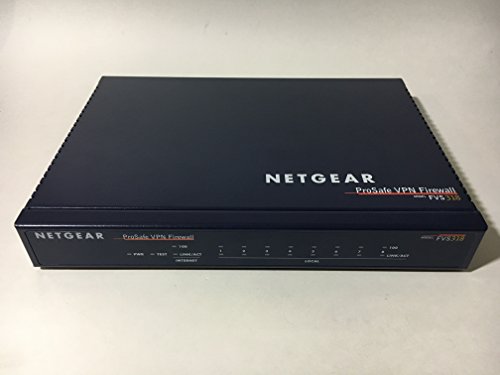
Belkin N300 Wireless N Router (Latest Generation) (F9K1002)
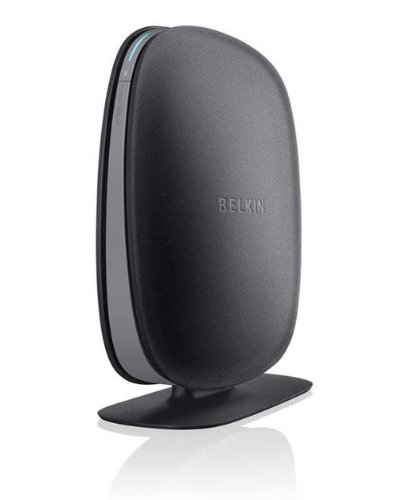


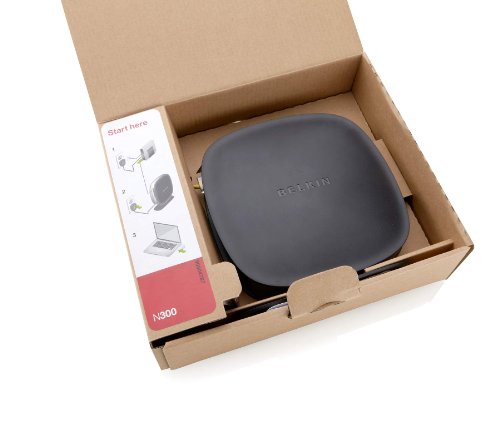

Key features
- •MultiBeam technology for a high-powered signal throughout your home
- •Easy setup for getting your network up and running in 3 steps
- •Self-Healing to detect and resolve network problems
- •Preset Security to get you up and running safely
- •N technology for great network performance and speeds of up to 300Mbps*
Belkin N300 Wireless N Router (Latest Generation) (F9K1002)
List Price: $108.87$97.98DEALYou Save: $10.89 (10%)
Free shippingFree Returns – 30 daysFree Order CancellationSecure Payment2–3 Days DeliveryGet It October 24, 2026In Stock (1)No marketing spamNo account requiredFulfilment by FedEx / Amazon / UPS / ShipwirePayPal / Card Buyer Protection
Customer Reviews
Reviews sourced from verified Amazon purchasers4.1
out of 5
Based on 10 reviews
5★
50%
4★
50%
3★
0%
2★
0%
1★
0%
Excellent router - easy to set up, perfect for people who are good with computer and for those who aren't.
Amy W✓ Verified Purchase•August 24, 2023
I consider my computer skills to be pretty good. I am not an "expert" by any means, but can certainly manage enough. I can maintain/update my computer as needed and can trouble shoot problems pretty well. However, this router is great for people who have little no computer experience too because it is SO easy to use!
I needed a new router for a couple reason. First, my old router was, well, old, about 4 years old and it was not an "n" router. Second, my router began to have problems about a month or so ago. It would randomly drop the internet on me which was VERY frustrating. In order to get my laptop back online I would have to turn the router off and back on. It was annoying to say the least.
I looked at a lot of routers on here before choosing this one. I wanted an "N" router and also one that would allow for wireless printing as I just ordered a new, wireless printer too. I also wanted router that could handle what we have: 2 laptops, a PS3, a Nintendo Wii and two Nintendo DSi's (Although the Dsi's are not connected all the time. I decided on this based on the number of good reviews and because I liked how it looked.
The shipping was super fast. I had the router 2 days after I ordered it. Set up was a breeze. This router comes with the router name/password on a little card. Once I had everything hooked up I just clicked on the router's name from the list of connections available, entered the given password and was online in seconds. I did go through and re-name the router and pick a different password, which was also very easy to do. The software that came with it was easy as well. Overall I was extremely happy with how quick it was to set everything up. Another nice thing about this router is that you can set up a "guest network". There are a few options, but I chose to set it up "cafe style" - when someone connects they are brought to a webpage where they have to enter the password, and that is it. Your guests can be online in your home, but not on your own network - I love it!!
The router itself is pretty nice. It is not quite as solid as I thought, as the plastic is lightweight. However, I still like how it looks/stands up. It takes up a minimal amount of space on my desk and blends in with my decor with no problem. The "looks" of a router may not be important to everyone, but for some people it is and this router def. works well.
Now for the best part: I am getting a VERY noticeable increase in speed. With the old router, when I went to "Open Network and Sharing Center", and then clicked on my connection, under "Speed" it would say: 54 Mbps. Now, when I look I see the number staying between 130-144 Mbps. I am guessing this difference in due to the fact that my old router was not an "N" router, and my laptop's wifi is 802.11n. I could be wrong though. Networks/wifi is one thing that I do not know a lot about, beyond being able to set up a connection. This increase in speed was noticed right away. I would have a few seconds of lag time before when I opened a web page, but now I see none. Also, downloading music goes about twice as fast and when I watch videos there are no pauses. I think I'm finally getting the speed I am paying for from my cable company. =
The range with this router is impressive as well. I am getting full bars everywhere in my house, where before I would get about 2-3 at the furthest point from the old router. I am not yet taken my laptop(s) outside to see how far I can get, but I bet it will be pretty good. Also, I have not been kicked on the internet at all since setting the router up. By now it would have happened at least 8-10 times in a 24 hours period. That alone has made me very happy.
I have not yet been able to try the wireless printing as my printer will not be delivered for a few more days. With the ease I have had so far though, I do not anticipate any problems in setting up the wireless printing for both laptops. I also have not yet tried the "video share" feature but do plan to try it. I will update this review after trying those features.
I needed a new router for a couple reason. First, my old router was, well, old, about 4 years old and it was not an "n" router. Second, my router began to have problems about a month or so ago. It would randomly drop the internet on me which was VERY frustrating. In order to get my laptop back online I would have to turn the router off and back on. It was annoying to say the least.
I looked at a lot of routers on here before choosing this one. I wanted an "N" router and also one that would allow for wireless printing as I just ordered a new, wireless printer too. I also wanted router that could handle what we have: 2 laptops, a PS3, a Nintendo Wii and two Nintendo DSi's (Although the Dsi's are not connected all the time. I decided on this based on the number of good reviews and because I liked how it looked.
The shipping was super fast. I had the router 2 days after I ordered it. Set up was a breeze. This router comes with the router name/password on a little card. Once I had everything hooked up I just clicked on the router's name from the list of connections available, entered the given password and was online in seconds. I did go through and re-name the router and pick a different password, which was also very easy to do. The software that came with it was easy as well. Overall I was extremely happy with how quick it was to set everything up. Another nice thing about this router is that you can set up a "guest network". There are a few options, but I chose to set it up "cafe style" - when someone connects they are brought to a webpage where they have to enter the password, and that is it. Your guests can be online in your home, but not on your own network - I love it!!
The router itself is pretty nice. It is not quite as solid as I thought, as the plastic is lightweight. However, I still like how it looks/stands up. It takes up a minimal amount of space on my desk and blends in with my decor with no problem. The "looks" of a router may not be important to everyone, but for some people it is and this router def. works well.
Now for the best part: I am getting a VERY noticeable increase in speed. With the old router, when I went to "Open Network and Sharing Center", and then clicked on my connection, under "Speed" it would say: 54 Mbps. Now, when I look I see the number staying between 130-144 Mbps. I am guessing this difference in due to the fact that my old router was not an "N" router, and my laptop's wifi is 802.11n. I could be wrong though. Networks/wifi is one thing that I do not know a lot about, beyond being able to set up a connection. This increase in speed was noticed right away. I would have a few seconds of lag time before when I opened a web page, but now I see none. Also, downloading music goes about twice as fast and when I watch videos there are no pauses. I think I'm finally getting the speed I am paying for from my cable company. =
The range with this router is impressive as well. I am getting full bars everywhere in my house, where before I would get about 2-3 at the furthest point from the old router. I am not yet taken my laptop(s) outside to see how far I can get, but I bet it will be pretty good. Also, I have not been kicked on the internet at all since setting the router up. By now it would have happened at least 8-10 times in a 24 hours period. That alone has made me very happy.
I have not yet been able to try the wireless printing as my printer will not be delivered for a few more days. With the ease I have had so far though, I do not anticipate any problems in setting up the wireless printing for both laptops. I also have not yet tried the "video share" feature but do plan to try it. I will update this review after trying those features.
Good router, poor documentation & software
Dan Barnett✓ Verified Purchase•July 16, 2023
I bought this router to upgrade from 802.11g to 802.11n as I'm moving some video around my house. After getting the router working, it has not been a problem.
I received the router on a Thursday and jumped into the installation at 6:00 AM on Friday so that no one else would be using the network. The first problem that I encountered was that the software would not install on my desktop (Windows 7 Ultimate 64-bit). It seemed to be installing and just stopped - there was an icon in my system tray, but none of the options worked. I tried the installation over again and even moved to my wife's desktop system (Windows 7 Home premium 32-bit) with identical results. Since the documentation for the router was supposed to be installed with the software, this was irritating.
I located the documentation on the CD and read it (all) and tried more re-installations with the same results. Much of the documentation is poorly written (grammar, etc.) and the "MORE INFO" links only go to a glossary. The instructions are written as though everything will work the first time.
I had problems getting the router to connect to my cable modem, but that was resolved by removing the battery from the modem for 10 minutes and restarting it. This was done in response to a suggestion from technical support.
I had technical support on the telephone for about 6 hours before the router was up. Multiple times, they requested that I do the same steps over to verify that I had done them. I felt like they were calling me an idiot. If the instructions were clearer, this could have been easier (not the idiot part). As it turned out, my network was down almost all Friday and my wife was unhappy (understatement).
After a total of 12 hours, the router was working fine, but the software still did not install. I got a reference number and a elevated technical service person called me on Monday and we did the whole install/reinstall over again including downloading the software from their site. After quite awhile, the tech said that I really didn't need the software anyway.
I have been using the router for just over a month now without problems. I have a USB disk drive attached that is working fine. I have both 2.4GHz and 5GHz devices connected wirelessly and my desk top system connected via cable. I use MAC address authentication for all the devices.
I received the router on a Thursday and jumped into the installation at 6:00 AM on Friday so that no one else would be using the network. The first problem that I encountered was that the software would not install on my desktop (Windows 7 Ultimate 64-bit). It seemed to be installing and just stopped - there was an icon in my system tray, but none of the options worked. I tried the installation over again and even moved to my wife's desktop system (Windows 7 Home premium 32-bit) with identical results. Since the documentation for the router was supposed to be installed with the software, this was irritating.
I located the documentation on the CD and read it (all) and tried more re-installations with the same results. Much of the documentation is poorly written (grammar, etc.) and the "MORE INFO" links only go to a glossary. The instructions are written as though everything will work the first time.
I had problems getting the router to connect to my cable modem, but that was resolved by removing the battery from the modem for 10 minutes and restarting it. This was done in response to a suggestion from technical support.
I had technical support on the telephone for about 6 hours before the router was up. Multiple times, they requested that I do the same steps over to verify that I had done them. I felt like they were calling me an idiot. If the instructions were clearer, this could have been easier (not the idiot part). As it turned out, my network was down almost all Friday and my wife was unhappy (understatement).
After a total of 12 hours, the router was working fine, but the software still did not install. I got a reference number and a elevated technical service person called me on Monday and we did the whole install/reinstall over again including downloading the software from their site. After quite awhile, the tech said that I really didn't need the software anyway.
I have been using the router for just over a month now without problems. I have a USB disk drive attached that is working fine. I have both 2.4GHz and 5GHz devices connected wirelessly and my desk top system connected via cable. I use MAC address authentication for all the devices.
People....
greatgm✓ Verified Purchase•June 24, 2023
You know there are some people who buy a router and they want to run the U.S. Pentagon with it. You know they have 20 PC's, 50 cellphones and 50 playstations and XBOXes and they expect the router not to have problems running all that stuff at the same time? Additionally, some people have these huge mansions that are so big that you have to ride a bicycle to get from one end of the mansion to the other end. And they expect one router to cover the entire mansion? Let us be realistic here it is a home router not a industrial one. If they don't have a router that can run the U.S. Pentagon they get upset and start complaining that this Belkin router is no good.
Well I beg to differ. I had the Belkin N600-db router for about 2-3 months. This is my first router. I bought a Belkin because I had good luck with their other products. As far as I'm concerned this router has never let me down. I get excellent and consistent 5-bar connection. I can go to to every corner of my house with my laptop and still get a connection to the internet. Additionally I have a Playstation 3 and I had no connection problems. Again good speed, no drops and I have yet to reboot it as so many people keep saying that they have to reboot. As a matter of fact, this Belkin router works so flawlessly, if I were to move and reinstall it, I probably forgot how to. This is how maintenence free this router has been. I'm writing my review on my laptop right now with this Belkin N600-db router providing me signal and still have no problems.
I'm glad I bought this router on sale at amazon.com as opposed to buying some overly priced router of the same class. I'm very happy with it. If it one day just happens to break down, in which I doubt, I would buy another Belkin N600-db router again,.
Well I beg to differ. I had the Belkin N600-db router for about 2-3 months. This is my first router. I bought a Belkin because I had good luck with their other products. As far as I'm concerned this router has never let me down. I get excellent and consistent 5-bar connection. I can go to to every corner of my house with my laptop and still get a connection to the internet. Additionally I have a Playstation 3 and I had no connection problems. Again good speed, no drops and I have yet to reboot it as so many people keep saying that they have to reboot. As a matter of fact, this Belkin router works so flawlessly, if I were to move and reinstall it, I probably forgot how to. This is how maintenence free this router has been. I'm writing my review on my laptop right now with this Belkin N600-db router providing me signal and still have no problems.
I'm glad I bought this router on sale at amazon.com as opposed to buying some overly priced router of the same class. I'm very happy with it. If it one day just happens to break down, in which I doubt, I would buy another Belkin N600-db router again,.
Good buy but be aware
Roger Green✓ Verified Purchase•June 23, 2023
I had a little Belkin G router and after a long time it finally stopped working. So I got this one because (a) I liked the old one when it was working, and (b) because this one looked like a good buy. But I have some caveats which resonate with some of the other comments here.
First of all, when you set it up follow the instructions exactly! No short cuts even if you're just replacing a similar router or think you have a knack for this sort of thing. And don't do it when you're tired! I did and got the oft-mentioned "connection with a strong signal but no internet access". My internet provider tried but in the end said to contact Belkin.
Second, if you contact Belkin support be sure you contact the real one. My internet provider gave me an 8xx number for "Belkin support" which was to some outfit in India that was no help and tried to convince me that I needed their $99 fix-everything-on-my-computer deal. I was somewhat suspicious because (a) my computer has no other problems, (b) it works fine on a home wireless router at another location, (b) I keep it reasonably clean with Norton 360 and PC Pitstop, (d) it does internet just fine on a lan cable, and (e) the apparent problem was that the router wasn't sending a log-in signal to the internet provider. I was later informed by Belkin that I had contacted some third party outfit - not their support people. For Belkin support start by going to [...].
So, the next morning, well-rested, I started over slowly and methodically, step by step. And it worked fine - on both my computer and my wife's computer, and on our Blackberry Playbook tablets - with strong connections AND internet access.
So - buy it, don't give up if your first effort at installing it fails, instead start over carefully step by step.
First of all, when you set it up follow the instructions exactly! No short cuts even if you're just replacing a similar router or think you have a knack for this sort of thing. And don't do it when you're tired! I did and got the oft-mentioned "connection with a strong signal but no internet access". My internet provider tried but in the end said to contact Belkin.
Second, if you contact Belkin support be sure you contact the real one. My internet provider gave me an 8xx number for "Belkin support" which was to some outfit in India that was no help and tried to convince me that I needed their $99 fix-everything-on-my-computer deal. I was somewhat suspicious because (a) my computer has no other problems, (b) it works fine on a home wireless router at another location, (b) I keep it reasonably clean with Norton 360 and PC Pitstop, (d) it does internet just fine on a lan cable, and (e) the apparent problem was that the router wasn't sending a log-in signal to the internet provider. I was later informed by Belkin that I had contacted some third party outfit - not their support people. For Belkin support start by going to [...].
So, the next morning, well-rested, I started over slowly and methodically, step by step. And it worked fine - on both my computer and my wife's computer, and on our Blackberry Playbook tablets - with strong connections AND internet access.
So - buy it, don't give up if your first effort at installing it fails, instead start over carefully step by step.
Flawless Victory with the Belkin N600
Robert✓ Verified Purchase•May 24, 2023
LET'S BE HONEST...
This wireless router is the bee's knees. I mean, seriously, it might as well be Liam Neeson's offspring, it is THAT phenomenal. Earth would implode due to an imbalance in the force if this thing was any better but still priced the same. Just look at the pictures of it. Two words: Sex Appeal. Another two words. Chick magnet. If this router was born a car instead of a router, it would be a 2013 Bentley Continental GT V8 coupe. This is possibly the best router you can get for 70 bucks or less. If you play multiplayer video games online, stream multimedia content, or even just cruise the interwebs, this little guy will hold your hand tight and walk you straight into Mordor.
I would share some negative aspects about this router, but oh... wait... there aren't any. Even if there were, why would I be honest about them and tear apart that ingeniously conceived first paragraph of positive aspects just so you can have an unbiased review to read?
In short, this router will easily breeze through pretty much any task you put it up to (as long as your ISP provides respectable speeds and a multitude of other variables, which you have absolutely no control over, work out in your favor). And how long did it take me to get this out of the box, plugged in, and start surfing the web wirelessly? From its humble beginnings within its packaging, less than 5 minutes had passed before I was on a magic carpet ride through limitless cyberspace. Just plug it in, pop in the setup disc, click a couple buttons and it does the rest. Super fast, super easy.
Read on if you want the specific (yet boring) information that will only convince you even more strongly that you want this router.
FEATURES...
- Dual-Band technology runs two frequency channels at once and smartly prioritizes demands in order to prevent interruptions in streaming, gaming, and downloading
- Up to 300Mbps + 300Mbps (both channels run at up to 300Mbps simultaneously)
- Fancy media server lets you easily share photos and video between your home/mobile devices (Smart TVs, cell phones, tablets, etc.)
- 4 integrated gigabit ports for connecting multiple devices
- 2 USB ports for wireless printing and sharing photos, etc.
- Extensive Parental Control options
- Reliable and excellent signal from anywhere in your home (unless you live in an enormous mansion).
- Great customer support, firmware updates, and accompanying software
- Blue status light on top front of router is very soft and non-intrusive
WHAT COMES IN THE BOX...
- The sleek, stylish, and very sexy Belkin N600 wireless router
- Power cord
- Very nice quality Ethernet cable
- Software disc with User Manual
MY INFO...
- 22 years old
- College student
- Avid PC gamer (including online multiplayer)
- Frequently watch YouTube videos
- Download lots of files almost every day
- Spend a lot of time on the interwebs
I expect great performance, speed, and reliability from my wireless router. As I write this, I have only owned this particular Belkin router for a couple days, but my signal has not stuttered at all and my download speed is just as good as when wired directly to the modem. Before this router, I owned a mid-range Belkin wireless router that performed flawlessly for a year and a half. For the record, that router did not die, but when I moved out of my old place I opted to buy a new one and let my roommate have the older one. The quality and reliability I experienced with my previous Belkin wireless led me to purchase this one.
UPDATE SEPTEMBER 27th 2012
I'm not sure if it was the fault of the router, modem, or my internet service, but last night I experienced my first hiccup in its performance. I unplugged the router and then modem, waited a full minute, and plugged the modem back in. Waited for it to boot up, then plugged the router back in. Then tested the wireless connection again and it was back to normal. Most upsets with performance can be solved with this method. Will update again if anything else happens in the future.
I will try to update this review as time goes on. I hope this review was helpful to you!
This wireless router is the bee's knees. I mean, seriously, it might as well be Liam Neeson's offspring, it is THAT phenomenal. Earth would implode due to an imbalance in the force if this thing was any better but still priced the same. Just look at the pictures of it. Two words: Sex Appeal. Another two words. Chick magnet. If this router was born a car instead of a router, it would be a 2013 Bentley Continental GT V8 coupe. This is possibly the best router you can get for 70 bucks or less. If you play multiplayer video games online, stream multimedia content, or even just cruise the interwebs, this little guy will hold your hand tight and walk you straight into Mordor.
I would share some negative aspects about this router, but oh... wait... there aren't any. Even if there were, why would I be honest about them and tear apart that ingeniously conceived first paragraph of positive aspects just so you can have an unbiased review to read?
In short, this router will easily breeze through pretty much any task you put it up to (as long as your ISP provides respectable speeds and a multitude of other variables, which you have absolutely no control over, work out in your favor). And how long did it take me to get this out of the box, plugged in, and start surfing the web wirelessly? From its humble beginnings within its packaging, less than 5 minutes had passed before I was on a magic carpet ride through limitless cyberspace. Just plug it in, pop in the setup disc, click a couple buttons and it does the rest. Super fast, super easy.
Read on if you want the specific (yet boring) information that will only convince you even more strongly that you want this router.
FEATURES...
- Dual-Band technology runs two frequency channels at once and smartly prioritizes demands in order to prevent interruptions in streaming, gaming, and downloading
- Up to 300Mbps + 300Mbps (both channels run at up to 300Mbps simultaneously)
- Fancy media server lets you easily share photos and video between your home/mobile devices (Smart TVs, cell phones, tablets, etc.)
- 4 integrated gigabit ports for connecting multiple devices
- 2 USB ports for wireless printing and sharing photos, etc.
- Extensive Parental Control options
- Reliable and excellent signal from anywhere in your home (unless you live in an enormous mansion).
- Great customer support, firmware updates, and accompanying software
- Blue status light on top front of router is very soft and non-intrusive
WHAT COMES IN THE BOX...
- The sleek, stylish, and very sexy Belkin N600 wireless router
- Power cord
- Very nice quality Ethernet cable
- Software disc with User Manual
MY INFO...
- 22 years old
- College student
- Avid PC gamer (including online multiplayer)
- Frequently watch YouTube videos
- Download lots of files almost every day
- Spend a lot of time on the interwebs
I expect great performance, speed, and reliability from my wireless router. As I write this, I have only owned this particular Belkin router for a couple days, but my signal has not stuttered at all and my download speed is just as good as when wired directly to the modem. Before this router, I owned a mid-range Belkin wireless router that performed flawlessly for a year and a half. For the record, that router did not die, but when I moved out of my old place I opted to buy a new one and let my roommate have the older one. The quality and reliability I experienced with my previous Belkin wireless led me to purchase this one.
UPDATE SEPTEMBER 27th 2012
I'm not sure if it was the fault of the router, modem, or my internet service, but last night I experienced my first hiccup in its performance. I unplugged the router and then modem, waited a full minute, and plugged the modem back in. Waited for it to boot up, then plugged the router back in. Then tested the wireless connection again and it was back to normal. Most upsets with performance can be solved with this method. Will update again if anything else happens in the future.
I will try to update this review as time goes on. I hope this review was helpful to you!
Page 1 of 2
Related products


Fortinet FortiGate 80E and 1YR 24x7 UTM Protection BDL (FG-80E-BDL-950-12)
List: $2255.25$2029.73DEAL