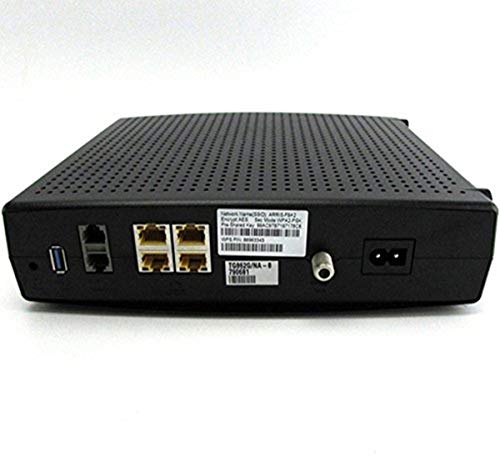
ARRIS TG862G DOCSIS 3 WIRELESS GATEWAY TELEPHONY MODEM(Comcast/Xfinity, Brighthouse)

Key features
- •Compatible with major U.S. Cable Providers. Contact your ISP to confirm compatibility.
- •Not Compatible with VoIP (telephony) Service with Comcast in Most Locations (Results may vary)
- •DOCSIS 3.0 residential gateway with 802.11n, 4 Port Router, and 8x4 Channel Bonding
- •320 MBPS Down Speed: Up to eight times faster than DOCSIS 2.0 cable modems
- •Comcast Telephony users must have tier 3 tech support force firmware download for phone activation
ARRIS TG862G DOCSIS 3 WIRELESS GATEWAY TELEPHONY MODEM(Comcast/Xfinity, Brighthouse)
List Price: $290.99$261.89DEALYou Save: $29.10 (10%)
Free shippingFree Returns – 30 daysFree Order CancellationSecure Payment2–3 Days DeliveryGet It October 24, 2026In Stock (1)No marketing spamNo account requiredFulfilment by FedEx / Amazon / UPS / ShipwirePayPal / Card Buyer Protection
Customer Reviews
Reviews sourced from verified Amazon purchasers3.7
out of 5
Based on 10 reviews
5★
50%
4★
50%
3★
0%
2★
0%
1★
0%
Works well as a Docsis 3.0 Modem, Router and EMTA. Read for tips
Jason P. Baxter✓ Verified Purchase•December 2, 2023
First off I do not recommend buying this device because it has wifi built in, plan on using your own wifi router/access point. I had no plans on using the wifi built into the device and after testing it I reconfirmed my decision. Test results were poor compared to my 2 yr old Dlink N300 router. "see below for details on disabling the Wifi or putting into bridge mode". I have this device installed in a telco closet which houses all of my home wiring to a central location. I use the built in router of this device to broadcast DHCP to my devices on my LAN, it works well for this. It does have 4 GigPorts which was a must for me. I also use 2 Gigabit switches and a Dlink Wireless Router "in Bridge Mode, which disables DHCP" in my setup all located in different parts of the house and the Arris device plays well with all, plug and play.
The main reason I purchased this device was to upgrade from a Cisco Docsis 2.0 modem and to return a rented Arris EMTA for voice service that I was being billed for. This device gives me both in one box for simplicity, power savings and greater Internet speeds. I have the Comcast Blast plan and was getting around 25MB to 30MB down/5MB to 7MB up before upgrading, now with Docsis 3.0 I see consistent 50MB to 57MB down/9MB to 12MB up. This to me is a no brainer if you are in the same position to make this change.
Lastly, activating this device was very simple or would have been if I reset the device before hand "I bought mine used on Amazon". I had to make a few extra calls to activate it, all went well after I was instructed to hold the rest button in for 20 seconds. I was online with internet and phone 5 minutes later. MY MAJOR ISSUE with activating this device was getting the Wifi turned off. I did not want another wifi signal "SSID" being transmitted in the house and wanted to conserve power and heat from the device. Because this device is a Gateway and touches the Comcast network they have full control over the advanced options of this device. When you login to the router through browser "10.0.0.1" the advanced tab is blocked off for consumer access, this is how you change the wifi and router options such as putting the device into bridge mode. I called at least 7 times for Comcast to turn off the Wifi but NO ONE was able to help do it. I believe this came down to the device not being tide to an outlet for the changes. >>>>>Before I could get someone to help with that I figured out that if I disconnected the COAX cable from the modem I could login to the Router settings without restrictions in the advanced tab, make my changes and save then reconnect everything. After reconnecting the coax line everything worked perfect and the wifi was turned off. I would recommend advanced users to do this on there own before connecting the coax and contacting Comcast to activate. It will save you time and frustration.
The main reason I purchased this device was to upgrade from a Cisco Docsis 2.0 modem and to return a rented Arris EMTA for voice service that I was being billed for. This device gives me both in one box for simplicity, power savings and greater Internet speeds. I have the Comcast Blast plan and was getting around 25MB to 30MB down/5MB to 7MB up before upgrading, now with Docsis 3.0 I see consistent 50MB to 57MB down/9MB to 12MB up. This to me is a no brainer if you are in the same position to make this change.
Lastly, activating this device was very simple or would have been if I reset the device before hand "I bought mine used on Amazon". I had to make a few extra calls to activate it, all went well after I was instructed to hold the rest button in for 20 seconds. I was online with internet and phone 5 minutes later. MY MAJOR ISSUE with activating this device was getting the Wifi turned off. I did not want another wifi signal "SSID" being transmitted in the house and wanted to conserve power and heat from the device. Because this device is a Gateway and touches the Comcast network they have full control over the advanced options of this device. When you login to the router through browser "10.0.0.1" the advanced tab is blocked off for consumer access, this is how you change the wifi and router options such as putting the device into bridge mode. I called at least 7 times for Comcast to turn off the Wifi but NO ONE was able to help do it. I believe this came down to the device not being tide to an outlet for the changes. >>>>>Before I could get someone to help with that I figured out that if I disconnected the COAX cable from the modem I could login to the Router settings without restrictions in the advanced tab, make my changes and save then reconnect everything. After reconnecting the coax line everything worked perfect and the wifi was turned off. I would recommend advanced users to do this on there own before connecting the coax and contacting Comcast to activate. It will save you time and frustration.
Perfectly fine docsis 3 cable modem. user interface software bugs but didn't affect my successful operation. 125Mb/s download.
1GoodDog✓ Verified Purchase•November 28, 2023
Worked fine in our Comcast installation. Gave us download speed (as measured by ookla) of 125Mb/s, and upload of around 11Mb.s. Phone line worked fine.
I will say that in our particular case, the installation was a royal pain. I have no idea whether this has anything to do with the modem or if it's entirely on the comcast side. We plugged in the modem and it sync'd fine, but we were not redirected to the comcast activation portal. We needed to get on the phone with Comcast and it took something like an hour with multiple unintended transfers to get first the data connection and then the telephone line activated. I think this is more an issue on the comcast side than with the modem. The modem appeared to perform as expected all through the process.
Although, I did have inexplicable difficulty disabling the modem's built-in wifi. I have a separate 802.11ac simultaneous dual band router, so I definitely do NOT want to use the mediocre 802.11bgn wireless that's built-in to the modem. Each time i tried to disable wifi, I got an error message that the SSID cannot be blank. It looks like a simple GUI software bug, but may be indicative of low software quality. I finally decided just to ignore the wireless. And since no clients will associate, the only cost is 10 wifi beacons per second coming from this device on wifi 2.4GHz channel 1.
I will say that in our particular case, the installation was a royal pain. I have no idea whether this has anything to do with the modem or if it's entirely on the comcast side. We plugged in the modem and it sync'd fine, but we were not redirected to the comcast activation portal. We needed to get on the phone with Comcast and it took something like an hour with multiple unintended transfers to get first the data connection and then the telephone line activated. I think this is more an issue on the comcast side than with the modem. The modem appeared to perform as expected all through the process.
Although, I did have inexplicable difficulty disabling the modem's built-in wifi. I have a separate 802.11ac simultaneous dual band router, so I definitely do NOT want to use the mediocre 802.11bgn wireless that's built-in to the modem. Each time i tried to disable wifi, I got an error message that the SSID cannot be blank. It looks like a simple GUI software bug, but may be indicative of low software quality. I finally decided just to ignore the wireless. And since no clients will associate, the only cost is 10 wifi beacons per second coming from this device on wifi 2.4GHz channel 1.
Works fine, but still have a few concerns...
Tsunami✓ Verified Purchase•November 16, 2023
Delivery on the modem was no problem nor was the set-up. The modem is working properly and I am able to access the Internet and make/receive calls with Comcast. My concerns:
1. I purchased "New," but I'm not sure I received an absolutely new unit. The unit had Comcast stickers and warnings on it that were identical to those on my leased unit. Although the unit was wrapped in plastic and came in an Arris box, it just didn't have the "look and feel" that you get with absolutely new products.
2. The modem I received is not the one that is pictured. The modem I received, however, is identical to the one I recently leased from Comcast. I personally like it better than the one in the picture because it looks a little more contemporary and it is the one currently displayed on the Arris Web site.
3. The price on this modem fluctuates wildly. When my brother-in-law bought the identical unit, he paid $70 less than the currently posted price of $239.99. I paid $199.99, but was willing to do so to avoid the $7.00 monthly charge from Comcast as soon as possible.
4. I bought my modem from a company called "it's all for sale," but my brother-in-law bought the identical unit from another company using the same Web site but a different name. Today, I noticed that there is another vendor using the same Web site. All of the shipments come from the New York area. Not sure whether it is one company changing its name or several companies using the same warehouse. I have no complaints about any of the companies. Just think that it's a bit odd.
My advice: If you can wait to purchase this modem, you will probably save some money. I assume that current pricing is set by supply/demand. I have no criticisms re: this vendor as long as I don't experience any problems with the modem and I am able to receive my payback by avoiding the $7.00/month Comcast charge for the next two + years.
1. I purchased "New," but I'm not sure I received an absolutely new unit. The unit had Comcast stickers and warnings on it that were identical to those on my leased unit. Although the unit was wrapped in plastic and came in an Arris box, it just didn't have the "look and feel" that you get with absolutely new products.
2. The modem I received is not the one that is pictured. The modem I received, however, is identical to the one I recently leased from Comcast. I personally like it better than the one in the picture because it looks a little more contemporary and it is the one currently displayed on the Arris Web site.
3. The price on this modem fluctuates wildly. When my brother-in-law bought the identical unit, he paid $70 less than the currently posted price of $239.99. I paid $199.99, but was willing to do so to avoid the $7.00 monthly charge from Comcast as soon as possible.
4. I bought my modem from a company called "it's all for sale," but my brother-in-law bought the identical unit from another company using the same Web site but a different name. Today, I noticed that there is another vendor using the same Web site. All of the shipments come from the New York area. Not sure whether it is one company changing its name or several companies using the same warehouse. I have no complaints about any of the companies. Just think that it's a bit odd.
My advice: If you can wait to purchase this modem, you will probably save some money. I assume that current pricing is set by supply/demand. I have no criticisms re: this vendor as long as I don't experience any problems with the modem and I am able to receive my payback by avoiding the $7.00/month Comcast charge for the next two + years.
Excellent alternative for Comcast (California) customers
Mitchell F✓ Verified Purchase•October 15, 2023
I have been using the Arris TG862G gateway for several months now and everything has been performing as expected. The gateway has been reliable and a solid performer. The configuration interface is a bit clunky, but manageable for anyone that's spent time delving into multiple router configuration systems and knows how/where to find what they're looking for. The biggest issue I had with this modem was getting Comcast (in California) to configure the thing correctly. Because it wasn't a "Dory" gateway, they had to escalate me to the next tier of support and I had to read (and re-read, and re-read) the MAC addresses and IDs of the various gateway components to get them all configured and working. That is absolutely on Comcast, not on the gateway or Arris. If Comcast hired smarter people...
The backup battery works as expected, the WiFi is decent (not the best thru-wall and distance coverage, not the worst by far, either), and as I said earlier, the device has been extremely stable. If you want to avoid Comcast's monthly "equipment rental fee" and aren't afraid of getting your networking digital hands a little dirty, this is an excellent alternative to what Comcast provides.
I would absolutely NOT recommend this gateway for people who are of the "I should just be able to plug it in and it should start working" mindset. If this describes you, stick with the device Comcast sends you. You'll be happier in both the short and long runs. Again, this has nothing to do with the Arris hardware: it is all about dealing with relatively inept and unskilled Comcast support techs that you have to rely on to get this working. If you can't talk them through their job, you won't get this working.
The backup battery works as expected, the WiFi is decent (not the best thru-wall and distance coverage, not the worst by far, either), and as I said earlier, the device has been extremely stable. If you want to avoid Comcast's monthly "equipment rental fee" and aren't afraid of getting your networking digital hands a little dirty, this is an excellent alternative to what Comcast provides.
I would absolutely NOT recommend this gateway for people who are of the "I should just be able to plug it in and it should start working" mindset. If this describes you, stick with the device Comcast sends you. You'll be happier in both the short and long runs. Again, this has nothing to do with the Arris hardware: it is all about dealing with relatively inept and unskilled Comcast support techs that you have to rely on to get this working. If you can't talk them through their job, you won't get this working.
Comcast Internet and phone modem replacement success
W. Walden✓ Verified Purchase•September 30, 2023
Purchased this modem/gateway and got it yesterday.
Replaced a new Technicolor TC8305C modem that was installed in new service two days ago.
Used for Comcast 105 mbps service plus single line voice.
Modem works as advertised and is not the first Arris modem I've used. All Arris modems have been rock solid.
Observations for experts and newbies.
1. Follow Comcast directions for hooking up hardware
2. It can be confusing getting a computer to 'connect' with the modem/router to activate, and if that's your case, just call from the US 1 (800) 652-3446 to activate both internet and phone.
3. Have your account number, phone number and CMAC # if you're activating voice, address etc available for technician
4. CMAC # is for the phone (I think) and on the modem as well as the stickers on top of the modem. Easy to find
5. Don't be concerned if you connect to the activation web site, go thru all the steps successfully, activate the internet service, and then find that your phone isn't working.
6. My phone didn't work after a successful on-line internet activation.
7. I called the above phone number, stepped through the phone activation, and voila......the phone worked.
8. Note: the call I made sounded like it was going to a service technician, and then was answered by someone in Activation. Doesn't make sense, but they fixed the problem.
9. Tips: 1) Check to assure you have a phone dial tone and 2) ask them to call you back on the line that they activated. You would probably be calling from your cell phone so don't assume the incoming works. They will call on the land line and then you can drop the cell to finish any other work.
10. After successfully getting the phone to work, I asked the same person to do two other tasks: a) Disable wifi, and b) put the modem into 'Bridged Mode'. Bridged is when you want to use your own router/wifi. Neither of the are available after Comcast loads their firmware on the Arris modem.
11. These two tasks only took 10 minutes and they were done correctly.
Great product, no hassle from Comcast, good tech service person and overall positive experience.
Replaced a new Technicolor TC8305C modem that was installed in new service two days ago.
Used for Comcast 105 mbps service plus single line voice.
Modem works as advertised and is not the first Arris modem I've used. All Arris modems have been rock solid.
Observations for experts and newbies.
1. Follow Comcast directions for hooking up hardware
2. It can be confusing getting a computer to 'connect' with the modem/router to activate, and if that's your case, just call from the US 1 (800) 652-3446 to activate both internet and phone.
3. Have your account number, phone number and CMAC # if you're activating voice, address etc available for technician
4. CMAC # is for the phone (I think) and on the modem as well as the stickers on top of the modem. Easy to find
5. Don't be concerned if you connect to the activation web site, go thru all the steps successfully, activate the internet service, and then find that your phone isn't working.
6. My phone didn't work after a successful on-line internet activation.
7. I called the above phone number, stepped through the phone activation, and voila......the phone worked.
8. Note: the call I made sounded like it was going to a service technician, and then was answered by someone in Activation. Doesn't make sense, but they fixed the problem.
9. Tips: 1) Check to assure you have a phone dial tone and 2) ask them to call you back on the line that they activated. You would probably be calling from your cell phone so don't assume the incoming works. They will call on the land line and then you can drop the cell to finish any other work.
10. After successfully getting the phone to work, I asked the same person to do two other tasks: a) Disable wifi, and b) put the modem into 'Bridged Mode'. Bridged is when you want to use your own router/wifi. Neither of the are available after Comcast loads their firmware on the Arris modem.
11. These two tasks only took 10 minutes and they were done correctly.
Great product, no hassle from Comcast, good tech service person and overall positive experience.
Page 1 of 2
Related products



Fortinet FortiGate 80E and 1YR 24x7 UTM Protection BDL (FG-80E-BDL-950-12)
List: $2255.25$2029.73DEAL