Verifi P2000 Desktop USB Fingerprint Reader - Windows Hello, Windows Password Free Operation




Key features
- •Use this product for logon to Windows 7, 8 and 10 including Windows Hello
- •Comes with Roboform Free Edition password manager for fingerprint logon to websites and applications
- •One finger access to your PC
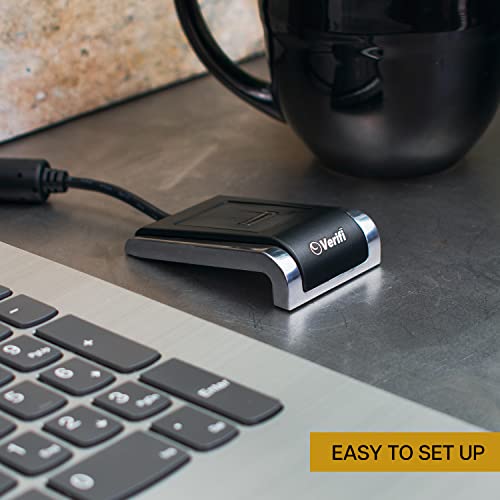
- •State of the art silicon slide sensor in an all-metal housing
- •CD included with Quick Start guide, drivers and RoboForm Free Edition
Verifi P2000 Desktop USB Fingerprint Reader - Windows Hello, Windows Password Free Operation
List Price: $105.85$95.27DEALYou Save: $10.58 (10%)
Free shippingFree Returns – 30 daysFree Order CancellationSecure Payment2–3 Days DeliveryGet It October 25, 2026In Stock (1)No marketing spamNo account requiredFulfilment by FedEx / Amazon / UPS / ShipwirePayPal / Card Buyer Protection
Customer Reviews
Reviews sourced from verified Amazon purchasers4.0
out of 5
Based on 10 reviews
5★
70%
4★
10%
3★
10%
2★
10%
1★
0%
I'll keep the one for the office but will find a replacement for the one at home which is wasted money.
W. M. Roberts•September 21, 2017
Purchased 2 of these, one for office & one for home. One works flawlessly but one is a constant problem. Have to unplug & re-plug frequently to use it. 3 time today. I'll keep the one for the office but will find a replacement for the one at home which is wasted money.
Works Great
Mark Twain•March 9, 2017
Works great on Windows 7 64-bit with preexisting Roboform Everywhere installation. Easy setup; read the pdf or ReadMe text file instruction guide on the provided install disk before plugging the scanner into your computer. This is my first fingerprint reader, and I am happy with it; it is a time-saver.
Great device, I've bought two
Hectord•June 2, 2016
Great device, I've bought two, one for each computer. Very reliable scanning operation, one failed after a few months and was serviced and returned quickly.
Professional Reliable Biometric Logon for Windows 10 & Password Manager
PlanetAnonymous•February 21, 2016
SCANNER: Quick & Accurate! 500 DPI. Scratch resistant coating similar to Gorilla Glass.
INSTALL: Works flawlessly with WINDOWS 10. Installation was extremely easy. Step by step instructions and updated drivers (32/64 bit) can be downloaded from the helpful support page: [...]
Build Quality: EXCELLENT
Scanner: 500 dpi. Scratch resistant coating similar to Gorilla Glass
Base: Aluminum. Nice weight. Front & Rear full length rubber foot pads keep it in place during use.
Footprint: 2.75 inches X 1.75 inches X 0.7 inches.
USB cord: non-detachable, 6' length.
Computer logon: No need to navigate away from the PIN logon field. Just scan your finger and you're in.
Password Manager: Roboform integration is easy, but obviously you'll need to purchase the full-version.
INSTALL: Works flawlessly with WINDOWS 10. Installation was extremely easy. Step by step instructions and updated drivers (32/64 bit) can be downloaded from the helpful support page: [...]
Build Quality: EXCELLENT
Scanner: 500 dpi. Scratch resistant coating similar to Gorilla Glass
Base: Aluminum. Nice weight. Front & Rear full length rubber foot pads keep it in place during use.
Footprint: 2.75 inches X 1.75 inches X 0.7 inches.
USB cord: non-detachable, 6' length.
Computer logon: No need to navigate away from the PIN logon field. Just scan your finger and you're in.
Password Manager: Roboform integration is easy, but obviously you'll need to purchase the full-version.
What took me so long?
K. Breeden•December 15, 2015
Man, I just got this little guy and am really impressed. I set it up on Windows 10 in about ten minutes. All it took was for me to plug it into a USB port (drivers loaded automatically without use of included disk), set up a PIN for Windows login and swipe my finger over the unit a couple of times.
I have been a longtime user of the paid version of Roboform, which I highly recommend. Getting the reader to work with that was simply a matter of clicking an option in Roboform. It has since worked flawlessly for both Windows login and Roboform login. Woohoo, no more typing in passwords for those logins! (Now if I could just get it to log into Diskcryptor for me. :-) ) What took me so long to get a fingerprint reader?
I have been a longtime user of the paid version of Roboform, which I highly recommend. Getting the reader to work with that was simply a matter of clicking an option in Roboform. It has since worked flawlessly for both Windows login and Roboform login. Woohoo, no more typing in passwords for those logins! (Now if I could just get it to log into Diskcryptor for me. :-) ) What took me so long to get a fingerprint reader?
Page 1 of 2