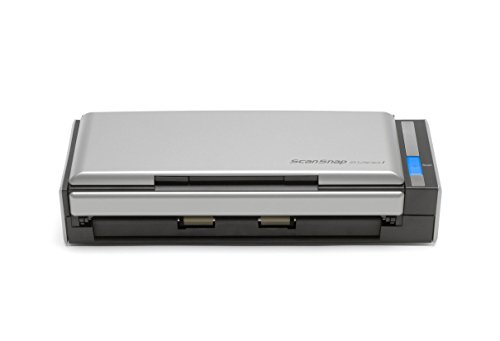
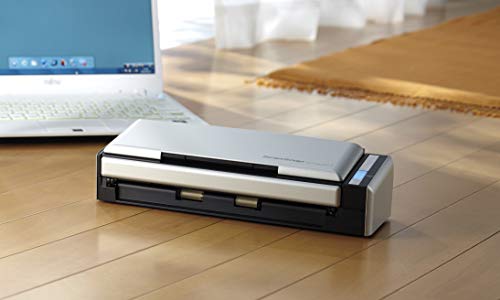
Fujitsu ScanSnap S1300i Portable Color Duplex Document Scanner for Mac or PC, Classic



Key features
- •Organize your paperwork in a breeze - create searchable, multi-page PDFs with the click of a button ; Scan to editable Word and Excel files
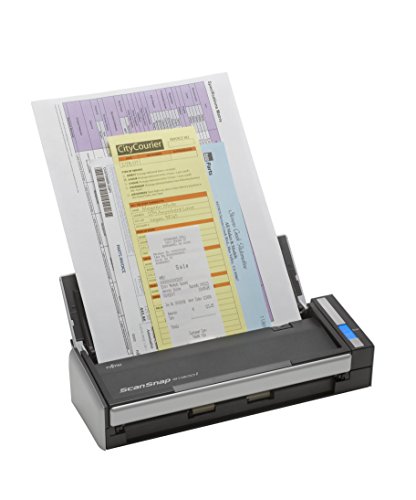
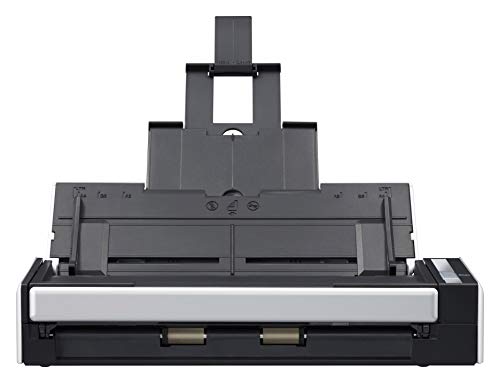
- •Double sided color scanning with 10 page automatic document feeder (ADF). Scan receipts, business cards, extra long pages, and more
- •Intelligent scan correction performs a quick quality check on your scans - features include auto color detection, auto rotation for upside down documents, and blank page removal
- •Easy to use software with color, grayscale, and monochrome scan speeds of up to 12 double-sided pages per minute
- •Scan your documents directly into the cloud to access them from anywhere - compatible with Dropbox, Google Drive, Evernote, and more.Paper Chute Capacity:Maximum 10 sheets (A4 size at 20 lb. or 80 g/m2)
Fujitsu ScanSnap S1300i Portable Color Duplex Document Scanner for Mac or PC, Classic
List Price: $589.28$530.35DEALYou Save: $58.93 (10%)
Free shippingFree Returns – 30 daysFree Order CancellationSecure Payment2–3 Days DeliveryGet It October 25, 2026In Stock (8)No marketing spamNo account requiredFulfilment by FedEx / Amazon / UPS / ShipwirePayPal / Card Buyer Protection
Customer Reviews
Reviews sourced from verified Amazon purchasers4.4
out of 5
Based on 10 reviews
5★
40%
4★
60%
3★
0%
2★
0%
1★
0%
fast scanning, not so perfect OCR and alignment
MisterMysterio✓ Verified Purchase•July 20, 2023
The s1300i claims to deskew pages, but aside from the s1300i's page guide tabs, my scans come through crooked, requiring them to be de-skewed by a different software application. In addition to the adjustable guide tabs in the paper tray, the mechanical de-skew works via a second set of translucent rollers feeding the paper after the first stage black roller advances the page into the scanner. The skew issue also affects OCR, requiring some additional post-processing for good OCR (currently Adobe Acrobat Pro; I am looking into ExactScan).
Do not use this to scan photos when image quality is desired. I have not yet found a good setting for preserving the quality of inline photos in scanned pages - the photos appear dithered. This may be a result of the s1300i using tri-color LEDs to achieve color - the spectrum of LED light is not evenly distributed. The S1500 uses a traditional lamp light source which might give better photo results.
Overall the speed is great, but expect to purchase additional OCR software for high-quality text archiving.
I use the Fujitsu s1300i with DEVONthink.
1 Month Update, October :
I have used this scanner for 100-200 documents so far.
+ my workflow: plug usb port into laptop. start ScanSnap driver software on computer. load document into scanner, press scan button. If a page came out of an envelope and is tri-folded, I have to place a finger on the page in the document tray to keep it aligned - the vertical plastic guide tabs are stubby and don't keep folded pages in the tray. Wait for all pages to scan. type the name of the document after the ABBYY OCR software completes (dialog box automatically pops up asking for name). The pdf document goes into DevonThink Pro's inbox. Move the document to the proper folder. At the 300dpi color/ 600dpi grey resolution, OCR'd pages come in at 1-1.5MB per page. Right-click the document and open it up in Adobe Acrobat Pro->Tools->"Document Processing"->"Optimize Scanned PDF"; select JPEG 2000 lossless compression, deskew, background removal, descreen, sharpen text, no additional OCR. Quality of the scanned image drops down, but now the document's size is 100-200KB per page. Since I scan in duplex (front+back) by default, sometimes a blank back page will still be picked up because it has a crease in it; I also delete the blank page in Acrobat. Save.
+ although the workflow seems long, it is still much faster than waiting on a slower scanner. The post-processing in Adobe Acrobat could be skipped if you don't mind 2-10MB pdf files, but I just need the text on the pages for archiving.
+ ABBYY fine-reader produces much better OCR results than Adobe Acrobat Pro X. I only use Acrobat Pro's OCR if I have a long document that could benefit from using ClearScan.
+ I have not tried ExactScan's post-processing software - this might be able to automate the steps I do in Acrobat Pro.
- At 300dpi color/600dpi grey, scans are fast; pages move right through. At the highest setting, 600dpi color/1200dpi grey, scans are painfully slow, so I just don't use that setting unless a document is important. I have 16GB RAM/SSD/i7 2.7GHz Ivy Bridge/ USB 3.0, so the slow speed is all due to the s1300i's hardware.
- The small strip of glass above the detector inside the s1300i seems to be easily dirtied and smudged - this results in vertical lines on the page that most of the time are not removed by the ABBYY software - highly annoying but easily cleaned.
- The paper detector tab is flimsy and not backed by a spring - once it became stuck and I wasted half an hour trying to troubleshoot why the scanner would not work - the SnapScan software's error message was no help.
- I have run into long grocery receipts that will not scan without being torn in half. The auto feeder has a page heigh length longer than a flatbed scanner but still restrictive.
- Unless your pages are flat without creases, expect to baby sit the scanner keeping the pages from falling out of the auto feeder - the angle of the tray is too vertical.
- Baby sitting is also required to keep pages straight. The drive rollers are only in the center of the scanner, so a slightly crooked page will become more crooked as it is fed into the scanner because there are no drive rollers at the edges to keep an even advancement.
Bottom Line:
YES, this will save you time and make a paperless office possible. This is not a photo scanner. If you have the money and portability isn't an issue, look into the S1500, or jury-rig a wire clothes hanger as a guide
Do not use this to scan photos when image quality is desired. I have not yet found a good setting for preserving the quality of inline photos in scanned pages - the photos appear dithered. This may be a result of the s1300i using tri-color LEDs to achieve color - the spectrum of LED light is not evenly distributed. The S1500 uses a traditional lamp light source which might give better photo results.
Overall the speed is great, but expect to purchase additional OCR software for high-quality text archiving.
I use the Fujitsu s1300i with DEVONthink.
1 Month Update, October :
I have used this scanner for 100-200 documents so far.
+ my workflow: plug usb port into laptop. start ScanSnap driver software on computer. load document into scanner, press scan button. If a page came out of an envelope and is tri-folded, I have to place a finger on the page in the document tray to keep it aligned - the vertical plastic guide tabs are stubby and don't keep folded pages in the tray. Wait for all pages to scan. type the name of the document after the ABBYY OCR software completes (dialog box automatically pops up asking for name). The pdf document goes into DevonThink Pro's inbox. Move the document to the proper folder. At the 300dpi color/ 600dpi grey resolution, OCR'd pages come in at 1-1.5MB per page. Right-click the document and open it up in Adobe Acrobat Pro->Tools->"Document Processing"->"Optimize Scanned PDF"; select JPEG 2000 lossless compression, deskew, background removal, descreen, sharpen text, no additional OCR. Quality of the scanned image drops down, but now the document's size is 100-200KB per page. Since I scan in duplex (front+back) by default, sometimes a blank back page will still be picked up because it has a crease in it; I also delete the blank page in Acrobat. Save.
+ although the workflow seems long, it is still much faster than waiting on a slower scanner. The post-processing in Adobe Acrobat could be skipped if you don't mind 2-10MB pdf files, but I just need the text on the pages for archiving.
+ ABBYY fine-reader produces much better OCR results than Adobe Acrobat Pro X. I only use Acrobat Pro's OCR if I have a long document that could benefit from using ClearScan.
+ I have not tried ExactScan's post-processing software - this might be able to automate the steps I do in Acrobat Pro.
- At 300dpi color/600dpi grey, scans are fast; pages move right through. At the highest setting, 600dpi color/1200dpi grey, scans are painfully slow, so I just don't use that setting unless a document is important. I have 16GB RAM/SSD/i7 2.7GHz Ivy Bridge/ USB 3.0, so the slow speed is all due to the s1300i's hardware.
- The small strip of glass above the detector inside the s1300i seems to be easily dirtied and smudged - this results in vertical lines on the page that most of the time are not removed by the ABBYY software - highly annoying but easily cleaned.
- The paper detector tab is flimsy and not backed by a spring - once it became stuck and I wasted half an hour trying to troubleshoot why the scanner would not work - the SnapScan software's error message was no help.
- I have run into long grocery receipts that will not scan without being torn in half. The auto feeder has a page heigh length longer than a flatbed scanner but still restrictive.
- Unless your pages are flat without creases, expect to baby sit the scanner keeping the pages from falling out of the auto feeder - the angle of the tray is too vertical.
- Baby sitting is also required to keep pages straight. The drive rollers are only in the center of the scanner, so a slightly crooked page will become more crooked as it is fed into the scanner because there are no drive rollers at the edges to keep an even advancement.
Bottom Line:
YES, this will save you time and make a paperless office possible. This is not a photo scanner. If you have the money and portability isn't an issue, look into the S1500, or jury-rig a wire clothes hanger as a guide
After 3 years, including home use, business trips and the classroom, it's still going strong! One of my best purchases, ever!
Purgandi Dracointerfectorem✓ Verified Purchase•July 3, 2023
I purchased this scanner in October, 2013. It is still working great! This scanner is a huge time-saver, as it works faster than a flat-bed scanner, and faster than the home-office scanner that has a feed. This is my go-to scanner!
Pros: The results are just as good as what can be obtained on a flat-bed.
You may select black & white, grayscale, or color.
It is portable, making it easy to move around the house to your working area
It can go along to meetings, with your laptop. This is handy when there are things that may need to be scanned.
This scanner also allowed me to make optimal use of business trips, getting work done wherever I was.
I have brought it into the classroom on days when students evaluate each other, so that I can scan copies of the evals for my record, and
still have the students turn around discuss their suggestions with each other during the same class period.
It can be set to duplex or single scan.
If you are on duplex, yet there is an occasional one-sided page, it will skip the blank pages for you.
It is able to scan to pdf or jpg
If pdf mode, you may also have it go slower and convert the file so that it can recognize the words, and then search features or
a digital audio reader is able to work with the document.
There is control over the dpi so that you can work quickly when time is not an issue, or get optimal resolution when you can
give it a minute. .
If there is a paper jam, the lid snaps open easily, and that is all you need to do to free your document. Much better than an MFD!
You can set the scanner so that when it does not detect any more paper, it will allow you to add more, choose to "continue
scanning," and what you add in will keep being added to the same file, unless you tell it to "stop."
This is helpful for longer documents, and if a paper jam is encountered, you do not end up losing the work done so far.
You are able to set the destination folder as well as the name of the file up, within the Scansnap Manager program that comes with
this device. If you will have a series of scans that are all grouped, then you can set it to keep adding a digit, counting up
with each scan. That way, your group of documents all have the same name, with a unique number.
It comes with both the generously long USB connection (I'd guess 6 ft. This can be on the desk next to mine while connected), AND
It comes with a two-prong plug that you can use for extra power, making the scanning go very fast. You can work the scanner without
that plug, if you want.
When you connect the USB, there will be a pop-up message at the lower left of your screen, letting you know that the scanner is
ready. I love the way it was designed- low profile, doesn't get in the way of my work, and it goes away by itself without clicking!
The back-rest for the paper has adjustable sliders for different page sizes. It also has a section in the center of it that lifts up, telescoping
two levels, and including a piece that flips upward. This holds the paper remarkably stable, and was more than I expected
for such a small, portable printer.
It is very easy to keep clean. The same top part that is opened to free up a paper jam also gives easy and wide access to the rollers,
etc. Being able to get rid of the paper dust has been key to keeping this going for 3 years.
When it grips the paper, it grips really well! This helps with fast, clear scans. If you didn't have your paper set right, you'll learn quick.
The USB connection and the power cord are quality made. I haven't had to replace or splice anything. Either that
quality is uncommon, or I could be uncommonly rough with USB cables and power cords, because I usually have
them fall apart pretty readily, especially the USB cords. Whether it's me, or the cords, this one stands up!
Neutral: There is no try to catch the items that you scan. Some people may want one. I like to take this with me, so I do not want the
unnecessary bulk that would require. I just use good sense with where I am placing the scanner.
Cons:
Sometimes it automatically rotates pages. There could be a setting to change that; I don't know.
The little icon showing how to place your paper for one-sided reading indicates that you should have the side with the writing
facing away. That's not correct, so if that is forgotten, then you may need to do your scan over again.
It's not a load-and-walk-away-scanner. If that is what you want, then you do not want this one. Here are some reasons why
you will want to monitor it:
1) The feed cannot handle too many pages, and does have a tendency to run more than one sheet together.
This seems to a more frequent issue now that the device is getting on in years. It is such a fast scanner, though, that it is
worth it to me to "be" the continuous feed and avoid the problem that way. That means that I will place one sheet, and as
soon as it starts being scanned then I add another, and so on. Otherwise, if I came up short on pages, I had to re-do the
scan anyways.
2) It has trouble with thinner papers, such as those that come out of a spiral notebook. It can scan them, it is just much more
likely to jam. Feed those through carefully.
3) If the paper is in just right and has a straight edge, then it gets pulled through- straight, fantastically well. As a user you'll
develop a knack for placement. You'll know right away if you did it wrong, as it will get pulled through crooked. If the paper
has an uneven edge. or has a fold, then it is likely that the scanner will have trouble pulling it through. For example,
to try to get some of those thinner sheets of paper through, I tried adding a fold. The scanner did not go for that idea. :)
It hasn't been the best for scanning photos. It will do that, I just have had issues with streaking. It is intermittent, not always in the
same place, so I have no idea.
I am amazed that after 3 years this is still working so well, especially as a portable item, it has been many, many outings. It seems to be holding up to that better than my laptops do. :) Even if I did not need a portable scanner, this is the scanner that I prefer at home, too. It is fast. Did I mention that? Fast.
Pros: The results are just as good as what can be obtained on a flat-bed.
You may select black & white, grayscale, or color.
It is portable, making it easy to move around the house to your working area
It can go along to meetings, with your laptop. This is handy when there are things that may need to be scanned.
This scanner also allowed me to make optimal use of business trips, getting work done wherever I was.
I have brought it into the classroom on days when students evaluate each other, so that I can scan copies of the evals for my record, and
still have the students turn around discuss their suggestions with each other during the same class period.
It can be set to duplex or single scan.
If you are on duplex, yet there is an occasional one-sided page, it will skip the blank pages for you.
It is able to scan to pdf or jpg
If pdf mode, you may also have it go slower and convert the file so that it can recognize the words, and then search features or
a digital audio reader is able to work with the document.
There is control over the dpi so that you can work quickly when time is not an issue, or get optimal resolution when you can
give it a minute. .
If there is a paper jam, the lid snaps open easily, and that is all you need to do to free your document. Much better than an MFD!
You can set the scanner so that when it does not detect any more paper, it will allow you to add more, choose to "continue
scanning," and what you add in will keep being added to the same file, unless you tell it to "stop."
This is helpful for longer documents, and if a paper jam is encountered, you do not end up losing the work done so far.
You are able to set the destination folder as well as the name of the file up, within the Scansnap Manager program that comes with
this device. If you will have a series of scans that are all grouped, then you can set it to keep adding a digit, counting up
with each scan. That way, your group of documents all have the same name, with a unique number.
It comes with both the generously long USB connection (I'd guess 6 ft. This can be on the desk next to mine while connected), AND
It comes with a two-prong plug that you can use for extra power, making the scanning go very fast. You can work the scanner without
that plug, if you want.
When you connect the USB, there will be a pop-up message at the lower left of your screen, letting you know that the scanner is
ready. I love the way it was designed- low profile, doesn't get in the way of my work, and it goes away by itself without clicking!
The back-rest for the paper has adjustable sliders for different page sizes. It also has a section in the center of it that lifts up, telescoping
two levels, and including a piece that flips upward. This holds the paper remarkably stable, and was more than I expected
for such a small, portable printer.
It is very easy to keep clean. The same top part that is opened to free up a paper jam also gives easy and wide access to the rollers,
etc. Being able to get rid of the paper dust has been key to keeping this going for 3 years.
When it grips the paper, it grips really well! This helps with fast, clear scans. If you didn't have your paper set right, you'll learn quick.
The USB connection and the power cord are quality made. I haven't had to replace or splice anything. Either that
quality is uncommon, or I could be uncommonly rough with USB cables and power cords, because I usually have
them fall apart pretty readily, especially the USB cords. Whether it's me, or the cords, this one stands up!
Neutral: There is no try to catch the items that you scan. Some people may want one. I like to take this with me, so I do not want the
unnecessary bulk that would require. I just use good sense with where I am placing the scanner.
Cons:
Sometimes it automatically rotates pages. There could be a setting to change that; I don't know.
The little icon showing how to place your paper for one-sided reading indicates that you should have the side with the writing
facing away. That's not correct, so if that is forgotten, then you may need to do your scan over again.
It's not a load-and-walk-away-scanner. If that is what you want, then you do not want this one. Here are some reasons why
you will want to monitor it:
1) The feed cannot handle too many pages, and does have a tendency to run more than one sheet together.
This seems to a more frequent issue now that the device is getting on in years. It is such a fast scanner, though, that it is
worth it to me to "be" the continuous feed and avoid the problem that way. That means that I will place one sheet, and as
soon as it starts being scanned then I add another, and so on. Otherwise, if I came up short on pages, I had to re-do the
scan anyways.
2) It has trouble with thinner papers, such as those that come out of a spiral notebook. It can scan them, it is just much more
likely to jam. Feed those through carefully.
3) If the paper is in just right and has a straight edge, then it gets pulled through- straight, fantastically well. As a user you'll
develop a knack for placement. You'll know right away if you did it wrong, as it will get pulled through crooked. If the paper
has an uneven edge. or has a fold, then it is likely that the scanner will have trouble pulling it through. For example,
to try to get some of those thinner sheets of paper through, I tried adding a fold. The scanner did not go for that idea. :)
It hasn't been the best for scanning photos. It will do that, I just have had issues with streaking. It is intermittent, not always in the
same place, so I have no idea.
I am amazed that after 3 years this is still working so well, especially as a portable item, it has been many, many outings. It seems to be holding up to that better than my laptops do. :) Even if I did not need a portable scanner, this is the scanner that I prefer at home, too. It is fast. Did I mention that? Fast.
Very good scanner that seems to jam frequently
J. Page✓ Verified Purchase•May 31, 2023
I purchased this scanner in conjunction with DevonThink Pro Office for my Mac. An expensive combination but I have been itching to go paperless and the Fuji ScanSnap line of scanners have native support for DevonThink which is generally regarded as one of (if not the best) the better document management software packages out there for the Mac.
The scanner is extremely easy to setup and is very compact. Scanning is pretty simple, although it's worth noting that the "forward" document side of scans is the side that is facing towards the paper tray... which is a bit confusing... fortunately the ScanSnap tries to orient your scans automatically, so not that big of a deal, but if you are scanning a multi-page document then if you don't properly then your resulting multi-page scan will be in the wrong order.
Scan quality itself is outstanding. I've scanned business cards, lease contracts (that were 4-5 times the length of a normal page), documents with lots of small type, etc, and this scanner does a great job with all of it. I even scanned some old birthday cards and they came out looking great, even the color seemed to be pretty accurate. One of the big advantages of this scanner (in addition to the small size and speed) is that it is full duplex, so you can scan all of your double sided stuff in one pass, which saves quite a bit of time, especially when scanning things like financial documents which are printed out on both sides (and which you want to fully capture).
The only real downsides that I have found to the scanner is that there is no output paper tray, and the input paper tray is very limited (perhaps 10 sheets safely go in).. so if you need to scan larger documents it can be a bit of a hassle. Also, I don't know about others but I do get semi-regular paper jams with this unit. Frequently a scan will look like it has gone through fine but the ScanSnap Manager software comes up with an error indicating that scanning was halted due to a jam and I have to open the unit up, and re-do my scan after reloading the paper... I've noticed that this seems to happen quite a bit more frequently with certain kinds of paper, paper folded a certain way, etc.
I don't think much can be done about this, but I have gotten into the habit of watching the scanner and trying to "pre-straighten" any documents that appear that they might not load correctly... I also will sometimes grab things that have scanned so that the paper output area does not get cluttered and potentially cause the scanner to believe that it is jammed.
The second thing I've had happen is that the paper loading tray basically folds up and out of the unit. This is a clever trick so that you can fold the whole thing down for travel... folding the paper tray down also puts the scanner to "sleep" (the blue light goes off). The problem that I've had is that the paper loading tray is a little bit flimsy. When I opened it up one time I applied just a bit too much pressure while trying to extend the final section and it came off in my hand. Fortunately I was able to fix it, but it was a bit surprising.
I really like this scanner, but as I occasionally scan larger documents I am wondering if I should have upgraded to the next model up, which has a larger capacity than this one... it's also worth pointing out that this scanner does track the use of "consumable" parts in the scanner, and after those parts are exhausted, you will be asked to replace them. Hopefully they are not too expensive.
On the whole though, great product, drivers work great, and so far it's worth the price I paid.
The scanner is extremely easy to setup and is very compact. Scanning is pretty simple, although it's worth noting that the "forward" document side of scans is the side that is facing towards the paper tray... which is a bit confusing... fortunately the ScanSnap tries to orient your scans automatically, so not that big of a deal, but if you are scanning a multi-page document then if you don't properly then your resulting multi-page scan will be in the wrong order.
Scan quality itself is outstanding. I've scanned business cards, lease contracts (that were 4-5 times the length of a normal page), documents with lots of small type, etc, and this scanner does a great job with all of it. I even scanned some old birthday cards and they came out looking great, even the color seemed to be pretty accurate. One of the big advantages of this scanner (in addition to the small size and speed) is that it is full duplex, so you can scan all of your double sided stuff in one pass, which saves quite a bit of time, especially when scanning things like financial documents which are printed out on both sides (and which you want to fully capture).
The only real downsides that I have found to the scanner is that there is no output paper tray, and the input paper tray is very limited (perhaps 10 sheets safely go in).. so if you need to scan larger documents it can be a bit of a hassle. Also, I don't know about others but I do get semi-regular paper jams with this unit. Frequently a scan will look like it has gone through fine but the ScanSnap Manager software comes up with an error indicating that scanning was halted due to a jam and I have to open the unit up, and re-do my scan after reloading the paper... I've noticed that this seems to happen quite a bit more frequently with certain kinds of paper, paper folded a certain way, etc.
I don't think much can be done about this, but I have gotten into the habit of watching the scanner and trying to "pre-straighten" any documents that appear that they might not load correctly... I also will sometimes grab things that have scanned so that the paper output area does not get cluttered and potentially cause the scanner to believe that it is jammed.
The second thing I've had happen is that the paper loading tray basically folds up and out of the unit. This is a clever trick so that you can fold the whole thing down for travel... folding the paper tray down also puts the scanner to "sleep" (the blue light goes off). The problem that I've had is that the paper loading tray is a little bit flimsy. When I opened it up one time I applied just a bit too much pressure while trying to extend the final section and it came off in my hand. Fortunately I was able to fix it, but it was a bit surprising.
I really like this scanner, but as I occasionally scan larger documents I am wondering if I should have upgraded to the next model up, which has a larger capacity than this one... it's also worth pointing out that this scanner does track the use of "consumable" parts in the scanner, and after those parts are exhausted, you will be asked to replace them. Hopefully they are not too expensive.
On the whole though, great product, drivers work great, and so far it's worth the price I paid.
Outstanding!
Billy Hicks✓ Verified Purchase•May 11, 2023
I've been using this one since 2018; 5 years!! & it has never failed me. Every job from west Texas to New mexico, Alabama, North Carolina, Detroit Tennessee, Louisiana this thing has gone to every single project and I've used it to put every one of my job books together. I'm not a lite user either, I do a wholeee lot of scanning for my job. This thing is up to the task & the portability is unmatched. One of my smartest buys no doubt about it.
An excellent document scanner, okay for other stuff...
Anthony Jenkins✓ Verified Purchase•May 6, 2023
I've been on the lookout for a true duplex scanner for quite some time. Three years ago, I purchased an Epson V500 Photo, and while it was a great photo scanner and did well at scanning single sided, one-page documents, I was a bit daunted at the idea of scan/flip/switch/flip/switch/flip/etc... scanning for my longer documents. I didn't want to rely on a scanner which used a duplex document feeder (but still scanned one side at a time) because they tend to be unreliable, especially if the paper isn't perfect.
I had pretty much settled on a Fujitsu ScanSnap brand scanner, because for a long time, that was about the only affordable duplex scanner. I wasn't happy with the need to choose between Mac or PC, though, because I use both, but for different things. Unfortunately, all of Fujitsu's products were specifically limited to one platform or the other. I ended up putting off the purchase multiple times just because I wasn't happy with the offerings available.
I would go back every few months, though, and look again, both at Fujitsu and others. When I did a search on duplex scanners a couple of months ago, I noticed several new offerings, both from Fujitsu and other companies. Epson has a new Workforce series, Brother has a couple of new machines and Fujitsu has the new S1300i, which finally had both Windows and Mac compatibility. After a bit of indecision, I finally settled on the Scansnap, ordered it from Amazon and waited impatiently for the scanner to arrive.
Here are my observations after a month (and over 1000 scans) of using it.
The Good:
From the beginning I've enjoyed the ScanSnap s1300i. The ScanSnap Organizer program works well for keeping my PDFs organized, and the interface for the scanner software is pretty easy for scanning documents, both single page and multipage.
The scanner is able to be powered by a second USB cable (which makes it portable), or by plugging it in to the wall (which will produce faster scans).
There is only a single button on the scanner, which is lit when the scanner is on and ready for scanning, or dark when it has powered itself down or you've closed the "lid" (the fold down document feeder will power off the unit when it is closed).
It provides excellent quality PDF files, and the OCR capabilities (provided by an OEM copy of ABBYY Finereader) work better than expected for most documents.
The Automatic Document Feeder is rated at ten pages, but I can get at least 20 or so in there without a problem, then I can drop 10 or so more at a time after it has scanned some. I have successfully scanned 70 page documents in this way.
The scanner is able to be used with either (or both) Mac and PC machines.
The Bad:
The software isn't TWAIN compliant, meaning you can't use it from within other programs, like Adobe Acrobat or PhotoShop. This is only a minor annoyance, since you can scan to a file, then automatically open the file with a particular program (chosen from the ScanSnap Manager program).
The Scanner is OKAY at scanning photos. I did a side by side comparison between the ScanSnap and my Epson, and the Epson wins the quality contest, hands down. You can readily see the JPG mosaic patterns and artifacts (and you can ONLY save image files as JPG) in the ScanSnap file, even on the highest scan settings.
The scan settings are limited to 1200 dpi for black and white, and 600 for color. This is more than adequate for documents (I generally scan at 600 b&w/300 color), but it is a limitation. I don't know why the resolution is different for b&w vs color, but it is.
Since the scanner is a "Sheetfed" type, you can't scan things which are too stiff to go through the paper path. This isn't a problem for most things, and it should be pretty obvious when you're purchasing the scanner that this will be a limitation, but just in case you haven't thought about it, there it is.
The scanner has "consumables", meaning the pick rollers and pad assembly, which are rated at 100,000 and 10,000 scans, respectively. This is actually both good and bad, since these parts aren't user replaceable on most units, and they will just start giving sheet feed errors (too many pages at a time, or not grabbing any pages). However most scanners pads will be rated for more scans.
The scanner has a problem reading "legal" paper if the scan begins with "letter" paper. The manual says you can't mix different paper lengths in the same scan batch, but you actually can do this, so long as the first page scanned is a "legal" size sheet.
The Ugly:
Nothing. There are no "showstopper" problems with this scanner that I have come across.
Overall, I love the scanner. It is great for scanning documents, which is the exact reason I purchased it. I'm giving it four stars out of five, and mostly knocking the one star off because of the JPG quality, and the mixed paper length problem. It's really more of a 4.25, but regardless, I can't give it five stars because of these issues.
I had pretty much settled on a Fujitsu ScanSnap brand scanner, because for a long time, that was about the only affordable duplex scanner. I wasn't happy with the need to choose between Mac or PC, though, because I use both, but for different things. Unfortunately, all of Fujitsu's products were specifically limited to one platform or the other. I ended up putting off the purchase multiple times just because I wasn't happy with the offerings available.
I would go back every few months, though, and look again, both at Fujitsu and others. When I did a search on duplex scanners a couple of months ago, I noticed several new offerings, both from Fujitsu and other companies. Epson has a new Workforce series, Brother has a couple of new machines and Fujitsu has the new S1300i, which finally had both Windows and Mac compatibility. After a bit of indecision, I finally settled on the Scansnap, ordered it from Amazon and waited impatiently for the scanner to arrive.
Here are my observations after a month (and over 1000 scans) of using it.
The Good:
From the beginning I've enjoyed the ScanSnap s1300i. The ScanSnap Organizer program works well for keeping my PDFs organized, and the interface for the scanner software is pretty easy for scanning documents, both single page and multipage.
The scanner is able to be powered by a second USB cable (which makes it portable), or by plugging it in to the wall (which will produce faster scans).
There is only a single button on the scanner, which is lit when the scanner is on and ready for scanning, or dark when it has powered itself down or you've closed the "lid" (the fold down document feeder will power off the unit when it is closed).
It provides excellent quality PDF files, and the OCR capabilities (provided by an OEM copy of ABBYY Finereader) work better than expected for most documents.
The Automatic Document Feeder is rated at ten pages, but I can get at least 20 or so in there without a problem, then I can drop 10 or so more at a time after it has scanned some. I have successfully scanned 70 page documents in this way.
The scanner is able to be used with either (or both) Mac and PC machines.
The Bad:
The software isn't TWAIN compliant, meaning you can't use it from within other programs, like Adobe Acrobat or PhotoShop. This is only a minor annoyance, since you can scan to a file, then automatically open the file with a particular program (chosen from the ScanSnap Manager program).
The Scanner is OKAY at scanning photos. I did a side by side comparison between the ScanSnap and my Epson, and the Epson wins the quality contest, hands down. You can readily see the JPG mosaic patterns and artifacts (and you can ONLY save image files as JPG) in the ScanSnap file, even on the highest scan settings.
The scan settings are limited to 1200 dpi for black and white, and 600 for color. This is more than adequate for documents (I generally scan at 600 b&w/300 color), but it is a limitation. I don't know why the resolution is different for b&w vs color, but it is.
Since the scanner is a "Sheetfed" type, you can't scan things which are too stiff to go through the paper path. This isn't a problem for most things, and it should be pretty obvious when you're purchasing the scanner that this will be a limitation, but just in case you haven't thought about it, there it is.
The scanner has "consumables", meaning the pick rollers and pad assembly, which are rated at 100,000 and 10,000 scans, respectively. This is actually both good and bad, since these parts aren't user replaceable on most units, and they will just start giving sheet feed errors (too many pages at a time, or not grabbing any pages). However most scanners pads will be rated for more scans.
The scanner has a problem reading "legal" paper if the scan begins with "letter" paper. The manual says you can't mix different paper lengths in the same scan batch, but you actually can do this, so long as the first page scanned is a "legal" size sheet.
The Ugly:
Nothing. There are no "showstopper" problems with this scanner that I have come across.
Overall, I love the scanner. It is great for scanning documents, which is the exact reason I purchased it. I'm giving it four stars out of five, and mostly knocking the one star off because of the JPG quality, and the mixed paper length problem. It's really more of a 4.25, but regardless, I can't give it five stars because of these issues.
Page 1 of 2