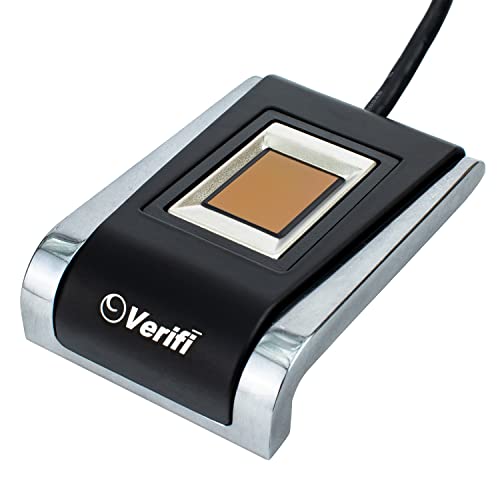
Verifi P5100 Desktop USB Premium Fingerprint Reader - Windows Hello, Windows Password Free Operation


Key features
- •Use this product for logon to Windows 7, 8, & 10. Works with Windows HELLO.
- •Comes with Roboform Free Edition password manager
- •One finger access to your PC
- •State of the art silicon touch sensor in an all-metal housing.
- •Large easy to use silicon (non-optical) touch sensor is best in class
Verifi P5100 Desktop USB Premium Fingerprint Reader - Windows Hello, Windows Password Free Operation
List Price: $125.12$112.61DEALYou Save: $12.51 (10%)
Free shippingFree Returns – 30 daysFree Order CancellationSecure Payment2–3 Days DeliveryGet It October 26, 2026In Stock (2)No marketing spamNo account requiredFulfilment by FedEx / Amazon / UPS / ShipwirePayPal / Card Buyer Protection
Customer Reviews
Reviews sourced from verified Amazon purchasers3.8
out of 5
Based on 10 reviews
5★
50%
4★
50%
3★
0%
2★
0%
1★
0%
You get what you pay for.
V1✓ Verified Purchase•August 8, 2023
Expensive, but in this case you do get what you pay for. I had used an iDOO Lockey mini fingerprint reader for over a year but found it very frustrating to use, frequent misses and constantly having to be retrained. Probably the very small sensor was to blame, but for $25 what do you expect. The Zvetco Verify is a completely different story. All I had to do was plug it in and Windows 10 Pro instantly recognized it and provided the driver, no installation needed. Once I had it trained and set up in Windows Hello it has been smooth sailing, almost. There was a conflict with RoboForm's update, causing a BSOD, but that was fixed by RoboForm in a subsequent update (though they claimed it was the reader's driver causing the problem). Zvetco's email support was very prompt and friendly, but unfortunately could not provide a solution. Anyway, that's fixed and the reader has been a pleasure to use. So far (after 1 month), it has been 100% accurate. It takes a little longer that the iDOO to recognize my fingerprint (maybe 1 second in RoboForm, 2 signing into Windows), but it has a lot more data points to analyze. It's an extra wire on my desk, but the reader is very sturdy and attractive. Overall I'm very happy with it and highly recommend it. Money well spent. BTW, RoboForm is an excellent password manager which I have been using for many years.
Requires a bit of extra technical support to get working
PETEY!!!!!✓ Verified Purchase•July 10, 2023
Modifying a previous review which warned shoppers to avoid this product.
In order to get the device working in Win10 Pro 20H2, I called the technical support phone # on Zvetco's website and left a message. Surprisingly, they called back about an hour later with a solution.
Zvetco will send you a link to download a "manual install" archive, along with instructions for providing the driver in Device Manager to get the device working properly.
After I installed the driver, it showed up as an option in Windows Hello immediately and setup was a breeze. In terms of performance, it seems to be a *little* less precise than the fingerprint scanner on my work MacBook; but that just means you might have to put your finger on it twice to log in. Not a huge deal.
Minus one star for having to go through this rigmarole--based on the comments here it would seem the driver issue has been around for a long time, definitely long enough for Zvetco to update their website with the correct drivers. However I will say their customer support is very good!
In order to get the device working in Win10 Pro 20H2, I called the technical support phone # on Zvetco's website and left a message. Surprisingly, they called back about an hour later with a solution.
Zvetco will send you a link to download a "manual install" archive, along with instructions for providing the driver in Device Manager to get the device working properly.
After I installed the driver, it showed up as an option in Windows Hello immediately and setup was a breeze. In terms of performance, it seems to be a *little* less precise than the fingerprint scanner on my work MacBook; but that just means you might have to put your finger on it twice to log in. Not a huge deal.
Minus one star for having to go through this rigmarole--based on the comments here it would seem the driver issue has been around for a long time, definitely long enough for Zvetco to update their website with the correct drivers. However I will say their customer support is very good!
Works exceptionally well - mine is now 7 years old, in use every single day
Mr. Picky✓ Verified Purchase•July 6, 2023
I was looking up fingerprint readers to buy one for someone else, to see what is new on the market, and tried a few.
This remains, as far as I can tell, THE premium fingerprint reader, and is priced accordingly.
Again, a far as I know: this company is the only one that makes an FBI approved fingerprint reader, used on their gun safes.
The only issue I ever have is that in winter, my skin is sometimes very dry and under those circumstances, the reader occasionally (connected to my desktop PC) has a tough time reading my print. Putting things in perspective, the reader on my (expensive) company laptop reads absolutely nothing at all under the same circumstances.
As noted by the company in big bold letters which people still seem to ignore - you MUST download and install drivers for the reader. It's very easy to do, but not optional.
Personally, I like Roboform and use it everyday, just don't confuse the function or effectiveness of Roboform with the effectiveness of the fingerprint reader - two separate companies, with separate products, and it just suits their marketing purposes to "hold hands" from time to time. If you have an issue with Roboform, that isn't the fault of the print reader.
This remains, as far as I can tell, THE premium fingerprint reader, and is priced accordingly.
Again, a far as I know: this company is the only one that makes an FBI approved fingerprint reader, used on their gun safes.
The only issue I ever have is that in winter, my skin is sometimes very dry and under those circumstances, the reader occasionally (connected to my desktop PC) has a tough time reading my print. Putting things in perspective, the reader on my (expensive) company laptop reads absolutely nothing at all under the same circumstances.
As noted by the company in big bold letters which people still seem to ignore - you MUST download and install drivers for the reader. It's very easy to do, but not optional.
Personally, I like Roboform and use it everyday, just don't confuse the function or effectiveness of Roboform with the effectiveness of the fingerprint reader - two separate companies, with separate products, and it just suits their marketing purposes to "hold hands" from time to time. If you have an issue with Roboform, that isn't the fault of the print reader.
Works with LastPass
Amazon Customer✓ Verified Purchase•June 2, 2023
So I bought this for one use only, to reduce the amount of typing I had to do for my Last Pass Password on my Desktop computer. Why you ask? I have a Microsoft Sidewinder keyboard that has "Flat" laptop like keys. I'm used to typing on a keyboard with with raised keys, so whenever I try to put in passwords with that MS keyboard, I mess it up. The length of the password ensures that I sometimes have to retype the password 5 or 6 times before I get it right. Hence the want for a Fingerprint scanner.
Well I can say that this scanner is sturdy, well built, and does essentially almost instantaneous recognition of my fingerprints when scanning. This is definitely an industrial grade fingerprint reader (we have a similar one on our Time Clocks at work and it works the same, if not better than that reader). It came with a Mini CD with the drivers to install (So make sure your CD or DVD R supports Mini-CD's), and it runs fine. It integrated with windows like I expected and Last Pass picked up on it after toggling the Fingerprint setting in the settings window in the LastPass Vault.
While a 150$ is expensive for home use, I personally enjoy the convenience of not having to retype that long password in all the time. And with the quality of the Item in question, I don't see that I will need to replace this for quite awhile.
Well I can say that this scanner is sturdy, well built, and does essentially almost instantaneous recognition of my fingerprints when scanning. This is definitely an industrial grade fingerprint reader (we have a similar one on our Time Clocks at work and it works the same, if not better than that reader). It came with a Mini CD with the drivers to install (So make sure your CD or DVD R supports Mini-CD's), and it runs fine. It integrated with windows like I expected and Last Pass picked up on it after toggling the Fingerprint setting in the settings window in the LastPass Vault.
While a 150$ is expensive for home use, I personally enjoy the convenience of not having to retype that long password in all the time. And with the quality of the Item in question, I don't see that I will need to replace this for quite awhile.
Windows integration is a little tricky
D. P.✓ Verified Purchase•May 26, 2023
Microsoft really, really wants you to have an online account associated with your Windows installation. It is possible to install with only local accounts, but this cripples many of the Windows Hello functions. You can enable a fingerprint reader, without going full online authentication, but you have to at least start down that path and then abort. It's a problem in Redmond, WA, not for this device.
Reader is reliable, reasonably fast, durably constructed and relatively unobtrusive. Pricey, but quality seems to make up for most of that. No interaction with the company, but given the track record with this and some of their other products, I would say I don't expect to need support any time soon. The stuff just works, in my experience.
Reader is reliable, reasonably fast, durably constructed and relatively unobtrusive. Pricey, but quality seems to make up for most of that. No interaction with the company, but given the track record with this and some of their other products, I would say I don't expect to need support any time soon. The stuff just works, in my experience.
Page 1 of 2