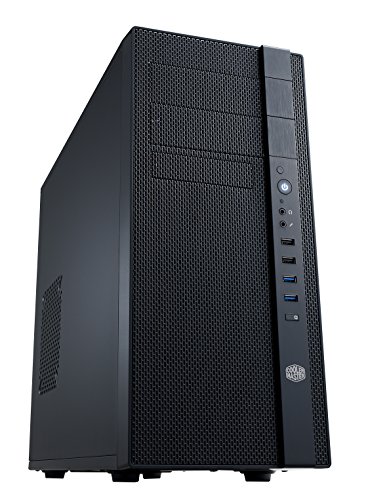
Cooler Master N400 - Mid Tower Computer Case with Fully Meshed Front Panel (NSE-400-KKN2)


Key features
- •Fully meshed front panel for superior airflow
- •Supports a 240 mm water cooling radiator or two 120 mm fans on the right side or top of case
- •Supports up to three SSDs - two on the tool-less 2.5-Inch bracket and one at the bottom of the HDD cage
- •Fully meshed front panel for superior airflow
- •Supports a 240 mm water cooling radiator or two 120 mm fans on the right side or top of case
- •Supports up to three SSDs -two on the tool-less 2.5 Inch bracket and one at the bottom of the HDD cage
Cooler Master N400 - Mid Tower Computer Case with Fully Meshed Front Panel (NSE-400-KKN2)
List Price: $116.50$104.85DEALYou Save: $11.65 (10%)
Free shippingFree Returns – 30 daysFree Order CancellationSecure Payment2–3 Days DeliveryGet It October 24, 2026In Stock (24)No marketing spamNo account requiredFulfilment by FedEx / Amazon / UPS / ShipwirePayPal / Card Buyer Protection
Customer Reviews
Reviews sourced from verified Amazon purchasers4.1
out of 5
Based on 10 reviews
5★
20%
4★
80%
3★
0%
2★
0%
1★
0%
This case will not fit a 240m water cooler or
D. A. WILLIAMS✓ Verified Purchase•September 21, 2023
I am building upgrading a gaming system and I had this case so I decided to reuse it to save some bucks. For my headline Search N400 case review on YouTube to see the water cooler issue. I never overclock my systems so water cooling is not necessary. But for better thermals I will be using a third party 120mm air cooler.
This case has lots of room for GPU for this upgrade I have a 3060 RTX which si a great upgrade from 1660 GTX. This build was to future poof my gaming PC for a bit. The build has a Intel i5 13400G with 32GB of ram
In closing I tend not to build to high end to save bucks but high enough to last for a while.
This case has lots of room for GPU for this upgrade I have a 3060 RTX which si a great upgrade from 1660 GTX. This build was to future poof my gaming PC for a bit. The build has a Intel i5 13400G with 32GB of ram
In closing I tend not to build to high end to save bucks but high enough to last for a while.
Provides able storage drive space at a budget friendly price
DFisher✓ Verified Purchase•August 30, 2023
I bought the Cooler Master N400 to hold my modest TrueNAS CORE build. I had 4 x 3.5" hard drives cramped into a smaller OEM case, and wanted something that could neatly hold my current system, with space for 8-10 3.5" drives total for future growth. The N400 checked those boxes, and was only about $70. There are more premium cases with lots of room for storage, but many cost twice as much.
I completed the build, and this case was what I hoped for. I particularly liked the 2 quality 120mm Cooler Master fans it comes with. I put both in front as intake, and added another fan I had in back as exhaust. Air flow is good, and there is enough space for cable management to make the drive cage clear for maintenance and new future drives. However, this does feel like a cheaper case, and there were a few annoyances:
Pros:
- Space for 10 total 3.5" drives (8 + 2 more if you adapt the 5.25" bays) plus 2 x 2.5" SSDs
- mATX and ATC mobo support
- ample ventilation and options for case fan configuration
- 2 included 120mm fans (3-pin)
- adequate included standoffs, screws, etc. for mounting hardware
- inexpensive
Some cons:
- 2.5" SSDs aren't held too well by the included plastic bracket, and when in place the screws are blocked on one side of several of the 3.5" drives
- Dust filter for the PSU intake on the bottom of the case is on the inside, between the PSU and the floor of the case. This means that to remove and clean it you'd have to remove the PSU (?). I chose to flip the PSU so that it draws air from the case and exhausts it out the back.
- No cutout for routing the CPU power cable up behind the mobo and down from the corner where most plugs are
- Other space for cable management behind the mobo tray isn't great (just a channel along the bottom)
It's not perfect, but overall this case is just what I needed at the right price.
I completed the build, and this case was what I hoped for. I particularly liked the 2 quality 120mm Cooler Master fans it comes with. I put both in front as intake, and added another fan I had in back as exhaust. Air flow is good, and there is enough space for cable management to make the drive cage clear for maintenance and new future drives. However, this does feel like a cheaper case, and there were a few annoyances:
Pros:
- Space for 10 total 3.5" drives (8 + 2 more if you adapt the 5.25" bays) plus 2 x 2.5" SSDs
- mATX and ATC mobo support
- ample ventilation and options for case fan configuration
- 2 included 120mm fans (3-pin)
- adequate included standoffs, screws, etc. for mounting hardware
- inexpensive
Some cons:
- 2.5" SSDs aren't held too well by the included plastic bracket, and when in place the screws are blocked on one side of several of the 3.5" drives
- Dust filter for the PSU intake on the bottom of the case is on the inside, between the PSU and the floor of the case. This means that to remove and clean it you'd have to remove the PSU (?). I chose to flip the PSU so that it draws air from the case and exhausts it out the back.
- No cutout for routing the CPU power cable up behind the mobo and down from the corner where most plugs are
- Other space for cable management behind the mobo tray isn't great (just a channel along the bottom)
It's not perfect, but overall this case is just what I needed at the right price.
Good case for specific uses
brian mercer✓ Verified Purchase•August 15, 2023
Good case for specific uses. This case is good for the money for a cheap home server build. A few modern case features like all-in-one watercooler support and cable management are an afterthought.
Good value
David✓ Verified Purchase•July 13, 2023
This case is a good value, especially if you're looking for a case to hold a lot of drives. It's almost ideal for my purpose; building a small file and media server for my home network. I am mostly pleased with my purchase, and even with a few items displeasing me I couldn't find any other case that met my needs for less than double the price.
My requirements:
Room for a micro-ATX motherboard, a big CPU heat-sink, and as many hard drives as I can stuff inside the box.
Ventilation adequate to keep the drives and CPU cool while transcoding video.
Graphics card fit or cooling was not a consideration. The server does not contain a graphics card (other than the one embedded in the chipset). Most of the time it doesn't even have a monitor, keyboard or mouse attached.
Pros:
Lots of space for drives. I put eight 3.5 inch hard drives in the case. In addition there are two 5.25 inch bays and three places to mount 2.5 inch drives.
Lots of ventilation. The front is fully ventilated with room to mount two 120mm fans so I can blow outside air over all those drives. There are also vents on both sides and the top. Most vents are filtered (though see the cons below for more on those filters)
No frills look. This thing is sitting in my home office. I do not want a computer that looks like a gaming system. I do not want a window on the side nor do I want LED fans. This case looks nice but doesn't look like it should be in a game room.
Comes with two basic (no PWM) fans mounted. I replaced them with PWM fans (and added more PWM fans elsewhere), but I didn't really need to.
Motherboard mounting plate has an opening for mounting a cooler back-plate.
Cable management is decent. I've never worried about this before (I don't care to see inside my computer) but I suppose it makes airflow within the case a bit cleaner.
Cons:
Fit and finish leave a bit to be desired. One side panel was bent at the corner when I received the case. I straightened it, but it still doesn't sit squarely on the side of the case. It's not worth the trouble to RMA, so I'll live with it.
Filters are difficult to remove for washing. All require you to remove one side panel or the other to access. In some cases, if you mount a fan, the filter ends up between the fan and the case side (meaning you must remove the fan to remove the filter).
Little headroom between the motherboard and the top of the case. I use a downward blowing CPU cooler (Scythe Kabuto II). There is so little space between the cooler vanes and the top of the case that it's impossible to mount standard 25mm thick fans to the top vents. I think I can make thin (15mm) fans fit, but I'm not certain. It would have been nice if the case had a little more headroom.
My requirements:
Room for a micro-ATX motherboard, a big CPU heat-sink, and as many hard drives as I can stuff inside the box.
Ventilation adequate to keep the drives and CPU cool while transcoding video.
Graphics card fit or cooling was not a consideration. The server does not contain a graphics card (other than the one embedded in the chipset). Most of the time it doesn't even have a monitor, keyboard or mouse attached.
Pros:
Lots of space for drives. I put eight 3.5 inch hard drives in the case. In addition there are two 5.25 inch bays and three places to mount 2.5 inch drives.
Lots of ventilation. The front is fully ventilated with room to mount two 120mm fans so I can blow outside air over all those drives. There are also vents on both sides and the top. Most vents are filtered (though see the cons below for more on those filters)
No frills look. This thing is sitting in my home office. I do not want a computer that looks like a gaming system. I do not want a window on the side nor do I want LED fans. This case looks nice but doesn't look like it should be in a game room.
Comes with two basic (no PWM) fans mounted. I replaced them with PWM fans (and added more PWM fans elsewhere), but I didn't really need to.
Motherboard mounting plate has an opening for mounting a cooler back-plate.
Cable management is decent. I've never worried about this before (I don't care to see inside my computer) but I suppose it makes airflow within the case a bit cleaner.
Cons:
Fit and finish leave a bit to be desired. One side panel was bent at the corner when I received the case. I straightened it, but it still doesn't sit squarely on the side of the case. It's not worth the trouble to RMA, so I'll live with it.
Filters are difficult to remove for washing. All require you to remove one side panel or the other to access. In some cases, if you mount a fan, the filter ends up between the fan and the case side (meaning you must remove the fan to remove the filter).
Little headroom between the motherboard and the top of the case. I use a downward blowing CPU cooler (Scythe Kabuto II). There is so little space between the cooler vanes and the top of the case that it's impossible to mount standard 25mm thick fans to the top vents. I think I can make thin (15mm) fans fit, but I'm not certain. It would have been nice if the case had a little more headroom.
Hard to fit Water cooling with some Motherboards
Tube2IC✓ Verified Purchase•June 29, 2023
This Case does not lend itself very well to modern cooling solutions. The water cooler listed as compatible is not available anymore.
I looked at compatibility websites and ordered this case along with a Corsair H100i RGB Pro XT cooler for my Asus ROG Strix B560A Gaming Wi-Fi with an Intel 10700K LGA1200 CPU. A number of websites claim there were no compatibility problems with this combination. However, I discovered otherwise to my dismay.
The radiator simply does not fit in the front of the case. The USB/Audio connection block gets in the way. On the side, the radiator is too big to fit between the fan bracket and the drive bays which are fixed in place. The front panel case wiring also gets in the way. On the top, the Motherboard, Connector block gets in the way of the radiator and fans , as does the auxiliary CPU power cable.
The main reason I bought the case was because I was upgrading an older machine's motherboard/CPU/RAM and this case has 2 CDROM bays and a 3.5 in bay in the front of the case for my Blue-Ray drives and Card reader. It also has ample 3.5in and 2.5in bays for adding all my HDD. The case has plenty of ventilation and dust covers and comes with two 120mm fans.
Despite the problems, I am not retuning this case and instead I am opting to switch to air cooling by adding more fans and an Air-Cooled CPU cooler.
Pros: Lots of 120mm fan vents with dust covers for the top, PSU, front and one side. the back and other side should be used in exhaust mode. Plenty of external and internal bays. Great value for money. I bought it on sale.
Cons: recessed motherboard mounting makes it difficult to connect SATA, etc. The metal body isn't all that thick and has some flex unless it is braced by fans. Plastic parts, especially an extra 2.5 in bay will probably not last long if you keep swapping drives. It doesn't have a USB-C front-panel connector.
Update:
I replaced the water cooler with a Noctua NH-D15S. The heatsink will only fit with the two columns parallel to the back of the case. Otherwise the DIMM sockets get in the way. As it is, the first DRAM bank is too close to the coolant pipes for comfort. In this position, although the heatsink fits, It is extremely difficult to get the central fan mounted as there is barely enough clearance at the top to insert a finger. I used a piece of cable tie to pull the fan tab into locking position.
However, it worked and my PC is finally operational and upgraded.
I looked at compatibility websites and ordered this case along with a Corsair H100i RGB Pro XT cooler for my Asus ROG Strix B560A Gaming Wi-Fi with an Intel 10700K LGA1200 CPU. A number of websites claim there were no compatibility problems with this combination. However, I discovered otherwise to my dismay.
The radiator simply does not fit in the front of the case. The USB/Audio connection block gets in the way. On the side, the radiator is too big to fit between the fan bracket and the drive bays which are fixed in place. The front panel case wiring also gets in the way. On the top, the Motherboard, Connector block gets in the way of the radiator and fans , as does the auxiliary CPU power cable.
The main reason I bought the case was because I was upgrading an older machine's motherboard/CPU/RAM and this case has 2 CDROM bays and a 3.5 in bay in the front of the case for my Blue-Ray drives and Card reader. It also has ample 3.5in and 2.5in bays for adding all my HDD. The case has plenty of ventilation and dust covers and comes with two 120mm fans.
Despite the problems, I am not retuning this case and instead I am opting to switch to air cooling by adding more fans and an Air-Cooled CPU cooler.
Pros: Lots of 120mm fan vents with dust covers for the top, PSU, front and one side. the back and other side should be used in exhaust mode. Plenty of external and internal bays. Great value for money. I bought it on sale.
Cons: recessed motherboard mounting makes it difficult to connect SATA, etc. The metal body isn't all that thick and has some flex unless it is braced by fans. Plastic parts, especially an extra 2.5 in bay will probably not last long if you keep swapping drives. It doesn't have a USB-C front-panel connector.
Update:
I replaced the water cooler with a Noctua NH-D15S. The heatsink will only fit with the two columns parallel to the back of the case. Otherwise the DIMM sockets get in the way. As it is, the first DRAM bank is too close to the coolant pipes for comfort. In this position, although the heatsink fits, It is extremely difficult to get the central fan mounted as there is barely enough clearance at the top to insert a finger. I used a piece of cable tie to pull the fan tab into locking position.
However, it worked and my PC is finally operational and upgraded.
Page 1 of 2