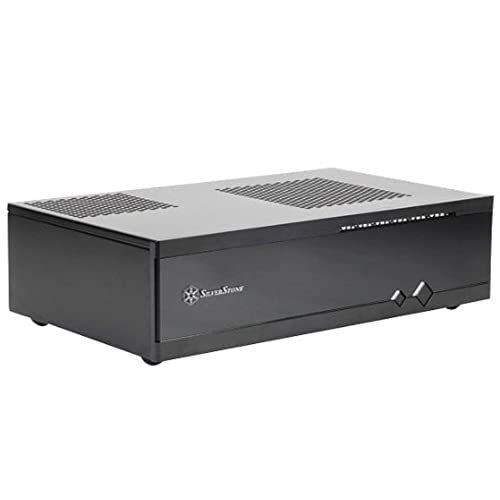
Silverstone 0.8mm Steel Body Tek Acrylic Front Panel for Mini-ITX Media Center/HTPC Case Cases ML05B



Key features
- •Super small at only 7 liters
- •Support up to two 80mm fans
- •Multipurpose 4-in-1 bracket
- •Support Mini-ITX motherboard and SFX power supply
- •Support four 2.5-Inch HDD/SSD
Silverstone 0.8mm Steel Body Tek Acrylic Front Panel for Mini-ITX Media Center/HTPC Case Cases ML05B
List Price: $118.51$106.66DEALYou Save: $11.85 (10%)
Free shippingFree Returns – 30 daysFree Order CancellationSecure Payment2–3 Days DeliveryGet It October 25, 2026In Stock (8)No marketing spamNo account requiredFulfilment by FedEx / Amazon / UPS / ShipwirePayPal / Card Buyer Protection
Customer Reviews
Reviews sourced from verified Amazon purchasers4.3
out of 5
Based on 10 reviews
5★
40%
4★
50%
3★
10%
2★
0%
1★
0%
Small, Stylish mini-ITX Case with lots of room!
Amazon Customer✓ Verified Purchase•September 19, 2017
So this is the first mini-ITX case I've used. As a PC Case, it's pretty standard, but there are a couple of flaws.
All the parts fit fine. The Power supply, hard drive bay, and motherboard are all as one would expect.
I like the magnetic fan filter, which lets you put the filter on one of several possible locations, without having to use screws.
I like that you can add an optional slot-loading DVD drive -- you can use a laptop DVD drive with slot-loading, without worrying about finding a drive with the correct color bezel, plus slot-loading drives appeal to people who like a stylish case.
The amount of space for airflow and fans in this case make it a great buy. You have room for 4 SSDs, lots of cables, and there are at least 4 or 5 places to mount extra fans.
The only flaw is with the Case's USB 3.0 cables. They only plug into motherboards that have a single 16-pin, notched socket. For older motherboards, where you have 2 smaller 8-pin sockets for an external USB port, like I have on mine, you will need to abandon the front-panel USB ports. My project was to find the cheapest quad-core ITX board, and I got one that was about $25 (ecs bat j1800). Fortunately, for my project, I need to use a USB Hub, anyway, so I'm not at a loss.
All the parts fit fine. The Power supply, hard drive bay, and motherboard are all as one would expect.
I like the magnetic fan filter, which lets you put the filter on one of several possible locations, without having to use screws.
I like that you can add an optional slot-loading DVD drive -- you can use a laptop DVD drive with slot-loading, without worrying about finding a drive with the correct color bezel, plus slot-loading drives appeal to people who like a stylish case.
The amount of space for airflow and fans in this case make it a great buy. You have room for 4 SSDs, lots of cables, and there are at least 4 or 5 places to mount extra fans.
The only flaw is with the Case's USB 3.0 cables. They only plug into motherboards that have a single 16-pin, notched socket. For older motherboards, where you have 2 smaller 8-pin sockets for an external USB port, like I have on mine, you will need to abandon the front-panel USB ports. My project was to find the cheapest quad-core ITX board, and I got one that was about $25 (ecs bat j1800). Fortunately, for my project, I need to use a USB Hub, anyway, so I'm not at a loss.
PSU a tight fit but great overall case
David S.✓ Verified Purchase•August 5, 2016
After a motherboard failure, I bought all new components for a build and chose this case over the cheap one I had previously that came with a generic PSU. I attributed the failure of the components to that.
The one thing that caught my eye with this case is that I can use a high quality regular ATX power supply in this.
I used a micro ATX board along with an Intel processor with stock cooler. All of that fit great. The regular size PSU gets a bit cramped if you install one that isn't modular (which mine wasn't). I didn't install a DVDdrive, but could see his being a potential problem fitting it if you don't get one that isn't shorter than normal. It would butt right up to the PSU.
I opted to put a NAS hard drive in place of where the optical drive would go, along with a boot drive SSD under it. It also has enough room for another 3.5" HDD in the middle front of the case.
Overall the case has a good solid feel to it. I'm very pleased, it was easy to work with. The right side offers space for 4 80mm but I only installed two to keep down on the noise factor since this is for an HTPC. With the PSU fan, cup fan, and two 80's I can hardly hear it in an open tv cabinet - so that's a big win.
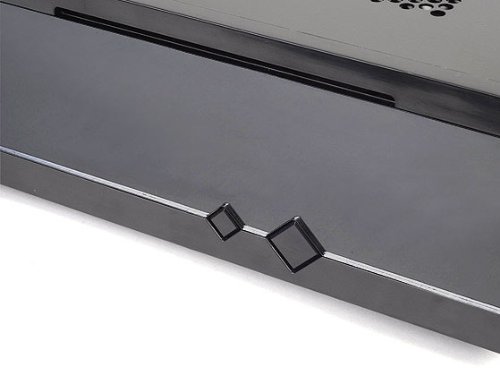
The front offers a keyed lock so my little ones can't mess with the power or reset buttons. This was not something I bought it for, but now that I have it I would never buy another HTPC case without this feature. Silver stone even makes it so u can dim the front case LEDs with a slider under the front door.
If your on the fence between this case and another, I'd definitely give this one a try!
The one thing that caught my eye with this case is that I can use a high quality regular ATX power supply in this.
I used a micro ATX board along with an Intel processor with stock cooler. All of that fit great. The regular size PSU gets a bit cramped if you install one that isn't modular (which mine wasn't). I didn't install a DVDdrive, but could see his being a potential problem fitting it if you don't get one that isn't shorter than normal. It would butt right up to the PSU.
I opted to put a NAS hard drive in place of where the optical drive would go, along with a boot drive SSD under it. It also has enough room for another 3.5" HDD in the middle front of the case.
Overall the case has a good solid feel to it. I'm very pleased, it was easy to work with. The right side offers space for 4 80mm but I only installed two to keep down on the noise factor since this is for an HTPC. With the PSU fan, cup fan, and two 80's I can hardly hear it in an open tv cabinet - so that's a big win.
The front offers a keyed lock so my little ones can't mess with the power or reset buttons. This was not something I bought it for, but now that I have it I would never buy another HTPC case without this feature. Silver stone even makes it so u can dim the front case LEDs with a slider under the front door.
If your on the fence between this case and another, I'd definitely give this one a try!
Very nice case.
DJohnson✓ Verified Purchase•July 17, 2015
This case is exactly what I needed for my HTPC. The last HTPC case I had (also from SilverStone) was 2" taller and allowed less airflow in the small media cabinet I have. Two problems I had with this case was my Blu-ray drive and power supply were both large and gave almost no room for cabling. Also air flow is 99% from the right side of the case meaning hot air and cool air are coming from the same location (not ideal). I will upload a couple photos.
Sweet Case
Guy Ivie✓ Verified Purchase•January 10, 2015
I wanted a new case for my Asrock Z87E-ITX motherboard because the old one was a bit large for the vintage buffet that I'm using for an entertainment console. I also wanted a case that would let me install a slot-loading Blu-ray drive. There aren't a lot of choices out there, so I was really happy to find the ML-06.
Construction is solid, as you would expect, and there were no surprises when it came to opening up the case. I was pleased to see that Silverstone hadn't used any oddball fasteners; they were all Philips-head screws. However, I thought it was odd that they used silver screws to attach the top panel and the power supply given that the case is black.
I had Silverstone's SFX power supply in the old case, so I just moved it over along with the motherboard. Power supply goes in first, and you WILL need the modular cables for it, because space is at a heavy premium when you get everything installed. The motherboard drops in and attaches with 4 screws. I moved the pair of 2.5" hard drives from the old case into the drive cage (I also have an mSATA drive attached directly to the motherboard). Although Silverstone says you can put 4 drives in the cage, poor placement of one set of holes (at least in my unit) means you can really only put in 3. And given the lack of room in the case, you can really only put 2 drives in the case because you need the space in the cage to stuff some of the wires.
I attached my Blu-ray drive to the bottom of the multipurpose bracket, and then went to put it back in the case. I was disappointed to find out that my Zalman CPU cooler, which I though was pretty low-profile, is too tall; the bracket will go back in on its own, but not with the drive hanging from it. Dang! I guess at some point I can get a new CPU cooler, but for now, I'll go back to using the Blu-ray from an external box.
The case has space on the right side for a pair of 80mm fans, but I didn't bother. The PSU and CPU fans provide enough exhaust, though if I do install the Blu-ray drive, it will block the CPU fan's access to the top vent, and then I might need at least one of those side fans.
The front audio and USB 3 ports are on the right side of the case, which is a bit nonstandard. If the space you're putting the case in is a little tight, this might be a consideration for you. For me, it's not an issue.
After I reattached all the cables, I put the top back on, attached the power cord, the USB WiFi, the USB transmitter for the wireless keyboard, and the HDMI cable, and it was off the races! Everything is working fine, and the ML-06 fits great in the available space in the console. I'm a happy camper!
Construction is solid, as you would expect, and there were no surprises when it came to opening up the case. I was pleased to see that Silverstone hadn't used any oddball fasteners; they were all Philips-head screws. However, I thought it was odd that they used silver screws to attach the top panel and the power supply given that the case is black.
I had Silverstone's SFX power supply in the old case, so I just moved it over along with the motherboard. Power supply goes in first, and you WILL need the modular cables for it, because space is at a heavy premium when you get everything installed. The motherboard drops in and attaches with 4 screws. I moved the pair of 2.5" hard drives from the old case into the drive cage (I also have an mSATA drive attached directly to the motherboard). Although Silverstone says you can put 4 drives in the cage, poor placement of one set of holes (at least in my unit) means you can really only put in 3. And given the lack of room in the case, you can really only put 2 drives in the case because you need the space in the cage to stuff some of the wires.
I attached my Blu-ray drive to the bottom of the multipurpose bracket, and then went to put it back in the case. I was disappointed to find out that my Zalman CPU cooler, which I though was pretty low-profile, is too tall; the bracket will go back in on its own, but not with the drive hanging from it. Dang! I guess at some point I can get a new CPU cooler, but for now, I'll go back to using the Blu-ray from an external box.
The case has space on the right side for a pair of 80mm fans, but I didn't bother. The PSU and CPU fans provide enough exhaust, though if I do install the Blu-ray drive, it will block the CPU fan's access to the top vent, and then I might need at least one of those side fans.
The front audio and USB 3 ports are on the right side of the case, which is a bit nonstandard. If the space you're putting the case in is a little tight, this might be a consideration for you. For me, it's not an issue.
After I reattached all the cables, I put the top back on, attached the power cord, the USB WiFi, the USB transmitter for the wireless keyboard, and the HDMI cable, and it was off the races! Everything is working fine, and the ML-06 fits great in the available space in the console. I'm a happy camper!
I used both a modular power supply and a full blown 1000watt power supply (overkill I know) but the gaming power supply has a be
marshmallow✓ Verified Purchase•December 15, 2014
I've spent a considerable amount of time assembling and dissembling this HTPC box for various reasons, one in particular is the dimensions are awkward and make it difficult for fitting. The power supply cables will rub against the blueray drive and make it pop out of the case so you'll need to have a smaller (in length) power supply. I used both a modular power supply and a full blown 1000watt power supply (overkill I know) but the gaming power supply has a better fit than the modular one since the module connectors will not fit with the blueray. I did end up breaking the sata connector a little, but ended up fixing it with some handy diy.
The Pros:
- It looks good, and better than the rest seen on amazon for its price. (in my opinion)
- It's built sturdy, and has a steel rod inside the top part of the case for added support (you can unscrew this easily)
- The front-panel is incredible. You won't have a place for your LCD if you have one, but there's a nice dimmer switch, anti-child lock (with key), and the power button also locks mechanically. Did I mention it doesn't look like fake plastic?
- There's room for 4 fans on the side, that's what I did, I splurged for the extra silent kind and I hardly can hear it.
- There's plenty of ventilation everywhere
- Works excellent for what I was aiming for (Media Center HTPC)
The Cons:
- It needs to be longer, like front-to-back an extra 2-3cm to support blueray + powersupply
- Many people claimed that it can store a few hard drives, but let's be honest, even with a modular power supply, that's not going to happen. You can place a single full size hard drive and maybe a laptop size hard drive if you're lucky with your cables.
- The case is a little warp at the front, so it's not perfectly aligned. You can manually fix this if it comes this way. It's not really noticeable however.
Things to know:
- You can use a regular size ATX power supply. I'm not sure how well other power supplies fit but the width is for ATX
- Don't screw things in except for the motherboard until you're ready to plug everything together. For example, you'll need to put in the power supply before the blueray and then once you get the idea with the mounted hard drive you'll have to screw in the blueray and then you screw in the hard drive, otherwise you won't have room to maneuver.
- If you have particular questions about the power supply sizing, you can probably contact their customer support to get help with your particular setup.
- The USB 3.0 connector didn't come with an adapter for the motherborad, so it's a full-size connector, not the tiny one. You may have to buy one of these with the case. Lucky for me I had a spare.
- Worth every penny!
The Pros:
- It looks good, and better than the rest seen on amazon for its price. (in my opinion)
- It's built sturdy, and has a steel rod inside the top part of the case for added support (you can unscrew this easily)
- The front-panel is incredible. You won't have a place for your LCD if you have one, but there's a nice dimmer switch, anti-child lock (with key), and the power button also locks mechanically. Did I mention it doesn't look like fake plastic?
- There's room for 4 fans on the side, that's what I did, I splurged for the extra silent kind and I hardly can hear it.
- There's plenty of ventilation everywhere
- Works excellent for what I was aiming for (Media Center HTPC)
The Cons:
- It needs to be longer, like front-to-back an extra 2-3cm to support blueray + powersupply
- Many people claimed that it can store a few hard drives, but let's be honest, even with a modular power supply, that's not going to happen. You can place a single full size hard drive and maybe a laptop size hard drive if you're lucky with your cables.
- The case is a little warp at the front, so it's not perfectly aligned. You can manually fix this if it comes this way. It's not really noticeable however.
Things to know:
- You can use a regular size ATX power supply. I'm not sure how well other power supplies fit but the width is for ATX
- Don't screw things in except for the motherboard until you're ready to plug everything together. For example, you'll need to put in the power supply before the blueray and then once you get the idea with the mounted hard drive you'll have to screw in the blueray and then you screw in the hard drive, otherwise you won't have room to maneuver.
- If you have particular questions about the power supply sizing, you can probably contact their customer support to get help with your particular setup.
- The USB 3.0 connector didn't come with an adapter for the motherborad, so it's a full-size connector, not the tiny one. You may have to buy one of these with the case. Lucky for me I had a spare.
- Worth every penny!
Page 1 of 2