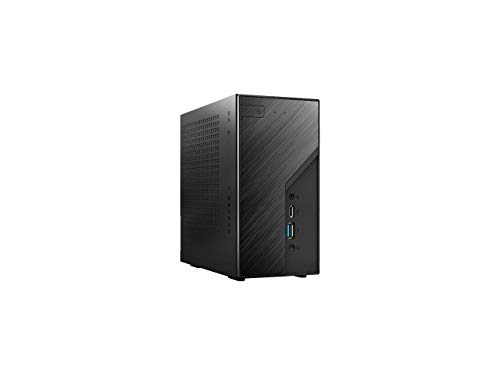
Intel NUC Kit NUC5i7RYH Barebone System BOXNUC5I7RYH


Key features
- •5th Generation Intel Core i7-5557U processor
- •Intel Iris Graphics 6100
- •Headphone/Microphone jack on the front panel
- •Mini HDMI & Mini DisplayPort.Internal support for M.2 SSD card & SATA3 for 2.5" HDD/SSD
- •Memory types:DDR3L-1333/1600 1.35V SO-DIMM
Intel NUC Kit NUC5i7RYH Barebone System BOXNUC5I7RYH
List Price: $945.75$851.18DEALYou Save: $94.57 (10%)
Free shippingFree Returns – 30 daysFree Order CancellationSecure Payment2–3 Days DeliveryGet It October 24, 2026In Stock (1)No marketing spamNo account requiredFulfilment by FedEx / Amazon / UPS / ShipwirePayPal / Card Buyer Protection
Customer Reviews
Reviews sourced from verified Amazon purchasers4.0
out of 5
Based on 10 reviews
5★
80%
4★
20%
3★
0%
2★
0%
1★
0%
A+ Fast device (suggestions for what to put into the build)
Chris.Stevens.1955✓ Verified Purchase•July 8, 2023
It took me along time to figure out what to put in the system, so here is my build with reviews. No one has time to read long reviews. Short, sweet and to the point.
Fan Noise: Yes, you can hear the fan at times, but it really is not a huge deal. Compared to my old 750W system, this thing is a whisper at high CPU load.
Time: Took me all of 2 minutes to get the components into the system. This isn't my first build, but by far my easiest.
Under the hood
Main Drive: Samsung 950 PRO -Series 256GB PCIe NVMe (MZ-V5P256BW): Overkill yes as the system does not utilize it to the max, but at least this can be used in future builds and not be outdated. Benchmark on my system [Sequential Read (Q= 32,T= 1) : 1671.905 MB/s Sequential Write (Q= 32,T= 1) : 958.841 MB/s].
Secondary Drive: Toshiba 1TB 5400RPM SATA3/SATA 6.0 GB/s 8MB Notebook Hard Drive. Using just as a backup so speed is not overly important here.
RAM (WARNING): 16 GB [Corsair Vengeance Performance 16GB (2x8GB) DDR3 1866MHz Laptop Memory (CMSX16GX3M2B1866C10): Currently the NUC system only runs on 1600 mhz, this is 1866mhz which initially caused an issue but was corrected quickly by changing manual settings. I went this route because rumors have it that the NUC will recognize 1866mhz speed on a BIOS update in the future so why not get the fastest now. If you go this route and get an error, enter manual setting for RAM in the BIOS and change the first 4 numbers to 10-10-10-32.
Real Estate: this thing is tiny. You could fit 40 of these into my old 6 year old i5 tower. I am still shocked at how small this thing is.
Verdict: Super Fast. In my setup I get windows 10 pro to boot within 2-4 seconds. Amazed at how fast. At first I was hesitant but now I am glad I did.
Suggestions: my speakers run on a 3.5mm jack and that is located in the front of the unit. Try Sabrent USB External Stereo Sound Adapter so you can keep the front of the unit wire free. If you have a lot of USB devices, you will need a hub.
Fan Noise: Yes, you can hear the fan at times, but it really is not a huge deal. Compared to my old 750W system, this thing is a whisper at high CPU load.
Time: Took me all of 2 minutes to get the components into the system. This isn't my first build, but by far my easiest.
Under the hood
Main Drive: Samsung 950 PRO -Series 256GB PCIe NVMe (MZ-V5P256BW): Overkill yes as the system does not utilize it to the max, but at least this can be used in future builds and not be outdated. Benchmark on my system [Sequential Read (Q= 32,T= 1) : 1671.905 MB/s Sequential Write (Q= 32,T= 1) : 958.841 MB/s].
Secondary Drive: Toshiba 1TB 5400RPM SATA3/SATA 6.0 GB/s 8MB Notebook Hard Drive. Using just as a backup so speed is not overly important here.
RAM (WARNING): 16 GB [Corsair Vengeance Performance 16GB (2x8GB) DDR3 1866MHz Laptop Memory (CMSX16GX3M2B1866C10): Currently the NUC system only runs on 1600 mhz, this is 1866mhz which initially caused an issue but was corrected quickly by changing manual settings. I went this route because rumors have it that the NUC will recognize 1866mhz speed on a BIOS update in the future so why not get the fastest now. If you go this route and get an error, enter manual setting for RAM in the BIOS and change the first 4 numbers to 10-10-10-32.
Real Estate: this thing is tiny. You could fit 40 of these into my old 6 year old i5 tower. I am still shocked at how small this thing is.
Verdict: Super Fast. In my setup I get windows 10 pro to boot within 2-4 seconds. Amazed at how fast. At first I was hesitant but now I am glad I did.
Suggestions: my speakers run on a 3.5mm jack and that is located in the front of the unit. Try Sabrent USB External Stereo Sound Adapter so you can keep the front of the unit wire free. If you have a lot of USB devices, you will need a hub.
I will never purchase another desktop after the NUC - this thing brings me joy
BJT316✓ Verified Purchase•July 8, 2023
This is definitely a product to get very excited about. I am surprised that there have been so few reviews for this incredible little computer. I purchased this NUC to replace my bulky Dell XPS 8100 that melted a motherboard when my graphics card overheated while playing World of Tanks for too long. After a year without owning a functioning desktop, I decided it was time to get one so I could at least salvage the nice Samsung Pro 840 SSD I recently installed in the Dell. Don't have time to write a lengthy review so here's the bottom line - this mini desktop outperforms my Dell XPS Studio in every category.
The unit fits in the palm of my hand, is not noisy at all (unlike what other reviewers have posted), runs surprisingly fast (i7 duo-core boots up in Keep in mind that this is a bare bones system so you will be required to assemble some key components and install all of the essential drivers before it will work.
Here's what I installed under the hood:
- Samsung 850 EVO 500 GB M.2 3.5-Inch SSD (MZ-N5E500BW) (This is where I installed my Windows 10 OS)
- Samsung Electronics 840 Pro Series 2.5-Inch Solid State Drive, 256GB (harvested from my DELL XPS Studio)
- Kingston HyperX Impact Black 16GB Kit (2x8GB) 1600MHz DDR3L CL9 SODIMM 1.35V Laptop Memory (HX316LS9IBK2/16)
Once you get all of your hardware installed, you will need to boot up from a USB flash drive unless you already installed your OS on one of the SSD's and the NUC can read it. I used the USB flash drive method since the NUC couldn't read the Windows 7 Pro OS I had installed on the SSD.
The first driver you will need to install is your wifi adapter and/or LAN adapter. Otherwise you will not be able to get online to download the rest of the drivers from the website. http://www.intel.com/p/en_US/support/detect?iid=dc_iduu. Recommend you download these two essential drivers to your USB flash drive from another computer prior to setting up your NUC.
From there, you will need to download the driver for the Iris 6100 video card which can be found on the same site.
It took me about 2 hours to download and install all of the drivers and update everything from the bios to the antivirus software.
Finally, I used an HDMI cable (mini-HDMI to HDMI) to connect to the monitor and plugged in the USB receiver for my Logitech wireless keyboard/mouse.
After all of that tedious business was over, I must say that my NUC experience has been pure tech heaven.
One neat feature that comes with the NUC is a mounting bracket that allows you to mount the unit to the back of a large flat screen TV, to a wall, under a table, or where ever you need to hide it. Eventually I can see this becoming very useful when I decide to use it to stream videos through my home theater system.
Total cost to own ended up around $650 after figuring in alllof the memory cards, accessories, and software.
If you are thinking about purchasing the NUC, stop thinking and just buy it. Chances are once the word gets out, this will be one of the hottest Black Friday, Cyber Monday, and Christmas items on the computer market. I can already see the order backlog.
The unit fits in the palm of my hand, is not noisy at all (unlike what other reviewers have posted), runs surprisingly fast (i7 duo-core boots up in Keep in mind that this is a bare bones system so you will be required to assemble some key components and install all of the essential drivers before it will work.
Here's what I installed under the hood:
- Samsung 850 EVO 500 GB M.2 3.5-Inch SSD (MZ-N5E500BW) (This is where I installed my Windows 10 OS)
- Samsung Electronics 840 Pro Series 2.5-Inch Solid State Drive, 256GB (harvested from my DELL XPS Studio)
- Kingston HyperX Impact Black 16GB Kit (2x8GB) 1600MHz DDR3L CL9 SODIMM 1.35V Laptop Memory (HX316LS9IBK2/16)
Once you get all of your hardware installed, you will need to boot up from a USB flash drive unless you already installed your OS on one of the SSD's and the NUC can read it. I used the USB flash drive method since the NUC couldn't read the Windows 7 Pro OS I had installed on the SSD.
The first driver you will need to install is your wifi adapter and/or LAN adapter. Otherwise you will not be able to get online to download the rest of the drivers from the website. http://www.intel.com/p/en_US/support/detect?iid=dc_iduu. Recommend you download these two essential drivers to your USB flash drive from another computer prior to setting up your NUC.
From there, you will need to download the driver for the Iris 6100 video card which can be found on the same site.
It took me about 2 hours to download and install all of the drivers and update everything from the bios to the antivirus software.
Finally, I used an HDMI cable (mini-HDMI to HDMI) to connect to the monitor and plugged in the USB receiver for my Logitech wireless keyboard/mouse.
After all of that tedious business was over, I must say that my NUC experience has been pure tech heaven.
One neat feature that comes with the NUC is a mounting bracket that allows you to mount the unit to the back of a large flat screen TV, to a wall, under a table, or where ever you need to hide it. Eventually I can see this becoming very useful when I decide to use it to stream videos through my home theater system.
Total cost to own ended up around $650 after figuring in alllof the memory cards, accessories, and software.
If you are thinking about purchasing the NUC, stop thinking and just buy it. Chances are once the word gets out, this will be one of the hottest Black Friday, Cyber Monday, and Christmas items on the computer market. I can already see the order backlog.
Amazing punch from this tiny device
jbordetas✓ Verified Purchase•July 3, 2023
Ok, lets start off by saying that i have been researching a NUC or NUC like device for about 3 months now. I have read everything there is to read. Toms, Anand, Ars, Amazon, etc... You name it I have read it.
I am beyond thrilled with my early Christmas present to myself! The device came in two days (gotta love prime) and it was a piece of cake to set up! I am very technical and have been building boxes for close to 20 years now and I can categorically say this was cake! The one caveat is that you must make sure you have the right memory for it. I purchased some 1866 instead of 1600 and for some reason it did not like the Corsair Vengance chips, even though the matched the NUC requirements. I had two wait an extra couple of days for two Crucial stix to get to me and the device powered up like a champ.
It installed Windows 10 with minimal fuss, but, I suggest that you go online and download all of the drivers to a thumb drive first. It did not recognize the wireless card at first, but the NIC worked fine and allowed me to upgrade all drivers easily.
Now let's talk about the performance. BOOM! This NUC replaced a quad core Phenom 945 AMD HTPC with 16GB or Ram and a AMD 5830 video card. I can tell you that it is definitely faster since the M2 Samsung I got with it speeds things up nicely. But were it really shine was in the computational power. I extracted some movie files stored in rar format and it flew, I mean the other PC was fast but this was great. I don't have a 4K display so I can't speak to that, but on my 65in 1080p Plasma, it was brilliant. No games as of yet, but I will definitely put it through it's paces soon.For grins and giggles I installed office on it and did some pivot tables and some crunching in excel, again amazing performance.
Now let's talk about the sound... I do not understand what some people are talking about regarding the fan in this unit, compared to my old beast of a HTPC, this thing is silent. Seriously, I ran Prime 95 for about an hour straight and with the CPU's maxed out 100% all you could hear was a whir. BTW I was also watching a Prime Show at the time and no stutters, nothing, zip zilch nada. Anyone complaining about not being able to enjoy a movie with this thing on must have some serious super hearing or something. It is a non issue, seriously.
All said, if you are on the fence, don't be, go for it. I am thinking about getting another one and giving my gaming PC to my kid since I don't game much anymore. That is an 8 Core overclocked beast that runs all 8 cores at 4.5GHZ and I really think I would like this much better. Lord knows it would be quieter since that one has about 7 fans on it :)
Great machine, easy to setup, amazing performance from such a tiny device.
I am beyond thrilled with my early Christmas present to myself! The device came in two days (gotta love prime) and it was a piece of cake to set up! I am very technical and have been building boxes for close to 20 years now and I can categorically say this was cake! The one caveat is that you must make sure you have the right memory for it. I purchased some 1866 instead of 1600 and for some reason it did not like the Corsair Vengance chips, even though the matched the NUC requirements. I had two wait an extra couple of days for two Crucial stix to get to me and the device powered up like a champ.
It installed Windows 10 with minimal fuss, but, I suggest that you go online and download all of the drivers to a thumb drive first. It did not recognize the wireless card at first, but the NIC worked fine and allowed me to upgrade all drivers easily.
Now let's talk about the performance. BOOM! This NUC replaced a quad core Phenom 945 AMD HTPC with 16GB or Ram and a AMD 5830 video card. I can tell you that it is definitely faster since the M2 Samsung I got with it speeds things up nicely. But were it really shine was in the computational power. I extracted some movie files stored in rar format and it flew, I mean the other PC was fast but this was great. I don't have a 4K display so I can't speak to that, but on my 65in 1080p Plasma, it was brilliant. No games as of yet, but I will definitely put it through it's paces soon.For grins and giggles I installed office on it and did some pivot tables and some crunching in excel, again amazing performance.
Now let's talk about the sound... I do not understand what some people are talking about regarding the fan in this unit, compared to my old beast of a HTPC, this thing is silent. Seriously, I ran Prime 95 for about an hour straight and with the CPU's maxed out 100% all you could hear was a whir. BTW I was also watching a Prime Show at the time and no stutters, nothing, zip zilch nada. Anyone complaining about not being able to enjoy a movie with this thing on must have some serious super hearing or something. It is a non issue, seriously.
All said, if you are on the fence, don't be, go for it. I am thinking about getting another one and giving my gaming PC to my kid since I don't game much anymore. That is an 8 Core overclocked beast that runs all 8 cores at 4.5GHZ and I really think I would like this much better. Lord knows it would be quieter since that one has about 7 fans on it :)
Great machine, easy to setup, amazing performance from such a tiny device.
Awesome compact computer
DarrenR✓ Verified Purchase•June 16, 2023
I received the unit plus 16GB of crucual memory and a Samsung 850 EVO 250GB SSD same day it was ordered via Amazon prime. Can't beat that service. Installing the memory and SSD was a breeze. One of the caveats to first installing the OS and playing with the BIOS is that you'll needed a corded keyboard and mouse. Ubuntu 15.10 installed without a hitch and all is running smoothly with my bluetooh io devices and A2DP speaker. Also running dual screens at 1920x1200 per monitor with a mini-hdmi to DVI-D for one and a mini displayport to displayport for the other monitor. They both work very well without issues. I did stumble initially with my dual monitor setup because i was trying to output to a monitor with a mini hdmi (NUC side) to displayport (monitor), which produced no signal. Thought maybe I had a bad HDMI video output as I've read these issues here in the reviews. But a quick hookup to my Samsung 60" HDTV (with HDMI input) quickly assured me that the mini HDMI out on the NUC was working fine. So, for future buyers, don't attempt to output from mini hdmi to displayport. It just doesn't work as expected. You need to do mini hdmi to DVI-D instead. By the way, output to your 60-80" HDTV looks great at 1920x1200 if you're wanting to plug this in to your LCD/LED screen directly to watch movies or you need large screen space to work in (powerpoint presentations, etc). My near future goal is to ditch my dual monitors altogether and go with a UHD monitor capable of 3840x2160, which I believe the mini display port out on the NUC will drive just fine. I tested this ability somewhat with a StarTech displayport 1x2 MST hub and both 1920x1200 monitors (with DP) were driven just fine off of one displayport out on the NUC. I'm not a big time gamer but enjoy some lightweight gaming now and then (bzflag mostly). If I'm going to play COD, I'll switch over to the PS3. I'm mostly a programmer and care about productivity; it's quite an upgrade to my Levono X201t I've had since 2010. Lately, I've been doing a lot of PDF form editing and creation in Adobe via VirtualBox and I do notice a snappier speed difference. The Intel i7 processor and 16GB memory certainly helps with any perceived speed improvements. One other thing I would mention after buying this box is to locate the latest bios firmware (.bio file). Throw it on a thumbdrive and plug it in, then press F12 to enter the bios and start the upgrade process. So far, I'm thrilled with the NUC. I can't believe how compact it is and how much power it handles. Another issue people have address is how loud the fan is. To be honest, I really can't notice it at all, it's whisper quiet. Could be related to the 10+ years of military service and some hearing loss. But I do recall that my old Lenovo X201t laptop was a screamer when the fan kicked on during heavy processing (was quite noticeable). These units could easily function as a HTPC as some here have suggested (or complained about). But why would you purpose the NUC for that? There are better solutions for that out there, such as a dedicated server (offsite) with 2TB or more of storage and serving media content to your home theater system directly through the internet (similar to netflix).
I received the unit plus 16GB of crucual memory and a Samsung 850 EVO 250GB SSD same day it was ordered via Amazon prime. Can't beat that service. Installing the memory and SSD was a breeze. One of the caveats to first installing the OS and playing with the BIOS is that you'll needed a corded keyboard and mouse. Ubuntu 15.10 installed without a hitch and all is running smoothly with my bluetooh io devices and A2DP speaker. Also running dual screens at 1920x1200 per monitor with a mini-hdmi to DVI-D for one and a mini displayport to displayport for the other monitor. They both work very well without issues. I did stumble initially with my dual monitor setup because i was trying to output to a monitor with a mini hdmi (NUC side) to displayport (monitor), which produced no signal. Thought maybe I had a bad HDMI video output as I've read these issues here in the reviews. But a quick hookup to my Samsung 60" HDTV (with HDMI input) quickly assured me that the mini HDMI out on the NUC was working fine. So, for future buyers, don't attempt to output from mini hdmi to displayport. It just doesn't work as expected. You need to do mini hdmi to DVI-D instead. By the way, output to your 60-80" HDTV looks great at 1920x1200 if you're wanting to plug this in to your LCD/LED screen directly to watch movies or you need large screen space to work in (powerpoint presentations, etc). My near future goal is to ditch my dual monitors altogether and go with a UHD monitor capable of 3840x2160, which I believe the mini display port out on the NUC will drive just fine. I tested this ability somewhat with a StarTech displayport 1x2 MST hub and both 1920x1200 monitors (with DP) were driven just fine off of one displayport out on the NUC. I'm not a big time gamer but enjoy some lightweight gaming now and then (bzflag mostly). If I'm going to play COD, I'll switch over to the PS3. I'm mostly a programmer and care about productivity; it's quite an upgrade to my Levono X201t I've had since 2010. Lately, I've been doing a lot of PDF form editing and creation in Adobe via VirtualBox and I do notice a snappier speed difference. The Intel i7 processor and 16GB memory certainly helps with any perceived speed improvements. One other thing I would mention after buying this box is to locate the latest bios firmware (.bio file). Throw it on a thumbdrive and plug it in, then press F12 to enter the bios and start the upgrade process. So far, I'm thrilled with the NUC. I can't believe how compact it is and how much power it handles. Another issue people have address is how loud the fan is. To be honest, I really can't notice it at all, it's whisper quiet. Could be related to the 10+ years of military service and some hearing loss. But I do recall that my old Lenovo X201t laptop was a screamer when the fan kicked on during heavy processing (was quite noticeable). These units could easily function as a HTPC as some here have suggested (or complained about). But why would you purpose the NUC for that? There are better solutions for that out there, such as a dedicated server (offsite) with 2TB or more of storage and serving media content to your home theater system directly through the internet (similar to netflix).
EDIT: As of 11/20/15, this NUC is still running fantastic. I recently purchased a Philips BDM4065UC 4K 40" LED monitor (arrived today) to replace my dual 24" monitors and the NUC drives the 40" monitor wonderfully using the DisplayPort 1.2 input. You'll need to change the DP setting on the Philips monitor from 1.1 to 1.2 to get the full 60Hz refresh rate. Game-wise, this little machine is ok. You're not going to be able to run Call of Duty: AW at full 4K full screen at 60 Hz and there will be some lag. Lightweight or flash games running full screen, or games running in a window will run fine. 4K video playback on youtube or Plex/Netflix full screen also work well. So far, I'm very happy with the decision to purchase this NUC5i7RYH and the 4K monitor. As a caveat, make sure that if you buy a 4K monitor, it supports DisplayPort 1.2 as an input. Even if the monitor or TV has an HDMI 2.0 input, you will not achieve 3840x2160 @ 60Hz because the mini HDMI port on the NUC is only 1.4. You will only achieve a 30Hz refresh rate at the full resolution.
I received the unit plus 16GB of crucual memory and a Samsung 850 EVO 250GB SSD same day it was ordered via Amazon prime. Can't beat that service. Installing the memory and SSD was a breeze. One of the caveats to first installing the OS and playing with the BIOS is that you'll needed a corded keyboard and mouse. Ubuntu 15.10 installed without a hitch and all is running smoothly with my bluetooh io devices and A2DP speaker. Also running dual screens at 1920x1200 per monitor with a mini-hdmi to DVI-D for one and a mini displayport to displayport for the other monitor. They both work very well without issues. I did stumble initially with my dual monitor setup because i was trying to output to a monitor with a mini hdmi (NUC side) to displayport (monitor), which produced no signal. Thought maybe I had a bad HDMI video output as I've read these issues here in the reviews. But a quick hookup to my Samsung 60" HDTV (with HDMI input) quickly assured me that the mini HDMI out on the NUC was working fine. So, for future buyers, don't attempt to output from mini hdmi to displayport. It just doesn't work as expected. You need to do mini hdmi to DVI-D instead. By the way, output to your 60-80" HDTV looks great at 1920x1200 if you're wanting to plug this in to your LCD/LED screen directly to watch movies or you need large screen space to work in (powerpoint presentations, etc). My near future goal is to ditch my dual monitors altogether and go with a UHD monitor capable of 3840x2160, which I believe the mini display port out on the NUC will drive just fine. I tested this ability somewhat with a StarTech displayport 1x2 MST hub and both 1920x1200 monitors (with DP) were driven just fine off of one displayport out on the NUC. I'm not a big time gamer but enjoy some lightweight gaming now and then (bzflag mostly). If I'm going to play COD, I'll switch over to the PS3. I'm mostly a programmer and care about productivity; it's quite an upgrade to my Levono X201t I've had since 2010. Lately, I've been doing a lot of PDF form editing and creation in Adobe via VirtualBox and I do notice a snappier speed difference. The Intel i7 processor and 16GB memory certainly helps with any perceived speed improvements. One other thing I would mention after buying this box is to locate the latest bios firmware (.bio file). Throw it on a thumbdrive and plug it in, then press F12 to enter the bios and start the upgrade process. So far, I'm thrilled with the NUC. I can't believe how compact it is and how much power it handles. Another issue people have address is how loud the fan is. To be honest, I really can't notice it at all, it's whisper quiet. Could be related to the 10+ years of military service and some hearing loss. But I do recall that my old Lenovo X201t laptop was a screamer when the fan kicked on during heavy processing (was quite noticeable). These units could easily function as a HTPC as some here have suggested (or complained about). But why would you purpose the NUC for that? There are better solutions for that out there, such as a dedicated server (offsite) with 2TB or more of storage and serving media content to your home theater system directly through the internet (similar to netflix).
EDIT: As of 11/20/15, this NUC is still running fantastic. I recently purchased a Philips BDM4065UC 4K 40" LED monitor (arrived today) to replace my dual 24" monitors and the NUC drives the 40" monitor wonderfully using the DisplayPort 1.2 input. You'll need to change the DP setting on the Philips monitor from 1.1 to 1.2 to get the full 60Hz refresh rate. Game-wise, this little machine is ok. You're not going to be able to run Call of Duty: AW at full 4K full screen at 60 Hz and there will be some lag. Lightweight or flash games running full screen, or games running in a window will run fine. 4K video playback on youtube or Plex/Netflix full screen also work well. So far, I'm very happy with the decision to purchase this NUC5i7RYH and the 4K monitor. As a caveat, make sure that if you buy a 4K monitor, it supports DisplayPort 1.2 as an input. Even if the monitor or TV has an HDMI 2.0 input, you will not achieve 3840x2160 @ 60Hz because the mini HDMI port on the NUC is only 1.4. You will only achieve a 30Hz refresh rate at the full resolution.
Amazing PC
steves✓ Verified Purchase•May 26, 2023
Amazing product. Perhaps I'm a bit naive, but the product's packaging alone blew my mind. Really only a couple of inches taller than the NUC (NUC5i7RYH), which itself is a nice heavy brick. Four screws reveal the bottom of the unit. The 2x8GB Kingston Hyper-X ram kit and the Samsung XP941 512GB AHCI M.2 80mm PCIe 2.0 x4 SSD slipped in easier then a sharp knife through sushi. The 7mm Seagate Laptop Thin 500 GB 7200RPM SATA 6 GB/s 32 MB Cache took a little bit of jiggling but had room to spare. Yes, I'm expecting a system faster then my Dell XPS 15 9530 laptop.
This configuration cost just under a $1K, exactly my price-point. My application is not all that demanding, a Windows PC for my ham radio shack. There were many ideas that led to purchasing the NUC to replace my existing tower that has an AMD Phenom II x4. The tower was no longer fast enough to decode sound card-based digital modes with Digital Master from Ham Radio Deluxe software. My laptop is plenty fast (fantastic laptop) but I didn't want another laptop and I didn't want to use my existing laptop. I did want a system that would be future proofed and capable of 4k graphics, even though my current display is just FHD. I also want the system run 24x7, to hold a copy of my local backups, Dropbox cache, be a network drive and keep my photo collection, hence the mechanical SATA drive. I don't think a laptop is right for that, not to mention a laptop with the specs of my NUC would probably be three times the price.
I'm involved in Amateur (Ham) Radio Emergency Communications (EmComm). The NUC, able to run off a car battery without an inverter is a new option for mobile or portable use. I'll have to work on either a Pelican case or a portable rack case to hold a transceiver, a monitor, the NUC and a few other essentials.
I screwed up and ordered a Displayport cable instead of a Mini DP to DVI cable, I've just ordered a mini DP to DP adapter that's guaranteed to arrive the day before Christmas. Assuming Amazon & UPS keep their word, I'll write the next chapter of this review Christmas day. I've just received an email that orders promised for delivery today are delayed, so I don't put much stock in the delivery date.
Surprise me, Amazon.
This configuration cost just under a $1K, exactly my price-point. My application is not all that demanding, a Windows PC for my ham radio shack. There were many ideas that led to purchasing the NUC to replace my existing tower that has an AMD Phenom II x4. The tower was no longer fast enough to decode sound card-based digital modes with Digital Master from Ham Radio Deluxe software. My laptop is plenty fast (fantastic laptop) but I didn't want another laptop and I didn't want to use my existing laptop. I did want a system that would be future proofed and capable of 4k graphics, even though my current display is just FHD. I also want the system run 24x7, to hold a copy of my local backups, Dropbox cache, be a network drive and keep my photo collection, hence the mechanical SATA drive. I don't think a laptop is right for that, not to mention a laptop with the specs of my NUC would probably be three times the price.
I'm involved in Amateur (Ham) Radio Emergency Communications (EmComm). The NUC, able to run off a car battery without an inverter is a new option for mobile or portable use. I'll have to work on either a Pelican case or a portable rack case to hold a transceiver, a monitor, the NUC and a few other essentials.
I screwed up and ordered a Displayport cable instead of a Mini DP to DVI cable, I've just ordered a mini DP to DP adapter that's guaranteed to arrive the day before Christmas. Assuming Amazon & UPS keep their word, I'll write the next chapter of this review Christmas day. I've just received an email that orders promised for delivery today are delayed, so I don't put much stock in the delivery date.
Surprise me, Amazon.
Page 1 of 2