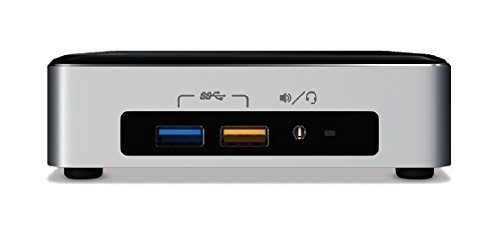
Intel NUC Kit NUC6i5KYK



Key features
- •6th generation Intel Core i5-6260U
- •Intel Iris graphics 540
- •Up to 7.1 surround audio via HDMI and Mini DisplayPort
- •Internal support for M.2 SSD card (22x42 or 22x80)
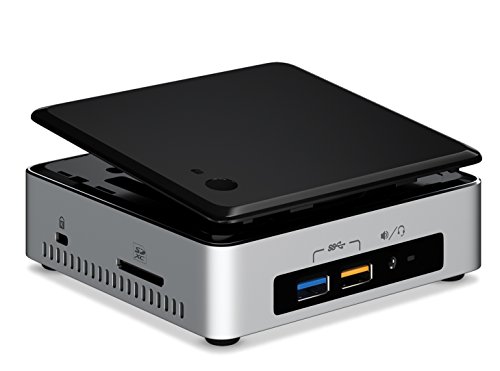
- •Support for user-replaceable 3rdparty lids
- •Intel Wireless-AC 8260 M.2 soldered-down, wireless antennas (IEEE 802.11ac, Bluetooth 4.1, Intel Wireless Display 6.0)
Intel NUC Kit NUC6i5KYK
List Price: $509.08$458.17DEALYou Save: $50.91 (10%)
Free shippingFree Returns – 30 daysFree Order CancellationSecure Payment2–3 Days DeliveryGet It October 25, 2026In Stock (1)No marketing spamNo account requiredFulfilment by FedEx / Amazon / UPS / ShipwirePayPal / Card Buyer Protection
Customer Reviews
Reviews sourced from verified Amazon purchasers3.9
out of 5
Based on 10 reviews
5★
80%
4★
20%
3★
0%
2★
0%
1★
0%
Awesome little item
Arda Kilicdagi✓ Verified Purchase•August 8, 2023
Awesome little item. I'm using as a server for my personal needs on my home. As far as I remember it came with bios #42. So no old bios which gave problem to people. I updated to version 52.
Before using You'll need additional memory module and SSD. I bought a 2133 MHZ DDR4 ram module (more than 2133 MHZ is unnecessary since the device cannot understand), and a M.2 SSD module, but there is a sata port and you can install a 2.5" sata ssd, too. But since m.2 SSD is smaller (in size) I suggest using one.
As for power plugging, the adapter has the plugs for various types in the package. My country has EU type power plug, I bought from USA, and I am having no issues.
Unlike other people who use Windows, I've installed Ubuntu server edition over it (because of newer Linux kernel supports more modules) through an USB stick, and using it as a headless server. Quite happy with the product so far.
Before using You'll need additional memory module and SSD. I bought a 2133 MHZ DDR4 ram module (more than 2133 MHZ is unnecessary since the device cannot understand), and a M.2 SSD module, but there is a sata port and you can install a 2.5" sata ssd, too. But since m.2 SSD is smaller (in size) I suggest using one.
As for power plugging, the adapter has the plugs for various types in the package. My country has EU type power plug, I bought from USA, and I am having no issues.
Unlike other people who use Windows, I've installed Ubuntu server edition over it (because of newer Linux kernel supports more modules) through an USB stick, and using it as a headless server. Quite happy with the product so far.
Had this and the 5i5 (5th Gen i5 Version). DO NOT BE SCARED ANYMORE w/BIOS 42 UPDATE!
Zane✓ Verified Purchase•August 5, 2023
Yes, intel released a bad product before; however, it was an advanced problem Itel needed some time to fix; which they did. let me start with this unit is NOT defective anymore, as long as you have BIOS 42, you will have a blue dot on the bottom (fixing the voltage regulator on the motherboard). I did not, it came with BIOS 28 and I updated immediately. Let's get that out of the way, not defective anymore, here are the details
I purchased the previous version. While I loved it, there were 2 things that really made me upset at Intel for it, and I could not live with it. I originally, (before the 5th gen) had an ACER UX305 w/ i3 4160, 8GB RAM, Crucial 256SSD, and a GT 730 1GB DDR5. It flew and I liked it! However, I have an IT business and wanted to have a NUC for myself, so figured that ACER will be sold to a customer. I tell you all this because I was replacing an already fast computer. The 5th gen was awesome, but two things I couldn't deal with.
1.) Awful HD 6000 graphics. Usually, the graphics are pretty admirable for internal graphics, but the NUC sounded like a jet engine with old games like AOE III AOM, etc. It cried and screamed because of the heat. And a lot of games usually playable on desktops (because the card didn't throttle with the heat), were not on the NUC. Intel advertised it as a "LAN PARTY". What a joke.
2.) Mini HDMI, so many units you needed a connector. I knew this when buying, but it ended up really bothering me. I returned the unit.
Now for the 6th Gen: I paired it with Hyper 16GB 2113 Speed Memory, Samsung 950 Pro, and Windows 10. It's laughable how fast it boots (5 seconds with intel rapid technology and fast boot enabled in BIOS.
-----------------------------------------------------------------------------------
PROS
-The skylake chip is only 10% faster than the last version in "general computing", but the Iris chip is AWESOME! I do not play games much, but like to occasionally. I max out AOEIII and get 60fps. yes, the graphics are that good! This graphics chip I am 100% satisfied and JUST is enough of power for me. Finally, intel can brag about integrated graphics, just as good as my discrete GT 730 1GB DDR5 card
-I am OCD about fan noise, the NUC is SILENT in general computing, but playing games the fan understandably comes on. And fan noise is that of a laptop. I replaced my whole tower because of how efficient this chip is. Can get very hot on games though (95C-max temp is around 105 so still OK for hour bursts)
-Visual BIOS is great to work in. I love this part. TIP: adjust fan speed from 35 to 30, it makes the unit completely silent while still keeping temps 40C at idle (my room can get hot around 73F, so 40C for the chip is more than fine. I would not recommend changing anything else, as the fan needs to go to "emergency mode" if need be.
-FAST FAST FAST! I have to mention how much I love the chip again. It's nearly as fast as my 4160, a true compliment for 15W chip.
-Minuscule, but you will save probably $50-$75 a year on this vs a "desktop" chip consuming 10x more watts.
-Small! Can unplug my cables and transfer it anywhere. I move a lot for my job, this is a nice bonus. Plus, something is really cool having your computer the size of your palm, I may sound like I am an idiot for doing it, but I sometimes pick it up randomly, in dismay this thing can be as powerful as a mid-high to high end range desktop.
-FULL HDMI Port! No bull mini hdmi port, allowing a lot more devices to connect easier.
-Mini Display port (if you want to add another display, pretty nice)
-4 USB 3.0 ports, 2 in the back 2 in front (1 fast charge). Nice because I have my keyboard and mouse usb, and my speakers usb (powered by NUC)
-Full Ethernet port
-FAST and nice AC wireless card
-Multiple plug ports if you travel internationally
-Great motherboard layout & stable as heck
-Looks sexy
-----------------------------------------------------------------------------
CONS (nitpicking)
-Gets hot but that's because of the case of how small the case is
-Expensive....Intel could lower this a little
-Still mad Intel classified the last version as "LAN PARTY" worthy, pretty much false advertisements
Honestly, if you want a NUC get this one.
I purchased the previous version. While I loved it, there were 2 things that really made me upset at Intel for it, and I could not live with it. I originally, (before the 5th gen) had an ACER UX305 w/ i3 4160, 8GB RAM, Crucial 256SSD, and a GT 730 1GB DDR5. It flew and I liked it! However, I have an IT business and wanted to have a NUC for myself, so figured that ACER will be sold to a customer. I tell you all this because I was replacing an already fast computer. The 5th gen was awesome, but two things I couldn't deal with.
1.) Awful HD 6000 graphics. Usually, the graphics are pretty admirable for internal graphics, but the NUC sounded like a jet engine with old games like AOE III AOM, etc. It cried and screamed because of the heat. And a lot of games usually playable on desktops (because the card didn't throttle with the heat), were not on the NUC. Intel advertised it as a "LAN PARTY". What a joke.
2.) Mini HDMI, so many units you needed a connector. I knew this when buying, but it ended up really bothering me. I returned the unit.
Now for the 6th Gen: I paired it with Hyper 16GB 2113 Speed Memory, Samsung 950 Pro, and Windows 10. It's laughable how fast it boots (5 seconds with intel rapid technology and fast boot enabled in BIOS.
-----------------------------------------------------------------------------------
PROS
-The skylake chip is only 10% faster than the last version in "general computing", but the Iris chip is AWESOME! I do not play games much, but like to occasionally. I max out AOEIII and get 60fps. yes, the graphics are that good! This graphics chip I am 100% satisfied and JUST is enough of power for me. Finally, intel can brag about integrated graphics, just as good as my discrete GT 730 1GB DDR5 card
-I am OCD about fan noise, the NUC is SILENT in general computing, but playing games the fan understandably comes on. And fan noise is that of a laptop. I replaced my whole tower because of how efficient this chip is. Can get very hot on games though (95C-max temp is around 105 so still OK for hour bursts)
-Visual BIOS is great to work in. I love this part. TIP: adjust fan speed from 35 to 30, it makes the unit completely silent while still keeping temps 40C at idle (my room can get hot around 73F, so 40C for the chip is more than fine. I would not recommend changing anything else, as the fan needs to go to "emergency mode" if need be.
-FAST FAST FAST! I have to mention how much I love the chip again. It's nearly as fast as my 4160, a true compliment for 15W chip.
-Minuscule, but you will save probably $50-$75 a year on this vs a "desktop" chip consuming 10x more watts.
-Small! Can unplug my cables and transfer it anywhere. I move a lot for my job, this is a nice bonus. Plus, something is really cool having your computer the size of your palm, I may sound like I am an idiot for doing it, but I sometimes pick it up randomly, in dismay this thing can be as powerful as a mid-high to high end range desktop.
-FULL HDMI Port! No bull mini hdmi port, allowing a lot more devices to connect easier.
-Mini Display port (if you want to add another display, pretty nice)
-4 USB 3.0 ports, 2 in the back 2 in front (1 fast charge). Nice because I have my keyboard and mouse usb, and my speakers usb (powered by NUC)
-Full Ethernet port
-FAST and nice AC wireless card
-Multiple plug ports if you travel internationally
-Great motherboard layout & stable as heck
-Looks sexy
-----------------------------------------------------------------------------
CONS (nitpicking)
-Gets hot but that's because of the case of how small the case is
-Expensive....Intel could lower this a little
-Still mad Intel classified the last version as "LAN PARTY" worthy, pretty much false advertisements
Honestly, if you want a NUC get this one.
Great little device -- especially for SMB users
Ken L.✓ Verified Purchase•July 19, 2023
I've become a big fan of the Intel NUCs for SMB users. I've used the 4th, 5th and 6th generation and have found them to be a good value and especially useful as they take up almost no desk space. We've been installing Windows 7 on them, which is a little tricky -- the Intel app (check their website) someone automates the process... but now we have a thumb drive with the image so installing the OS on additional images should be easier.
I had a little problem with the Samsung 950 PRO NVM installation -- you need to install the drivers as part of the OS load. Unless you really need the performance difference of the NVM drive, I'd go with a standard SSD stick.
We turn off the WiFi & Bluetooth, so I can't report on how well the work (all wired network here).
Advantages: get a pure installation of Windows without any vendor-added software; small size; attractive & well designed
Disadvantages: may end up being more expensive than equivalent Dell/Lenovo/HP because you need to add retail versions of OS, Office (and in our case Acrobat)
I had a little problem with the Samsung 950 PRO NVM installation -- you need to install the drivers as part of the OS load. Unless you really need the performance difference of the NVM drive, I'd go with a standard SSD stick.
We turn off the WiFi & Bluetooth, so I can't report on how well the work (all wired network here).
Advantages: get a pure installation of Windows without any vendor-added software; small size; attractive & well designed
Disadvantages: may end up being more expensive than equivalent Dell/Lenovo/HP because you need to add retail versions of OS, Office (and in our case Acrobat)
EASY
Mitch Scherer✓ Verified Purchase•July 8, 2023
I love this computer. My main computer is an i7 tower I use in the study. I bought this one to attach to the TV in the living room. I used the media creation tool to put Windows 10 install on a USB. Then, from the time I opened the NUC package, it took about two hours to install RAM Crucial 8GB Kit (4GBx2) DDR4 2133 MT/s (PC4-17000) SR x8 SODIMM 260-Pin - CT2K4G4SFS8213 , SSD Intel 128GB M.2 80mm SSD (SSDPEKKW128G7X1) , Widows 10 and activate it with a credit card through the store, all without a hitch. I updated the BIOS even though everything seemed fine just to be sure. I'm surprised how quick and easy the build was. This NUC starts and runs fast.
This 6th Generation NUC is nothing short of spectacular!
OLAN✓ Verified Purchase•July 5, 2023
This 6th Generation NUC is nothing short of spectacular! With the latest BIOS and Windows 10 installed, it's stable, fast, silent and power efficient.
With that said, there are a few things to be aware of:
1. Install the latest BIOS before attempting to do anything! Download the latest BIOS from Intel's website onto a USB flash drive using a different computer. Upgrade it using the NUC's flash utility built into the Visual BIOS. Earlier version of the BIOS were very unstable. The NUC received a lot of bad reviews on Amazon because of this. Don't worry about looking for a blue sticker, mine didn't come with one. Simply upgrade the BIOS and everything will be fine!
2. Install Windows 10 instead of Windows 7. While this machine is fully capable of running Windows 7, it takes a lot of work and technical know-how to install it properly. This generation NUC has USB 3.0 ports; Windows 7 does not support USB 3.0 out of the box. Thus, USB 3.0 drivers have to be manually "injected" into the Windows 7 installation .WIM using Microsoft's DISM utility. Intel released a program to do this "automagically", but it doesn't work properly with all version of Windows 7. Also, Windows 7 requires a ton of system drivers because it is older. Windows 10 will automatically download and install all of the system drivers except for the Ethernet adapter (as of 06/24/2016).
3. This NUC system get a little warm when the CPU is being stressed. As such, the cooling fan spins up and makes some noise. If this bothers you, try replacing the thermal compound on the processor with some decent Arctic Silver or MX-4, it helps. Also, a 3rd party fan-less case can be purchase for ~$80.
With that said, there are a few things to be aware of:
1. Install the latest BIOS before attempting to do anything! Download the latest BIOS from Intel's website onto a USB flash drive using a different computer. Upgrade it using the NUC's flash utility built into the Visual BIOS. Earlier version of the BIOS were very unstable. The NUC received a lot of bad reviews on Amazon because of this. Don't worry about looking for a blue sticker, mine didn't come with one. Simply upgrade the BIOS and everything will be fine!
2. Install Windows 10 instead of Windows 7. While this machine is fully capable of running Windows 7, it takes a lot of work and technical know-how to install it properly. This generation NUC has USB 3.0 ports; Windows 7 does not support USB 3.0 out of the box. Thus, USB 3.0 drivers have to be manually "injected" into the Windows 7 installation .WIM using Microsoft's DISM utility. Intel released a program to do this "automagically", but it doesn't work properly with all version of Windows 7. Also, Windows 7 requires a ton of system drivers because it is older. Windows 10 will automatically download and install all of the system drivers except for the Ethernet adapter (as of 06/24/2016).
3. This NUC system get a little warm when the CPU is being stressed. As such, the cooling fan spins up and makes some noise. If this bothers you, try replacing the thermal compound on the processor with some decent Arctic Silver or MX-4, it helps. Also, a 3rd party fan-less case can be purchase for ~$80.
Page 1 of 2