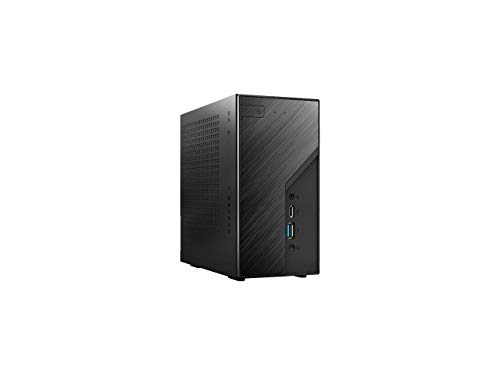
ASRock DESKMINI X300W Barebone




Key features
- •support amd am4 socket cpu (renoir, picasso,raven ridge, up to 650w)
- •chipset:amd x300
- •memory:suports 2so-dimm ddr4 max 64gb
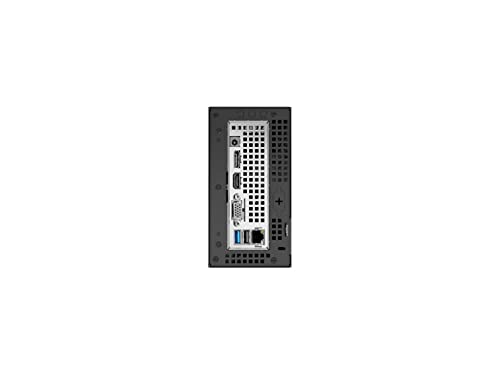
- •graphics output;1hdmi;1dp;1d-sub
ASRock DESKMINI X300W Barebone
List Price: $247.34$222.61DEALYou Save: $24.73 (10%)
Free shippingFree Returns – 30 daysFree Order CancellationSecure Payment2–3 Days DeliveryGet It October 24, 2026In Stock (8)No marketing spamNo account requiredFulfilment by FedEx / Amazon / UPS / ShipwirePayPal / Card Buyer Protection
Customer Reviews
Reviews sourced from verified Amazon purchasers4.4
out of 5
Based on 10 reviews
5★
60%
4★
40%
3★
0%
2★
0%
1★
0%
Would be great if it worked.
James W York✓ Verified Purchase•July 11, 2023
Update 9/14/21: ASRock answered the phone when I finally had a chance to call (never did respond to my email). RMA process was painless and they responded to e-mailed questions once I had an RMA# assigned. Return shipping on the RMA was quick (I had my new motherboard in hand a week after they received my old one, although I did have to pay for shipping to them, but whatever). Thus far, that seems to have fixed things. -1 star for not responding to my initial email, but glad I no longer have a paperweight!
Works great. Until I'm in a zoom call and it randomly reboots. Tried Windows, tried Linux. Run memory testing, CPU testing, all the troubleshooting I can do.
I'm past 30 days on my return window, and ASRock hasn't responded to the ticket I entered on their website. $160 paperweight at this point.
Works great. Until I'm in a zoom call and it randomly reboots. Tried Windows, tried Linux. Run memory testing, CPU testing, all the troubleshooting I can do.
I'm past 30 days on my return window, and ASRock hasn't responded to the ticket I entered on their website. $160 paperweight at this point.
Why VGA. Great mini PC. USB C and USB 3.2 does NOT output video
Mychal B.✓ Verified Purchase•July 3, 2023
Purchased this to do a triple monitor setup (2x 1440p and 1x 1080p)
APU is more than strong enough to run these, however having a VGA is a bit of a letdown.
Had to use a VGA to HDMI which degrades quality a bit on the 1080p monitor.
Upgraded to 32GB of RAM and this is more than powerful enough to run a VM and a handful of tabs opened on chrome. Overall happy
APU is more than strong enough to run these, however having a VGA is a bit of a letdown.
Had to use a VGA to HDMI which degrades quality a bit on the 1080p monitor.
Upgraded to 32GB of RAM and this is more than powerful enough to run a VM and a handful of tabs opened on chrome. Overall happy
Great design for multiple storage and ease of build
Sammyfed1✓ Verified Purchase•July 2, 2023
Best mini I ever built! Great design for adding storage. I was impressed with how small the design is and how it has performed compared to my desktop builds. I highly recommend AMD 5600G. I have built 3 of these now for friends and family. Huge space-saver with plenty of performance. My specs below..
Ryzen 5 5600G w/Radeon Vega Integrated
Thermalright AXP-90R Full Copper 4 heat pipes PWM 47mm CPU Cooler- Fits perfect!
Samsung 970 EVO Plus 250GB M.2 SSD NVMe -Boot Drive
TEAMGROUP EX2 1TB 3D NAND TLC 2.5 SATA III SSD - Storage/APPS
Timetec 32GB KIT(2x16GB) DDR4 3200MHz PC4-25600 Single Rank
Ryzen 5 5600G w/Radeon Vega Integrated
Thermalright AXP-90R Full Copper 4 heat pipes PWM 47mm CPU Cooler- Fits perfect!
Samsung 970 EVO Plus 250GB M.2 SSD NVMe -Boot Drive
TEAMGROUP EX2 1TB 3D NAND TLC 2.5 SATA III SSD - Storage/APPS
Timetec 32GB KIT(2x16GB) DDR4 3200MHz PC4-25600 Single Rank
ASRock DESKMINI X300
SKG✓ Verified Purchase•June 29, 2023
Excellent Customer Service and Communication from DOLICA, Amazon US.
Don't forget to change this option in UEFI
Victor G✓ Verified Purchase•June 28, 2023
The first time you boot X300W, it will enter UEFI with no action on your side, and by default you will have no drive shown at the Boot Option Priorities (no access to the option at all).
You must enter CSM in the same Boot menu, it is Disabled by default.
Once you change it to Enabled, you can set to UEFI (not Legacy) the three other options that open once you set CSM to Enabled (at least, I set them that way).
Then Save and Exit changes, the PC will boot to UEFI again, and now the Boot Option Priorities will show all the drives you have connected to the motherboard.
Pick the one with OS and you're good to go.
Flashing the UEFI is fast and easy, I did for both I own.
I have one with 240GE processor and 16 GB RAM for media center, and I'm building the second one with a Ryzen 5600G or 5700G for home office and light CAD work.
You must enter CSM in the same Boot menu, it is Disabled by default.
Once you change it to Enabled, you can set to UEFI (not Legacy) the three other options that open once you set CSM to Enabled (at least, I set them that way).
Then Save and Exit changes, the PC will boot to UEFI again, and now the Boot Option Priorities will show all the drives you have connected to the motherboard.
Pick the one with OS and you're good to go.
Flashing the UEFI is fast and easy, I did for both I own.
I have one with 240GE processor and 16 GB RAM for media center, and I'm building the second one with a Ryzen 5600G or 5700G for home office and light CAD work.
Page 1 of 2


