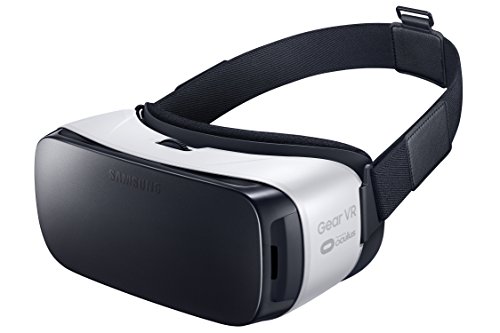
Samsung Gear VR (2015) Bumper Case - Compatible with Note 5, GS6s, Anti-Slip, Black - US Version w/ Warranty


Key features
- •Light weight so you can play and watch more comfortably
- •Easy to use touch pad
- •Wide field of view, precise head-tracking and low latency brings reality to the virtual. Be transported to amazing new worlds in games, video, and images. Thousands of 360 degree panoramic photos
- •Compatible with: Samsung Galaxy Note5,S6 edge+,S6,S6 edge
- •Improved fit, including room for most eyeglasses and improved padding for extra comfort and durability
- •Light weight so you can play and watch more comfortably
Samsung Gear VR (2015) Bumper Case - Compatible with Note 5, GS6s, Anti-Slip, Black - US Version w/ Warranty
List Price: $60.94$54.85DEALYou Save: $6.09 (10%)
Free shippingFree Returns – 30 daysFree Order CancellationSecure Payment2–3 Days DeliveryGet It October 24, 2026In Stock (5)No marketing spamNo account requiredFulfilment by FedEx / Amazon / UPS / ShipwirePayPal / Card Buyer Protection
Customer Reviews
Reviews sourced from verified Amazon purchasers4.1
out of 5
Based on 10 reviews
5★
80%
4★
10%
3★
0%
2★
0%
1★
10%
Best Buy Ever!!
CThrasher✓ Verified Purchase•August 1, 2017
I am so happy I got this. I have a 3 year old who loves the dinosaurs and animal videos. I enjoy the travel ones. Some seem super real. Recommend downloading the Samsung VR app for lots of videos. Relix for a decent roller coaster. Jurrasic Park for dinosaur. Discovery app for educational. If you have anxiety like i do theres an app called Relax that puts you on a beach. All free.
I have a Samsung Note 5 that fits perfectly. Side controls are easy to use on Right side of device. Theres the touchpad for games and other control. A back button to get out of things or double click in Samsung VR to orient. The volume buttons which work flawlessly, it delivers great sound for videos. Then theres the vision adjustment dial on the top of the device. Just move until it comes into focus.
The front cover...a word of advice theres only one way it fits even though you can accidently put it on rotated 180 degrees. If you dont hear the click it isnt on right.
I have a Samsung Note 5 that fits perfectly. Side controls are easy to use on Right side of device. Theres the touchpad for games and other control. A back button to get out of things or double click in Samsung VR to orient. The volume buttons which work flawlessly, it delivers great sound for videos. Then theres the vision adjustment dial on the top of the device. Just move until it comes into focus.
The front cover...a word of advice theres only one way it fits even though you can accidently put it on rotated 180 degrees. If you dont hear the click it isnt on right.
Love this!
Majeanmi✓ Verified Purchase•July 9, 2017
Just tried it out today and downloaded programs into my Galaxy S 6. Was already blown away by the tutorials which were as far as I got! I believe there are plastic films that are covering the vr lenses but I have no idea how to remove them as I can't find an end or corner to lift them off. I think the pictures would be clearer if I could find them. The phone heated up after about ten minutes and I stopped. Tomorrow I have a cooling fan coming which I have read will take care of the overheating. I also decided to buy the hand controller also so tomorrow will be a great day. I love this and haven't even delved into the possibilities yet.
Fascinating new world - Great Menu system!
Michael Baker✓ Verified Purchase•February 27, 2017
Very cool, amazing new world but I got to say you can get a bit dizzy if you spend more than 30 minutes on it at a time so parents beware on limiting time for your children. This shouldn't be a shocker though, they have that same information in their instructions. Also, I bought two other cheaper ones prior to this thinking there couldn't be much of a difference but the Samsung Gear VR is made very specifically for Samsung (however others including iphone I believe will work) and everything is awesome. I especially like the menu system super easy to navigate, active push button options, and would recommend an add on remote if you don't want to keep reaching for your headset.
For the price it is an excellent VR system
Shane McLain✓ Verified Purchase•January 11, 2017
For the price it is an excellent VR system! I got a defective one based on my many failed attempts at connecting this using my Samsung S7 Edge, but I have used this in the store and am very impressed. I have a bit of a weak stomach on rides like rollercoasters, so that may have something to do with how I felt for a good hour after using them (nauseated, dizzy, disoriented, dazed). That being said, I still wanted a pair for parties as a novelty or to pass time in between my online gaming downtime. I am re-purchasing them after getting a full refund from Amazon. I still really want to own them because it is a quite extraordinary experience. I do wish the theater viewing for movies wasn't so far away even though the seating is neat to look at for a few minutes. I gave this item 4 stars because of my defective unit and the app obviously has some bugs to be worked out. I hope these get fixed in the future as well as the way I feel after using the VR. I will consider taking some sort of Dramamine medicine to lessen the feelings in the future most likely. If my next product works perfectly, I will raise my rating happily.
Pros: Immersive extraordinary experience, most content is 360 degrees, can watch movies in the theater, very novel games for parties, and the library of content is quite extensive.
Cons: Can make you nauseated if prone to such sickness, theater for movies puts picture set a fair distance back, and a personal glitch in app/device forced a return on my product.
Pros: Immersive extraordinary experience, most content is 360 degrees, can watch movies in the theater, very novel games for parties, and the library of content is quite extensive.
Cons: Can make you nauseated if prone to such sickness, theater for movies puts picture set a fair distance back, and a personal glitch in app/device forced a return on my product.
The future is here now… ALMOST…
Jay Tee✓ Verified Purchase•May 9, 2016
I've been waiting for these googles my whole life, but sadly I'm afraid I might have to wait a little longer.
NOTE: I've paid for these goggles. They were not a freebie in return for a review (unfortunately). Although if someone wants to send me some free ones they are more than welcome ;)
First some background. I'm a military pilot. I have 20/20 vision and have never required any vision correction. My vision gets tested annually. I also don't suffer from motion sickness. I only mention this now, not to brag, but it will become pertinent later when I bring up a couple of things I've learnt about myself from operating with Night Vision Goggles (NVG's). I'm also not an optometrist/ophthalmologist so hopefully my opinions are close to correct.
I'm using my goggles with a Galaxy S7 Edge (no screen protector "“ as instructed by the goggles instructions).
First the good stuff"¦
- The Oculus app, and store (that come included "“ and are indeed required) is great. The Oculus app is it's own ecosystem of apps"¦ and all other apps are launched from WITHIN the Oculus app. It looks professional and sets the tone for a great VR experience. It's your very first look into the VR world, and as soon as you put the goggles on you know you are in for something special. Oculus have done a great job and Samsung has done well to pair with them.
- A good number of the apps you can access for free, through the Oculus store, are pretty impressive even just simply accessing their main menu screens. They really leverage the VR experience.
MY TIPS:
(1) The download and installation of the REQUIRED Oculus app is fully automatic once you connect your phone. The setup is really easy so don't stress if you are concerned about a big setup process. The Oculus app makes it all very easy.
(2) If you are like me and want to try and download the Oculus app and additional content prior to the arrival of your goggles don't worry about it. There appears to be no way of doing it without the goggles, so like me you will be just wasting your time looking. I found there is not too much about the how to access the Samsung VR/Oculus apps written anywhere "“ I did search beforehand and was a little confused as to what was available and how to download them from Google Play Store. Basically"¦ you don't! (NOTE: you will find "˜Google Cardboard' VR apps in the Google Play Store, and also find online workaround tips on how to use "˜Google Cardboard' apps with the Samsung VR goggles. This is definitely not required, and these apps are run EXTERNALLY to the Oculus app and it's ecosystem.)
(3) Definitely try the Netflix app, Moon VR player, Samsung Milk VR, Titans of Space. They are all pretty impressive. A number of the VR players on there will also allow you to play your own content from your SD Card.
Next"¦ Get a controller"¦ maybe"¦
- Although the Samsung VR goggles come with a touchpad controller on the side, which can do MOST stuff, life can be a little easier with a separate Bluetooth controller (sometimes). It also gives you access to some of the content that requires a controller.
- Don't get confused when you read online about people using "˜magnets' to control VR apps. This is a "˜Google Cardboard' thing, and once again does not apply to anything from the Oculus store.
- I happened to have the "MOGA Pocket" Bluetooth game controller already, just by chance. It works with the Samsung goggles if you set it up properly. It took me a little while to track down the info on this.
- The "MOGA Pocket" is an older controller (but feels good and works well enough) that's on Amazon for only $6 right now so why not? (That's way less than what I paid for it 6 months ago.)
MY TIPS FOR THE "MOGA POCKET" CONTROLLER:
(1) Forget about the "MOGA Pivot App". Unless you want it for the games on their website which (a) aren't good (b) aren't free (c) reportedly no longer work or download properly. Importantly"¦ THE MOGA PIVOT APP DOES NOT WORK WITH THE OCULUS APP. I wasted hours trying to get this to work before conceding defeat and giving up. The redemption code included in the box for a free game also doesn't work. Overall"¦ very poorly done.
(2) Download the "MOGA UNIVERSAL DRIVER" from the playstore. Manually pair the controller via Bluetooth to your phone (I think my controller showed as "˜BD&A' or something like that), then open the "MOGA Universal Driver" app, and continue the setup, and add it to your keyboards. NOTE: You need to open the app, pair the controller activate the keyboard, and enable the driver, prior to inserting your phone into the goggles each time. (There is probably a more automated way but I haven't worried at this stage).
(3) There is more info in the Amazon reviews for the MOGA controllers if I've not been clear here. (This was not meant to be a MOGA Controller review :)' )
(UPDATE: please note that someone in the comments has mentioned that they have had trouble trying to get this controller to work with the headset. The best I can offer is that the MOGA controller worked fine for me, although I no longer have the headset to test it out anymore (still working fine for Non-GEAR VR apps right now though)... if this concerns you there are a number of other controllers out there give a go. I do believe it was worthwhile having one.)
Now the negatives"¦ and there's a pretty big one"¦
"¦ Within about 5-10mins of putting these goggles on I start to feel a painful eye strain. It is NOT excruciating, however it is quiet noticeable and uncomfortable and more importantly I can still feel it some many hours after taking them off. This is not motion sickness, but eyestrain. It feels like pulling a muscle"¦ in your eye sockets. I've spent ages trying to work it out and I think it all comes down to the basicness and cheapness of Samsung's build/design.
I'm not an optometrist/ophthalmologist but for what it's worth here are my thoughts.
- Inter Pupillary Distance (IPD) "“ IPD is the distance between the pupils (your eyes) and hence how far the lenses are apart. Most of us have used binoculars before. You will recall there are normally 3 basic adjustments to be made:- IPD (when you adjust the width of your binocs), Diopter, and Focus. The IPD in the Samsung goggles is fixed, yet we don't all have one-size-fits-all heads. I've read previously that the Samsung VR goggles are designed for 55-71mm IPD (I'm not sure what mine are). The spacing between the two images on your phone screen is also fixed. This affects the "˜convergence' of your eyes. Think of the case where the lens' IPD are too far apart. Each eye will be trying to look in opposite directions to see through each lens at the same time, whilst simultaneously trying to converge the 2 images into one in an attempt to create a stereoscopic image. This is not normal for your eyes. In real life they normally naturally converge onto one subject in a manner comfortable to them"¦ not look outwards (as in the "˜too wide' case) at 2 separate images. The opposite is true for too close "“ you must go slightly cross-eyed. Ideally, you should be able to adjust the lenses in the goggles, to your eyes IPD and natural convergence range.
Also... if you aren't looking through the centre of the lens, but rather the edge, they go out of focus. The spacing of the lenses in the is not the same as my IPD hence I am not looking through the centre of the lens most of the time.
- Diopter "“ Diopter is designed to let you compensate for differences between your own two eyes. Basically, some people's eyes don't focus equally"¦ so what you do is close one eye, then focus for the open eye normally. Then change eyes and adjust the diopter for the now open eye. Both eyes should now be in focus. Think of it as individual focus for each eye. (On your binoculars it's the eyepiece with the +/- numbers around it.) The Samsung VR goggles do not have the ability to adjust diopter or focus for each eye individually. Just one central focus adjustment.
Now, as some background, prior to each flight on NVG's we place them into a calibrated test unit and adjust the diopter and IPD (amongst other things) for myself and my special head. Most of us are all slightly different. The outcome however is that we can wear these goggles comfortably for many hours with no adverse eyestrain. In my case my diopter is generally 0 meaning my eyes focus about the same. The same goes for the diopter setting on my Canon DSLR. Now I don't know if I have a bad set of VR goggles (but I do tend to trust the expensive and calibrated aviation NVG's), but with the Samsung VR goggles I find that if I close one eye and focus the goggles, when I switch eyes the other is always out of focus. Sadly as there is no way to adjust diopter (or focus each eye separately) this cannot be rectified and may be another source of this discomfort "“ as one eye is always struggling to focus an unfocusable image. I certainly personally have never experienced eye discomfort like this wearing goggles.
So why such a low rating from me? Because regardless of how awesome the technology behind it is, and how good the Oculus store and associated apps are, it is all a deal breaker if the goggles cause eye pain.
AND, because there are a number of small no name chinese manufacturers out their turning out plastic Google Cardboard goggles that are of comparable build quality (the Samsung goggles only have plastic lens' also), that also offer IPD adjustment and individual eye focus, for less than $30. I find it astonishing that Samsung has not incorporated these features and can only assume that they might have been able to rectify my discomfort. Considering this is Samsung's second generation of these goggles, and considering the resources behind Samsung, and considering SAMSUNG CHARGE 3xTIMES MORE! for their goggles, I would expect that they would have these basic features also included, just as the cheaper manufacturers have (they could also easily include a calibration section in the Oculus app allowing you to adjust the goggles and set the apps IPD, as well as calibrate Diopter).
So, whilst it guts me to say this, and I really really want to keep them"¦ but every time I use them I can't help but feeling I'm doing irreparable damage to my eyes"¦ So I'm going to have to send them back. Hopefully Samsung will do a better job with their 3rd generation goggles - we are almost there.
In the meantime I might try some of the 3rd party goggles and see how they feel and will likely report back here with an update.
Sorry for the long winded review. Hopefully you found some of it useful.
NOTE: I've paid for these goggles. They were not a freebie in return for a review (unfortunately). Although if someone wants to send me some free ones they are more than welcome ;)
First some background. I'm a military pilot. I have 20/20 vision and have never required any vision correction. My vision gets tested annually. I also don't suffer from motion sickness. I only mention this now, not to brag, but it will become pertinent later when I bring up a couple of things I've learnt about myself from operating with Night Vision Goggles (NVG's). I'm also not an optometrist/ophthalmologist so hopefully my opinions are close to correct.
I'm using my goggles with a Galaxy S7 Edge (no screen protector "“ as instructed by the goggles instructions).
First the good stuff"¦
- The Oculus app, and store (that come included "“ and are indeed required) is great. The Oculus app is it's own ecosystem of apps"¦ and all other apps are launched from WITHIN the Oculus app. It looks professional and sets the tone for a great VR experience. It's your very first look into the VR world, and as soon as you put the goggles on you know you are in for something special. Oculus have done a great job and Samsung has done well to pair with them.
- A good number of the apps you can access for free, through the Oculus store, are pretty impressive even just simply accessing their main menu screens. They really leverage the VR experience.
MY TIPS:
(1) The download and installation of the REQUIRED Oculus app is fully automatic once you connect your phone. The setup is really easy so don't stress if you are concerned about a big setup process. The Oculus app makes it all very easy.
(2) If you are like me and want to try and download the Oculus app and additional content prior to the arrival of your goggles don't worry about it. There appears to be no way of doing it without the goggles, so like me you will be just wasting your time looking. I found there is not too much about the how to access the Samsung VR/Oculus apps written anywhere "“ I did search beforehand and was a little confused as to what was available and how to download them from Google Play Store. Basically"¦ you don't! (NOTE: you will find "˜Google Cardboard' VR apps in the Google Play Store, and also find online workaround tips on how to use "˜Google Cardboard' apps with the Samsung VR goggles. This is definitely not required, and these apps are run EXTERNALLY to the Oculus app and it's ecosystem.)
(3) Definitely try the Netflix app, Moon VR player, Samsung Milk VR, Titans of Space. They are all pretty impressive. A number of the VR players on there will also allow you to play your own content from your SD Card.
Next"¦ Get a controller"¦ maybe"¦
- Although the Samsung VR goggles come with a touchpad controller on the side, which can do MOST stuff, life can be a little easier with a separate Bluetooth controller (sometimes). It also gives you access to some of the content that requires a controller.
- Don't get confused when you read online about people using "˜magnets' to control VR apps. This is a "˜Google Cardboard' thing, and once again does not apply to anything from the Oculus store.
- I happened to have the "MOGA Pocket" Bluetooth game controller already, just by chance. It works with the Samsung goggles if you set it up properly. It took me a little while to track down the info on this.
- The "MOGA Pocket" is an older controller (but feels good and works well enough) that's on Amazon for only $6 right now so why not? (That's way less than what I paid for it 6 months ago.)
MY TIPS FOR THE "MOGA POCKET" CONTROLLER:
(1) Forget about the "MOGA Pivot App". Unless you want it for the games on their website which (a) aren't good (b) aren't free (c) reportedly no longer work or download properly. Importantly"¦ THE MOGA PIVOT APP DOES NOT WORK WITH THE OCULUS APP. I wasted hours trying to get this to work before conceding defeat and giving up. The redemption code included in the box for a free game also doesn't work. Overall"¦ very poorly done.
(2) Download the "MOGA UNIVERSAL DRIVER" from the playstore. Manually pair the controller via Bluetooth to your phone (I think my controller showed as "˜BD&A' or something like that), then open the "MOGA Universal Driver" app, and continue the setup, and add it to your keyboards. NOTE: You need to open the app, pair the controller activate the keyboard, and enable the driver, prior to inserting your phone into the goggles each time. (There is probably a more automated way but I haven't worried at this stage).
(3) There is more info in the Amazon reviews for the MOGA controllers if I've not been clear here. (This was not meant to be a MOGA Controller review :)' )
(UPDATE: please note that someone in the comments has mentioned that they have had trouble trying to get this controller to work with the headset. The best I can offer is that the MOGA controller worked fine for me, although I no longer have the headset to test it out anymore (still working fine for Non-GEAR VR apps right now though)... if this concerns you there are a number of other controllers out there give a go. I do believe it was worthwhile having one.)
Now the negatives"¦ and there's a pretty big one"¦
"¦ Within about 5-10mins of putting these goggles on I start to feel a painful eye strain. It is NOT excruciating, however it is quiet noticeable and uncomfortable and more importantly I can still feel it some many hours after taking them off. This is not motion sickness, but eyestrain. It feels like pulling a muscle"¦ in your eye sockets. I've spent ages trying to work it out and I think it all comes down to the basicness and cheapness of Samsung's build/design.
I'm not an optometrist/ophthalmologist but for what it's worth here are my thoughts.
- Inter Pupillary Distance (IPD) "“ IPD is the distance between the pupils (your eyes) and hence how far the lenses are apart. Most of us have used binoculars before. You will recall there are normally 3 basic adjustments to be made:- IPD (when you adjust the width of your binocs), Diopter, and Focus. The IPD in the Samsung goggles is fixed, yet we don't all have one-size-fits-all heads. I've read previously that the Samsung VR goggles are designed for 55-71mm IPD (I'm not sure what mine are). The spacing between the two images on your phone screen is also fixed. This affects the "˜convergence' of your eyes. Think of the case where the lens' IPD are too far apart. Each eye will be trying to look in opposite directions to see through each lens at the same time, whilst simultaneously trying to converge the 2 images into one in an attempt to create a stereoscopic image. This is not normal for your eyes. In real life they normally naturally converge onto one subject in a manner comfortable to them"¦ not look outwards (as in the "˜too wide' case) at 2 separate images. The opposite is true for too close "“ you must go slightly cross-eyed. Ideally, you should be able to adjust the lenses in the goggles, to your eyes IPD and natural convergence range.
Also... if you aren't looking through the centre of the lens, but rather the edge, they go out of focus. The spacing of the lenses in the is not the same as my IPD hence I am not looking through the centre of the lens most of the time.
- Diopter "“ Diopter is designed to let you compensate for differences between your own two eyes. Basically, some people's eyes don't focus equally"¦ so what you do is close one eye, then focus for the open eye normally. Then change eyes and adjust the diopter for the now open eye. Both eyes should now be in focus. Think of it as individual focus for each eye. (On your binoculars it's the eyepiece with the +/- numbers around it.) The Samsung VR goggles do not have the ability to adjust diopter or focus for each eye individually. Just one central focus adjustment.
Now, as some background, prior to each flight on NVG's we place them into a calibrated test unit and adjust the diopter and IPD (amongst other things) for myself and my special head. Most of us are all slightly different. The outcome however is that we can wear these goggles comfortably for many hours with no adverse eyestrain. In my case my diopter is generally 0 meaning my eyes focus about the same. The same goes for the diopter setting on my Canon DSLR. Now I don't know if I have a bad set of VR goggles (but I do tend to trust the expensive and calibrated aviation NVG's), but with the Samsung VR goggles I find that if I close one eye and focus the goggles, when I switch eyes the other is always out of focus. Sadly as there is no way to adjust diopter (or focus each eye separately) this cannot be rectified and may be another source of this discomfort "“ as one eye is always struggling to focus an unfocusable image. I certainly personally have never experienced eye discomfort like this wearing goggles.
So why such a low rating from me? Because regardless of how awesome the technology behind it is, and how good the Oculus store and associated apps are, it is all a deal breaker if the goggles cause eye pain.
AND, because there are a number of small no name chinese manufacturers out their turning out plastic Google Cardboard goggles that are of comparable build quality (the Samsung goggles only have plastic lens' also), that also offer IPD adjustment and individual eye focus, for less than $30. I find it astonishing that Samsung has not incorporated these features and can only assume that they might have been able to rectify my discomfort. Considering this is Samsung's second generation of these goggles, and considering the resources behind Samsung, and considering SAMSUNG CHARGE 3xTIMES MORE! for their goggles, I would expect that they would have these basic features also included, just as the cheaper manufacturers have (they could also easily include a calibration section in the Oculus app allowing you to adjust the goggles and set the apps IPD, as well as calibrate Diopter).
So, whilst it guts me to say this, and I really really want to keep them"¦ but every time I use them I can't help but feeling I'm doing irreparable damage to my eyes"¦ So I'm going to have to send them back. Hopefully Samsung will do a better job with their 3rd generation goggles - we are almost there.
In the meantime I might try some of the 3rd party goggles and see how they feel and will likely report back here with an update.
Sorry for the long winded review. Hopefully you found some of it useful.
Page 1 of 2