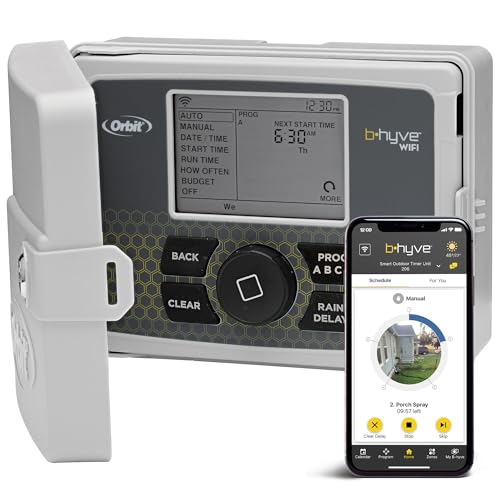
Orbit 57950 B-hyve 12-Zone Smart Indoor/Outdoor Sprinkler Controller




Key features
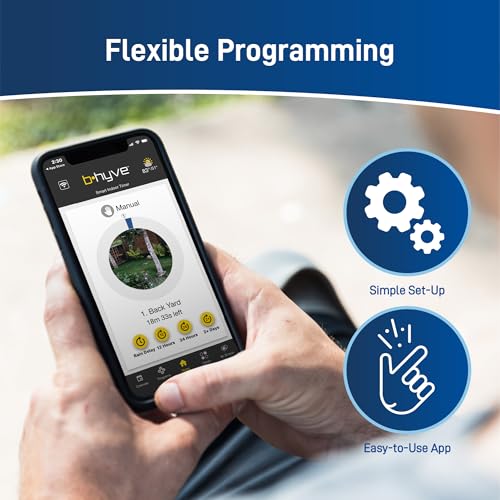
- •ULTIMATE WIFI AND TIMER CONTROL - The B-hyve app is fully functional for Android, iOS or web devices, and gives you control wherever you need it. Program your timer on the app, at the timer, or let the weather-based software create a program for you
- •SMART WATERING - WeatherSense technology provides watering based on site conditions such as slope, soil type, sun/shade, forecast ET and live weather feeds. It automatically adjusts your controller to deliver the right amount of water to your plants
- •EASY TO INSTALL AND USE - Utilize the swing panel for easy access to the angled wiring terminals, which makes wiring simple and convenient, and the plug-and-go line cord that can also be cut for hardwired applications
- •MADE IN USA - Made in the USA with global materials, the B-hyve comes in a weather-resistant case, allowing you to mount your timer indoors or outdoors without risk of weather damage, and a locking cabinet that keeps your timer safe from harm
- •WATER SAVINGS - Integrate your B-hyve timer with use of Catch Cups (Orbit 26250) to save up to 50% more water than with traditional controllers. Optimize the way you water, so you can keep everything lush and green without breaking the bank
Orbit 57950 B-hyve 12-Zone Smart Indoor/Outdoor Sprinkler Controller
List Price: $193.34$174.01DEALYou Save: $19.33 (10%)
Free shippingFree Returns – 30 daysFree Order CancellationSecure Payment2–3 Days DeliveryGet It October 25, 2026In Stock (30)No marketing spamNo account requiredFulfilment by FedEx / Amazon / UPS / ShipwirePayPal / Card Buyer Protection
Customer Reviews
Reviews sourced from verified Amazon purchasers4.5
out of 5
Based on 10 reviews
5★
60%
4★
30%
3★
10%
2★
0%
1★
0%
I'm glad I chose the Orbit 57950
editortr✓ Verified Purchase•September 2, 2017
I looked at several controllers and got advice from a well-seasoned irrigation expert. I'm glad I chose the Orbit 57950. I installed it on a very hot day and had a lot of issues working in a very tight spot. I got it installed, hooked up the valves, downloaded the app and started to pair it to my wi-fi. About half of the way through the pairing, a terrific thunder storm hit, the power browned out several times but came back up. The pairing reported that my wi-fi was offline. I had checked the wi-fi signal at the controller location before ordering and it was very strong - only about five feet from the router through a wall. I rebooted the modem and router but still no signal.
I then spent about an hour programming the controller at the box; setting up two programs. Who needs the app when it can be controlled from the box anyway? This morning, while cleaning up the residue of my installation, I pulled out my phone and checked the wi-fi signal again at the controller location - again, it was very strong. However, to pair it again, I'd have to reset and reprogram again. That's why I dropped one star.
I then spent about an hour programming the controller at the box; setting up two programs. Who needs the app when it can be controlled from the box anyway? This morning, while cleaning up the residue of my installation, I pulled out my phone and checked the wi-fi signal again at the controller location - again, it was very strong. However, to pair it again, I'd have to reset and reprogram again. That's why I dropped one star.
Great, but be smarter than the Smart Watering feature
Review Master✓ Verified Purchase•July 16, 2017
My old Rainbird box was a pain in the butt. Hard to program, and it would reset itself all the time. This box is the exact opposite. Easy to install, and once the app is up and running, you are in business. I can test my heads while I am standing behind them, and can control the watering from my lawn chair.
I like the Smart Watering feature, but be aware that the rain delays are implemented when rain is in the forecast, and the change in schedule holds if that rain never actually comes. When the phantom rain is forecast, I manually program a watering schedule, and the app will protest but will dutifully follow orders.
I like the Smart Watering feature, but be aware that the rain delays are implemented when rain is in the forecast, and the change in schedule holds if that rain never actually comes. When the phantom rain is forecast, I manually program a watering schedule, and the app will protest but will dutifully follow orders.
Easy to install and use
Josh✓ Verified Purchase•July 11, 2017
I've been pretty happy with this controller and the associated app. Installation was pretty simple and once everything was synced up via wifi I haven't had any issues with the smart watering or its ability to control each zone. The only limitation is that if you have a zone that has a mix of different plants, you will have to choose a type and work from there. Having your zones set up in a way that is more granular to a specific type of plant would yield better results. That being said, I haven't had issues with it over or under watering.
Amazing addition to my home automation
The Chris✓ Verified Purchase•June 10, 2017
Easy install and super easy setup. I really enjoy having control over my UGS on my phone. So instead of running back to the panel to manually turn on my sprinklers I can do it from my phone and saves all the back and forth. It also utilizes local weather to adjust watering. If it's raining it will delay so you do not have waste run off. I also have this linked to my Alexa and can control the sprinklers via voice command. I have not played with the Smart Water feature as I am too nervous. Smart Water utilizes input factors to determine watering frequency and duration. So far it wants to water my lawn once per week for an hour per zone. I have 6 zones and feel this us a bit excessive but you never know.
Well thought out, intuitive, and it just works as its supposed to. Perfect. Yes, the Alexa integration works awesome.
Your Name Here✓ Verified Purchase•May 29, 2017
Having an old Rain Bird Analog rotary controller, I was looking to upgrade to a modern WiFi Controller so I would no longer be running down the basement to turn on and off the Rain Delay. I was keeping an eye on a competing product to this, but wasn't crazy about the competitors' $200.00 price tag. So when this Orbit Controller came to market with the same features at half the price, it immediately had my attention.
I waited a few months to let some reviews trickle in and once I felt comfortable, I went for it. It is a one piece assembly in a weatherproof box for indoor or outdoor mounting. I opted for the 6 zone controller as currently I only have 3 zones, with plans to add one more zone for a feature garden in front of my house. Ultimately, the decision was made to keep it inside where the old one was, since I had a power outlet right there. The power cord is about 6 feet long so if you need some length, no worries. Installation took all of 5 minutes. Take a photo of the old wires, which was a Green Common, and Red, White, and Blue wires for zones 1, 2, and 3, respectively. I removed the wires from the old controller with a small flathead screwdriver, unplugged the old controller, removed from the wall, and cleaned it up and put it away to keep as a "backup" since it still worked fine. I removed the old plastic anchors and screws from the wall, popped in the new ones and had the Orbit controller hung on the wall. Then I passed the wires through the grommet in the bottom of the case, and connected them to the Common, 1, 2, and 3 terminals. Couldn't have been any easier.
I didn't bother to program anything at the controller because the app was so easy. I set up a log-in with my e-mail address, connected it to my WiFi, and then I programmed a manual schedule as I don't want to use the "Smart Watering" feature. I couldn't believe how easy and fast it was. Literally, the whole process took MINUTES.
The Alexa compatibility is cool. Definitely a combination of "Wow Factor" and befuddlement from anyone around when I ask "Alexa, ask b-Hyve to water the lawn" and my sprinklers run. Nice touch, but the app control is easy as pie too. Works over a cellular connection too so if you're not home you can flip your sprinklers on anytime.
The best feature of this controller, however, is its integration with the weather forecast. It automatically schedules rain delays with ZERO input from the user. Want to override the rain delay? Simple click of ONE button when you open the app. I have mine set to run Monday, Wednesday, and Friday at 3AM (don't water in the evening, you don't want root rot, and don't water when the suns up or it will evaporate!). In the 3 weeks I have had this controller, my sprinklers have only run TWICE because of the weather integration. It looks at how much rain you've gotten and is forecast, and does its thing. At this rate, it will pay for itself in one spring/summer with water savings alone. I couldn't be happier. You can set Notifications in the app to tell you when a Rain Delay is automatically set, when a Watering program has run, and a few other things. Love it! The app has a calendar in it so you can look back and see what days have been watered. You can take a picture of each zone so if you have multiple zones, you wont forget what number is what. You can also go into the app and run any zone you want for any time, great for adjusting or repairing sprinkler heads or chasing birds off the lawn! Run zone 2 for one minute, no problem. Highly recommended.
I waited a few months to let some reviews trickle in and once I felt comfortable, I went for it. It is a one piece assembly in a weatherproof box for indoor or outdoor mounting. I opted for the 6 zone controller as currently I only have 3 zones, with plans to add one more zone for a feature garden in front of my house. Ultimately, the decision was made to keep it inside where the old one was, since I had a power outlet right there. The power cord is about 6 feet long so if you need some length, no worries. Installation took all of 5 minutes. Take a photo of the old wires, which was a Green Common, and Red, White, and Blue wires for zones 1, 2, and 3, respectively. I removed the wires from the old controller with a small flathead screwdriver, unplugged the old controller, removed from the wall, and cleaned it up and put it away to keep as a "backup" since it still worked fine. I removed the old plastic anchors and screws from the wall, popped in the new ones and had the Orbit controller hung on the wall. Then I passed the wires through the grommet in the bottom of the case, and connected them to the Common, 1, 2, and 3 terminals. Couldn't have been any easier.
I didn't bother to program anything at the controller because the app was so easy. I set up a log-in with my e-mail address, connected it to my WiFi, and then I programmed a manual schedule as I don't want to use the "Smart Watering" feature. I couldn't believe how easy and fast it was. Literally, the whole process took MINUTES.
The Alexa compatibility is cool. Definitely a combination of "Wow Factor" and befuddlement from anyone around when I ask "Alexa, ask b-Hyve to water the lawn" and my sprinklers run. Nice touch, but the app control is easy as pie too. Works over a cellular connection too so if you're not home you can flip your sprinklers on anytime.
The best feature of this controller, however, is its integration with the weather forecast. It automatically schedules rain delays with ZERO input from the user. Want to override the rain delay? Simple click of ONE button when you open the app. I have mine set to run Monday, Wednesday, and Friday at 3AM (don't water in the evening, you don't want root rot, and don't water when the suns up or it will evaporate!). In the 3 weeks I have had this controller, my sprinklers have only run TWICE because of the weather integration. It looks at how much rain you've gotten and is forecast, and does its thing. At this rate, it will pay for itself in one spring/summer with water savings alone. I couldn't be happier. You can set Notifications in the app to tell you when a Rain Delay is automatically set, when a Watering program has run, and a few other things. Love it! The app has a calendar in it so you can look back and see what days have been watered. You can take a picture of each zone so if you have multiple zones, you wont forget what number is what. You can also go into the app and run any zone you want for any time, great for adjusting or repairing sprinkler heads or chasing birds off the lawn! Run zone 2 for one minute, no problem. Highly recommended.
Page 1 of 2