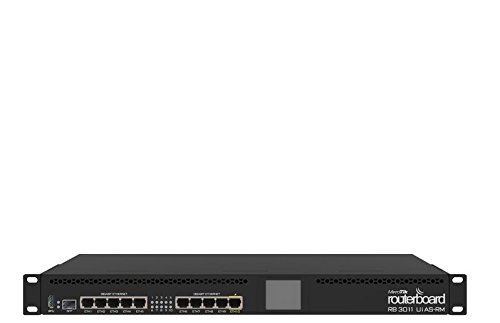
Mikrotik RB3011UIAS-RM RouterBOARD 10xGigabit Ethernet, USB 3.0, LCD, RB3011


Key features
- •RB3011UiAS-RM Unit comes with 1U rackmount enclosure, a touchscreen LCD panel, a serial console port and PoE output functionality on the last Ethernet port.
- •CPU nominal frequency 1.4 GHz / CPU core count 2 / Size of RAM 1 GB / 10/100/1000 Ethernet ports 10 / Switch chip model QCA8337-AL3C-R
- •PoE in Yes (passive only) / PoE out Yes (port 10) / Supported input voltage 10 V - 30 V / Voltage Monitor Yes / PCB temperature monitor Yes / License level 5
- •Operating System RouterOS / CPU IPQ-8064 / Max Power consumption 10 W
- •The RB3011 is a new multi port device, our first to be running an ARM architecture CPU for higher performance than ever before. The RB3011 has ten Gigabit ports divided in two switch groups, an SFP cage and for the first time a SuperSpeed full size USB 3.0 port, for adding storage or an external 3G/4G modem.
Mikrotik RB3011UIAS-RM RouterBOARD 10xGigabit Ethernet, USB 3.0, LCD, RB3011
List Price: $251.32$226.19DEALYou Save: $25.13 (10%)
Free shippingFree Returns – 30 daysFree Order CancellationSecure Payment2–3 Days DeliveryGet It October 26, 2026In Stock (3)No marketing spamNo account requiredFulfilment by FedEx / Amazon / UPS / ShipwirePayPal / Card Buyer Protection
Customer Reviews
Reviews sourced from verified Amazon purchasers4.3
out of 5
Based on 10 reviews
5★
90%
4★
10%
3★
0%
2★
0%
1★
0%
If you are looking for a device that is easy to configure & setup
Colum•July 16, 2018
If you are looking for a device that is easy to configure & setup, turn back now and look at Ubuquiti.
I'm extremely satisfied with this router. It has every feature one could possibly ask for in a router, it's able to switch at least 4gb/s across multiple ports, and it's low power. It has all the makings of an enterprise grade device without that enterprise price.
The one major downside is that many of the configuration options are not intuitive, burred, or not exposed in the GUI. There also tasks that are not intuitive at all. VPN setup comes to mind. I can not get any VPN service successfully configured through the GUI. The CLI is excellent, and hasn't changed much so guides 6 years old still work.
There is a learning curve, but for anyone who wants to get their hands a bit dirty with networking this is the router for you. You can do almost anything with it, and for the price it's a steal.
I'm extremely satisfied with this router. It has every feature one could possibly ask for in a router, it's able to switch at least 4gb/s across multiple ports, and it's low power. It has all the makings of an enterprise grade device without that enterprise price.
The one major downside is that many of the configuration options are not intuitive, burred, or not exposed in the GUI. There also tasks that are not intuitive at all. VPN setup comes to mind. I can not get any VPN service successfully configured through the GUI. The CLI is excellent, and hasn't changed much so guides 6 years old still work.
There is a learning curve, but for anyone who wants to get their hands a bit dirty with networking this is the router for you. You can do almost anything with it, and for the price it's a steal.
Huge feature set, reliable, ultra-competitive price, great specs for the price.
D. M. Kruse•January 6, 2018
I'm partner in a multi-national MSP, and have deployed hundreds of Mikrotik devices. In short, this is the best "bang-for-your-buck" router possible for a small-medium size business.
The RB3011 is an absolute monster router for the price. $170 for a 1U 10-port gigabit, SFP, and 6Gbps of WAN>LAN potential throughput. Though none of the ports can go faster than 1Gbps, the processing power is still there. When I ran a comparison of the specs between this and say, an equivalent Sonicwall (already lower-end gear), it's $170 for a RB3011-RM vs a $3,400 for a Sonicwall NSA 2600, more features too.
When you hold the device it feels like a prop, it's nearly empty since Mikrotik designs their equipment around CPU-based routing over dedicated hardware. It allows for the feature-set to be upgraded over time, increases reliability, and massively reduces cost. Though it's not uncommon for a switch to fail... and it's not impossible for a CPU to fail, when is the last time you've see a mid-range (non-server) CPU actually just completely die? Probably pretty rare. We have a few Mikrotik routers with over 3 years uptime, just cranking along without issues.
Another benefit -- everything is unlocked, no insane licensing fees like with Cisco gear! 50+ L2TP VPN users -- no problem! MPLS, Wireless Hotspot through the CAPsMAN Wireless Manager, Layer7 filtering. Mikrotik gives you all of the bells and whistles to work with, but no hand-holding -- you need to be familiar with network concepts and spend some time following their wiki. Mikrotik equipment is targeted at Wireless ISPs and networking professionals -- not for beginners to computers.
Good luck, have fun, for $170 it can't hurt to buy one and play with it a bit. Once you see the feature set for yourself, you'll likely be buying more of these.
The RB3011 is an absolute monster router for the price. $170 for a 1U 10-port gigabit, SFP, and 6Gbps of WAN>LAN potential throughput. Though none of the ports can go faster than 1Gbps, the processing power is still there. When I ran a comparison of the specs between this and say, an equivalent Sonicwall (already lower-end gear), it's $170 for a RB3011-RM vs a $3,400 for a Sonicwall NSA 2600, more features too.
When you hold the device it feels like a prop, it's nearly empty since Mikrotik designs their equipment around CPU-based routing over dedicated hardware. It allows for the feature-set to be upgraded over time, increases reliability, and massively reduces cost. Though it's not uncommon for a switch to fail... and it's not impossible for a CPU to fail, when is the last time you've see a mid-range (non-server) CPU actually just completely die? Probably pretty rare. We have a few Mikrotik routers with over 3 years uptime, just cranking along without issues.
Another benefit -- everything is unlocked, no insane licensing fees like with Cisco gear! 50+ L2TP VPN users -- no problem! MPLS, Wireless Hotspot through the CAPsMAN Wireless Manager, Layer7 filtering. Mikrotik gives you all of the bells and whistles to work with, but no hand-holding -- you need to be familiar with network concepts and spend some time following their wiki. Mikrotik equipment is targeted at Wireless ISPs and networking professionals -- not for beginners to computers.
Good luck, have fun, for $170 it can't hurt to buy one and play with it a bit. Once you see the feature set for yourself, you'll likely be buying more of these.
very fast router. I have replaced a rb2011 with ...
Jhon Chavarriaga•October 9, 2017
very fast router.
I have replaced a rb2011 with which managed 65 users through simple queues, qos via queue tree, balancing loads of 3 wan via vlans, more than 30 firewall rules and another 30 in mangle. in the peak hour 60 megs were spent with an average use of 70% to 90% cpu.
now with this new router 3011 the same work consumes between 8% and 11% cpu
I have replaced a rb2011 with which managed 65 users through simple queues, qos via queue tree, balancing loads of 3 wan via vlans, more than 30 firewall rules and another 30 in mangle. in the peak hour 60 megs were spent with an average use of 70% to 90% cpu.
now with this new router 3011 the same work consumes between 8% and 11% cpu
Powerful router but complex to setup beyond the basics
bitblt•June 1, 2017
This is currently my edge router for the house and home lab. The unit has worked without issues and doesn't have any problems keeping up with my 300Mbs line and hopefully the same will be true when we get gigabit fiber.
The unit is very quiet and uses little power.
Mikrotik doesn't design these unit for the general population and I struggle somethings setting things up that are "easy" on the Cisco routers. That said, I love the price and feature set that is available. Winbox is a great tool for administration. The forums have a lot of good information.
The unit provides firewall policy, DHCP for the house, DNS for the home lab, VLAN routing, VPN gateway, and other tasks. With the kids home and me tinkering, it barely exceeds 5% utilization.
My only "complaint" is this unit only comes with a single SFP port and it would have a great SFP+ instead for use in the network core for VLAN routing.
The unit is very quiet and uses little power.
Mikrotik doesn't design these unit for the general population and I struggle somethings setting things up that are "easy" on the Cisco routers. That said, I love the price and feature set that is available. Winbox is a great tool for administration. The forums have a lot of good information.
The unit provides firewall policy, DHCP for the house, DNS for the home lab, VLAN routing, VPN gateway, and other tasks. With the kids home and me tinkering, it barely exceeds 5% utilization.
My only "complaint" is this unit only comes with a single SFP port and it would have a great SFP+ instead for use in the network core for VLAN routing.
Fast and Stable
Just Honest•May 1, 2017
It's been installed in my home for about 2 weeks now and so far has been rock solid and lightning fast. Everything works as advertised except the touchscreen dispay. There's no nice way to say it, so I'll just say it sucks. It looks okay, but it is a pain to use. Try to click on the right side of the screen and it will register something on the left side. Try scrolling down and you will click on every option a few times before you get to where you want to go. I only used it a little bit during setup, so it's no big deal. The web interface is pretty straightforward and not complicated if you have a little experience with network equipment. Overall, I'm very pleased with the product and highly recommend it.
Page 1 of 2
Related products


Fortinet FortiGate 80E and 1YR 24x7 UTM Protection BDL (FG-80E-BDL-950-12)
List: $2255.25$2029.73DEAL