ULTRALOQ UL3 BT Bluetooth Enabled Fingerprint and Touchscreen Smart Lock (Satin Nickel) | 5-in-1 Keyless Entry | Secure Finger ID | Anti-peep Code | Works with iOS and Android | Match Home Aesthetics


Key features
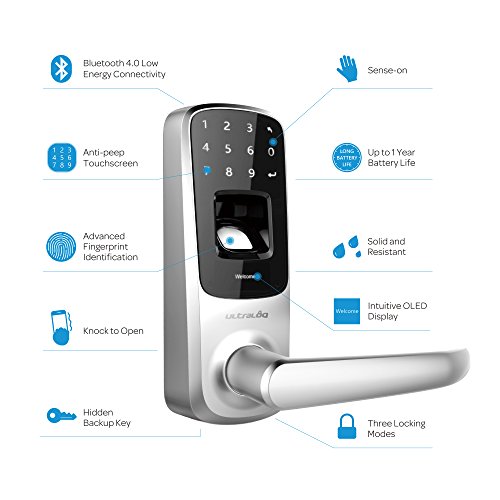
- •World's First 5-in-1 Keyless Entry Smart Lock, Fingerprint + Code + Smartphone + Knock to Open + Key
- •Advanced Fingerprint Identification, Anti-peep Touch Keypad Technology, View Logs via Ultraloq App; Temperature: Inside lock body: 14°F (-10°C) to 131°F (55°C)
- •Reversible Handle, Weatherproof, Intuitive OLED Display, Long Battery Life, Low Battery Alarm
- •18 Months Electronic and Lifetime Mechanical Warranty, DIY Installation, Auto-relock/Passage/Lockout
- •Single Latch (Optional Deadbolt Cover Plate Required for Replacing Existing Deadbolt).Projection:0.6 inches
ULTRALOQ UL3 BT Bluetooth Enabled Fingerprint and Touchscreen Smart Lock (Satin Nickel) | 5-in-1 Keyless Entry | Secure Finger ID | Anti-peep Code | Works with iOS and Android | Match Home Aesthetics
List Price: $289.55$260.60DEALYou Save: $28.95 (10%)
Free shippingFree Returns – 30 daysFree Order CancellationSecure Payment2–3 Days DeliveryGet It October 26, 2026In Stock (4)No marketing spamNo account requiredFulfilment by FedEx / Amazon / UPS / ShipwirePayPal / Card Buyer Protection
Customer Reviews
Reviews sourced from verified Amazon purchasers3.8
out of 5
Based on 20 reviews
5★
40%
4★
35%
3★
5%
2★
0%
1★
20%
Not a perfect system, but still worth a purchase
Scott E✓ Verified Purchase•March 13, 2018
I purchased this for my apartment building in December. A few things: first, I don't own the building, but I am a longtime tenant. It is a 7 unit-building with three exterior entrances. The property manager lives in the building and runs the (absentee) owner's company. We live a few blocks off Haight Street in San Francisco, and package theft for items left on the front porch has been an issue. I offered to purchase locks for the exterior doors (all three) if the property manager took care of the installation (and any flak from the owner). Since I plan on staying in the building for a long time, it was an expense that I was willing to bear.
That out of the way, here are my impressions and those of my fellow tenants:
Ease of Setup: 2 stars. It isn't too difficult to set up the Utraloqs on first blush, and it looks like you can quickly copy the setup from one lock to another, but it is actually a pain if you are trying to create entries for multiple users. For our setup, the property manager and I were to be administrators. In my professional life, I have more than a passing familiarity with good security (technical and otherwise) practices, and I also set up a separate user account for both of us (which was good, because the property manager quickly forgot the administrator account that I had set up but had no problem remembering the user account). But for each unit in the building, I had to assign a number to each intended user, because you use the keypad to add all the new accounts and it is numeric only. I had to assign one for each tenant, and not each apartment, because the biometric captures only one finger per user account. Then I realized that some of us (myself included) wanted to record a finger from each hand, to make it easier to use if we were carrying a package, which meant I had to make two user accounts for each person that wanted to record two fingers. And while using the keypad is convenient in that you don't need an app to add users, it is certainly a pain from the perspective of User Interface. It should be noted that there is a place in the Ultraloq App for you to add a name to a user, but more on that below.
Installation: I didn't handle this, a trained locksmith did, but he said it was painless and asked me about the locks, as he may start recommending them to others.
Battery life: 5 out of 5. They have been in use constantly for four months with no issues. Batteries are AA, and I am using AmazonBasics rechargeables without an issue.
Usage - Keypad: 4 out of 5. The keypad stays asleep (and dark) until you need to use it, then it wakes up. You type in your code and press the enter key, which is a symbol (look at the picture of the keypad if you don't know what I mean). I have only had one person that couldn't figure out how to use the keypad, and to be fair, there's no indication that you need to press enter, but everyone else, from delivery drivers to cleaning services, figured it out on their own.
Usage - Biometrics: 4 out of 5. The reader wakes up very quickly, and when it gets it right on the first try, it is amazingly fast. However, your mileage will vary based on the placement of your finger (relative to when you originally recorded it), the weather (if it is cold or very dry, the reader may have more difficulty than during warmer weather), the cleanliness of the reader (obviously, if it is smudged with mud, it won't work so well) and the condition of your chosen finger. One trick that works when it's cold or your skin is dry - touch the surface of your finger to your forehead, then touch the reader, and the additional transferred skin oil aids the reader in picking up your whorls and ridges.
Usage - Bluetooth: NR. Honestly, none of us use this. I tested it and it works, but a sample size of one test use is insufficient for a rating.
Usage - Manual Key: NR. The keys exist for emergencies and should not be used as a regular means of opening the locks. The company says this, our locksmith said this, and they definitely feel flimsy.
Ultraloq App: 2 out of 5. The app exists. It shows you the locks. It works most of the time to open them. It has difficulty maintaining a connection when performing administrative maintenance. It lacks the ability to move most of the administration work from the lock to the app. It *does* keep a security log of who has successfully used the lock and any unsuccessful attempts, as well as administrative logins; however, it is difficult to maintain a connection long enough to download the log. It does monitor rough battery status, but I have found this to be very unreliable.
Right now, I am awaiting the release of the bridges that upgrade the usability of these locks. In theory this will allow me to set certain codes to only work during certain days / times (like delivery drivers) and more easily administer the locks for the building. I purchased three of the bridges, but they have yet to be released by Ultraloq.
In conclusion, despite the fact I didn't just give everything five stars and say the locks are amazing, these are pretty good locks for the money. They do about 75% of what we need them to do, and they work flawlessly about 90% of the time. Not a single tenant has complained about the switch; on the contrary, almost everyone in the building has thanked me for purchasing them for the building. The property manager has left me with the responsibility of maintaining the user database until it's a bit easier, but I don't mind. Most of the delivery companies have no problems using the codes we have given them, with the notable exception of Amazon Logistics (who keeps leaving packages on the porch without even trying the code, but we are working on this) and OnTrac (although we may have them onboard now). If the functionality of the smartphone interface, the ease of adding, deleting, and modifying users, or the enhanced capabilities of the forthcoming bridges were addressed, I would not hesitate to give this five stars. Until then, this is not a perfect system, but I do recommend it.
That out of the way, here are my impressions and those of my fellow tenants:
Ease of Setup: 2 stars. It isn't too difficult to set up the Utraloqs on first blush, and it looks like you can quickly copy the setup from one lock to another, but it is actually a pain if you are trying to create entries for multiple users. For our setup, the property manager and I were to be administrators. In my professional life, I have more than a passing familiarity with good security (technical and otherwise) practices, and I also set up a separate user account for both of us (which was good, because the property manager quickly forgot the administrator account that I had set up but had no problem remembering the user account). But for each unit in the building, I had to assign a number to each intended user, because you use the keypad to add all the new accounts and it is numeric only. I had to assign one for each tenant, and not each apartment, because the biometric captures only one finger per user account. Then I realized that some of us (myself included) wanted to record a finger from each hand, to make it easier to use if we were carrying a package, which meant I had to make two user accounts for each person that wanted to record two fingers. And while using the keypad is convenient in that you don't need an app to add users, it is certainly a pain from the perspective of User Interface. It should be noted that there is a place in the Ultraloq App for you to add a name to a user, but more on that below.
Installation: I didn't handle this, a trained locksmith did, but he said it was painless and asked me about the locks, as he may start recommending them to others.
Battery life: 5 out of 5. They have been in use constantly for four months with no issues. Batteries are AA, and I am using AmazonBasics rechargeables without an issue.
Usage - Keypad: 4 out of 5. The keypad stays asleep (and dark) until you need to use it, then it wakes up. You type in your code and press the enter key, which is a symbol (look at the picture of the keypad if you don't know what I mean). I have only had one person that couldn't figure out how to use the keypad, and to be fair, there's no indication that you need to press enter, but everyone else, from delivery drivers to cleaning services, figured it out on their own.
Usage - Biometrics: 4 out of 5. The reader wakes up very quickly, and when it gets it right on the first try, it is amazingly fast. However, your mileage will vary based on the placement of your finger (relative to when you originally recorded it), the weather (if it is cold or very dry, the reader may have more difficulty than during warmer weather), the cleanliness of the reader (obviously, if it is smudged with mud, it won't work so well) and the condition of your chosen finger. One trick that works when it's cold or your skin is dry - touch the surface of your finger to your forehead, then touch the reader, and the additional transferred skin oil aids the reader in picking up your whorls and ridges.
Usage - Bluetooth: NR. Honestly, none of us use this. I tested it and it works, but a sample size of one test use is insufficient for a rating.
Usage - Manual Key: NR. The keys exist for emergencies and should not be used as a regular means of opening the locks. The company says this, our locksmith said this, and they definitely feel flimsy.
Ultraloq App: 2 out of 5. The app exists. It shows you the locks. It works most of the time to open them. It has difficulty maintaining a connection when performing administrative maintenance. It lacks the ability to move most of the administration work from the lock to the app. It *does* keep a security log of who has successfully used the lock and any unsuccessful attempts, as well as administrative logins; however, it is difficult to maintain a connection long enough to download the log. It does monitor rough battery status, but I have found this to be very unreliable.
Right now, I am awaiting the release of the bridges that upgrade the usability of these locks. In theory this will allow me to set certain codes to only work during certain days / times (like delivery drivers) and more easily administer the locks for the building. I purchased three of the bridges, but they have yet to be released by Ultraloq.
In conclusion, despite the fact I didn't just give everything five stars and say the locks are amazing, these are pretty good locks for the money. They do about 75% of what we need them to do, and they work flawlessly about 90% of the time. Not a single tenant has complained about the switch; on the contrary, almost everyone in the building has thanked me for purchasing them for the building. The property manager has left me with the responsibility of maintaining the user database until it's a bit easier, but I don't mind. Most of the delivery companies have no problems using the codes we have given them, with the notable exception of Amazon Logistics (who keeps leaving packages on the porch without even trying the code, but we are working on this) and OnTrac (although we may have them onboard now). If the functionality of the smartphone interface, the ease of adding, deleting, and modifying users, or the enhanced capabilities of the forthcoming bridges were addressed, I would not hesitate to give this five stars. Until then, this is not a perfect system, but I do recommend it.
Very difficult to use when exposed to direct sun light.
John✓ Verified Purchase•March 12, 2018
Seems to be built well but that's about it. Finger print reader is spotty at best, just will not read my prints. knock to open does not work & it's very slow to hook up to bluetooth. Using number code to open seems to work pretty good but you can't see the numbers in the morning when the sun is coming up. Hard to program! Should have provision for programming on the desk before installation. Needs allot of work!
Amazing, for a short time.
Shay Dulle✓ Verified Purchase•October 22, 2017
Handle broke and battery cover as well. So amazing for the first few months
its awesome. Setting it up is easy
The Original Dad Guy✓ Verified Purchase•September 5, 2017
If your thinking about this lock, its awesome. Setting it up is easy, however if you are going to setup the Bluetooth on multiple phones under multiple accounts, you need to let it rest for a bit between setups (I don't know why, maybe its processing just like when I reset my router it takes 3 min to see the signal again) . anyway after you set it up on one phone and test that it works, power off that phone or turn off Bluetooth and wait 5min (a real five min, time it) then set up the 2nd phone. if you try to set them up right after eachother you can expect a headache and you might even think its defective. its not. just give it 5 min before programing the next number.
Intstall was a piece of cake. fits any normal door knob hole.
Intstall was a piece of cake. fits any normal door knob hole.
awesome smart lock
Butterfly24✓ Verified Purchase•September 2, 2017
Before I bought this lock, i read some negative reviews about Bluetooth issue but manufacturer stated issue was solved by latest app. I decided to give it a try. Everything turned out to be working as described. Fingerprint almost works every time. I will get another one for my garage door.
Page 1 of 4