Ambient Weather WS-2902 WiFi Smart Weather Station


Key features
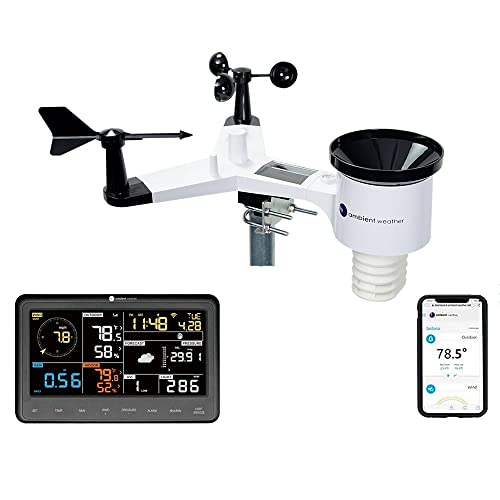
- •The Professional weather station allows you to monitor your home and backyard weather conditions with the brilliant, easy-to-read LCD color display
- •The enhanced Wi-Fi connectable option that enables your station to transmit its data wirelessly to the world's largest personal weather station Network, weather Underground
- •Experience the convenience of having your personal weather information with you on the go using your computer, tablet, or mobile device
- •The weather station measures wind speed, wind direction, rainfall, outdoor temperature and humidity, solar radiation and UV
- •Also included inside the console is temperature, humidity and barometric pressure. The weather station also calculates dew point, wind Chill and heat index
BrandAmbient Weather
CategoryKitchen & Dining Features
SizeBase Console + Array
ColorWS-2902-ARRAY+2902C
Warranty1 year.
Ambient Weather WS-2902 WiFi Smart Weather Station
List Price: $290.99$261.89DEALYou Save: $29.10 (10%)
Free shippingFree Returns – 30 daysFree Order CancellationSecure Payment2–3 Days DeliveryGet It October 25, 2026In Stock (30)No marketing spamNo account requiredFulfilment by FedEx / Amazon / UPS / ShipwirePayPal / Card Buyer Protection
Customer Reviews
Reviews sourced from verified Amazon purchasers4.5
out of 5
Based on 10 reviews
5★
50%
4★
50%
3★
0%
2★
0%
1★
0%
Good weather station with a bad console display.
Mr. Man✓ Verified Purchase•August 15, 2023
I've been meaning to get myself a weather station and after a lot of reading, decided on the WS-2902c for a number of reasons. Here's an overview of this product, if you're considering a purchase:
The Sensor Array
The sensor array is the part that stays outdoors and contains most of the weather sensors. The sensor array itself is pretty lightweight and easy to assemble; it can measure temperature, barometric pressure, wind speed, wind direction, humidity, rainfall, and sunlight strength. Assembly takes a few minutes and will require a precision screwdriver (aka jeweler's screwdriver), which is not included.
The rain bucket funnel installation was slightly trickier than I expected. The instructions tell you to push it down and rotate clockwise. This is correct, but the tabs on the funnel need to align to the grooves in the bucket, or things won't click in place. Also, it required more force when pushing down than I expected.
The sensor array works with two AA batteries and a small solar panel. Don't forget to remove the sticker that covers the solar panel before installing the array on a pole. In fact, the manual wisely recommends that you assemble the array and make sure it connects to the console before installing it in a permanent location. It's also important to note that you *cannot* use rechargeable batteries on the sensor array (different voltage). Regular alkalines should last for years, but I used a Lithium AA (non-rechargeable) for maximum time between recharges. Remember, the array only uses the batteries when there's no solar light available, and it only sends one pulse of data every 15s or so.
Sensor Array installation (outdoors)
This is the fun part of installing your weather station. First, search around the Internet for instructions on where to mount your sensor array. More expensive models allow setting up each component at a different location (for instance, temperature sensors are best if installed ~5ft from the ground, but anemometers need to go 10-15ft high and so on). This model has all sensors in a single unit, so a compromise is needed. It's important to not mount the station too close to other obstacles (trees, roofs, etc) and not too close to lawns (where irrigation will throw the humidity measurements off).
In my case, I used a 2" PVC conduit (see photo) to raise the station above my roof. The included U-bolts (used to tie the sensor array to the pole) can accept pipes up to 2" diameter but this is *outside diameter*. PVC pipes are measured in inside diameters. In my case, a PVC junction and a reduction bushing + a small piece of 1 1/2" PVC worked beautifully. I had to brace the pole to an existing 4-by-4, with three EMT braces, which worked beautifully.
Another tip is: If you want to use PVC, use at least 2" for more stability. Even 2" PVC starts to wobble after 6ft or so (which is what I needed). A metal pole is stiffer and ideal but presents complications with lightning. If you use a metal pole, make sure you properly ground it! Ideally, pay an electrician to do it if you're unsure about how to do that.
The console
The console is the part that stays inside your house. It has a few functions:
- Measures indoor temperature and humidity.
- Connects to the Sensor Array using the ISM band (915Mhz).
- Connects to your WiFI (2.4Ghz only!) and transmits data to ambientweather.net and others.
To set up the console, you also need a cellphone app. For Android, the app is "Awnet". It has terrible ratings, and is very simplistic, but did the job for me. Once you configure the console, you don't need to use this app anymore. The app will also check the firmware on the station and, if required, prompt you to upgrade it. If that's the case, make sure to upgrade the firmware. Newer versions come with nice features, like allowing the console to connect to arbitrary webservers.
The console requires 3 AAA batteries and will use them to keep the configuration intact if the power goes out. It is OK to use rechargeable batteries in the console.
The console will optionally transmit your data to ambientweather.net, where other people can see your data in realtime. It can also directly upload to other sites like Weather Underground and to a custom site (if, for example, you run your own web server and want to further process this data.) Note that ambientweather.net (the site) itself can transmit your data to other personal weather station aggregators. So in fact you only need to transmit your data once (to ambientweather.net). From there, you can configure the site to transmit to pwsweather and weather underground. It's all free.
Now, the bad: The display on the station is awful. The viewing angles are very narrow. I installed mine on a wall and it became almost unreadable since the console is naturally angled up instead of being flat. Here's a tip: The angles are not so bad when you're looking at the console from above. If you install it on a wall, it has to go lower than you expect. In my tests, it has to be around 10" below the line of your eyes. I docked one star out of my review for this and honestly considered docking two stars.
Extras
For the SDR geeks out there, you can listen to your weather station using rtl_433 software (open source) and a cheap SDR dongle. The station transmits on the 915Mhz frequency every 15s or so. If using rtl_433, just run "rtl_433 -f 915Mhz". You can also pipe this to a JSON file for further processing if you wish (add -f json to the rtl_433 command-line).
Conclusion
Overall, I like the weather station. Installation outside required some thinking but the result was rewarding. I really dislike the console though :( The ws-2902c (this model) supposedly has a redesigned console from the ws-2902b. It's a real shame they didn't improve this or give us another option of a console for this model. Fortunately, the integration with personal weather station aggregators works really well, and I particularly like the option to upload data to any web server of your choice, if you want to further process this data.
The Sensor Array
The sensor array is the part that stays outdoors and contains most of the weather sensors. The sensor array itself is pretty lightweight and easy to assemble; it can measure temperature, barometric pressure, wind speed, wind direction, humidity, rainfall, and sunlight strength. Assembly takes a few minutes and will require a precision screwdriver (aka jeweler's screwdriver), which is not included.
The rain bucket funnel installation was slightly trickier than I expected. The instructions tell you to push it down and rotate clockwise. This is correct, but the tabs on the funnel need to align to the grooves in the bucket, or things won't click in place. Also, it required more force when pushing down than I expected.
The sensor array works with two AA batteries and a small solar panel. Don't forget to remove the sticker that covers the solar panel before installing the array on a pole. In fact, the manual wisely recommends that you assemble the array and make sure it connects to the console before installing it in a permanent location. It's also important to note that you *cannot* use rechargeable batteries on the sensor array (different voltage). Regular alkalines should last for years, but I used a Lithium AA (non-rechargeable) for maximum time between recharges. Remember, the array only uses the batteries when there's no solar light available, and it only sends one pulse of data every 15s or so.
Sensor Array installation (outdoors)
This is the fun part of installing your weather station. First, search around the Internet for instructions on where to mount your sensor array. More expensive models allow setting up each component at a different location (for instance, temperature sensors are best if installed ~5ft from the ground, but anemometers need to go 10-15ft high and so on). This model has all sensors in a single unit, so a compromise is needed. It's important to not mount the station too close to other obstacles (trees, roofs, etc) and not too close to lawns (where irrigation will throw the humidity measurements off).
In my case, I used a 2" PVC conduit (see photo) to raise the station above my roof. The included U-bolts (used to tie the sensor array to the pole) can accept pipes up to 2" diameter but this is *outside diameter*. PVC pipes are measured in inside diameters. In my case, a PVC junction and a reduction bushing + a small piece of 1 1/2" PVC worked beautifully. I had to brace the pole to an existing 4-by-4, with three EMT braces, which worked beautifully.
Another tip is: If you want to use PVC, use at least 2" for more stability. Even 2" PVC starts to wobble after 6ft or so (which is what I needed). A metal pole is stiffer and ideal but presents complications with lightning. If you use a metal pole, make sure you properly ground it! Ideally, pay an electrician to do it if you're unsure about how to do that.
The console
The console is the part that stays inside your house. It has a few functions:
- Measures indoor temperature and humidity.
- Connects to the Sensor Array using the ISM band (915Mhz).
- Connects to your WiFI (2.4Ghz only!) and transmits data to ambientweather.net and others.
To set up the console, you also need a cellphone app. For Android, the app is "Awnet". It has terrible ratings, and is very simplistic, but did the job for me. Once you configure the console, you don't need to use this app anymore. The app will also check the firmware on the station and, if required, prompt you to upgrade it. If that's the case, make sure to upgrade the firmware. Newer versions come with nice features, like allowing the console to connect to arbitrary webservers.
The console requires 3 AAA batteries and will use them to keep the configuration intact if the power goes out. It is OK to use rechargeable batteries in the console.
The console will optionally transmit your data to ambientweather.net, where other people can see your data in realtime. It can also directly upload to other sites like Weather Underground and to a custom site (if, for example, you run your own web server and want to further process this data.) Note that ambientweather.net (the site) itself can transmit your data to other personal weather station aggregators. So in fact you only need to transmit your data once (to ambientweather.net). From there, you can configure the site to transmit to pwsweather and weather underground. It's all free.
Now, the bad: The display on the station is awful. The viewing angles are very narrow. I installed mine on a wall and it became almost unreadable since the console is naturally angled up instead of being flat. Here's a tip: The angles are not so bad when you're looking at the console from above. If you install it on a wall, it has to go lower than you expect. In my tests, it has to be around 10" below the line of your eyes. I docked one star out of my review for this and honestly considered docking two stars.
Extras
For the SDR geeks out there, you can listen to your weather station using rtl_433 software (open source) and a cheap SDR dongle. The station transmits on the 915Mhz frequency every 15s or so. If using rtl_433, just run "rtl_433 -f 915Mhz". You can also pipe this to a JSON file for further processing if you wish (add -f json to the rtl_433 command-line).
Conclusion
Overall, I like the weather station. Installation outside required some thinking but the result was rewarding. I really dislike the console though :( The ws-2902c (this model) supposedly has a redesigned console from the ws-2902b. It's a real shame they didn't improve this or give us another option of a console for this model. Fortunately, the integration with personal weather station aggregators works really well, and I particularly like the option to upload data to any web server of your choice, if you want to further process this data.
Love it
Cd. Boykin✓ Verified Purchase•August 14, 2023
I'm fascinated by the weather but put off buying a weather station because of cost and do I really need this. I finally decided to get one. I love this thing!!! Seems accurate, easy to use, and just fun. It's so nice to know the wind speed for things like going out on the boat. Super nice to know how much rain we got and great to know the feels like temp before stepping outside. Live in Texas so that's a must for working outside.
It was easy to set up except connecting to the Wi-Fi, and that was only because I'm not very computer savvy. All in all I had it set up in about an hour and half total. I bought a 7foot birdhouse pole to attach to and it worked great.
Another thing I love is no matter what town I'm in I can always check the weather at my house.
It was easy to set up except connecting to the Wi-Fi, and that was only because I'm not very computer savvy. All in all I had it set up in about an hour and half total. I bought a 7foot birdhouse pole to attach to and it worked great.
Another thing I love is no matter what town I'm in I can always check the weather at my house.
Love it!
Martin P. Hanley✓ Verified Purchase•August 6, 2023
This was an easy install! I was concerned, because I saw some people had commented with some issues, but this went together and connected without any issues whatsoever. I would highly encourage you to purchase the mast because it doesn't come with one.
It took me all of 15 minutes to get everything assembled and mounted outside. Connection to the consul went quickly. I was able to connect using my phone to connect the consul to the Wi-Fi. And it started working right away.
The only issue that I'm having is, I really don't like the base that the consul sits in. It just feels flimsy when the consul is in it. So when I have a little time this week, I'll mount the consul to the wall.
It took me all of 15 minutes to get everything assembled and mounted outside. Connection to the consul went quickly. I was able to connect using my phone to connect the consul to the Wi-Fi. And it started working right away.
The only issue that I'm having is, I really don't like the base that the consul sits in. It just feels flimsy when the consul is in it. So when I have a little time this week, I'll mount the consul to the wall.
Finally, a weather station that delivers on what AcuRite promises - and great product support
Marksto✓ Verified Purchase•July 10, 2023
One additional comment to add to my review below. After writing this I started noticing some issues with the sensor briefly but regularly dropping the connection to the base at night. I called AW and the person who handles return issues answered the phone. With nothing more than a brief description of the issue and assurance that I was using fresh batteries she simply said she would send another sensor out right away. It works flawlessly. Yet another aspect of AW I am more than impressed with - super easy to work with and easy product support and a company that stands by their warranty.
Just replaced my AcuRite 5 in 1 station with the Ambient Weather WS2902 - and so glad I did. Suffice it to say if this is your first weather station purchase this is the right one to get. If this is not your first station (and especially if you're an AcuRite user) read on for more details.
I've owned a personal weather station for about three years now. When I first purchased the AcuRite I was quite happy and impressed with the functionality, but it didn't take long for issues to become apparent and increasingly frustrating. Sort of an irony that AcuRite isn't much of either - accurate or right. I can break down user experience into three general areas:
1. Functional Design. The Ambient Weather station (AW) is the clear winner and way, way ahead of Acurite (AR). For starters, the internet connectivity is built-in and utilizes wireless. AR makes you buy a separate "bridge" to join the station to the internet and even then the bridging device has to physically plug into a router which limits placement. That is a horribly outdated and expensive design. The AR bridge also could only report on the feed from the sensor which meant only outdoor conditions could be networked, the AW design allows network reporting for all the indicators on the console which means indoor as well as outdoor. AW did it right, virtually everyone who cares to own a weather station will want internet/network connectivity for record keeping and visibility and this unit is built to work.
Setup with the AW station was a breeze...I was assembled, mounted, and up and running on Wunderground within 20 minutes, and most of that was with the physical assembly. Instructions were very clear and easy to understand.
The AW sensor shape and design is also superior. The AR sensor was designed with a very large internal cavity, which in my case quickly became a spacious home for all manner of insects and even small frogs which inevitably affected the readings and reliability. It was a regular routine to have to dismount it, take the sensor apart and clean out the bugs and webs and put it all back together. The only real cavity with the AW unit is the rain gauge. The solar panels are also facing upward (the direction of the sun...duh) on the AW unit, and the AR had panels that were angled more perpendicular and had to face southward, which under some circumstances limited the light exposure to the panels.
One note I will add though as an improvement suggestion for the AW design: There are compass readings stamped into the sensor below the wind vane that have to be used when mounting the unit to ensure directional accuracy. The stamped readings only face upward, and since most stations are mounted higher than eye-level that makes for a poor user experience. I easily got around it by placing a piece of red tape on the underside corresponding to "south" so I could see if from below when mounting, but it would be much better if the compass readings were indicated and visible from below.
2. Accuracy. Once again, AW is the clear winner. The AR temperature constantly read too high when in direct sunlight - to the tune of 2-5 degrees. It had a fan that was supposed to circulate fresh air to allow accuracy but it just flat did not work well enough. Also, on the AR unit the interior temperature on the console would become inaccurate when you turned the backlight on in the sensor. The light itself caused the temp to read several degrees too high (nice quality control, huh?)
All the readings on the AW were spot on right out of the box. Temp, rainfall, etc were good with no calibration necessary - though all readings can be calibrated if needed, that functional adjustment is built into the console. The AR unit only had calibration for the rain gauge and that involved a manual adjustment of a screw in the sensor itself.
3. Durability. This is the one area I cannot yet commend the AW on, only time will tell. It appears to be a better-built unit so I am optimistic and will update this review as necessary.
I can say that durability was another chronic problem with the AR. The first sensor just flat out failed to read one day and had to be replaced at my expense. Then, the second sensor developed a problem about a year into its life where it would just eat up batteries about every 3 weeks when they were supposed to last a year or more. From the volume of complaints about this on the AR support forum it was clear that there was a manufacturing defect causing battery issues that were extremely widespread, yet they did nothing to make it right "“ instead they just told people over and over to use fresh batteries. The AR was also built with plastic that weakened with exposure to UV light and weather. Several of the screw holes stripped out because of the weak plastic. The plastic on the AW sensor appears thicker and harder and is a brighter color which I suspect will help with the UV exposure issues.
Just replaced my AcuRite 5 in 1 station with the Ambient Weather WS2902 - and so glad I did. Suffice it to say if this is your first weather station purchase this is the right one to get. If this is not your first station (and especially if you're an AcuRite user) read on for more details.
I've owned a personal weather station for about three years now. When I first purchased the AcuRite I was quite happy and impressed with the functionality, but it didn't take long for issues to become apparent and increasingly frustrating. Sort of an irony that AcuRite isn't much of either - accurate or right. I can break down user experience into three general areas:
1. Functional Design. The Ambient Weather station (AW) is the clear winner and way, way ahead of Acurite (AR). For starters, the internet connectivity is built-in and utilizes wireless. AR makes you buy a separate "bridge" to join the station to the internet and even then the bridging device has to physically plug into a router which limits placement. That is a horribly outdated and expensive design. The AR bridge also could only report on the feed from the sensor which meant only outdoor conditions could be networked, the AW design allows network reporting for all the indicators on the console which means indoor as well as outdoor. AW did it right, virtually everyone who cares to own a weather station will want internet/network connectivity for record keeping and visibility and this unit is built to work.
Setup with the AW station was a breeze...I was assembled, mounted, and up and running on Wunderground within 20 minutes, and most of that was with the physical assembly. Instructions were very clear and easy to understand.
The AW sensor shape and design is also superior. The AR sensor was designed with a very large internal cavity, which in my case quickly became a spacious home for all manner of insects and even small frogs which inevitably affected the readings and reliability. It was a regular routine to have to dismount it, take the sensor apart and clean out the bugs and webs and put it all back together. The only real cavity with the AW unit is the rain gauge. The solar panels are also facing upward (the direction of the sun...duh) on the AW unit, and the AR had panels that were angled more perpendicular and had to face southward, which under some circumstances limited the light exposure to the panels.
One note I will add though as an improvement suggestion for the AW design: There are compass readings stamped into the sensor below the wind vane that have to be used when mounting the unit to ensure directional accuracy. The stamped readings only face upward, and since most stations are mounted higher than eye-level that makes for a poor user experience. I easily got around it by placing a piece of red tape on the underside corresponding to "south" so I could see if from below when mounting, but it would be much better if the compass readings were indicated and visible from below.
2. Accuracy. Once again, AW is the clear winner. The AR temperature constantly read too high when in direct sunlight - to the tune of 2-5 degrees. It had a fan that was supposed to circulate fresh air to allow accuracy but it just flat did not work well enough. Also, on the AR unit the interior temperature on the console would become inaccurate when you turned the backlight on in the sensor. The light itself caused the temp to read several degrees too high (nice quality control, huh?)
All the readings on the AW were spot on right out of the box. Temp, rainfall, etc were good with no calibration necessary - though all readings can be calibrated if needed, that functional adjustment is built into the console. The AR unit only had calibration for the rain gauge and that involved a manual adjustment of a screw in the sensor itself.
3. Durability. This is the one area I cannot yet commend the AW on, only time will tell. It appears to be a better-built unit so I am optimistic and will update this review as necessary.
I can say that durability was another chronic problem with the AR. The first sensor just flat out failed to read one day and had to be replaced at my expense. Then, the second sensor developed a problem about a year into its life where it would just eat up batteries about every 3 weeks when they were supposed to last a year or more. From the volume of complaints about this on the AR support forum it was clear that there was a manufacturing defect causing battery issues that were extremely widespread, yet they did nothing to make it right "“ instead they just told people over and over to use fresh batteries. The AR was also built with plastic that weakened with exposure to UV light and weather. Several of the screw holes stripped out because of the weak plastic. The plastic on the AW sensor appears thicker and harder and is a brighter color which I suspect will help with the UV exposure issues.
UPDATE: IMPOSSIBLE to connect to WIFI
Brian Lauer✓ Verified Purchase•July 10, 2023
So excited to get this weather station! Easy to set up and connect to the display console. Works great! But try to connect it to WIFI? GOOD LUCK!! I have tried everything I can think of to get this thing connected. NOTHING works. Guess I'll just enjoy the readings from the display and miss out on all the added features having it connected to WIFI get you. Do yourself a favor and get the much less expensive model WITHOUT WIFI!!
UPDATE:
Finally heard back from customer support. Only took about an hour, so not bad, they sent me a link to the same instructions that are in the manual on how to connect using a PC. Only problem is, when you go to the IP address they give you, you get a Login screen that only shows Admin. After telling them this, they say to just click the Login button, and there is no password. Low and behold!! You get to the screen they show in the pictures!! Piece of cake from there! Now connected, and it's GREAT!! Upping by 2 stars! Just so everyone knows, THERE IS NO PASSWORD, JUST CLICK LOGIN!! Ya know, since NOWHERE tells you that!!
UPDATE:
Finally heard back from customer support. Only took about an hour, so not bad, they sent me a link to the same instructions that are in the manual on how to connect using a PC. Only problem is, when you go to the IP address they give you, you get a Login screen that only shows Admin. After telling them this, they say to just click the Login button, and there is no password. Low and behold!! You get to the screen they show in the pictures!! Piece of cake from there! Now connected, and it's GREAT!! Upping by 2 stars! Just so everyone knows, THERE IS NO PASSWORD, JUST CLICK LOGIN!! Ya know, since NOWHERE tells you that!!
Page 1 of 2