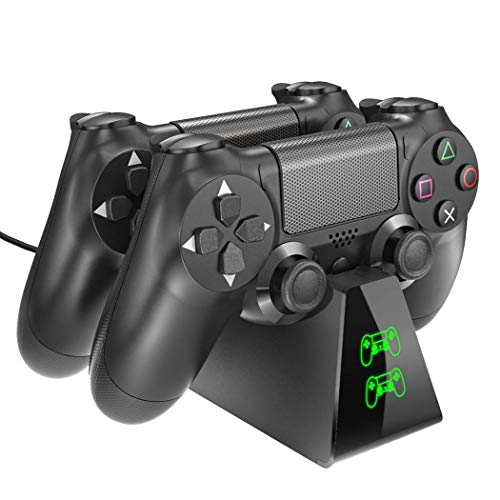
PS4 Controller Charger, DOBE Controller Charging Dock Station with LED Light Indicators Compatible with PS4/PS4 Slim/PS4 Pro Controller


Key features
- •Built-in Micro USB Micro Adapter Ports - Allows you to securely store and charge up two PS4 controllers simultaneously without having to connect them to the PS4 system.
- •Dual Wireless Controller Charger - Power through the USB port from either the PS4 console, PC or wall power source (Wall Adapter is not included) , steady current , you can even turn on and use the system with the controller while it's on the charger
- •Fully charge can be completed within 2.5 hours when charging one controller. Fully charge to two controllers simultaneously within 3 hours , it provides an easy and quick way to charge and store your PS4 controllers securely.
- •With LED Light Indicators - "Controller" and "DOBE" logo - USB cable connects the charging the "Controller" turns to GREEN COLOR , plug in the controller turns to RED COLER , charged fully turns to GREEN COLOR again
- •Save Place & Safe - Specially designed for saving the place & the built-in battery of the PS4 controller with a protector chip begins to charge when the power is below 70%, If the controller is interrupted in charging process, then put it for charging again, and if its power is over 70% but below 100%, the charging will stop. In this power status, the using time will be shorter than if it was otherwise fully charged.
PS4 Controller Charger, DOBE Controller Charging Dock Station with LED Light Indicators Compatible with PS4/PS4 Slim/PS4 Pro Controller
List Price: $23.26$20.93DEALYou Save: $2.33 (10%)
Free shippingFree Returns – 30 daysFree Order CancellationSecure Payment2–3 Days DeliveryGet It October 25, 2026In Stock (3)No marketing spamNo account requiredFulfilment by FedEx / Amazon / UPS / ShipwirePayPal / Card Buyer Protection
Customer Reviews
Reviews sourced from verified Amazon purchasers4.4
out of 5
Based on 10 reviews
5★
60%
4★
10%
3★
10%
2★
10%
1★
10%
Perfect
HolliJay•April 21, 2018
Device works perfectly, it's a great way to store the controllers in an organized way and to make sure they're always charged. My kids know the controllers always go back on the charging dock so I don't have to worry about loosing them or grabbing a dead one because someone forgot to charge it.
The only thing I would change is I wish the indicator light turned off when the controllers aren't connected, but that's more an astetic thing than anything else.
The only thing I would change is I wish the indicator light turned off when the controllers aren't connected, but that's more an astetic thing than anything else.
Nice charging station
T. Lemak•April 7, 2018
I'm happy to have found a solution that doesn't have the controllers taking up a lot of vertical space. I wish this would have come with an outlet adapter instead of just using USB to charge since I don't always have the PS4 plugged in the same room.
It works well, my controller was charged in less than 2 hours with it. The light indicator is a nice touch. It feels like a perfect fit inserting the controller, hopefully the unit has a long life.
It works well, my controller was charged in less than 2 hours with it. The light indicator is a nice touch. It feels like a perfect fit inserting the controller, hopefully the unit has a long life.
3 stars only because they don't come with a power ...
shannon m riley•March 25, 2018
3 stars only because they don't come with a power supply, only a USB cable and the charging indicating stays green even when they are disconnected. The charge indicator light should go off when disconnected, red when actively charging and green when fully charged.
Get it, it's good
Brad Robinson•February 22, 2018
I think there's something funny with the plug, as sometimes if you move if after you have put the ps4 in stand by our sleep or whatever the charger will turn off and not charge your controller while not in use.
But since that so minor and completely fixable, the awesomeness of it more than justifies the inconvenience.
1. It looks cool.
2. Only one wire to fight.
3. The stand holds the controller firmly, so i can set it on my leg and play with it while charging.
4. Tells you when the controller is fully charged.
It's worth it. If you're going to buy a new charging cable just buy this instead.
But since that so minor and completely fixable, the awesomeness of it more than justifies the inconvenience.
1. It looks cool.
2. Only one wire to fight.
3. The stand holds the controller firmly, so i can set it on my leg and play with it while charging.
4. Tells you when the controller is fully charged.
It's worth it. If you're going to buy a new charging cable just buy this instead.
WORKS!
Brandi J.•February 6, 2018
Easy to plug in controllers, charges them fine, doesn't take up too much room on TV stand. We've only had about a month but still works. Even if it ends up breaking for the price I will probably end up buying another. Not sure what else there is to say! The only confusing thing about this product is the lights on the front are 'backwards': when you plug in the back controller, the light on the panel that lights up is the bottom one...I find this odd, but no reason not to buy the product!!
Page 1 of 2