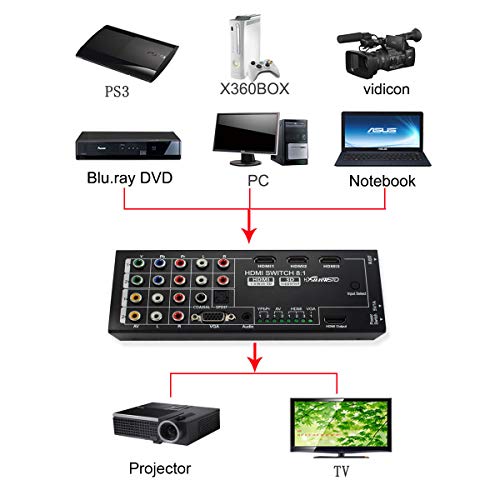
Multi-Functional HDMI Converter with 8 Inputs (VGA + AV + Ypbpr Component + HDMI) to One HDMI Output,COAXIAL Output,SPDIF Output Supports HDMI v1.4 3D


Key features
- •Multi-Functional HDMI Converter with 8 Inputs (VGA + AV + Ypbpr Component + HDMI) to One HDMI Output
- •nputs contains 2x YPbPR / Component Video, 2x AV, 1x VGA, and 3x HDMI
- •EDID Manipulation Feature to Support 2CH Stereo, 5.1/6CH or 7.1/8CH Surround Sound for 1080P TV
- •HDMI v1.3, supports HDMI v1.4 3D
- •The most complete solution for your HOME Theater Configuration
BrandHDSUNWSTD
CategorySelector Switch Boxes
Multi-Functional HDMI Converter with 8 Inputs (VGA + AV + Ypbpr Component + HDMI) to One HDMI Output,COAXIAL Output,SPDIF Output Supports HDMI v1.4 3D
List Price: $130.30$117.27DEALYou Save: $13.03 (10%)
Free shippingFree Returns – 30 daysFree Order CancellationSecure Payment2–3 Days DeliveryGet It October 25, 2026In Stock (2)No marketing spamNo account requiredFulfilment by FedEx / Amazon / UPS / ShipwirePayPal / Card Buyer Protection
Customer Reviews
Reviews sourced from verified Amazon purchasers3.8
out of 5
Based on 8 reviews
5★
75%
4★
25%
3★
0%
2★
0%
1★
0%
Component(YPbPr) input is picky
Reese✓ Verified Purchase•August 24, 2023
TL;DR: Remote/Switch work great except YPbPr video. Great for every other input.
I have a lot of classic and new game consoles. My setup is... messy. Before this, I was running an S-Video Switch, HDMI Switch, Composite Switch, HDMI Upscaler, and Composite Upscaler. Even pulling out of that out, did not resolve the issue with this device.
Both of the YPbPr produce no video, regardless of console, cable, TV settings, or in-console settings. I was able to verify the cables and consoles were working without the 8:1 switch. The description of the switch states "1.If you don't get the right video/audio, please make sure to use the "auto-copy" button on the remote, and for analog inputs, turn off the display unit and then turn it back on should fix no video problem." There is no "Auto-copy" on the remote, and cycling the power does nothing. The specific test consoles were a PS2(with Sony-branded Component cables) and a WiiU(Nintendo-branded Component cables). [Side note: Did also try with the Wii, no luck.
All 3 HDMI inputs, IR extender(for the remote), both Composite input, Coax input, and VGA all work. I don't have Digital Audio, so no comment. Only the video of the YPbPr inputs show no video. I was able to get video in black and white with a composite input on the Y of the Component inputs, but that was it. I did notice the On-screen display notated 1080p50hz. All of my stuff is NTSC-60hz. Perhaps the device was incorrectly assembled during the YPbPr section? Seems to be a common point in the reviews.
Edit/Update: Purchased some alternative unbranded Component cables for the Wii, got video to work. Both Component inputs seem to work with that specific cable. Weird.
I have a lot of classic and new game consoles. My setup is... messy. Before this, I was running an S-Video Switch, HDMI Switch, Composite Switch, HDMI Upscaler, and Composite Upscaler. Even pulling out of that out, did not resolve the issue with this device.
Both of the YPbPr produce no video, regardless of console, cable, TV settings, or in-console settings. I was able to verify the cables and consoles were working without the 8:1 switch. The description of the switch states "1.If you don't get the right video/audio, please make sure to use the "auto-copy" button on the remote, and for analog inputs, turn off the display unit and then turn it back on should fix no video problem." There is no "Auto-copy" on the remote, and cycling the power does nothing. The specific test consoles were a PS2(with Sony-branded Component cables) and a WiiU(Nintendo-branded Component cables). [Side note: Did also try with the Wii, no luck.
All 3 HDMI inputs, IR extender(for the remote), both Composite input, Coax input, and VGA all work. I don't have Digital Audio, so no comment. Only the video of the YPbPr inputs show no video. I was able to get video in black and white with a composite input on the Y of the Component inputs, but that was it. I did notice the On-screen display notated 1080p50hz. All of my stuff is NTSC-60hz. Perhaps the device was incorrectly assembled during the YPbPr section? Seems to be a common point in the reviews.
Edit/Update: Purchased some alternative unbranded Component cables for the Wii, got video to work. Both Component inputs seem to work with that specific cable. Weird.
Works like a charm
Laura S. Protz✓ Verified Purchase•August 19, 2023
The only thing it is missing is a cable connection! Very useful!
Great Media switch
Andre L Piernot✓ Verified Purchase•August 18, 2023
Easy to hook up and easy to use. Using it to hook up an original NES and original Sega. Works perfectly to transition the signal into my reciever.
Works great
Joan F.✓ Verified Purchase•August 1, 2023
I purchased this for a project to transfer old movie film to a flash drive. Worked great. Retaining quality film from the past is very valuable as we are maintaining our family history for the future!!
Great for Video Game Consoles
Isaac Berg✓ Verified Purchase•July 8, 2023
I use mine to switch between all my game consoles. I haven't noticed any lag going through this and an HDMI splitter.
It needs a reboot maybe monthly to stay lagless, but its a great box.
It needs a reboot maybe monthly to stay lagless, but its a great box.
Page 1 of 2