OREI Quad Multi HDMI Viewer 4 in 1 Out, HDMI Switcher 4 Ports Seamless Switcher and IR Remote Support 1080P for PS4/PC/DVD/Security Camera, HDMI Switch VGA Output - HD-401MV



Key features
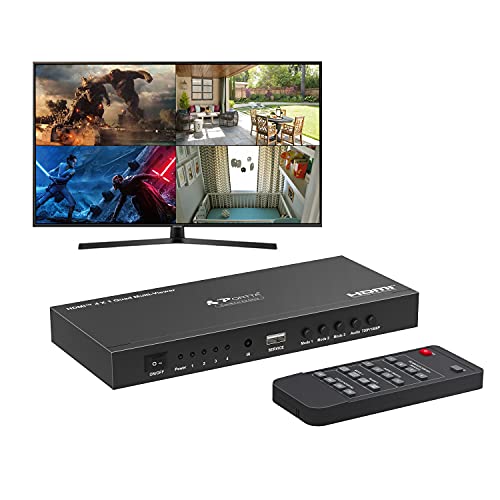
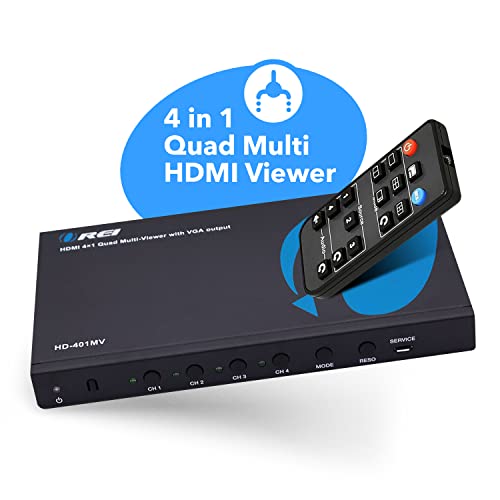
- •Quad multi viewer: Supports 4 HDMI input sources to a HD TV or display with real-time fast seamless switching up to 1080p. HDMI Switch 4 in 1 out, VGA Output
- •Full compatible: This HDMI matrix switch is compatible with gaming consoles such as PlayStation, Xbox one, Nintendo, Roku, DVD, blue ray, players Amazon fire TV, cable TV, Chromecast and so many other HDMI devices
- •Audio supported: DTS digital, Dolby digital, LPCM, Dolby True HD, Master Audio, pass through 2 channel. All other audio options are supported, integrated Audio converter for simultaneous digital and analog Audio output on all Audio output channels.
- •5 display modes: 4 in 1 out HDMI switch - This HDMI switcher designed with 4 Input ports and 1 output port, you can choose the HDMI signal source by the IR remote control and front panel buttons
- •1 Year Full Warranty with OREI Support. Includes: Hd-401MV Switch, Power supply, Remote control, Manual
OREI Quad Multi HDMI Viewer 4 in 1 Out, HDMI Switcher 4 Ports Seamless Switcher and IR Remote Support 1080P for PS4/PC/DVD/Security Camera, HDMI Switch VGA Output - HD-401MV
List Price: $105.91$95.32DEALYou Save: $10.59 (10%)
Free shippingFree Returns – 30 daysFree Order CancellationSecure Payment2–3 Days DeliveryGet It October 26, 2026In Stock (2)No marketing spamNo account requiredFulfilment by FedEx / Amazon / UPS / ShipwirePayPal / Card Buyer Protection
Customer Reviews
Reviews sourced from verified Amazon purchasers4.3
out of 5
Based on 10 reviews
5★
60%
4★
40%
3★
0%
2★
0%
1★
0%
Easy way to add PIP and PBP to any TV
DaveNLR✓ Verified Purchase•October 24, 2023
Model UHD-401MV
First the negatives. This device does NOT support HDR10, Dolby Vision or any other HDR formats.
That out of the way, it worked perfectly. I paired it with a 98" display to get four 49" diagonal PIPs. I used 3 Chromecasts with Google TV (one was actually the new ONN 4K puck). I havent plugged a 4th device in yet. I was going to use the PS5, but lack of HDR ruled that out. Whatever device is plugged into HDMI1 port, is controllable with CEC, so the TVs remote control works to control it. If you are HDMI2 thru 4, you need to use the device remote for what is plugged into it. With a streaming service with unlimited streams, it can easily display 4 football games or whatever 4 items you plug in. I use it for storm chasing, where I can have 4 simultaneous Youtube streams running at once. I have the box in the media closet behind the TV, and use the included IR blaster receiver. The range is about 11 feet. The remote has all the controls you will need, however the buttons are very stiff, and require a lot of pressure to press. Hopefully that lightens up. At some point, I will program my Harmony hub to duplicate all the buttons on the remote just in case. The remote uses a button battery which is replaceable. Audio is switched by using the remote, and outputs the audio selected via HDMI, or you can extract the audio to use with older amps or soundbars lacking HDMI. I gave the device 4 stars instead of 5 simply because of the lack of passing HDR10 on the single output, and the remote got a star subtracted due to its limited range and stiff buttons. I would highly recommend this to anyone with a projector or large screen TV wanting to add Picture in Picture or Picture by Picture. I would not recommend this just for the purpose of switching, as there are less expensive devices available that support 4K@120 hz with HDR. While it will accept a PS5 or XboxX input, you will lose 120hz and lose HDR, so I would not recommend it for use with a current game console.
First the negatives. This device does NOT support HDR10, Dolby Vision or any other HDR formats.
That out of the way, it worked perfectly. I paired it with a 98" display to get four 49" diagonal PIPs. I used 3 Chromecasts with Google TV (one was actually the new ONN 4K puck). I havent plugged a 4th device in yet. I was going to use the PS5, but lack of HDR ruled that out. Whatever device is plugged into HDMI1 port, is controllable with CEC, so the TVs remote control works to control it. If you are HDMI2 thru 4, you need to use the device remote for what is plugged into it. With a streaming service with unlimited streams, it can easily display 4 football games or whatever 4 items you plug in. I use it for storm chasing, where I can have 4 simultaneous Youtube streams running at once. I have the box in the media closet behind the TV, and use the included IR blaster receiver. The range is about 11 feet. The remote has all the controls you will need, however the buttons are very stiff, and require a lot of pressure to press. Hopefully that lightens up. At some point, I will program my Harmony hub to duplicate all the buttons on the remote just in case. The remote uses a button battery which is replaceable. Audio is switched by using the remote, and outputs the audio selected via HDMI, or you can extract the audio to use with older amps or soundbars lacking HDMI. I gave the device 4 stars instead of 5 simply because of the lack of passing HDR10 on the single output, and the remote got a star subtracted due to its limited range and stiff buttons. I would highly recommend this to anyone with a projector or large screen TV wanting to add Picture in Picture or Picture by Picture. I would not recommend this just for the purpose of switching, as there are less expensive devices available that support 4K@120 hz with HDR. While it will accept a PS5 or XboxX input, you will lose 120hz and lose HDR, so I would not recommend it for use with a current game console.
Actually Works
Eduardo Hinojosa✓ Verified Purchase•October 22, 2023
Running Xbox/AppleTv/Roku/Super Nintendo with no issues. Feeds your ADHD playing games and watching 2 sports events that the same time
Finally Solved 4k 60 hz split 4 screen
Michael R✓ Verified Purchase•September 23, 2023
I've been looking for years to split my 43" monitor screen into four 1920x1080 quadrants. This feature is built into some newer 4k monitors, but this would have required me to invest in a new monitor when my current monitor is just fine.
My goal was to have two Macs connected to the HDMI viewer where the screen is split horizontally giving each Mac 1920x2160 resolution side-by-side. Out of the box the Mac would not recognize the 1920x2160 resolution so I had to have two HDMI outputs at 1920x1080 for each screen. This is where the power of this viewer comes into play. For each Mac I now have a total of four screen, two on each Mac which are stacked at 1920x1080. In the Mac Display settings the Mac can be configured to shows the two screens as stacked and is considered one continuous screen. I now have a 1920x2160 workspace for each Mac.
I can confirm my monitor is receiving 4k @ 60hz and each quadrant is 1920x1080 using this viewer. Text is clear. Mission accomplished.
As others have mentioned the remote is pretty cheap, you have to sometimes press the button hard or several times. If the remote breaks, using the buttons on the front of the unit will be painful.
For my use case I would 100% purchase this again. Amazon says this was first available in 9/2020. Either I wasn't looking or it was too expensive at the time. For the price point of ~$200 this works as advertised for my use cases. You might have different needs from me and this viewer may or may not work for your use cases.
My goal was to have two Macs connected to the HDMI viewer where the screen is split horizontally giving each Mac 1920x2160 resolution side-by-side. Out of the box the Mac would not recognize the 1920x2160 resolution so I had to have two HDMI outputs at 1920x1080 for each screen. This is where the power of this viewer comes into play. For each Mac I now have a total of four screen, two on each Mac which are stacked at 1920x1080. In the Mac Display settings the Mac can be configured to shows the two screens as stacked and is considered one continuous screen. I now have a 1920x2160 workspace for each Mac.
I can confirm my monitor is receiving 4k @ 60hz and each quadrant is 1920x1080 using this viewer. Text is clear. Mission accomplished.
As others have mentioned the remote is pretty cheap, you have to sometimes press the button hard or several times. If the remote breaks, using the buttons on the front of the unit will be painful.
For my use case I would 100% purchase this again. Amazon says this was first available in 9/2020. Either I wasn't looking or it was too expensive at the time. For the price point of ~$200 this works as advertised for my use cases. You might have different needs from me and this viewer may or may not work for your use cases.
Great little simple switcher
John Swenson✓ Verified Purchase•September 15, 2023
I'm using this as a switcher for a video system in a church. There are cameras and computers feeding a switcher which goes to a splitter to several projectors and a display. With a simple switch the projectors can take many seconds to re-sync to the newly selected input. This device is a real switcher that synchronizes all the inputs to the one output so the projectors do not have to re-syncronize when the input changes. This part works beautifully well.
The major problem is that when changing inputs it displays the input number and input display parameters for several seconds. There doesn't seem to be anyway to turn this off. It's really annoying.
The other issue is that it doesn't come with anyway to rack mount it. We have a small rack that all the video equipment is mounted in. I had to make a shelf that fit in the rack and use the supplied "ears" to bolt it to the shelf. It really looks bad but it does work.
One reason I chose this model is that it does have front panel buttons to select inputs (the volunteers running the equipment really hate having to track down a remote to control something), but pushing the buttons requires the box to be tied down.
I REALLY, REALLY like the fact that this does not try and use some sort of "smart" algorithm to automatically choose what input to select, other devices I tried do this and they never do what we want.
So in summary, the actual function is great, except for the on screen pop-ups that occur every time the input is changed, it is almost a deal breaker. Rack mount would be great but not essential.
The major problem is that when changing inputs it displays the input number and input display parameters for several seconds. There doesn't seem to be anyway to turn this off. It's really annoying.
The other issue is that it doesn't come with anyway to rack mount it. We have a small rack that all the video equipment is mounted in. I had to make a shelf that fit in the rack and use the supplied "ears" to bolt it to the shelf. It really looks bad but it does work.
One reason I chose this model is that it does have front panel buttons to select inputs (the volunteers running the equipment really hate having to track down a remote to control something), but pushing the buttons requires the box to be tied down.
I REALLY, REALLY like the fact that this does not try and use some sort of "smart" algorithm to automatically choose what input to select, other devices I tried do this and they never do what we want.
So in summary, the actual function is great, except for the on screen pop-ups that occur every time the input is changed, it is almost a deal breaker. Rack mount would be great but not essential.
Confusing controls but does the job
SierraQ✓ Verified Purchase•September 7, 2023
This unit is a good example or great functionality but a user interface that could be better. I will talk about the overall summary and the different modes. Let's start with the good:
- unit is small, metal, well constructed
- remote is easy to use
- great for watching multiple videos or one video source and a desktop source
- very little lag
- no frame loss that I can tell (streaming video)
- Switching is nearly instant
- Several modes/layouts
- Remote covers all functions and a few extras like power and resolution.
- price is good for what you get
Not so good:
- it stretches sources so text in particular may not be readable
- power light is on all the time and is very bright
- physical buttons are labeled oddly. "Audio" does what it says"”switches audios sources"”but it also has a hidden feature that if you hold it down the source text toggles on or off. "Main" changes source order for modes that support that"”label makes no sense. "Mode" changes layout"”not very clear but better than "main."
- Monitor will never sleep unless you turn the switcher off
- You can only turn it off via remote. There is no auto off.
- On screen source labels are either on or off (with audio button long press). I wish it would briefly show you the source or else have lights on the unit.
- Remote provides direct audio source controls but not direct video source controls. You have to keep pressing the Mode button on remote or unit to cycle through video sources.
Onto the modes/layouts. When I talk about text I just pulled up a Google search in Chrome.
Full Screen Mode
Resolution is great. Not much else to say. Works like you think.
2x2 Mode
All four sources scaled. Positions are fixed. Text unreadable but it is good for monitoring changes or multiple videos. You can read it if you scale to 175% or more.
Side-Center Mode
This gives you 2 larger scaled views in the middle and two very stretched views on the sides. The side views are pretty useless but the center ones are good since it is the largest you can show 2 sources without stretching. Text is barely readable. Positions are fixed so only inputs 2 and 3 can be in the middle.
1x2 Mode
Two inputs side-by-side. You can show inputs 1+2 or 3+4, no other combinations. Text is more readable but you still need to scale it up to 150-200% to work on it. Both are stretched vertically.
1 + 3x1 Mode
1 large square screen and 3 scaled small screens. This is my favorite because the large screen, while slightly stretched vertically, is usable. Scale to 150% and it is very clear. The other three are good for video or monitoring something. You can cycle any source to be the large screen. It rotates around: 1234, 2341, 3412, etc.
- unit is small, metal, well constructed
- remote is easy to use
- great for watching multiple videos or one video source and a desktop source
- very little lag
- no frame loss that I can tell (streaming video)
- Switching is nearly instant
- Several modes/layouts
- Remote covers all functions and a few extras like power and resolution.
- price is good for what you get
Not so good:
- it stretches sources so text in particular may not be readable
- power light is on all the time and is very bright
- physical buttons are labeled oddly. "Audio" does what it says"”switches audios sources"”but it also has a hidden feature that if you hold it down the source text toggles on or off. "Main" changes source order for modes that support that"”label makes no sense. "Mode" changes layout"”not very clear but better than "main."
- Monitor will never sleep unless you turn the switcher off
- You can only turn it off via remote. There is no auto off.
- On screen source labels are either on or off (with audio button long press). I wish it would briefly show you the source or else have lights on the unit.
- Remote provides direct audio source controls but not direct video source controls. You have to keep pressing the Mode button on remote or unit to cycle through video sources.
Onto the modes/layouts. When I talk about text I just pulled up a Google search in Chrome.
Full Screen Mode
Resolution is great. Not much else to say. Works like you think.
2x2 Mode
All four sources scaled. Positions are fixed. Text unreadable but it is good for monitoring changes or multiple videos. You can read it if you scale to 175% or more.
Side-Center Mode
This gives you 2 larger scaled views in the middle and two very stretched views on the sides. The side views are pretty useless but the center ones are good since it is the largest you can show 2 sources without stretching. Text is barely readable. Positions are fixed so only inputs 2 and 3 can be in the middle.
1x2 Mode
Two inputs side-by-side. You can show inputs 1+2 or 3+4, no other combinations. Text is more readable but you still need to scale it up to 150-200% to work on it. Both are stretched vertically.
1 + 3x1 Mode
1 large square screen and 3 scaled small screens. This is my favorite because the large screen, while slightly stretched vertically, is usable. Scale to 150% and it is very clear. The other three are good for video or monitoring something. You can cycle any source to be the large screen. It rotates around: 1234, 2341, 3412, etc.
Page 1 of 2