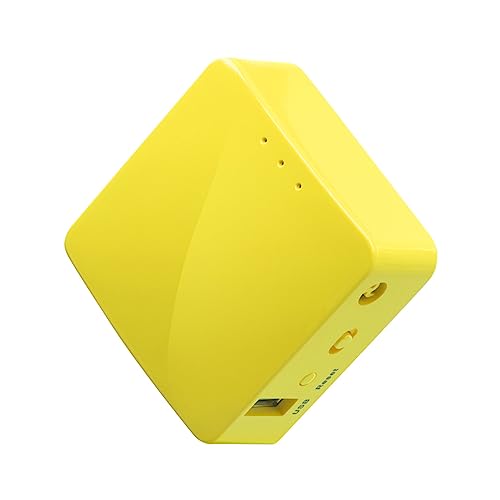
GL.iNet GL-MT300N-V2 (Mango) Portable Mini Travel Wireless Pocket VPN WiFi Router - 2X Ethernet Ports | USB 2.0 | OpenWrt | OpenVPN/Wireguard for Public & Hotel Wi-Fi | Easy to Set up via Admin Panel


Key features
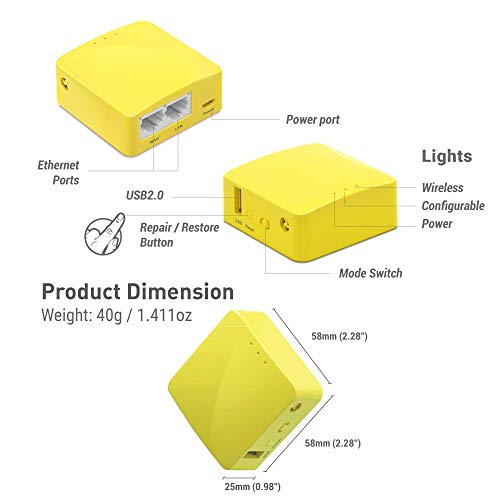
- •MINI TRAVEL ROUTER: Convert a public network(wired/wireless) to a private Wi-Fi for secure surfing. Tethering, 3G/4G USB Modem Compatible. Powered by any laptop USB, power banks or 5V DC adapters (sold separately). 39g (1.41 Oz) only and pocket friendly.
- •OPEN SOURCE & PROGRAMMABLE: OpenWrt pre-installed, USB disk extendable.
- •LARGER STORAGE & EXTENDABILITY: 128MB RAM, 16MB Flash ROM, dual Ethernet ports, UART and GPIOs available for hardware DIY.
- •OPENVPN CLIENT: OpenVPN client pre-installed, compatible with 20+ VPN service providers.
- •PACKAGE CONTENTS: GL-MT300N-V2 mini router (1-year Warranty), USB cable, Ethernet cable, User Manual. Please update to the latest firmware from the following link before using: https://dl.gl-inet.com/firmware/mt300n-v2/v1/
GL.iNet GL-MT300N-V2 (Mango) Portable Mini Travel Wireless Pocket VPN WiFi Router - 2X Ethernet Ports | USB 2.0 | OpenWrt | OpenVPN/Wireguard for Public & Hotel Wi-Fi | Easy to Set up via Admin Panel
List Price: $52.36$47.12DEALYou Save: $5.24 (10%)
Free shippingFree Returns – 30 daysFree Order CancellationSecure Payment2–3 Days DeliveryGet It June 24, 2026In Stock (1)No marketing spamNo account requiredFulfilment by FedEx / Amazon / UPS / ShipwirePayPal / Card Buyer Protection
Customer Reviews
Reviews sourced from verified Amazon purchasers3.8
out of 5
Based on 10 reviews
5★
50%
4★
30%
3★
0%
2★
0%
1★
20%
I love these the most so far
D✓ Verified Purchase•May 18, 2018
I own two of these, and a few other brands, I love these the most so far.
Pro:
Cheap.
Can install the opensource firmware or the fancy pants that comes with it.
Stores multiple WIFI configs and connects to them with the ability to control that feature.
Has Openvpn Client built in with drag and drop config, and only connect to internet when vpn is active.
Now has openvpn server in beta.
shares files via windows file sharing.
Can use advanced features of openwrt/lede such as remove packages, install packages, etc
Cons:
Comes with some software designed to defeat the Chinese DNS poisoning, which is not needed in the US (as far as I know), but you can remove it.
I can't figure out how to turn off the grab a dynamic dns from gl-inet from the default GUI. Maybe it is in advanced.....
Pro:
Cheap.
Can install the opensource firmware or the fancy pants that comes with it.
Stores multiple WIFI configs and connects to them with the ability to control that feature.
Has Openvpn Client built in with drag and drop config, and only connect to internet when vpn is active.
Now has openvpn server in beta.
shares files via windows file sharing.
Can use advanced features of openwrt/lede such as remove packages, install packages, etc
Cons:
Comes with some software designed to defeat the Chinese DNS poisoning, which is not needed in the US (as far as I know), but you can remove it.
I can't figure out how to turn off the grab a dynamic dns from gl-inet from the default GUI. Maybe it is in advanced.....
Wifi device or VPN device not both, at least for me.
Amazon Customer✓ Verified Purchase•April 16, 2018
Funny think, bought a mesh wifi system (Tenda Nova) which works okay but had no way to do vpn setup on it even though there are some reviews and forums saying you can when you can't, was okay with this as it did extend my wifi to where I needed it. So I bought this item the MT300N V2 for the sole purpose of setting up the vpn which works great. I did try the wifi on this item and it did work without vpn but with vpn it kept cutting out and forcing me to either reset the device or go back in through the browser and reinitialize the vpn, so I simpy shutdown the wifi as was not needed and this thing works great. I did note other people had similiar issues with it cutting out so would suggest either using strictly as wifi device with no vpn or a vpn device with no wifi.
Update: suddenly stopped working 3 months into usage. Two issues occurred same day as it stopped working, first was power outage (it was still working after this) but did develop a problem after another program tried to force another vpn provider onto my system (did remove offending program but can not get access to the modem even after several resets). Leaving orginally review cause this item did work great and may do another update again in future if I can get it working again. Little pived cause now only computer is vpn protected. After playing with it for 5 hours managed to get back in and set back up and working good again so patience here is the key (I have very little of that).
Update: suddenly stopped working 3 months into usage. Two issues occurred same day as it stopped working, first was power outage (it was still working after this) but did develop a problem after another program tried to force another vpn provider onto my system (did remove offending program but can not get access to the modem even after several resets). Leaving orginally review cause this item did work great and may do another update again in future if I can get it working again. Little pived cause now only computer is vpn protected. After playing with it for 5 hours managed to get back in and set back up and working good again so patience here is the key (I have very little of that).
Default Password did not work, rendered un-usable.
M. Warren✓ Verified Purchase•April 13, 2018
Tried multiple different ways to connect to this router; Wireless, LAN, etc. Nothing was connecting. Not sure why, but perhaps this was a one-off, as multiple people seem to enjoy this product. Spent about an hour or two trying to do everything I could to make it work to no avail. Seemed that the default password "goodlife" didn't work. Even tried hard-resetting and "goodlife" still did not work.
Update: Contacted GL support; they responded, which was great, but provided one-line assistance which proved to be not helpful, even for those who are somewhat tech savvy. Also, I REALLY wanted to like this product, so I purchased a second one in hopes the first one was just DOA; same issue unfortunately -- wouldn't connect out of the box, had to connect via ethernet, tried to log in directly, and would not work as it did not recognize their own default password even after hard-resetting. I ended up buying a HooToo and TP Link instead, because I needed at least one that would work during my travels. Hope to post a good review on one (or both) of those product pages soon.
Update: Contacted GL support; they responded, which was great, but provided one-line assistance which proved to be not helpful, even for those who are somewhat tech savvy. Also, I REALLY wanted to like this product, so I purchased a second one in hopes the first one was just DOA; same issue unfortunately -- wouldn't connect out of the box, had to connect via ethernet, tried to log in directly, and would not work as it did not recognize their own default password even after hard-resetting. I ended up buying a HooToo and TP Link instead, because I needed at least one that would work during my travels. Hope to post a good review on one (or both) of those product pages soon.
Good for non-techies
Careful buyer✓ Verified Purchase•April 12, 2018
I am non-technical when it comes to computers. I just wanted a small router to take overseas, in case a hotel had hardwired internet (an ethernet jack in the wall), but no wi-fi. The idea was to plug the router into the internet jack in the hotel wall using an ethernet cable, then I'd have a wi-fi signal for my iphone. My concern was that this little router would need all sorts of technical setup in order to work. NOT SO. I simply plugged in a power source (a portable charger that I use for my iphone) and ran an ethernet cable from my home's DSL internet jack and plugged it into the WAN receptacle on the router. PRESTO, the router's wi-fi signal showed up on my iPhone and I was in business. No setup required. I didn't even try to change password, just used the one listed in the directions that come with the router. The router comes with a USB cable to connect a power source, but you'll have to buy the ethernet cable separately (something like this: https://www.amazon.com/Ethernet-Cable-Meters-Network-Internet/dp/B00GBBSNMY/ref=sr_1_4?ie=UTF8&qid=1523723130&sr=8-4&keywords=ethernet+cable+3+feet)
trash! Self reset every several days, all setttings changes will be lost!
Harvey✓ Verified Purchase•March 16, 2018
Trash!
Update on bought:
Extremely small. Low heat. I put it in a secret place to store the surveillance video, and sync it with my remove cloud server.
The WIFI speed is not so impressive, but good enough for 3 surveillance cameras, which are set to trigger recording on motion.
Update: 03/22/2018
After a couple of days running, the USB share folder disappear from the device, I have to restart. And the FTP service is gone.
Update May 9 2018
This device reset FTP configuration every several days. All work was done before will be earased. Now it's just a piece of trash!
I have to buy a raspberry pie!
Zero star!
Update on bought:
Extremely small. Low heat. I put it in a secret place to store the surveillance video, and sync it with my remove cloud server.
The WIFI speed is not so impressive, but good enough for 3 surveillance cameras, which are set to trigger recording on motion.
Update: 03/22/2018
After a couple of days running, the USB share folder disappear from the device, I have to restart. And the FTP service is gone.
Update May 9 2018
This device reset FTP configuration every several days. All work was done before will be earased. Now it's just a piece of trash!
I have to buy a raspberry pie!
Zero star!
Page 1 of 2
Related products



Fortinet FortiGate 80E and 1YR 24x7 UTM Protection BDL (FG-80E-BDL-950-12)
List: $2255.25$2029.73DEAL