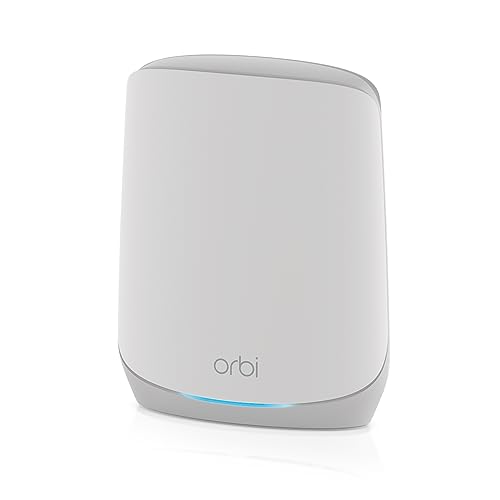
NETGEAR SRK60-100NAS - Discontinued by Manufacturer




Key features
- •5,000 SQUARE FEET | Blanket your Home Office, Restaurant or Commercial location with blazing fast WiFi
- •TRI-BAND WI-FI AND MU-MIMO | Maximize Internet speeds available throughout your business
- •SINGLE WI-FI NETWORK | Secure, Easy setup, works with your existing internet service
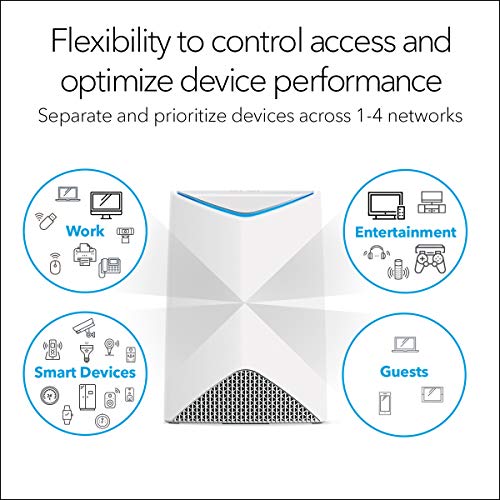
- •TRAFFIC SEPARATION | Dedicated portal for Guest/Customer, Employees, Admin/Manager
- •UP TO 80 CONNECTIONS | High-performance AC3000 Wi-Fi (40 connections per unit)
BrandNETGEAR
CategoryWhole Home & Mesh Wi-Fi Systems
Size2 Pack
Colorwhite
Warranty5 year limited warranty
NETGEAR SRK60-100NAS - Discontinued by Manufacturer
List Price: $392.85$353.57DEALYou Save: $39.28 (10%)
Free shippingFree Returns – 30 daysFree Order CancellationSecure Payment2–3 Days DeliveryGet It October 25, 2026In Stock (2)No marketing spamNo account requiredFulfilment by FedEx / Amazon / UPS / ShipwirePayPal / Card Buyer Protection
Customer Reviews
Reviews sourced from verified Amazon purchasers4.4
out of 5
Based on 10 reviews
5★
70%
4★
30%
3★
0%
2★
0%
1★
0%
No more dead spots
lms✓ Verified Purchase•September 26, 2023
No more dead spots, no more smart devices constantly losing connection to the Internet, no more restarting network extenders! We live in a 3800 sq. ft townhome with two floors. Now, we have coverage EVERYWERE, including the patio. GREAT deal on this discontinued BUSINESS system we're using at our HOME! Get 'em before they're sold out. Newer models may cost more, but I doubt they offer enough more to justify the price!
Great upgrade from older mesh system, but gauging how far satellite will work takes time
John B. Day✓ Verified Purchase•September 22, 2023
Like the older Orbi mesh system this replaced, the setup is fairly simple (unless you're using wired backhaul, which requires additional online support and patience). The only reason I don't grant this a 5 star rating is that if you're trying to set up the satellite well out into the range of the base unit, it can literally take an hour or so of plugging the satellite in, clicking the synch button (on the base AND the satellite within 2 minutes) waiting for contact to be established, and then gauging how strong or weak the wifi connection is based on the color displayed by the satellite. A very good systems once you have it up and running, but trying to maximize the range (or use wired backhaul) can be a bit of a challenge.
SRK60 — Orbi Pro AC3000 WiFi 5 Tri-Band WiFi System
matt g✓ Verified Purchase•September 19, 2023
I finally got myself to replace an older single WiFi router with extender in my 2-story house with the Orbi Pro AC3000 mesh WiFi router and one satellite. What a difference it made. I have near maximum bandwidth and speed for most locations provided by my ISP (300 Mbps download). It seems it could handle at least twice as much for peak performance. The two gripes I have are that the default WiFi network won't let me manually set 2.4 and 5 GHz SSIDs. So the algorithm determines that one of my devices has weak 5 GHz signal strength and gets kicked to the lower bandwidth 2.4 GHz channel with the stronger signal. Also the second WiFi network that can be set up for "employees" cannot access printers and file storage systems residing in the standard or "excecutive" network. All these concerns have been reported before by others. I just found out later. Still my primary reason to have a single WiFi network name with fast mesh technology in the entire house outweigh these shortcomings. It is noteworthy that the second or "employee" WiFi network does allow to configure with a toggle both 2.4 and 5 GHz SSIDs. The original setup of the Orbi was not quite as easy as I had wished. The basic instructions shipped didn't really say much about setting up the satellite. Though this became clear after reading the online manual. My satellite didn't find the router for the longest time. I guess, I was not patient enough. For the sales price I paid, I would buy again this older technology Since then the Orbi has been working like a charm for over one week now.
Orbi Pro Tri-Power Setup Works Well and Covers Entire House
Chad✓ Verified Purchase•September 1, 2023
I replaced an existing, recently new Tri-band router, that barely provided whole-house computer coverage and 1-floor cell phone coverage, with the Orbi Pro router. I installed the Orbi Pro router in the same central location as this Tri-band stand-alone router, on the 2nd floor. The signal strength to my most remote location in the house on the 1st floor was slightly better than with the the router the Orbi Pro router replaced.
Next I I added two satellites total, one at a time. After adding each satellite, I could see the signal strength available for my computer was stronger with each satellite added.
On the 1st floor, all rooms received computer coverage, but no rooms had cell phone coverage, using the stand-alone router that was replaced, except the room right below the router room on the 2nd floor.
With the Orbi Pro Tri-Power setup, all rooms have strong coverage for both laptops and cell phones. The administrative interface is adequate and I am satisfied. The Orbi Pro setup successfully covered my whole house and now it is something I don't have to think about. It just works.
Next I I added two satellites total, one at a time. After adding each satellite, I could see the signal strength available for my computer was stronger with each satellite added.
On the 1st floor, all rooms received computer coverage, but no rooms had cell phone coverage, using the stand-alone router that was replaced, except the room right below the router room on the 2nd floor.
With the Orbi Pro Tri-Power setup, all rooms have strong coverage for both laptops and cell phones. The administrative interface is adequate and I am satisfied. The Orbi Pro setup successfully covered my whole house and now it is something I don't have to think about. It just works.
Seems To Work Great, But...
Mr. Worldwide✓ Verified Purchase•July 22, 2023
This wireless mesh network seems to work great, and greatly improved my overall coverage from my old AP/router and extender plug. Following the advise of other reviewers, I updated the firmware before I did much of anything. After that, I connected directly to the primary AP to do the setup. You CAN definitely connect to the AP wirelessly or via Ethernet for the initial configuration. After you sync the satellite to the primary, you can also then directly connect to the satellite device as well. Both work just fine. I completely stayed away from the app, based on the reviews here, as well as the extremely low rating on the App store.
Keep in mind, this product is 'technically' a business network system, and not necessarily designed for home use. For example, it has three networks available: One for management, and two for general use. It can be confusing which network to use, as each has different restrictions. Of course, it works fine in either environment, but being a business focused product, I believe Netgear assumes a generally more technical person will be doing the install and configuration. For example, the Netgear Insight app is technically a business management tool, which can be used with many different Netgear business products. There is both a simple/quick configuration tool, as well as more advanced access.
Overall, I purchased this Netgear mesh network because it was deeply discounted from the MSRP/usual price, and I am happy with it. It is in no way worth the roughly $300 original price, but at just over $100, it is a great system. I am disappointed that there is no QoS option, but I have read it is supposed to have some sort of automatic QoS management system. I would have preferred to setup my own QoS though.
Keep in mind, this product is 'technically' a business network system, and not necessarily designed for home use. For example, it has three networks available: One for management, and two for general use. It can be confusing which network to use, as each has different restrictions. Of course, it works fine in either environment, but being a business focused product, I believe Netgear assumes a generally more technical person will be doing the install and configuration. For example, the Netgear Insight app is technically a business management tool, which can be used with many different Netgear business products. There is both a simple/quick configuration tool, as well as more advanced access.
Overall, I purchased this Netgear mesh network because it was deeply discounted from the MSRP/usual price, and I am happy with it. It is in no way worth the roughly $300 original price, but at just over $100, it is a great system. I am disappointed that there is no QoS option, but I have read it is supposed to have some sort of automatic QoS management system. I would have preferred to setup my own QoS though.
Page 1 of 2