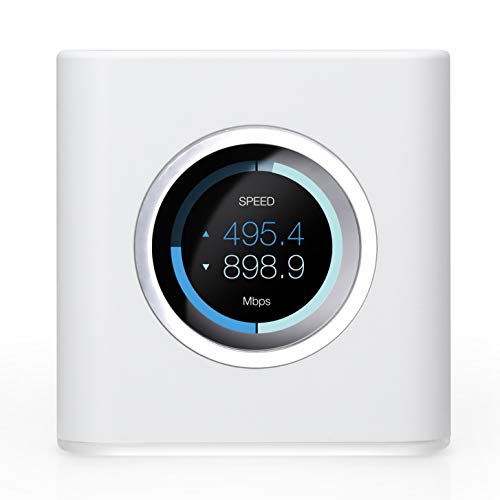
AmpliFi HD Wifi Router by Ubiquiti Labs, Seamless Whole Home Wireless Internet Coverage, HD Wifi Router with Touchscreen Display, 4 Gigabit Ethernet, 1 WAN Port, Ethernet Cable, Expandable Mesh System


Key features
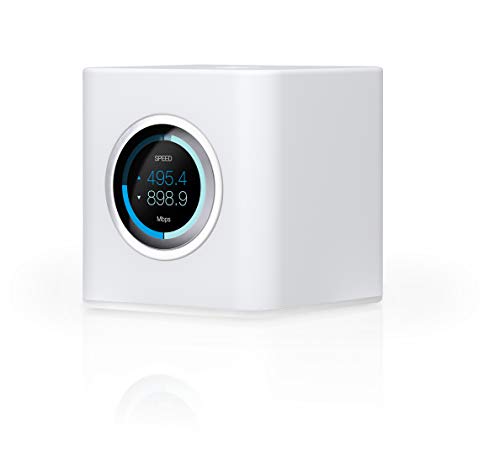
- •WHOLE HOME WIFI SYSTEM: Not Just a wifi router, it's a wifi system. The AmpliFi HD Router features an easy-to-use touchscreen display, four Gigabit Ethernet ports, a WAN port, and an Ethernet cable. The AmpliFi Router provides excellent coverage for standard size homes of approx. 6000 sq ft. Expand as needed by adding MeshPoints or additional Routers to your mesh wifi system.
- •802.11AC TECHNOLOGY FOR FASTER SPEEDS AND BETTER COVERAGE: AmpliFi HD is more than a wireless router: it's the ultimate WiFi system. With turbocharged 802.11ac wi-fi, AmpliFi utilizes multiple self-configuring radios and advanced wifi antenna technology to bring ubiquitous secure WiFi coverage to any home network. Ensure that your Smart TV, digital downloads, and streaming devices have the connectivity demanded in today's modern home.
- •WIFI RANGE EXTENDER REPLACEMENT: AmpliFi Routers feature mesh technology, allowing you to expand your wifi network as needed with additional Routers or MeshPoints.
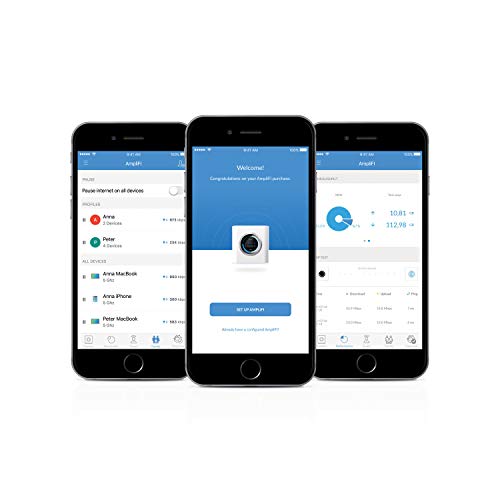
- •INSTANT SETUP: The intuitive, easy to use AmpliFi app allows you to setup your system in mere minutes. It also features configuration options, powerful reporting metrics, parental controls, remote access, and easy guest access. The mobile app is available for download on Android and iOS smartphones.
- •WIFI TECHNOLOGY EXPERTISE: The AmpliFi home wireless system is designed by Ubiquiti Labs, a division of Ubiquiti Networks, a global leader in developing wifi access points, wifi antennas, network switches, internet gateways, security cameras, VoIP phones, smart home and outdoor wifi solutions.
AmpliFi HD Wifi Router by Ubiquiti Labs, Seamless Whole Home Wireless Internet Coverage, HD Wifi Router with Touchscreen Display, 4 Gigabit Ethernet, 1 WAN Port, Ethernet Cable, Expandable Mesh System
List Price: $479.98$431.98DEALYou Save: $48.00 (10%)
Free shippingFree Returns – 30 daysFree Order CancellationSecure Payment2–3 Days DeliveryGet It October 26, 2026In Stock (1)No marketing spamNo account requiredFulfilment by FedEx / Amazon / UPS / ShipwirePayPal / Card Buyer Protection
Customer Reviews
Reviews sourced from verified Amazon purchasers4.5
out of 5
Based on 10 reviews
5★
80%
4★
20%
3★
0%
2★
0%
1★
0%
AmpliFi HD feels robust and performs well
JimAtKSF✓ Verified Purchase•July 29, 2023
I had been looking for a replacement for my aging AirPort Extreme Wifi router. I had always been enamored by Apple's software and ease of use as I had three different units over the years and was sad to see Apple discontinue this product.
AmpliFi HD was recommended to me by a member of my company's IT group. I did research, and finally puled the trigger.
I ordered just the AmpliFi HD unit without the mesh points, I didn't need them at my house.
The software is super easy to use, I had the unit up and running within a couple of minutes. The screen on the front panel is super useful, the look and feel of the hardware itself is premium and actually is something you don't want to hide away. It does not look like an alien landed in my home.
Feature-wise, it goes above and beyond what I was used to with the AirPort Extreme units I had been using. It has everything I need and some things I don't, but that's perfect.
At this point, a couple of months in to ownership, it is a recommended buy from me.
AmpliFi HD was recommended to me by a member of my company's IT group. I did research, and finally puled the trigger.
I ordered just the AmpliFi HD unit without the mesh points, I didn't need them at my house.
The software is super easy to use, I had the unit up and running within a couple of minutes. The screen on the front panel is super useful, the look and feel of the hardware itself is premium and actually is something you don't want to hide away. It does not look like an alien landed in my home.
Feature-wise, it goes above and beyond what I was used to with the AirPort Extreme units I had been using. It has everything I need and some things I don't, but that's perfect.
At this point, a couple of months in to ownership, it is a recommended buy from me.
Will satisfy most people, but pay a little more if you want more
Amazon Customer✓ Verified Purchase•July 12, 2023
I think this product is good. However, I ended up not keeping it for a few reasons.
Overall, it's easy to use and setup. I've always been a fan of Ubiquiti professional products in the world of IP video and networking for video production. I think they did a really good job adapting the user experience for this as it is very simplified and as long as you use the app and follow the directions, it gets up and running.
I do think the front screen is cool, along with the mini speaker and the under light are nifty features, but to be honest, they weren't really necessary. Honestly, it just seemed a little distracting than useful. But again, it IS something that other wireless routers don't have that make this stand out.
THe reason I ended up not keeping this is because for $100 more I was able to buy a router with tri-band connectivity, which so far, has seemed to get faster and slightly more consistent. Maybe it's just psychological, but it just seems that way. I don't have a big house, so I don't feel like it is a range issue. Honestly, I wasn't ready to spend more money on a mesh system since it seemed like my signal was just fine in all areas.
I think this is good for most people, honestly. And my guess is that the mesh connectivity is also nice (since Ubiquiti has the experience). But I just felt like if I'm going to spend this amount, i might as well spend just a little more to get a little more.
Overall, it's easy to use and setup. I've always been a fan of Ubiquiti professional products in the world of IP video and networking for video production. I think they did a really good job adapting the user experience for this as it is very simplified and as long as you use the app and follow the directions, it gets up and running.
I do think the front screen is cool, along with the mini speaker and the under light are nifty features, but to be honest, they weren't really necessary. Honestly, it just seemed a little distracting than useful. But again, it IS something that other wireless routers don't have that make this stand out.
THe reason I ended up not keeping this is because for $100 more I was able to buy a router with tri-band connectivity, which so far, has seemed to get faster and slightly more consistent. Maybe it's just psychological, but it just seems that way. I don't have a big house, so I don't feel like it is a range issue. Honestly, I wasn't ready to spend more money on a mesh system since it seemed like my signal was just fine in all areas.
I think this is good for most people, honestly. And my guess is that the mesh connectivity is also nice (since Ubiquiti has the experience). But I just felt like if I'm going to spend this amount, i might as well spend just a little more to get a little more.
Great machine. Poor customer service. No returns, only repairs through UL
Jens Troest✓ Verified Purchase•July 5, 2023
First one did not work properly with the power supply in one position, but OK with it the other way (USB-C) so I decided to contact customer service since it clearly is supposed to work both ways, and I did not want to keep a defective product not knowing what else could be wrong, or if it would break down completely leaving me without WiFi. That experience was appalling, reminiscent of dealing with a German company (You are the problem, not our product). They wanted me to return the device to them at my shipping expense and then let me know what would happen whenever they got time to look at it. That is just totally unacceptable in my book when someone wants to return a product. Apparently they only have a warranty process, oblivious to the fact someone might actually want to return it for their money back.
So my advice is DO NOT ENGAGE THEIR CUSTOMER SERVICE DEPARTMENT for returns but return it to the retailer. Luckily amazon has a super easy return system and I recommend buying it here or at a local retailer where you know you can return.
Alright enough ranting, the working product is great, it works and is easy to configure. Some people complain about the WiFi connected devices not being able to download at full speed. I attribute this to the QoS algorithms and seems fine to me if I designate the test device a streaming device and speedtest several times.
One thing I could not get to work was the accompanying Teleport app. It will not connect via T-Mobile for some reason. Hence minus 1 star since that was one reason I chose this product to begin with.
So my advice is DO NOT ENGAGE THEIR CUSTOMER SERVICE DEPARTMENT for returns but return it to the retailer. Luckily amazon has a super easy return system and I recommend buying it here or at a local retailer where you know you can return.
Alright enough ranting, the working product is great, it works and is easy to configure. Some people complain about the WiFi connected devices not being able to download at full speed. I attribute this to the QoS algorithms and seems fine to me if I designate the test device a streaming device and speedtest several times.
One thing I could not get to work was the accompanying Teleport app. It will not connect via T-Mobile for some reason. Hence minus 1 star since that was one reason I chose this product to begin with.
Works well, ethernet backhaul is a plus, but setup has a few kinks
John Lilley✓ Verified Purchase•June 9, 2023
I really like how this works once I got it set up. But for all the slickness of the app interface, it didn't go as easily as it should have. So my review is five stars, but I offer these cautions and additional instructions. Note that my setup is probably unusual because I use two routers and "ethernet backhaul" as opposed to the standard wifi mesh.
INITIAL SETUP: Like the manual says, plug your modem into the router's Internet port and turn it all on. These things take FOREVER to boot. Just be really patient and always wait for it to make a happy sound and give you something encouraging on the little LCD display.
SETUP WITH ANDROID APP: The android app is really slick. However the initial connection to the router is a bit clunky. It connects via wifi, and it offers an SSID on boot, but DON'T CHOOSE ITS SSID with the phone wifi. That's right. Phone wifi must be enabled, but don't actually connect to the router ssid yet. Instead, let the app find the router WITHOUT connecting your phone to its wifi. Which BTW takes a LONG TIME (sensing a theme, here?). And you might get notices on the phone about "unable to connect to wifi" during the process, which you just ignore. Once connected, you'll see a ready screen in the app, and you edit the router's settings. Set the SSID name and the password and CLICK THE LITTLE CHECK MARK AT THE TOP OF THE SCREEN TO SAVE IT. Wait for happy sounds.
SSID NAME: I had a lot of trouble reusing our previous SSID from the old router. Devices would be slow or show "no internet". I suspect that the devices had some settings cached which were not compatible. Once I started over with a new SSID everything was clean. So just use a brand new SSID. I don't think this is the router's fault, it is just how it goes with a lot of devices.
SECONDARY SSIDs: I couldn't make 2.4Ghz secondary SSIDs work. The connections were buggy and slow. Turns out I don't really need it, and you probably don't need it either.
BACKHAUL SETUP: Almost the entire reason why I bought this product. This is a special thing for areas that cannot be reached by a strong wifi signal from the base station, but which miraculously have ethernet cable. Such is our house and outbuilding. In that case, you buy a second router unit instead of a mesh point. You must follow the setup instructions very precisely or things get weird. What I'm calling the "base station" is the first router. Follow these steps:
-- Set up your base station normally, as if it were the only device.
-- Set up the new router "as a mesh point" in the same room as the base station, not in the remote area. Don't connect any ethernet cables to the 2nd router yet.
-- Add the new router as a mesh point using the LCD touch screen on the base station, not your Android app, it seems to work better.
-- Once that is done, wait for happy sounds from the routers and for your app to show both are happy-happy (once again, be patient). You might need to exit the app and re-enter to get a proper refresh.
-- Connect ethernet from a base station LAN port to the new router's Internet port.
-- In the app, choose the new router and edit it's settings. Give it a real name while you're at it. Find the "Ethernet backbone" setting and turn it ON. And then... this is VERY IMPORTANT... scroll to the top and press the little check mark! Otherwise nothing saves and you'll wonder why it didn't work.
-- Wait some more for both devices to update and make happy sounds. If they show "Connecting..." on the little LCD screens, just wait some more.
-- At this point, you must get a LAN port from the base station connected via your wired network to your remote location's ethernet jack. Hopefully you know what I mean. If not, call a friend who does.
-- If you can, use a laptop, go the the remote ethernet jack and verify that it has wired connectivity.
-- Finally, move the new device to the remote location and plug its Internet port into the ethernet jack. Wait some more for it to boot and make happy sounds. And voila! You should have wifi everywhere. (Note: some devices won't automatically move to the stronger signal, you might need to do that manually by reconnecting wifi).
-- Bonus: Your remote router has four LAN ports, which you can use for wired devices like laptops and printers.
If things get wonky and weird, use a paper clip to factory reset the routers and try again. I had to do this, because I probably didn't do the setup in the right order and probably tweaked too many things before I knew what I was doing. No shame. I'm just sayin'
INITIAL SETUP: Like the manual says, plug your modem into the router's Internet port and turn it all on. These things take FOREVER to boot. Just be really patient and always wait for it to make a happy sound and give you something encouraging on the little LCD display.
SETUP WITH ANDROID APP: The android app is really slick. However the initial connection to the router is a bit clunky. It connects via wifi, and it offers an SSID on boot, but DON'T CHOOSE ITS SSID with the phone wifi. That's right. Phone wifi must be enabled, but don't actually connect to the router ssid yet. Instead, let the app find the router WITHOUT connecting your phone to its wifi. Which BTW takes a LONG TIME (sensing a theme, here?). And you might get notices on the phone about "unable to connect to wifi" during the process, which you just ignore. Once connected, you'll see a ready screen in the app, and you edit the router's settings. Set the SSID name and the password and CLICK THE LITTLE CHECK MARK AT THE TOP OF THE SCREEN TO SAVE IT. Wait for happy sounds.
SSID NAME: I had a lot of trouble reusing our previous SSID from the old router. Devices would be slow or show "no internet". I suspect that the devices had some settings cached which were not compatible. Once I started over with a new SSID everything was clean. So just use a brand new SSID. I don't think this is the router's fault, it is just how it goes with a lot of devices.
SECONDARY SSIDs: I couldn't make 2.4Ghz secondary SSIDs work. The connections were buggy and slow. Turns out I don't really need it, and you probably don't need it either.
BACKHAUL SETUP: Almost the entire reason why I bought this product. This is a special thing for areas that cannot be reached by a strong wifi signal from the base station, but which miraculously have ethernet cable. Such is our house and outbuilding. In that case, you buy a second router unit instead of a mesh point. You must follow the setup instructions very precisely or things get weird. What I'm calling the "base station" is the first router. Follow these steps:
-- Set up your base station normally, as if it were the only device.
-- Set up the new router "as a mesh point" in the same room as the base station, not in the remote area. Don't connect any ethernet cables to the 2nd router yet.
-- Add the new router as a mesh point using the LCD touch screen on the base station, not your Android app, it seems to work better.
-- Once that is done, wait for happy sounds from the routers and for your app to show both are happy-happy (once again, be patient). You might need to exit the app and re-enter to get a proper refresh.
-- Connect ethernet from a base station LAN port to the new router's Internet port.
-- In the app, choose the new router and edit it's settings. Give it a real name while you're at it. Find the "Ethernet backbone" setting and turn it ON. And then... this is VERY IMPORTANT... scroll to the top and press the little check mark! Otherwise nothing saves and you'll wonder why it didn't work.
-- Wait some more for both devices to update and make happy sounds. If they show "Connecting..." on the little LCD screens, just wait some more.
-- At this point, you must get a LAN port from the base station connected via your wired network to your remote location's ethernet jack. Hopefully you know what I mean. If not, call a friend who does.
-- If you can, use a laptop, go the the remote ethernet jack and verify that it has wired connectivity.
-- Finally, move the new device to the remote location and plug its Internet port into the ethernet jack. Wait some more for it to boot and make happy sounds. And voila! You should have wifi everywhere. (Note: some devices won't automatically move to the stronger signal, you might need to do that manually by reconnecting wifi).
-- Bonus: Your remote router has four LAN ports, which you can use for wired devices like laptops and printers.
If things get wonky and weird, use a paper clip to factory reset the routers and try again. I had to do this, because I probably didn't do the setup in the right order and probably tweaked too many things before I knew what I was doing. No shame. I'm just sayin'
No issues
Silverberry✓ Verified Purchase•June 7, 2023
Works great, I haven't had any issues. I'm on fiber. I've been using for about 8 months now. My previous provider and router I had to reset quite often. I never think about it now.
Page 1 of 2