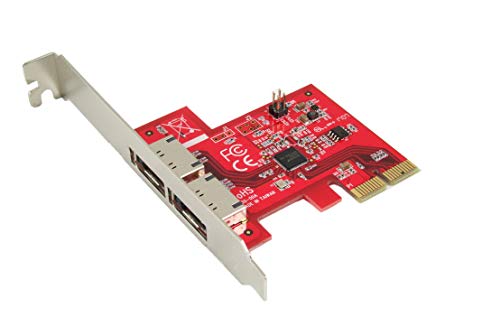
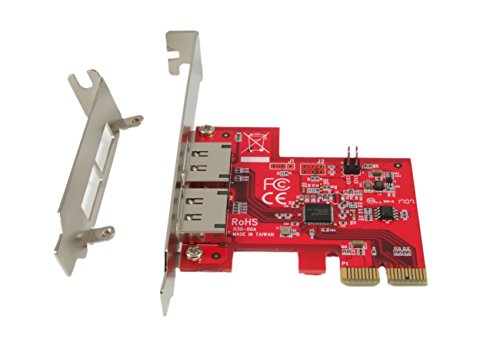
Ableconn PEX-SA130 2-Port eSATA III 6Gbps PCI Express x2 (Two Lanes) Host Adapter Card (ASMedia ASM1062 Controller)


Key features
- •Supports SATA III transfer speeds up to 6.0Gbps; backward compatible with SATA I/II at 1.5/3.0Gbps
- •Built with ASMedia ASM1062. 6Gbps eSATA III External PCIe Gen2 x2 lanes host adapter.
- •Supports two SATA Port Multipliers and up to 10 SATA drives in total when connecting with two 5-port PMs.
- •No driver installation is required on Windows 10/8/7/Vista, Server 2012/2008, Linux, Mac OS X 10.x and later.
- •High quality. Fully RoHS compliant. Made in Taiwan.
Ableconn PEX-SA130 2-Port eSATA III 6Gbps PCI Express x2 (Two Lanes) Host Adapter Card (ASMedia ASM1062 Controller)
List Price: $75.68$68.11DEALYou Save: $7.57 (10%)
Free shippingFree Returns – 30 daysFree Order CancellationSecure Payment2–3 Days DeliveryGet It October 24, 2026In Stock (1)No marketing spamNo account requiredFulfilment by FedEx / Amazon / UPS / ShipwirePayPal / Card Buyer Protection
Customer Reviews
Reviews sourced from verified Amazon purchasers4.1
out of 5
Based on 10 reviews
5★
40%
4★
60%
3★
0%
2★
0%
1★
0%
Exelent service. Probably not backwards compatible with PCI-e 1.0 systems.
Obigwan✓ Verified Purchase•August 29, 2023
EDIT/UPDATE:
I'm giving this more stars on account of the excellent customer service of Ableconn. They went out of their way to troubleshoot this card with me.
Unfortunately, it still didn't work with my old system so I can't give an objective review of the device performance.
Long and short, if your PC has PCI-E 2.0 x2 lane or greater, it may be new enough to boot from this card. Backwards compatibility is touch-and-go.
Given the performance of its options ROM, it seems to be a stable card.
Original review:
To give this card the benefit of the doubt, it may work on a PCI-e 2.0 system or greater, with Windows (or other OS) being installed *fresh*, just after the card's installation.
I purchased this card to get as close to SSD speeds as I could with my old ASUS P5N-32 e sli. (PCI-e 1.0 x1 = ~256MBs >> PCI-e 1. 0 x2 ~512MBs).
After going through driver installation (windows default as per manufacturer's sparse instructions) with my OS disk plugged in my motherboard's SATA, I swapped the drive to the cards primary port and it just hung at the cards POST screen.
Granted, the operating system was not installed in AHCI, but most likely IDE.
However, a close relative of this chipset, the ASM1061, had no issues recognizing this.
Amazon Customer Service was understanding.
I'm giving this more stars on account of the excellent customer service of Ableconn. They went out of their way to troubleshoot this card with me.
Unfortunately, it still didn't work with my old system so I can't give an objective review of the device performance.
Long and short, if your PC has PCI-E 2.0 x2 lane or greater, it may be new enough to boot from this card. Backwards compatibility is touch-and-go.
Given the performance of its options ROM, it seems to be a stable card.
Original review:
To give this card the benefit of the doubt, it may work on a PCI-e 2.0 system or greater, with Windows (or other OS) being installed *fresh*, just after the card's installation.
I purchased this card to get as close to SSD speeds as I could with my old ASUS P5N-32 e sli. (PCI-e 1.0 x1 = ~256MBs >> PCI-e 1. 0 x2 ~512MBs).
After going through driver installation (windows default as per manufacturer's sparse instructions) with my OS disk plugged in my motherboard's SATA, I swapped the drive to the cards primary port and it just hung at the cards POST screen.
Granted, the operating system was not installed in AHCI, but most likely IDE.
However, a close relative of this chipset, the ASM1061, had no issues recognizing this.
Amazon Customer Service was understanding.
ASM1062 Chipset Controller
Fred In CO✓ Verified Purchase•August 24, 2023
Here is what prompted me to purchase this controller.
1) My system wouldn't boot with the MediaSonic HF2-SU3S2HD Can (ASIN B003X26VV4) powered on.
2) I had to wait till my system was fully booted before I could seat the HDs, otherwise BSOD with IRQ problems.
Since then I ordered and installed this controller with the ASM1062 chipset and it works like champ. Not the cheapest controller, but it WORKS.
Apparently the ASM1061 chipset was the problem.
I have had an ongoing issue with controllers in Win10. The ASM1062 chipset seems to have resolved this issue. My drives are now available to be ejected as hot swappable (haven't had a controller yet that does this with multi-plex cans).
What was really nice was that Win10 has built in drivers that makes this look like an ordinary AHCI controller, didn't have to install any drivers.
For info purposes, I have been using 5 drives cans for years and have had to deal with these issues all this time.
Also, I'm a successful Computer Tech/Business owner since 1991 and just retired, so I do know what I'm doing/talking about.
The above is for clarity about my knowledge/experience with computers.
This Can and controller are the best I've used so far.
Already did a review for the can.
1) My system wouldn't boot with the MediaSonic HF2-SU3S2HD Can (ASIN B003X26VV4) powered on.
2) I had to wait till my system was fully booted before I could seat the HDs, otherwise BSOD with IRQ problems.
Since then I ordered and installed this controller with the ASM1062 chipset and it works like champ. Not the cheapest controller, but it WORKS.
Apparently the ASM1061 chipset was the problem.
I have had an ongoing issue with controllers in Win10. The ASM1062 chipset seems to have resolved this issue. My drives are now available to be ejected as hot swappable (haven't had a controller yet that does this with multi-plex cans).
What was really nice was that Win10 has built in drivers that makes this look like an ordinary AHCI controller, didn't have to install any drivers.
For info purposes, I have been using 5 drives cans for years and have had to deal with these issues all this time.
Also, I'm a successful Computer Tech/Business owner since 1991 and just retired, so I do know what I'm doing/talking about.
The above is for clarity about my knowledge/experience with computers.
This Can and controller are the best I've used so far.
Already did a review for the can.
VMWare ESXi & the Marvell 88SE9230 chipset: A technical dive.
Lee Crawford✓ Verified Purchase•August 21, 2023
A bit of background around my setup: I have a computer at home running VMWare ESXi, and on a (Windows Server 2012) VM I have Plex installed in order to stream content to various TVs and phones. I can make digital copies of movies and music and never again worry about the kids scratching disks or wearing out the Blueray optics on my PS4. I also back up all my family photos and videos to this VM, which allows me to stream this content as well, and I don't have to worry about my irreplaceable memories being lost when a phone dies. The missing piece, however, is that I don't want this (now over 2TB) collection of family memories to be lost if a hard drive crashes. I decided the stop-gap was to mirror the data between two hard drives (so I could lose one drive and still have my data), and then to regularly pull one of those disks out and replace it with another, to store it in a safe deposit box (so I could still have my data in the event that someone steals my server or the house burnt down). I tried Windows software RAID1 for awhile, and found it to be clunky, slow, and it sucked processing power from my CPU (which I'd rather have free for transcoding video). So the final answer was to get a card to handle hardware RAID.
Hardware RAID involves a separate processor which does nothing more than manage the reading and writing of data to/from your disks. Many SATA cards and motherboards (including the one in my server) claim to offer RAID, but there's no processor, so your CPU gets stuck with additional work managing your data. If you're looking for a good hardware RAID card, you're going to pay around $200. Then I found this (dedicated ARM processor, 4 physical ports, just over half a bill), and it seemed too good to be true. And it might be, still. But it's a whole lot of bang for the buck.
This card is not supported by ESXi, but it does work with (at least 5.5 and 6.0 in my experience) if you get this driver: https://www.v-front.de/2013/11/how-to-make-your-unsupported-sata-ahci.html. I have two RAID1 arrays: a pair of 8TB and a pair of 3TB; all Seagate drives. A third 8TB disk gets swapped in and the one that's replaced gets locked in a safe deposit box.
It does not display any message telling me when to press keys to get into the card's BIOS, so I had to look in the manual for the key combination, and I've found that if you start tapping Ctrl+M at one second intervals when you first start up, it will launch into the card's BIOS, and if you see the BIOS messages from the motherboard, then you need to reboot because you missed your window. The screen does go from black to a slightly bluish shade of black, presumably that's the window, but it's simpler to just button-mash until you're there. Also, if you have no drives plugged into the card, you don't get an opportunity to enter its BIOS. I wasted some time getting started because i wanted to see its BIOS to confirm it was working before plugging a disk in, and that's just an exercise in futility.
The interface is no-frills: you create an array and it gives you the status of the RAID. Because this card is unsupported by ESXi, this is the ONLY INTERFACE I have found so far. So if you want to view the SMART status of your drives or get email alerts on a potential disk failure, you probably need a more expensive, ESXi supported card. The controller card is a host device used locally by ESXi, so you cannot view the card in the Windows VM unless you tell ESXi to passthrough, and if you do that then you cannot use the array(s) as datastore(s) in ESXi. I am eventually going to tinker around with the Linux tools that come with the card; hopefully there is some mechanic that can work from the ESXi host and send alerts (I'll update this review if/when I know more).
The last issue I've had with this card, and why it might still be too-good-to-be-true: On occasion, and seemingly only when the disks would be seeing heavy write activity, everything just locks up. For example, I can move files from one virtual disk to another, while streaming video from Plex, while moving files to the VM via the network (CIFS), and the VM just locks up. RDP no longer allows inbound connections, and going to the console shows the time the lock-up happened frozen on the login screen; you cannot log in via console. If I attempt to restart the VM, the entire host becomes unresponsive, which leads me to beleive it's definitely a driver issue, although interestingly I'm able to interact with the host via vSphere and SSH terminal login just fine. But once this happens, I'm eventually going to have to power off or reboot the host via the physical buttons (which you typically don't EVER want to do). This may not happen for days at a time, but moving around lots of data (including heavy-disk-I/O tasks like compressing/uncompressing folders and defragmenting) is somewhat reliable in locking up the entire host. I have not yet been able to find logging in Windows or ESXi detailing what's happened here. Again, I'll update this if/when I'm able to learn more.
So, bottom line: a SATA controller card for this price seems crazy cheap. And it can be used with VMWare ESXi, using a third party driver set. It stops short of being a 5-star product because there's no way to get the status of your RAID without rebooting and sitting at a BIOS screen, and that feedback is pretty critical to having a RAID controller. And ultimately, it may be totally unfeasible for use in an ESXi host because it might be causing the entire host to need hard-powered off, but the jury is still out until I can prove it's this card at fault. I'll update this review if I come up with more info. Hope my experience helps others who are looking to do something similar, and maybe this will give you some ideas for your own setup.
Hardware RAID involves a separate processor which does nothing more than manage the reading and writing of data to/from your disks. Many SATA cards and motherboards (including the one in my server) claim to offer RAID, but there's no processor, so your CPU gets stuck with additional work managing your data. If you're looking for a good hardware RAID card, you're going to pay around $200. Then I found this (dedicated ARM processor, 4 physical ports, just over half a bill), and it seemed too good to be true. And it might be, still. But it's a whole lot of bang for the buck.
This card is not supported by ESXi, but it does work with (at least 5.5 and 6.0 in my experience) if you get this driver: https://www.v-front.de/2013/11/how-to-make-your-unsupported-sata-ahci.html. I have two RAID1 arrays: a pair of 8TB and a pair of 3TB; all Seagate drives. A third 8TB disk gets swapped in and the one that's replaced gets locked in a safe deposit box.
It does not display any message telling me when to press keys to get into the card's BIOS, so I had to look in the manual for the key combination, and I've found that if you start tapping Ctrl+M at one second intervals when you first start up, it will launch into the card's BIOS, and if you see the BIOS messages from the motherboard, then you need to reboot because you missed your window. The screen does go from black to a slightly bluish shade of black, presumably that's the window, but it's simpler to just button-mash until you're there. Also, if you have no drives plugged into the card, you don't get an opportunity to enter its BIOS. I wasted some time getting started because i wanted to see its BIOS to confirm it was working before plugging a disk in, and that's just an exercise in futility.
The interface is no-frills: you create an array and it gives you the status of the RAID. Because this card is unsupported by ESXi, this is the ONLY INTERFACE I have found so far. So if you want to view the SMART status of your drives or get email alerts on a potential disk failure, you probably need a more expensive, ESXi supported card. The controller card is a host device used locally by ESXi, so you cannot view the card in the Windows VM unless you tell ESXi to passthrough, and if you do that then you cannot use the array(s) as datastore(s) in ESXi. I am eventually going to tinker around with the Linux tools that come with the card; hopefully there is some mechanic that can work from the ESXi host and send alerts (I'll update this review if/when I know more).
The last issue I've had with this card, and why it might still be too-good-to-be-true: On occasion, and seemingly only when the disks would be seeing heavy write activity, everything just locks up. For example, I can move files from one virtual disk to another, while streaming video from Plex, while moving files to the VM via the network (CIFS), and the VM just locks up. RDP no longer allows inbound connections, and going to the console shows the time the lock-up happened frozen on the login screen; you cannot log in via console. If I attempt to restart the VM, the entire host becomes unresponsive, which leads me to beleive it's definitely a driver issue, although interestingly I'm able to interact with the host via vSphere and SSH terminal login just fine. But once this happens, I'm eventually going to have to power off or reboot the host via the physical buttons (which you typically don't EVER want to do). This may not happen for days at a time, but moving around lots of data (including heavy-disk-I/O tasks like compressing/uncompressing folders and defragmenting) is somewhat reliable in locking up the entire host. I have not yet been able to find logging in Windows or ESXi detailing what's happened here. Again, I'll update this if/when I'm able to learn more.
So, bottom line: a SATA controller card for this price seems crazy cheap. And it can be used with VMWare ESXi, using a third party driver set. It stops short of being a 5-star product because there's no way to get the status of your RAID without rebooting and sitting at a BIOS screen, and that feedback is pretty critical to having a RAID controller. And ultimately, it may be totally unfeasible for use in an ESXi host because it might be causing the entire host to need hard-powered off, but the jury is still out until I can prove it's this card at fault. I'll update this review if I come up with more info. Hope my experience helps others who are looking to do something similar, and maybe this will give you some ideas for your own setup.
A great, low cost 5Gbps RAID card!
Saj✓ Verified Purchase•August 21, 2023
The card was packaged very well coming in a nice box which included a driver CD and an insert with the relevant instructions and features information you would need to know. For my Window 10 install everything went smoothly using a RAID 1 configuration. The onboard header provided output for activity LEDs for each drive which was very handy in my case. The PCB was clearly silk screened adequately and is of decent quality in my opinion.
I really don't like how they market it as 6Gbps implying it will go that fast when in fact even though it will accept a SATA III drive which has a theoretical bandwidth capacity of 6Gbps its speed is limited my the PCI-E 2.0 bus that you are plugging the card into which is only 5Gbps. This can be misleading for some and I just want to put this out there for the purpose of clarifying. I added 2 screenshots to demonstrate the speed reduction one should expect to receive from this card compared to a full bandwidth SATA III port.
The card worked flawlessly and the reduced speed isn't very noticeable for the most part. The POST screen flashes just briefly, it's a bit too quick to make out any text on the screen. I just wish there was a way to adjust a delay so that I could at least see the POST info it provides.
I really don't like how they market it as 6Gbps implying it will go that fast when in fact even though it will accept a SATA III drive which has a theoretical bandwidth capacity of 6Gbps its speed is limited my the PCI-E 2.0 bus that you are plugging the card into which is only 5Gbps. This can be misleading for some and I just want to put this out there for the purpose of clarifying. I added 2 screenshots to demonstrate the speed reduction one should expect to receive from this card compared to a full bandwidth SATA III port.
The card worked flawlessly and the reduced speed isn't very noticeable for the most part. The POST screen flashes just briefly, it's a bit too quick to make out any text on the screen. I just wish there was a way to adjust a delay so that I could at least see the POST info it provides.
beware of ASUS incompatibility and ASUS tech support
Dean✓ Verified Purchase•July 27, 2023
The PEX-SA134 with an attached drive would work on an ASUS P8C-WS motherboard when booting from a single drive on the Intel MB controller in AHCI mode. The P8C would hang on boot if I attempted to boot from a RAID1 array with the Intel MB controller in RAID mode. Ableconn was quick to address my inquiry and we exchanged several emails. Ableconn and I both had the latest available P8C manual from ASUS, and it has no information on the CSM (compatibility support module) settings in the most recent BIOS. After considerable trial-and-error attemps at BIOS settings and slot selection I contacted ASUS. After phone, chat, and email with four different people, ASUS failed to address the P8C manual deficiencies and the only suggestions they had were for things that I had already tried. At that point I gave up and Amazon is processing my return. In the past 20+ years I have used TX-97, P3BF, A8N, P7F (still running), and P8C (still running) mother boards from ASUS, as well as graphics cards. I would be willing to buy another Ableconn product, but I will not buy another ASUS product. The saving grace of the experience was the effort from Ableconn and the efficient Amazon return process.
Page 1 of 2


