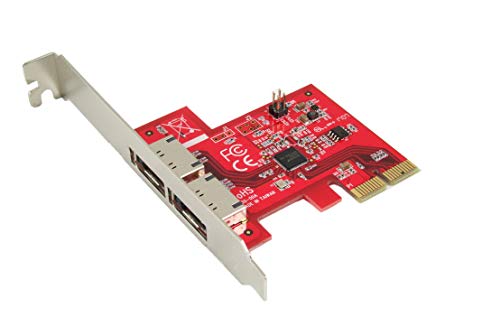
Ableconn PEX-SA134 4-Port eSATA III 6Gbps PCI Express Four Lanes Host Adapter Card - AHCI Port-Multiplier PCIe 2.0 x4 Controller Card

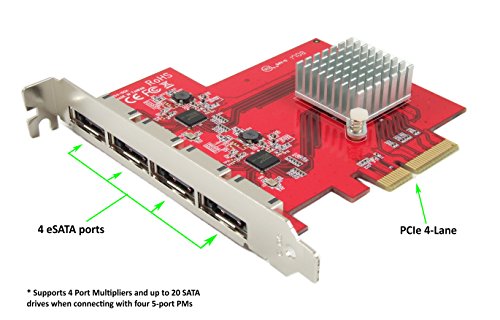


Key features
- •Supports SATA III transfer speeds up to 6.0Gbps; backward compatible with SATA I/II at 1.5/3.0Gbps
- •6 Gbps eSATA III External PCIe Gen2 x4 Lanes High Performance Host Adapter. Supports PCIe 1.0, 2.0, and 3.0 motherboard.
- •Supports four (4) Port Multipliers and up to 20 SATA drives in total when connecting with four 5-port PMs.
- •No driver installation is required on Windows 10/8/7/Vista, Server 2012/2008, Linux, Mac OS X 10.x and later. The AHCI drivers are natively built-in on most Operating Systems.
- •High quality. Fully RoHS compliant. Made in Taiwan.
Ableconn PEX-SA134 4-Port eSATA III 6Gbps PCI Express Four Lanes Host Adapter Card - AHCI Port-Multiplier PCIe 2.0 x4 Controller Card
List Price: $181.07$162.96DEALYou Save: $18.11 (10%)
Free shippingFree Returns – 30 daysFree Order CancellationSecure Payment2–3 Days DeliveryGet It October 24, 2026In Stock (1)No marketing spamNo account requiredFulfilment by FedEx / Amazon / UPS / ShipwirePayPal / Card Buyer Protection
Customer Reviews
Reviews sourced from verified Amazon purchasers4.1
out of 5
Based on 10 reviews
5★
40%
4★
60%
3★
0%
2★
0%
1★
0%
Had multiple issues getting this working in my Dell XPS ...
John Hagen✓ Verified Purchase•September 19, 2023
Had multiple issues getting this working in my Dell XPS 9100. I contacted Ableconn support and they told me it changes the boot sequence in my Dell XPS 9100. Here is what I sent them back. Might help anyone else out there installing it on a Dell XPS 9100.
Thanks for the response. I did finally get it working after troubleshooting for more than 4 hours. The results:
1. When the PEX-SAT4R is in the system, it does change the boot order. For the Dell XPS 9100.
2. Changing the boot order on the Dell XPS 9100 back did NOT allow the system to boot. It still hung.
3. Moving the boot drive to the PEX-SAT4R from the Dell XPS and changing the boot order to use the boot drive on the PEX-SAT4R did allow it to start booting but then came up with an error indicating the Windows 10 loader lost contact with the boot drive on the PEX-SAT4R. Repeated attempts to boot resulted in the same issue.
4. Moving the boot SATA cable to ANY position on the PEX-SAT4R had the same results, incomplete boot.
5. Moving the boot drive back to the Dell XPS 9100 and removing all SATA cables from the PEX-SAT4R allowed the system to completely boot.
6. Installed drivers and monitor program for PEX-SAT4R on Windows 10 will system was running.
7. Disconnected all SATA drive cables from Dell XPS 9100 and PEX-SAT4R. Put boot drive SATA cable on Port 1 of PEX-SAT4R and changed Dell XPS 9100 BIOS to boot off that drive. System fully booted.
8. Installed SATA cable on 2.0 GB drive (SATA 2) on P1 of Dell XPS 9100. Verified system saw both the PEX-SAT4R Port 1 (boot) drive and the data drive on the Dell XPS 9100 P1. Booted system, still booting off Port 1 of the PEX-SAT4R. System did NOT load. Hung up immediately.
9. Removed Dell XPS 9100 data drive P1 cable. Rebooted system and it loaded Windows 10 completely.
10. Connected 3 data drives to PEX-SAT4R Port 2, 3, and 4. No data drives connected to Dell XPS 9100. Booted system and it completed the load into Windows 10.
11. Connected a DVD-RW drive to P0 and a Blu-Ray DVD drive to P2 of Dell XPS 9100. Rebooted system still with Boot and 3 data drives connected to PEX-SAT4R and NO data drives on Dell XPS 9100. System completed boot into Windows 10.
12. Bottom line, if using the PEX-SAT4R, it must be the BOOT source and NO data drives can be connected to the Dell XPS 9100.
13. The PEX-SAT4R drivers MUST be loaded in Windows 10 on the boot disk or you can not boot from the PEX-SAT4R.
14. If booting from the Dell XPS 9100, NO cables can be connected to the PEX-SAT4R until Windows 10 is fully booted. Install the PEX-SAT4R drivers, plug in PEX-SAT4R data drives (while running Windows 10) and it will read the data drives. BUT, you must remove the PEX-SAT4R data cables before rebooting from the Dell XPS 9100 or it WILL NOT BOOT.
Hope this information helps you out. It was quite the experience, one that should have never of happened.
John Hagen
Thanks for the response. I did finally get it working after troubleshooting for more than 4 hours. The results:
1. When the PEX-SAT4R is in the system, it does change the boot order. For the Dell XPS 9100.
2. Changing the boot order on the Dell XPS 9100 back did NOT allow the system to boot. It still hung.
3. Moving the boot drive to the PEX-SAT4R from the Dell XPS and changing the boot order to use the boot drive on the PEX-SAT4R did allow it to start booting but then came up with an error indicating the Windows 10 loader lost contact with the boot drive on the PEX-SAT4R. Repeated attempts to boot resulted in the same issue.
4. Moving the boot SATA cable to ANY position on the PEX-SAT4R had the same results, incomplete boot.
5. Moving the boot drive back to the Dell XPS 9100 and removing all SATA cables from the PEX-SAT4R allowed the system to completely boot.
6. Installed drivers and monitor program for PEX-SAT4R on Windows 10 will system was running.
7. Disconnected all SATA drive cables from Dell XPS 9100 and PEX-SAT4R. Put boot drive SATA cable on Port 1 of PEX-SAT4R and changed Dell XPS 9100 BIOS to boot off that drive. System fully booted.
8. Installed SATA cable on 2.0 GB drive (SATA 2) on P1 of Dell XPS 9100. Verified system saw both the PEX-SAT4R Port 1 (boot) drive and the data drive on the Dell XPS 9100 P1. Booted system, still booting off Port 1 of the PEX-SAT4R. System did NOT load. Hung up immediately.
9. Removed Dell XPS 9100 data drive P1 cable. Rebooted system and it loaded Windows 10 completely.
10. Connected 3 data drives to PEX-SAT4R Port 2, 3, and 4. No data drives connected to Dell XPS 9100. Booted system and it completed the load into Windows 10.
11. Connected a DVD-RW drive to P0 and a Blu-Ray DVD drive to P2 of Dell XPS 9100. Rebooted system still with Boot and 3 data drives connected to PEX-SAT4R and NO data drives on Dell XPS 9100. System completed boot into Windows 10.
12. Bottom line, if using the PEX-SAT4R, it must be the BOOT source and NO data drives can be connected to the Dell XPS 9100.
13. The PEX-SAT4R drivers MUST be loaded in Windows 10 on the boot disk or you can not boot from the PEX-SAT4R.
14. If booting from the Dell XPS 9100, NO cables can be connected to the PEX-SAT4R until Windows 10 is fully booted. Install the PEX-SAT4R drivers, plug in PEX-SAT4R data drives (while running Windows 10) and it will read the data drives. BUT, you must remove the PEX-SAT4R data cables before rebooting from the Dell XPS 9100 or it WILL NOT BOOT.
Hope this information helps you out. It was quite the experience, one that should have never of happened.
John Hagen
A great, low cost 5Gbps RAID card!
Saj✓ Verified Purchase•September 18, 2023
The card was packaged very well coming in a nice box which included a driver CD and an insert with the relevant instructions and features information you would need to know. For my Window 10 install everything went smoothly using a RAID 1 configuration. The onboard header provided output for activity LEDs for each drive which was very handy in my case. The PCB was clearly silk screened adequately and is of decent quality in my opinion.
I really don't like how they market it as 6Gbps implying it will go that fast when in fact even though it will accept a SATA III drive which has a theoretical bandwidth capacity of 6Gbps its speed is limited my the PCI-E 2.0 bus that you are plugging the card into which is only 5Gbps. This can be misleading for some and I just want to put this out there for the purpose of clarifying. I added 2 screenshots to demonstrate the speed reduction one should expect to receive from this card compared to a full bandwidth SATA III port.
The card worked flawlessly and the reduced speed isn't very noticeable for the most part. The POST screen flashes just briefly, it's a bit too quick to make out any text on the screen. I just wish there was a way to adjust a delay so that I could at least see the POST info it provides.
I really don't like how they market it as 6Gbps implying it will go that fast when in fact even though it will accept a SATA III drive which has a theoretical bandwidth capacity of 6Gbps its speed is limited my the PCI-E 2.0 bus that you are plugging the card into which is only 5Gbps. This can be misleading for some and I just want to put this out there for the purpose of clarifying. I added 2 screenshots to demonstrate the speed reduction one should expect to receive from this card compared to a full bandwidth SATA III port.
The card worked flawlessly and the reduced speed isn't very noticeable for the most part. The POST screen flashes just briefly, it's a bit too quick to make out any text on the screen. I just wish there was a way to adjust a delay so that I could at least see the POST info it provides.
Exelent service. Probably not backwards compatible with PCI-e 1.0 systems.
Obigwan✓ Verified Purchase•July 23, 2023
EDIT/UPDATE:
I'm giving this more stars on account of the excellent customer service of Ableconn. They went out of their way to troubleshoot this card with me.
Unfortunately, it still didn't work with my old system so I can't give an objective review of the device performance.
Long and short, if your PC has PCI-E 2.0 x2 lane or greater, it may be new enough to boot from this card. Backwards compatibility is touch-and-go.
Given the performance of its options ROM, it seems to be a stable card.
Original review:
To give this card the benefit of the doubt, it may work on a PCI-e 2.0 system or greater, with Windows (or other OS) being installed *fresh*, just after the card's installation.
I purchased this card to get as close to SSD speeds as I could with my old ASUS P5N-32 e sli. (PCI-e 1.0 x1 = ~256MBs >> PCI-e 1. 0 x2 ~512MBs).
After going through driver installation (windows default as per manufacturer's sparse instructions) with my OS disk plugged in my motherboard's SATA, I swapped the drive to the cards primary port and it just hung at the cards POST screen.
Granted, the operating system was not installed in AHCI, but most likely IDE.
However, a close relative of this chipset, the ASM1061, had no issues recognizing this.
Amazon Customer Service was understanding.
I'm giving this more stars on account of the excellent customer service of Ableconn. They went out of their way to troubleshoot this card with me.
Unfortunately, it still didn't work with my old system so I can't give an objective review of the device performance.
Long and short, if your PC has PCI-E 2.0 x2 lane or greater, it may be new enough to boot from this card. Backwards compatibility is touch-and-go.
Given the performance of its options ROM, it seems to be a stable card.
Original review:
To give this card the benefit of the doubt, it may work on a PCI-e 2.0 system or greater, with Windows (or other OS) being installed *fresh*, just after the card's installation.
I purchased this card to get as close to SSD speeds as I could with my old ASUS P5N-32 e sli. (PCI-e 1.0 x1 = ~256MBs >> PCI-e 1. 0 x2 ~512MBs).
After going through driver installation (windows default as per manufacturer's sparse instructions) with my OS disk plugged in my motherboard's SATA, I swapped the drive to the cards primary port and it just hung at the cards POST screen.
Granted, the operating system was not installed in AHCI, but most likely IDE.
However, a close relative of this chipset, the ASM1061, had no issues recognizing this.
Amazon Customer Service was understanding.
This eSATA card actually works with the newer systems. (updated)
hdfazz✓ Verified Purchase•July 22, 2023
Had Been having problems getting my Mediasonic ProBox to work since I udated my system to one of the latest Asus motherboards and an 8th Gen Intel CPU. Had previously been using a StarTech eSATA controller card that provides a port multiplier. But was never able to get my system to boot my system and get it recognize the drives in the ProBox. Turns out that the card, a model PEXESAT32, is simply incompatible with motherboards that use the newer UEFI BIOS. I had the very same problem with the IOCrest SI-PEX40062 which is advertized to provide the same functionality as the StarTech card, but with a newer Marvell chipset. Still no luck when booting into Win 10 Pro.
All of those problems are gone with the much newer Ableconn PEX-SA130 2-port eSATA card. It uses the contemporary ASMedia ASM1062 chipset, which works just fine with the UEFI BIOS in my new ASUS motherboard. So now my system boots just fine without any workarounds by me, and the drives appear as they should in Windows Explorer when my system completes the boot process.
The drives in the ProBox do not show up in the BIOS as available boot resources, apparently because they are treated as SCSI drives by the UEFI BIOS. But, all is fine if the ProBox is already turned ON and active when the machine is booted. So there is no facility to configure a RAID setup with the ProBox drives prior to system boot with the newer m/bs and chipsets. In this case, a RAID configuration apparently must then be done with drives connected to internal SATA port on the motherboard. This seems to be related to Intel's Rapid Storage Technology. But had not trouble configuring the drive setup in the ProBox from within Windows 10 Pro.
All of those problems are gone with the much newer Ableconn PEX-SA130 2-port eSATA card. It uses the contemporary ASMedia ASM1062 chipset, which works just fine with the UEFI BIOS in my new ASUS motherboard. So now my system boots just fine without any workarounds by me, and the drives appear as they should in Windows Explorer when my system completes the boot process.
The drives in the ProBox do not show up in the BIOS as available boot resources, apparently because they are treated as SCSI drives by the UEFI BIOS. But, all is fine if the ProBox is already turned ON and active when the machine is booted. So there is no facility to configure a RAID setup with the ProBox drives prior to system boot with the newer m/bs and chipsets. In this case, a RAID configuration apparently must then be done with drives connected to internal SATA port on the motherboard. This seems to be related to Intel's Rapid Storage Technology. But had not trouble configuring the drive setup in the ProBox from within Windows 10 Pro.
works exactly as advertized
Ancient-Geek✓ Verified Purchase•June 12, 2023
The PXA-130SA saved me days of work migrating from CentOS-6-KVM to CentOS-7-KVM. Previously the Orico drive towers (without RAID) were connected by USB-3,0 Super Speed and were passed through to the virtualized NAS via PCIe address. CentOS-7-KVM passed the USB device through but not the ports of the JBOD (LVM + RAID). Simple drives worked, but not the drives of the JBOD storage pools. The BIOS SuperMicro X11SAE-F recognized the drives, enumerated the drive models, made the drives available for the hotswap/permanent BIOS menu and for the boot drive menu. I now have 16 fully BIOS integrated AHCI + NCQ SATA III drives that pass through to my virtual NAS's. Both the CentOS-6-KVM and CentOS-7-KVM systems now have their 17, full function, RAID arrays. The Supermicro typically has about 2 dozen SPICE (Simple Protocol for Independent Computing Environments - think RDP on steroids) virtual desktops and a half dozen workload servers. Thank you, Ablecom for making this device available at a reasonable price and no I am not a salesman.
After 2 months of operation I have not had a single JBOD (RAID + LVM) resynch. The almost triple throughput is a nice bonus. The upstart is I am migrating my VM "backup-nas" to use a second PEX-SA130 eSATA adapter.
I believe that 10 drives for the 2 port is an actual limitation because it lists drives frem "1" to "A". I have 4 drives per drive tower and 4 towers.
---
Ater 2 days in my production environment, I am blown away by the increase in the vNAS throughput. At least 4x faster than the USB-3.0 super-speed configuration. I didn't benchmark the USB configuration so this is a purely subjective opinion. The cause maybe because the the RAID-1 JBOD has the two LVM (storage pools in M$ terms) on different PCIe lanes or the AHCI command enhancements or both. in any case OMG and WOW.
---
After 2 months of operation, I have experienced no JBOD resynchs, which used to happen about every other week. I am purchasing another PEX-SA130 to migrate another pair of exteral drive towers from USB to eSATA used by my VM "backup-nas". This will provide my system with 24 AHCI drive bays. I never thought I could actually use that much storage; but then again, I never thought I would ever need 64 GB of memory.
After 2 months of operation I have not had a single JBOD (RAID + LVM) resynch. The almost triple throughput is a nice bonus. The upstart is I am migrating my VM "backup-nas" to use a second PEX-SA130 eSATA adapter.
I believe that 10 drives for the 2 port is an actual limitation because it lists drives frem "1" to "A". I have 4 drives per drive tower and 4 towers.
---
Ater 2 days in my production environment, I am blown away by the increase in the vNAS throughput. At least 4x faster than the USB-3.0 super-speed configuration. I didn't benchmark the USB configuration so this is a purely subjective opinion. The cause maybe because the the RAID-1 JBOD has the two LVM (storage pools in M$ terms) on different PCIe lanes or the AHCI command enhancements or both. in any case OMG and WOW.
---
After 2 months of operation, I have experienced no JBOD resynchs, which used to happen about every other week. I am purchasing another PEX-SA130 to migrate another pair of exteral drive towers from USB to eSATA used by my VM "backup-nas". This will provide my system with 24 AHCI drive bays. I never thought I could actually use that much storage; but then again, I never thought I would ever need 64 GB of memory.
Page 1 of 2