Computer PC Power Supply Tester, ATX/ITX/IDE/HDD/SATA/BYI Connectors Power Supply Tester, 1.8'' LCD Screen (Aluminum Alloy Enclosure)
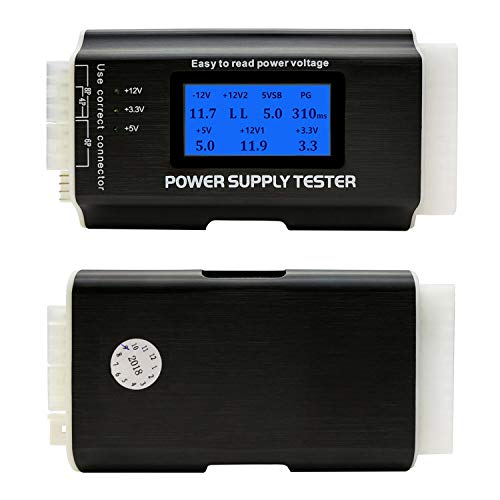


Key features
- •[8-in-1 ATX Power Supply Tester] -- Support test 20-pin IDE / 24-pin IDE / HDD / Floppy 4-pin / PCI-e 6-pin / 4-pin / 8-pin / SATA connectors
- •[Aluminum Alloy Enclosure] -- Light and Easy to Carry, High Strength, Nice Thermal Conductivity & Corrosion Resistance
- •[1.8'' LCD Screen] -- Outputted Voltages shows on the 1.8'' LCD Screen, Easy to Read (Only 20-pin / 24-pin connector shows Voltages on the 1.8'' LCD Screen)
- •[Beep Alarm] -- When your power supply PG Numerical in fault, the Power Supply Tester would issue a buzzer alarm, Easy to Know
- •NOTE: When test with HDD / Floppy 4-pin / PCI-e 6-pin / 4-pin / 8-pin / SATA connectors, Outputted Voltages shows on left side Indicator Light (+12V +3.3V +5V)
Computer PC Power Supply Tester, ATX/ITX/IDE/HDD/SATA/BYI Connectors Power Supply Tester, 1.8'' LCD Screen (Aluminum Alloy Enclosure)
List Price: $31.02$27.92DEALYou Save: $3.10 (10%)
Free shippingFree Returns – 30 daysFree Order CancellationSecure Payment2–3 Days DeliveryGet It October 26, 2026In Stock (2)No marketing spamNo account requiredFulfilment by FedEx / Amazon / UPS / ShipwirePayPal / Card Buyer Protection
Customer Reviews
Reviews sourced from verified Amazon purchasers4.6
out of 5
Based on 10 reviews
5★
50%
4★
50%
3★
0%
2★
0%
1★
0%
USeful voltage checker
Mike✓ Verified Purchase•October 4, 2023
I opened up the unit for you guys so you can see what's inside. The microcontroller or measurement IC's are underneath the display module so I can't tell what they are. The unit appears to be well-made and the soldering is OK.
The unit operates when the main power connector is plugged in and the power supply is turned on. If the 4 pin MB power connector is not plugged in, the unit will show, for the +12V2 voltage, "L.L" and the unit will beep. The beeps are very quiet.
You should only connect, at any one time, only one of these three power plugs:
SATA
Floppy (does anyone have a floppy drive these days?)
4 pin Molex
This is because they are all wired to the green LEDs at once and connecting more than one power plug at a time in parallel wouldn't mean much. This isn't explained in the documentation, which needs a second round of editing to make the operation of the device clearer.
The three green LEDs indicating 3.3, 5, or 12 V from the floppy, SATA, and 4 pin Molex power connectors are not an indication of a measurement "good" signal from an active device that is "measuring" the voltages. Rather, they are simply wired straight to the incoming voltages from the connected SATA, Floppy, or Molex plugs with a series current limiting resistor. It is not a "measurement" in the sense that the other voltages indicated on the LCD display are being measured. It is just a "dumb" indication that a voltage sort-of close to the required voltage is present, or that the wires are actually connected properly. The 3.3, 5, or 12 V lines could be off by a bit and the LEDs would still light up, but they would be brighter or darker than they would be with the correct voltage applied. You can look at the main LCD if you want to know the exact voltage coming out of those power supplies.
Also, this measurement unit does not load the power supply and draw a lot of power like a real operating computer will when plugged into the power supply. So, if the power supply has problems maintaining proper voltages operating under a load, this unit will not tell you that. But you could infer that problem if all the voltages showed OK using this tester, but the PC still won't run properly (could be many other problems also ...).
The unit operates when the main power connector is plugged in and the power supply is turned on. If the 4 pin MB power connector is not plugged in, the unit will show, for the +12V2 voltage, "L.L" and the unit will beep. The beeps are very quiet.
You should only connect, at any one time, only one of these three power plugs:
SATA
Floppy (does anyone have a floppy drive these days?)
4 pin Molex
This is because they are all wired to the green LEDs at once and connecting more than one power plug at a time in parallel wouldn't mean much. This isn't explained in the documentation, which needs a second round of editing to make the operation of the device clearer.
The three green LEDs indicating 3.3, 5, or 12 V from the floppy, SATA, and 4 pin Molex power connectors are not an indication of a measurement "good" signal from an active device that is "measuring" the voltages. Rather, they are simply wired straight to the incoming voltages from the connected SATA, Floppy, or Molex plugs with a series current limiting resistor. It is not a "measurement" in the sense that the other voltages indicated on the LCD display are being measured. It is just a "dumb" indication that a voltage sort-of close to the required voltage is present, or that the wires are actually connected properly. The 3.3, 5, or 12 V lines could be off by a bit and the LEDs would still light up, but they would be brighter or darker than they would be with the correct voltage applied. You can look at the main LCD if you want to know the exact voltage coming out of those power supplies.
Also, this measurement unit does not load the power supply and draw a lot of power like a real operating computer will when plugged into the power supply. So, if the power supply has problems maintaining proper voltages operating under a load, this unit will not tell you that. But you could infer that problem if all the voltages showed OK using this tester, but the PC still won't run properly (could be many other problems also ...).
Very good item.
Ron Powers✓ Verified Purchase•October 1, 2023
Exactly what was needed. Arrived quickly.
PSU Tester
James T Stubbs✓ Verified Purchase•September 25, 2023
Awesome tester!!
Easy to use and quite informative!
Brian S.✓ Verified Purchase•August 14, 2023
Got it quickly. Just plug in as labeled, and it tests all the power supply outputs while displaying the main motherboard voltages. Easy peasy.
This thing saves lives
Matt✓ Verified Purchase•August 5, 2023
Diagnostic 10/10. Easy to use. Wonderful tool. Helped me find out my psu was broken. Borrowed another psu and it passed the test. Bought new psu and out of the box it was giving same error. So I'll be switching brands. If it weren't for this tool I would have gone through heck diagnosing a second faulty psu. I'll be testing them all before installing. Again. 10/10
Page 1 of 2