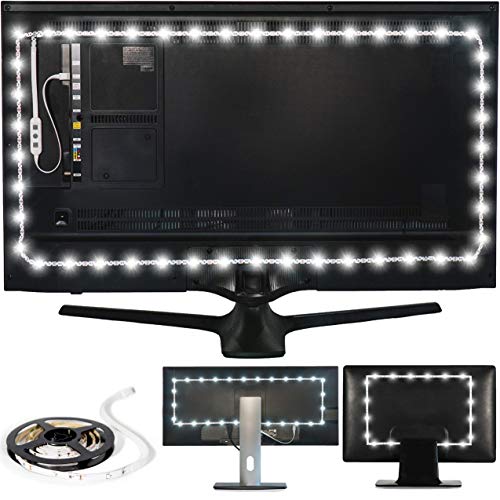
Power Practical USB Bias Lighting, LED TV Backlight Strip, Ambient Home Theater Light, TV Accent Lighting to Reduce Eye Strain, Improve Contrast, White, X-Large (41"-59" TV)


Key features
- •REDUCE EYE STRAIN: Increasing the ambient light in a room prevents our eyes from straining to adjust between a bright screen and dark room, preventing headaches and eye dryness.
- •IMPROVE CONTRAST: In a dark viewing area, eyes perceive black as shades of gray and colors look more washed out. The Luminoodle brightens the room without a screen glare, improving color and contrast.
- •BEAUTIFUL GLOW: The Luminoodle's high quality, true white LEDs can turn any TV room into a beatuiful home theater area, adding a comforting glow to the room.
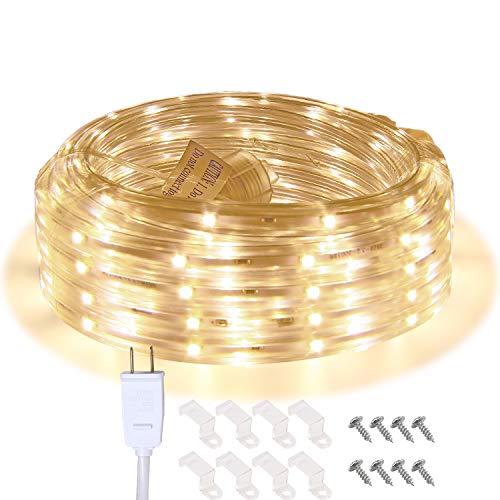
- •INCLUDES: 157 inch (4m, 13 FT) LED light strip (6000 Kelvin) with 3M adhesive that plugs into your TV's USB port. *Input: 5W (5V, 1A). Please check USB output prior to use.
- •1 YEAR WARRANTY: Power Practical offers a one year warranty on all products with friendly, easy to access customer support.
Power Practical USB Bias Lighting, LED TV Backlight Strip, Ambient Home Theater Light, TV Accent Lighting to Reduce Eye Strain, Improve Contrast, White, X-Large (41"-59" TV)
List Price: $43.63$39.27DEALYou Save: $4.36 (10%)
Free shippingFree Returns – 30 daysFree Order CancellationSecure Payment2–3 Days DeliveryGet It October 27, 2026In Stock (2)No marketing spamNo account requiredFulfilment by FedEx / Amazon / UPS / ShipwirePayPal / Card Buyer Protection
Customer Reviews
Reviews sourced from verified Amazon purchasers4.5
out of 5
Based on 10 reviews
5★
40%
4★
60%
3★
0%
2★
0%
1★
0%
Not bright enough for 77 inch TV against dark paneling..
Falcon_Defence✓ Verified Purchase•October 17, 2023
Still going to give these 5 stars because everything works great.
I just want to say these would be plenty bright reflecting off of a white wall. I had a smaller set of these but had them reflecting off of a white wall.
I didn't think ahead and put these on my main TV that was attached to a wood paneled wall (darkish brown). Probably half the brightness is not reflected vs. the white wall so it's something to consider.
I just want to say these would be plenty bright reflecting off of a white wall. I had a smaller set of these but had them reflecting off of a white wall.
I didn't think ahead and put these on my main TV that was attached to a wood paneled wall (darkish brown). Probably half the brightness is not reflected vs. the white wall so it's something to consider.
it’s okay
Amazon Customer✓ Verified Purchase•October 13, 2023
Your getting what you paid for. Don't have high expectations. Most USB plugs on the tv won't handle the power draw.
Zero Brightness Control
Ame✓ Verified Purchase•September 27, 2023
It's as described for the most part. It was easy to install, incredibly bright and kind to your eyes. It has nice 3M tape. The USB connector is a flat, cheap looking piece of plastic that appears to be sprayed painted gold. It's not boxed with metal like you would expect a USB connector to have. Unfortunately, this listing is misleading and there's no way to control the brightness. The product page clearly shows pictures highlighting an inline brightness control. It's clearly grey and white with plus and minus signs. It's easy to see in the overlay close up picture of the controller. The product that I received doesn't have the pictured dimmer switch. The switch and remote (sold separately, as a set only) cost about as much as the light strip when it was on sale. I don't need a remote, I just want the connector that I thought I had purchased. Like I said, it's extremely bright. If you buy this, make sure you pony up $20 for the brightness adapter and remote or it will get annoying fast.
Plan your layout first for perfect results.
Espresso Fan✓ Verified Purchase•August 20, 2023
Selecting the correct length of lightstrip for your TV is paramount for an ideal installation. More on this topic follows below. Be aware the adhesive strip on theses lights is very strong! If your initial layout does not go all the way around, or is too long and overlaps, trying to remove the strip so you can redo the installation can be near impossible due to the strength of the adhesive strip. If you attempt to remove the strip by pulling it off its possible you could damage the strip.
As a suggestion when preparing for your installation, do not peel the backing off the adhesive strip just yet. Instead, using masking tape or painters tape - temporarily- attach the light strip to the back of your TV, moving the light strip in or out from the edges until you find the spacing needed to successfully make it around the entire perimeter without coming up short. Where to place the strip, how far in from the outer edge, is there an ideal placement? It seems many agree ideal placement for these light strips is around 2.5 inches in from the edge of the screen although the included installation instructions simply say to install them within 4 inches of the edges. In my particular installation with the XL kit on my 65" TV I discovered placing them 4 inches in from the edge I had over a foot of excess but placing them at 2.5 inches in from the edge I was a couple inches short. In the end I discovered by placing the outer edge of the light strip in 3" from each edge I was able to make it all the way around my 65" TV perfectly with no unlighted spaces and no excess overlap. Practice testing the placement and you will be much happier with the installation and end result.
Some have stated they purchased the correct kit for their TV according to the information provided, but in the end"¦ the kit was not long enough to surround the entire perimeter on the back of their TV. They were either short several inches or a several inches too long. To avoid running into that issue I read the description for every kit.
There are various choices for the Luminoodle kit based on size and color options. The screen sizes listed within the variety of available options to chose from indicates the XL is for 41"-59" TV which seemed to indicate it would be too small for my 65", however if you view the various images to the left of the listing you will see an image showing a diagram of different TV screen sizes, The image for the XL indicates it is good for 55" to 75" which should work for my 65". See attached photo in regards to confusion.
I wanted to make sure the kit I purchased would make it around the entire perimeter. Should I select my kit based on the diagram showing TV screen sizes and corresponding kit or the make my selection based on the size indicated in the various size and color option available to select? After much research I ended up ordering the X-Large for (41-59"). Regardless of the size you order, as you might imagine, the larger you make the height and width of the rectangle of lights on the back of your TV, the longer strip you are going to need.
My TV mount is fully adjustable. During my installation placement experiments I discovered when the light strip was placed very close to the outer edge of the TV and the TV close or flush with the wall, the lighting brighter - but - the light strip produced bright spots where each LED abutted the wall. Whereas, when the TV was pulled further away from the wall the light had a chance to disburse into a more even glow. Moving the light strip in further away from the outer edge of the TV eliminated the bright spots around the TV and produced a more even the glow but was not as bright. I was able to compensate for the brightness using the remote and turning up the brightness level. Very pleased with the end result!
As a suggestion when preparing for your installation, do not peel the backing off the adhesive strip just yet. Instead, using masking tape or painters tape - temporarily- attach the light strip to the back of your TV, moving the light strip in or out from the edges until you find the spacing needed to successfully make it around the entire perimeter without coming up short. Where to place the strip, how far in from the outer edge, is there an ideal placement? It seems many agree ideal placement for these light strips is around 2.5 inches in from the edge of the screen although the included installation instructions simply say to install them within 4 inches of the edges. In my particular installation with the XL kit on my 65" TV I discovered placing them 4 inches in from the edge I had over a foot of excess but placing them at 2.5 inches in from the edge I was a couple inches short. In the end I discovered by placing the outer edge of the light strip in 3" from each edge I was able to make it all the way around my 65" TV perfectly with no unlighted spaces and no excess overlap. Practice testing the placement and you will be much happier with the installation and end result.
Some have stated they purchased the correct kit for their TV according to the information provided, but in the end"¦ the kit was not long enough to surround the entire perimeter on the back of their TV. They were either short several inches or a several inches too long. To avoid running into that issue I read the description for every kit.
There are various choices for the Luminoodle kit based on size and color options. The screen sizes listed within the variety of available options to chose from indicates the XL is for 41"-59" TV which seemed to indicate it would be too small for my 65", however if you view the various images to the left of the listing you will see an image showing a diagram of different TV screen sizes, The image for the XL indicates it is good for 55" to 75" which should work for my 65". See attached photo in regards to confusion.
I wanted to make sure the kit I purchased would make it around the entire perimeter. Should I select my kit based on the diagram showing TV screen sizes and corresponding kit or the make my selection based on the size indicated in the various size and color option available to select? After much research I ended up ordering the X-Large for (41-59"). Regardless of the size you order, as you might imagine, the larger you make the height and width of the rectangle of lights on the back of your TV, the longer strip you are going to need.
My TV mount is fully adjustable. During my installation placement experiments I discovered when the light strip was placed very close to the outer edge of the TV and the TV close or flush with the wall, the lighting brighter - but - the light strip produced bright spots where each LED abutted the wall. Whereas, when the TV was pulled further away from the wall the light had a chance to disburse into a more even glow. Moving the light strip in further away from the outer edge of the TV eliminated the bright spots around the TV and produced a more even the glow but was not as bright. I was able to compensate for the brightness using the remote and turning up the brightness level. Very pleased with the end result!
Great, But Could Be Better for the Price
Ryan Smith✓ Verified Purchase•August 18, 2023
One of the primary reasons that I selected these out of the dozens of various brands and sellers is because they were the most recommended I saw between video enthusiasts who wanted a "true white" bias lighting at ~6500K. I've been using these for around three months now and while I absolutely love them, I feel like they could deliver a bit more. Especially when you consider that these are one of the more expensive options.
The lights were very easy to install, taking maybe 15 minutes. The 3M adhesive on the back seems to be very strong. I'm likely going to need some kind of chemical or tool to remove these, should they ever decide to go bad.
The product also delivers on it's promises of improved image quality. Bias lighting basically tricks the eyes into constricting a bit, which makes blacks look a bit more "inky" and, in turn, makes other colors on the screen look a bit more saturated and lively, without sacrificing detail like you would be cranking up the contrast and saturation settings on your TV. Pro-tip: There are tons of available tools freely available online that you can use to calibrate the brightness, contrast, and color settings of your TV to industry standards, which will even further improve what these lights can do, as you'll be seeing your content EXACTLY how they were intended to look by those involved.
So far, I've been pretty lucky. There's a few reviews here and there that talk about getting faulty units with dead LEDs or some that don't even work. Mine have been working perfectly so far, and I have been using them roughly 4-6 hours per evening while I enjoy movies and/or gaming. I hope I at least get a good 3-4 years out them. Any longer would be a welcome bonus. The included remote feels a little flimsy at times, but it serves it's purpose and gets the job done well enough. There are a few pre-selected colors at the bottom, along with brightness adjustments, buttons to scroll through the roughly 20 available colors, and a "Mode" button that cycles through the various colors (with buttons to adjust the speed).
The one downside though is that even some of the cheaper options have more colors, or even mobile apps that allow you to dial in the exact color you want using some form of RGB settings, like a color wheel. Maybe one day down the line, Loominoodle can deliver a product like that, and maybe even improve the existing quality of the lights (less faulty units, brighter settings for those who want them, possibly longer life-span). Considering they have the backing of Mark Cuban, as well as the support of the video-enthusiast market, you would think they have the available funds to put together something with a bit more variety. I would even be willing to have paid an extra $5-7 for the ability to use an app to dial in the color exactly as I wanted, maybe save those colors to various profiles I can swap through.
For now though, the Loominoodle is likely going to be your best option, especially considering the varying quality of the similar, Chinese branded products. If you can look past the few, though somewhat glaring, omissions. Even if you just want plain white bias lighting, why not get one with a few extra colors thrown in? You can always use them for mood lighting, or even dim them and have a nightlight, when you're not using your TV. Highly recommended.
The lights were very easy to install, taking maybe 15 minutes. The 3M adhesive on the back seems to be very strong. I'm likely going to need some kind of chemical or tool to remove these, should they ever decide to go bad.
The product also delivers on it's promises of improved image quality. Bias lighting basically tricks the eyes into constricting a bit, which makes blacks look a bit more "inky" and, in turn, makes other colors on the screen look a bit more saturated and lively, without sacrificing detail like you would be cranking up the contrast and saturation settings on your TV. Pro-tip: There are tons of available tools freely available online that you can use to calibrate the brightness, contrast, and color settings of your TV to industry standards, which will even further improve what these lights can do, as you'll be seeing your content EXACTLY how they were intended to look by those involved.
So far, I've been pretty lucky. There's a few reviews here and there that talk about getting faulty units with dead LEDs or some that don't even work. Mine have been working perfectly so far, and I have been using them roughly 4-6 hours per evening while I enjoy movies and/or gaming. I hope I at least get a good 3-4 years out them. Any longer would be a welcome bonus. The included remote feels a little flimsy at times, but it serves it's purpose and gets the job done well enough. There are a few pre-selected colors at the bottom, along with brightness adjustments, buttons to scroll through the roughly 20 available colors, and a "Mode" button that cycles through the various colors (with buttons to adjust the speed).
The one downside though is that even some of the cheaper options have more colors, or even mobile apps that allow you to dial in the exact color you want using some form of RGB settings, like a color wheel. Maybe one day down the line, Loominoodle can deliver a product like that, and maybe even improve the existing quality of the lights (less faulty units, brighter settings for those who want them, possibly longer life-span). Considering they have the backing of Mark Cuban, as well as the support of the video-enthusiast market, you would think they have the available funds to put together something with a bit more variety. I would even be willing to have paid an extra $5-7 for the ability to use an app to dial in the color exactly as I wanted, maybe save those colors to various profiles I can swap through.
For now though, the Loominoodle is likely going to be your best option, especially considering the varying quality of the similar, Chinese branded products. If you can look past the few, though somewhat glaring, omissions. Even if you just want plain white bias lighting, why not get one with a few extra colors thrown in? You can always use them for mood lighting, or even dim them and have a nightlight, when you're not using your TV. Highly recommended.
Page 1 of 2