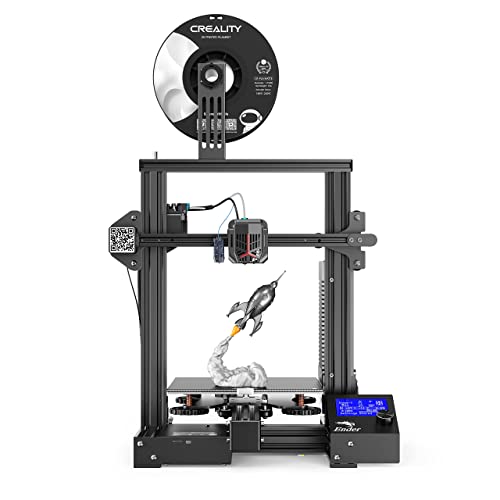
Official Creality Ender 3 3D Printer Fully Open Source with Resume Printing Function DIY Printers Build Volulme 8.66x8.66x9.84 inch



Key features
- •Resume Print: Ender 3 has the ability to resume prints even after a power outage or lapse occurs
- •Easy and Qucik Assembly: It comes with several assembled parts, you only need about 15 minutes to assemble 20 nuts well.
- •Patent Technology : MK-10 Extruder greatly reduces plugging risk and bad extrustion; V-Slot with POM wheel make it move noiseless, smoothly and durable
- •Safety protected Power supply, Only need 5 minutes for hotbed to reach 110℃
- •Strict Test: Strict testing for key components before delivery and life-time technical support
Official Creality Ender 3 3D Printer Fully Open Source with Resume Printing Function DIY Printers Build Volulme 8.66x8.66x9.84 inch
List Price: $245.90$221.31DEALYou Save: $24.59 (10%)
Free shippingFree Returns – 30 daysFree Order CancellationSecure Payment2–3 Days DeliveryGet It October 25, 2026In Stock (1)No marketing spamNo account requiredFulfilment by FedEx / Amazon / UPS / ShipwirePayPal / Card Buyer Protection
Customer Reviews
Reviews sourced from verified Amazon purchasers4.3
out of 5
Based on 10 reviews
5★
70%
4★
30%
3★
0%
2★
0%
1★
0%
Good printer for those who do not mind a little assembly
Alex S✓ Verified Purchase•August 12, 2018
Pros:
-Price and performance
-Well packaged
-Spare parts!
Cons:
-Instructions*
-User interface
-Bow in bedplate
This is a pretty good starter printer for those looking to get started but it isn't perfect (wish I could rate it 4.5). I have now used 6 different printers and I would recommend this one with the caveat that it may require some initial quality checks and a willingness to do some assembly. There are some more polished options out there at a similar price (Malyan M200/Monoprice Select Mini), but they often lack the build volume and/or are more expensive. That said, the price is outstanding for what you receive, so it wins points for that but there are a couple things people should be aware of.
First, as others have stated, the instructions are bad. While a large step-by-step poster is provided, it lacks clarity and detailed views and explanation. However, there are some very excellent Youtube videos that walk through the assembly. If you follow the videos, it should be "easy" - just hit pause at each step and take your time.
Speaking of assembly, overall assembly time was around 1-1.5 hours. Again, watch one of the assembly videos - it is not that complex. I did experience 2 hiccups.
1. The x-belt tension pulley was not assembled correctly. The bearings were stacked on mine with the flanges oriented the same way (rather than the flanges being on the outside to create a groove). It was not hard to fix but the locknut was tight, and I used a vice to hold it to loosen it. This could be a challenge for some depending on the tools you have available.
2. The y-limit switch was set too far back which caused the nozzle to overhang the bed when homed (the nozzle should sit over the front corner of the bed when homed). There were extra M4 screws and T-nuts included so I removed the larger screws holding the switch assembly and used the T-nuts and shorter M4 countersunk screws and positioned the switch further forward. There is zero mention of this in any videos I have seen but an easy fix. There are also switch mounting plates on thingiverse which do the same thing.
The bed plate is not that hard to level but mine does have a slight bow in the middle - which is somewhat typical for this style of printer (corners are higher than center). Not necessarily a show stopper for hobbygrade prints but could pose challenges for bed adhesion/dimensionally accurate parts. A glass plate would address this issue (and is included with some Ender 3 kits). It was, at one point, part of the listing for this kit but is not currently. I would recommend ordering one at the same time and attaching to the bed with binder clips.
Other than those things, the printer is solid and has some decent hardware. They also provide an extra nozzle, scraper, nozzle cleaning tool, wrenches, and all the allen keys you would need. The user interface is a little clumsy compared to my other printer but similar to many others. It works - I just wish it was a little more polished.
The print quality is quite good. I definitely recommend doing some Google/Youtube searches for best setup/settings for Cura. The printer is very capable of creating high quality prints and printing at pretty fine resolution levels. The underlying hardware is good - just needs to be setup properly.
-Price and performance
-Well packaged
-Spare parts!
Cons:
-Instructions*
-User interface
-Bow in bedplate
This is a pretty good starter printer for those looking to get started but it isn't perfect (wish I could rate it 4.5). I have now used 6 different printers and I would recommend this one with the caveat that it may require some initial quality checks and a willingness to do some assembly. There are some more polished options out there at a similar price (Malyan M200/Monoprice Select Mini), but they often lack the build volume and/or are more expensive. That said, the price is outstanding for what you receive, so it wins points for that but there are a couple things people should be aware of.
First, as others have stated, the instructions are bad. While a large step-by-step poster is provided, it lacks clarity and detailed views and explanation. However, there are some very excellent Youtube videos that walk through the assembly. If you follow the videos, it should be "easy" - just hit pause at each step and take your time.
Speaking of assembly, overall assembly time was around 1-1.5 hours. Again, watch one of the assembly videos - it is not that complex. I did experience 2 hiccups.
1. The x-belt tension pulley was not assembled correctly. The bearings were stacked on mine with the flanges oriented the same way (rather than the flanges being on the outside to create a groove). It was not hard to fix but the locknut was tight, and I used a vice to hold it to loosen it. This could be a challenge for some depending on the tools you have available.
2. The y-limit switch was set too far back which caused the nozzle to overhang the bed when homed (the nozzle should sit over the front corner of the bed when homed). There were extra M4 screws and T-nuts included so I removed the larger screws holding the switch assembly and used the T-nuts and shorter M4 countersunk screws and positioned the switch further forward. There is zero mention of this in any videos I have seen but an easy fix. There are also switch mounting plates on thingiverse which do the same thing.
The bed plate is not that hard to level but mine does have a slight bow in the middle - which is somewhat typical for this style of printer (corners are higher than center). Not necessarily a show stopper for hobbygrade prints but could pose challenges for bed adhesion/dimensionally accurate parts. A glass plate would address this issue (and is included with some Ender 3 kits). It was, at one point, part of the listing for this kit but is not currently. I would recommend ordering one at the same time and attaching to the bed with binder clips.
Other than those things, the printer is solid and has some decent hardware. They also provide an extra nozzle, scraper, nozzle cleaning tool, wrenches, and all the allen keys you would need. The user interface is a little clumsy compared to my other printer but similar to many others. It works - I just wish it was a little more polished.
The print quality is quite good. I definitely recommend doing some Google/Youtube searches for best setup/settings for Cura. The printer is very capable of creating high quality prints and printing at pretty fine resolution levels. The underlying hardware is good - just needs to be setup properly.
I wanted this to work well but customer service is great!
D✓ Verified Purchase•July 28, 2018
EDIT: Update 8-9-18
The company reached out to me and offered to replace some of the parts that I was having trouble with. I've changed the review from 3 stars to 5 starts for excellent customer service.
Original review:
I wanted so bad for this printer to be the best entry level printer on the market. Key word: wanted. I purchased this at the end of June as a small step into the 3D printing arena. With the success of the CR-10 (made by the same company as the Ender 3), I felt that the Ender 3 was a wonderful option if you didn't have a need for the large print space that the CR-10 has and were on an entry level budget. That's not to say that the Ender 3 has a small print space. For the price range, this has one of the largest. Assembly of the Ender 3 can definitely test your patience. If everything is not lined up just perfectly when you tighten all of the screws down, your end result will be a wobbly 3D printer. (FYI, the packaging that the printer came in helps resolve this issue if you set the printer on top of it.) Some of the first prints that I did weren't difficult to print as I wanted to ease into all of the features this has. Here's a quick list of my pros and cons:
Pros:
- Ease of use - The menus are easy to find and understand. It's incredibly simple to put your stl file on the micro SD card and start printing. While the placement of where the SD card goes in is a bit of a headache, you can get used to it over time.
- Bed surface - I like the surface of the heated bed as it really grabs the plastic and it's one less thing you have to worry about (i.e. putting glue on the bed). Some times, it can grab the print a little too well and it makes removal quiet interesting.
Cons:
- Quality - In general, overall quality of the printer is lacking, but that just may be par for the price point. Prints can greatly vary from "it looks fine" to "what happened?" While I admit some of this may be my fault and inexperience with Cura, I've found that printing the same successful print can also give different results without any of the files being changed. Another quality issue were the rollers either being too tight or too loose from the factory. While some experienced 3D printing people know to look for this, someone who is taking this printer as their first step may not know how this will affect their prints.
- Heated bed - Again, I like the build surface of the bed but I thoroughly dislike the bed overall. After spending so much time and effort into leveling the bed, making sure that all four corners are the right height and stay there consistently, disheartened is the best way to describe how it feels when you try and level the center of the bed. No matter what I did, the center of the bed was always too far from the nozzle. To fix this, I raised the bed but that causes all of the corners to now be too close to the nozzle. After much searching online, I came to find that this is a common issue and that the bed could be "cupped". A simple fix is to buy a 235mm x 235mm glass bed but that can be like throwing money at the problem.
- PTFE tube and couplers - This issue may not present itself in the beginning but over time, you may notice consist under-extrusion (like having holes or gaps in the print lines) no matter what your settings are. A quick synopses of the issue is the coupler that holds the PTFE tube in the hotend slowly lets the tube back out as filament is fed in. This causes the filament to melt and expand to create a jam. No matter what your settings are in general, you're going to end up with poor print quality. There are videos online on how to get around this but again, you're spending money to fix the problem.
Overall, I recommend this printer. While my experience may be vastly different from someone else, I seem to be having a similar experience to many other people online. I love the price point of the printer and that it helps you understand the 3D printing world. My advice is to do your homework. If this printer is exactly what you want and you don't mind that you may have to learn some things to get this running smoothly, then I hope my review has given you some insight.
The company reached out to me and offered to replace some of the parts that I was having trouble with. I've changed the review from 3 stars to 5 starts for excellent customer service.
Original review:
I wanted so bad for this printer to be the best entry level printer on the market. Key word: wanted. I purchased this at the end of June as a small step into the 3D printing arena. With the success of the CR-10 (made by the same company as the Ender 3), I felt that the Ender 3 was a wonderful option if you didn't have a need for the large print space that the CR-10 has and were on an entry level budget. That's not to say that the Ender 3 has a small print space. For the price range, this has one of the largest. Assembly of the Ender 3 can definitely test your patience. If everything is not lined up just perfectly when you tighten all of the screws down, your end result will be a wobbly 3D printer. (FYI, the packaging that the printer came in helps resolve this issue if you set the printer on top of it.) Some of the first prints that I did weren't difficult to print as I wanted to ease into all of the features this has. Here's a quick list of my pros and cons:
Pros:
- Ease of use - The menus are easy to find and understand. It's incredibly simple to put your stl file on the micro SD card and start printing. While the placement of where the SD card goes in is a bit of a headache, you can get used to it over time.
- Bed surface - I like the surface of the heated bed as it really grabs the plastic and it's one less thing you have to worry about (i.e. putting glue on the bed). Some times, it can grab the print a little too well and it makes removal quiet interesting.
Cons:
- Quality - In general, overall quality of the printer is lacking, but that just may be par for the price point. Prints can greatly vary from "it looks fine" to "what happened?" While I admit some of this may be my fault and inexperience with Cura, I've found that printing the same successful print can also give different results without any of the files being changed. Another quality issue were the rollers either being too tight or too loose from the factory. While some experienced 3D printing people know to look for this, someone who is taking this printer as their first step may not know how this will affect their prints.
- Heated bed - Again, I like the build surface of the bed but I thoroughly dislike the bed overall. After spending so much time and effort into leveling the bed, making sure that all four corners are the right height and stay there consistently, disheartened is the best way to describe how it feels when you try and level the center of the bed. No matter what I did, the center of the bed was always too far from the nozzle. To fix this, I raised the bed but that causes all of the corners to now be too close to the nozzle. After much searching online, I came to find that this is a common issue and that the bed could be "cupped". A simple fix is to buy a 235mm x 235mm glass bed but that can be like throwing money at the problem.
- PTFE tube and couplers - This issue may not present itself in the beginning but over time, you may notice consist under-extrusion (like having holes or gaps in the print lines) no matter what your settings are. A quick synopses of the issue is the coupler that holds the PTFE tube in the hotend slowly lets the tube back out as filament is fed in. This causes the filament to melt and expand to create a jam. No matter what your settings are in general, you're going to end up with poor print quality. There are videos online on how to get around this but again, you're spending money to fix the problem.
Overall, I recommend this printer. While my experience may be vastly different from someone else, I seem to be having a similar experience to many other people online. I love the price point of the printer and that it helps you understand the 3D printing world. My advice is to do your homework. If this printer is exactly what you want and you don't mind that you may have to learn some things to get this running smoothly, then I hope my review has given you some insight.
Great for the money.
Mack✓ Verified Purchase•July 15, 2018
After a bit of bed leveling, this printed great. Well, with the pla they give you and the test file you get. I mean, I can clearly tell it prints VERY well even with a minor speed increase, but the test filament didn't even cover half the test object. GET MORE FILAMENT!
Leveling was pretty easy with the large knobs underneath. It was lowered about as low as it could go when I first adjusted so feel free to raise that sucker a bunch. Heated it up, moved the extruder up just a hair using the knob interface and went with a bit more resistance on the index card I used than I thought I needed. Worked fine.
Loading filament was more art than science. I cut the tip at a 45 degree angle and it loaded easier.
Definitely not quiet by any stretch of the imagination, but my workshop is in the basement. Close the door and it's all set. Doesn't bother me upstairs at all. My dog slept next to it and considering I finished the build at 11:30pm I fell asleep next to it as well in my deskchair.
Don't be intimidated by the build. There's plenty of videos to go by as well. It makes sense after a read through or two as you go, but the videos from 3d printed tabletop helped a ton. Took me an hour or so going slow and safe.
All in all, considering the test filament is all I used and the quality of the maybe half of a dog test print was rather good for not having done anything to it aside from simple assembly I can say I'm fairly impressed. I ordered 3 new batches of filament to see what brands work best without going traight to hatchbox. Here's to many models in the future to work with.
Leveling was pretty easy with the large knobs underneath. It was lowered about as low as it could go when I first adjusted so feel free to raise that sucker a bunch. Heated it up, moved the extruder up just a hair using the knob interface and went with a bit more resistance on the index card I used than I thought I needed. Worked fine.
Loading filament was more art than science. I cut the tip at a 45 degree angle and it loaded easier.
Definitely not quiet by any stretch of the imagination, but my workshop is in the basement. Close the door and it's all set. Doesn't bother me upstairs at all. My dog slept next to it and considering I finished the build at 11:30pm I fell asleep next to it as well in my deskchair.
Don't be intimidated by the build. There's plenty of videos to go by as well. It makes sense after a read through or two as you go, but the videos from 3d printed tabletop helped a ton. Took me an hour or so going slow and safe.
All in all, considering the test filament is all I used and the quality of the maybe half of a dog test print was rather good for not having done anything to it aside from simple assembly I can say I'm fairly impressed. I ordered 3 new batches of filament to see what brands work best without going traight to hatchbox. Here's to many models in the future to work with.
Well built printer that provides decent build volume at a solid price point.
healthisimportant✓ Verified Purchase•July 7, 2018
This is my second 3d printer and second Creality. I didn't want to wait for shipping from overseas, so I paid more to get it via Prime through Comgrow. My experience with the vendor was good...as in everything was in the box, nothing was broken, so I didn't have to contact them. As far as build out, the Ender 3 is more of a kit than say the Creality CR10S (and variants). The CR10S I bought was quick to setup and nearly completely put together out of the box. The Ender 3 requires some additional steps to get it put together, but nothing that seemed overly complex or troublesome to me at least. I'm not a 3d printing expert, but I have a few months of experience with them, and am very comfortable with Creality printers in particular. I suspect that helped with the ease of putting this together. However, I found the quick start guide and pictures to be more than sufficient to get it assembled in fairly short order even if I didn't have much experience, anyone should be able to do it, just take your time and if you aren't sure hit the web to get additional opinions. It took me about an hour from box opening to first print. Though I take my time and really look at stuff so I'm pretty slow. First test print was really good and it's been running ever since. I've not had any technical issues with the printer at all. I've read about misc trouble some have with the Ender 3, but I haven't had one bit of trouble. For the print volume and price, it's hard to beat. It's a solid little printer.
The printer arrived fast and is amazing for the price
Mili Mulic✓ Verified Purchase•July 6, 2018
The printer arrived fast and is amazing for the price. I own a few printers already and would easily buy more of these.
My only problem was the printer will not home in on the X axis. When I emailed the seller about this we went a little back and forth and ultimately they asked me for a video of the problem, but it was just too much trouble by that point so I ordered a replacement part for under $3 online and got it working just fine. I had to manually push in the printhead to the far left before each print until it came in, but it's my first time with an issue like this for a 3D printer so I'm sure the problem is rare.
This thing prints perfectly and would have 5 stars if it wasn't for the small inconvenience. I attached a few prints and upgrades I printed using the machine stock with stock profile settings. I'll be doing a video review soon.
If your budget is 200-250 this is the best 3D printer money can buy. Setup is easy, but takes 45-1hr if you are a first time printer. Tons of online reasorces that show how to set this up.
I added dampeners to 2 of the motors to make it almost silent when printing.
If you are looking to get your feet wet with 3D printing. Get this machine!
My only problem was the printer will not home in on the X axis. When I emailed the seller about this we went a little back and forth and ultimately they asked me for a video of the problem, but it was just too much trouble by that point so I ordered a replacement part for under $3 online and got it working just fine. I had to manually push in the printhead to the far left before each print until it came in, but it's my first time with an issue like this for a 3D printer so I'm sure the problem is rare.
This thing prints perfectly and would have 5 stars if it wasn't for the small inconvenience. I attached a few prints and upgrades I printed using the machine stock with stock profile settings. I'll be doing a video review soon.
If your budget is 200-250 this is the best 3D printer money can buy. Setup is easy, but takes 45-1hr if you are a first time printer. Tons of online reasorces that show how to set this up.
I added dampeners to 2 of the motors to make it almost silent when printing.
If you are looking to get your feet wet with 3D printing. Get this machine!
Page 1 of 2