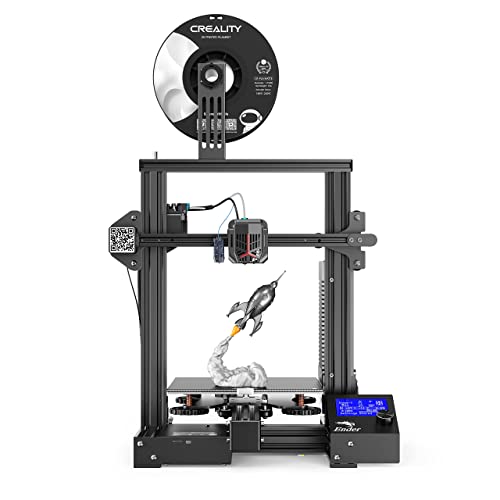
JGMAKER A5S 3D Printers Stable Working with Resume Print Filament Run Out Detection Large Build Volume 12X12X12.6in for Home Industry School Education ABS PLA 1.75mm Filament US Plug


Key features
- •JGAURORA 3d printer upgraded A5S has large build size: 305*305*320mm (12*12*12.6in)
- •Filament RUN-OUT detection : The machine beeps when filament runs out to remind you to change new filament quickly
- •BDG Heated Platform: Allows easy removable of printed model and save masking tape .
- •Power Failure Protection: Resume print from where the last print was stopped due to power failure.
- •Better customer experience, high print accuracy and high speed with quiet working, suit for school and home.And most importantly ,we offer 6 months warranty and maintenance from the date of your purchase
JGMAKER A5S 3D Printers Stable Working with Resume Print Filament Run Out Detection Large Build Volume 12X12X12.6in for Home Industry School Education ABS PLA 1.75mm Filament US Plug
List Price: $449.60$404.64DEALYou Save: $44.96 (10%)
Free shippingFree Returns – 30 daysFree Order CancellationSecure Payment2–3 Days DeliveryGet It October 26, 2026In Stock (1)No marketing spamNo account requiredFulfilment by FedEx / Amazon / UPS / ShipwirePayPal / Card Buyer Protection
Customer Reviews
Reviews sourced from verified Amazon purchasers4.0
out of 5
Based on 10 reviews
5★
50%
4★
50%
3★
0%
2★
0%
1★
0%
Easy to assemble, excellent print quality and speed JG MAKER 3D printer
c'est la vie🎉😘✓ Verified Purchase•January 23, 2024
The media could not be loaded. Very happy with almost every aspect of this JG MAKER 3D printer. The design is solid and very well thought out. Print quality and speed is on a par with, or better than, many more expensive machines
When I opened the box, did what little assembly was required, because it comes pre-assemble for most part, you will receive it with three modulars, only need to tight a few screws, adjust the nut under the hot bed to leveling the platform the bed and get everything connected it and produced a really nice print on the first try.
Easy to use and it works. Everything is there. This was a great price point. I can see myself printing out a ton of stuff.
The print quality so far has been exceptional, it prints very smoothly and is quite
Built-in power supply design creates a more elegant appearance and a safer option than other power exposed printer
Nozzle Temp.:180~245℃
Hotbed Temp.:Indoor temp.~110℃
Filament Diameter: 1. 75mm
Nozzle diameter: 0. 4mm
Print Size: 8.7 x 8.7 x 9.8 inches
Overall this printer is better than I expected for the price. I'd recommend it as an beginner or intermediate (or step-up) printer for anyone with basic 3D printing knowledge, quality is great and it's a feature-packed printer. Highly recommended
When I opened the box, did what little assembly was required, because it comes pre-assemble for most part, you will receive it with three modulars, only need to tight a few screws, adjust the nut under the hot bed to leveling the platform the bed and get everything connected it and produced a really nice print on the first try.
Easy to use and it works. Everything is there. This was a great price point. I can see myself printing out a ton of stuff.
The print quality so far has been exceptional, it prints very smoothly and is quite
Built-in power supply design creates a more elegant appearance and a safer option than other power exposed printer
Nozzle Temp.:180~245℃
Hotbed Temp.:Indoor temp.~110℃
Filament Diameter: 1. 75mm
Nozzle diameter: 0. 4mm
Print Size: 8.7 x 8.7 x 9.8 inches
Overall this printer is better than I expected for the price. I'd recommend it as an beginner or intermediate (or step-up) printer for anyone with basic 3D printing knowledge, quality is great and it's a feature-packed printer. Highly recommended
Sturdy machine, professional results!
Sunrise Circle✓ Verified Purchase•January 20, 2024
With my kids distance-learning, during these uncertain times, school has been especially challenging us, even more so, for my highschooler who is enrolled in a trade class... Studying electrical engineering. His shop teacher required models to be made, we had no choice but to invest in a 3-D printer for him, looking for the best value, I decided on this model.. so happy I did!
It's Fantastic. He says it's even better than the one that he had in class.
The printing is fast and the product quality is superb. My son loves his 3D printer. Since owning it he has done so much better on his project grades, there's nothing like hands-on experience!
Set up was super easy, and it was literally almost ready to go right out of the box ,just a few screws here and there, The instructions were Very clear and very easy to follow.. and with its solid metal base, it's extremely sturdy, and designed to last!
You can download the item you want online, either a car, a airplane, or a building ......or you can create anything you want with The software. He designed and made some tools, just today and he got and A plus!
Overall, this is a great model for professional results! Totally recommend this!
It's Fantastic. He says it's even better than the one that he had in class.
The printing is fast and the product quality is superb. My son loves his 3D printer. Since owning it he has done so much better on his project grades, there's nothing like hands-on experience!
Set up was super easy, and it was literally almost ready to go right out of the box ,just a few screws here and there, The instructions were Very clear and very easy to follow.. and with its solid metal base, it's extremely sturdy, and designed to last!
You can download the item you want online, either a car, a airplane, or a building ......or you can create anything you want with The software. He designed and made some tools, just today and he got and A plus!
Overall, this is a great model for professional results! Totally recommend this!
Great 3D printer for beginners!
Chris✓ Verified Purchase•December 28, 2023
Got this for my sister as her first 3D printer and she loved it! Figured out how to use it without needing much help and has made some great items with it, its now her backup printer but she is still using it a few years later. Great printer.
Very capable and affordable 3D printer but it's not perfect plug and play.
Timothy K Knechtly✓ Verified Purchase•December 1, 2023
Very affordable 3D printer however, this is a kit that requires careful mechanical assembly. All electronics are preassembled. The supplied cables to connect the various assemblies are preassembled and seem to be perfect.
I didn't even try to follow the printed instructions because they are not very complete, and the print is tiny as someone previously noted. I used the " Magic User Guide FINAL.pdf" on a laptop computer that I placed specifically in the assembly area so I could follow the instructions precisely. This file was on the supplied SD card. It provided detailed instructions in perfect English (not in the usual terribly-translated from Chinese to English) and was capable of extreme zooming-in to view details when the detailed instructions presented precautions of incorrect assembly (the vertical aluminum pieces really should have been labeled as left and right as their holes are different). If you use the wrong part you'll have to take it apart and switch around the parts. They tell you that but they don't really tell you exactly what is different between the parts. Cable routing requires great attention during assembly. A video shows cable installation error results if you don't catch the detailed precautions at the extruder (failure to place cable in the cable clamp on the extruder as an oversight). Also, you must use extra cable ties to make it look like it does in their other videos otherwise the cables might hang up during movement. Cable ties are provided but you're not told where to put them on the printer in the manual. Obviously, all cable placements and paths need to be considered for bed and extruder movements in the various directions during assembly and in final placement. If you are going to put it in a cabinet you should allow extra space for bed cables to move freely.
After much research I am convinced that most people looking at these in this price range are doing this as a hobby or have significant prior experience using completed 3D printers. With absolutely no prior experience I (a retired, disabled veteran and senior citizen) purchased it to print what I consider to be unusual highly practical things: adapters for hoses, 12 to 16 gram CO2 cylinder adapter, caps for tubes of sealant/glue, boxes for electronic projects, and the like. No vases, art or toy projects just to prove I can print them.
I had little idea how it should look when completed or how to adjust it and start printing because I had dismissed 3D printers as very expensive and impractical when I first saw them at Microcenter many years ago and had ignored them ever since. Prices have dropped dramatically over the years since introduction and you can print a myriad of things at a reasonable price.
I knew it would interface with my Windows 10 computer but it wasn't easy. In case you are wondering yes, you can print from up to a maximum 32GB SD card (or yes, it works with a micro SD card with adapter) without using the computer connected directly to the printer. And, yes, you can find many items ready to print from the internet. If you want to design your own items, you can learn CAD and print your projects with this printer.
This printer is not directly supported in Windows 10. Once connected to a Windows 10 computer, it only shows up in Windows Device Manager under Ports (COM & LPT), USB-Serial CH340 (COMn) which is actually only the interface from the printer's computer TTL to the PC USB. Windows 10 automatically loaded the correct driver but if you're using an older version of Windows you might have to hunt down the drivers on the internet. It DOES NOT show up as a Windows printer even though the latest update to Windows 10 adds support for some 3D printers. This means you can't use most Windows 3D applications (apps) and you can't share the printer with your other networked Windows computers.
I found it worked well with the included JGCREAT Windows software that was supplied with the printer kit on an SD card even without having to specify which Com Port the printer is connected to. Unfortunately, after each print is complete the JGCREAT application must be closed and reopened with the next project. It works OK through a very long USB cable on either USB 2 or 3.0 ports.
Bed leveling must be done to print successfully. JGAurora3d has an excellent video showing the procedure however, I still haven't mastered the positional controls from the printer. Apparently I can't tell it to position for adjustment from Windows. I did manage to position bed height from the extruder at the proper height with the on printer controls then I carefully moved the extruder head and the bed around to all four corners and adjusted height with the adjuster wheels using copy paper as a feeler gauge.
It works. You don't need "build plate adhesion" in JGCREAT. If you use it you'll have an awful time getting the thin extra edges off the build surface. Trust me on this.
Upgrades? Sure. I've ordered several magnetic build plates so I can swap them out easily. Adhesion is fine with the heated bed and PLA filament. You won't need painter's tape (that blue tape) or some kind of high temperature tape and certainly not hair spray to get your parts to stick. The bed is true, so I don't see the point in getting a glass bed surface for now.
I didn't even try to follow the printed instructions because they are not very complete, and the print is tiny as someone previously noted. I used the " Magic User Guide FINAL.pdf" on a laptop computer that I placed specifically in the assembly area so I could follow the instructions precisely. This file was on the supplied SD card. It provided detailed instructions in perfect English (not in the usual terribly-translated from Chinese to English) and was capable of extreme zooming-in to view details when the detailed instructions presented precautions of incorrect assembly (the vertical aluminum pieces really should have been labeled as left and right as their holes are different). If you use the wrong part you'll have to take it apart and switch around the parts. They tell you that but they don't really tell you exactly what is different between the parts. Cable routing requires great attention during assembly. A video shows cable installation error results if you don't catch the detailed precautions at the extruder (failure to place cable in the cable clamp on the extruder as an oversight). Also, you must use extra cable ties to make it look like it does in their other videos otherwise the cables might hang up during movement. Cable ties are provided but you're not told where to put them on the printer in the manual. Obviously, all cable placements and paths need to be considered for bed and extruder movements in the various directions during assembly and in final placement. If you are going to put it in a cabinet you should allow extra space for bed cables to move freely.
After much research I am convinced that most people looking at these in this price range are doing this as a hobby or have significant prior experience using completed 3D printers. With absolutely no prior experience I (a retired, disabled veteran and senior citizen) purchased it to print what I consider to be unusual highly practical things: adapters for hoses, 12 to 16 gram CO2 cylinder adapter, caps for tubes of sealant/glue, boxes for electronic projects, and the like. No vases, art or toy projects just to prove I can print them.
I had little idea how it should look when completed or how to adjust it and start printing because I had dismissed 3D printers as very expensive and impractical when I first saw them at Microcenter many years ago and had ignored them ever since. Prices have dropped dramatically over the years since introduction and you can print a myriad of things at a reasonable price.
I knew it would interface with my Windows 10 computer but it wasn't easy. In case you are wondering yes, you can print from up to a maximum 32GB SD card (or yes, it works with a micro SD card with adapter) without using the computer connected directly to the printer. And, yes, you can find many items ready to print from the internet. If you want to design your own items, you can learn CAD and print your projects with this printer.
This printer is not directly supported in Windows 10. Once connected to a Windows 10 computer, it only shows up in Windows Device Manager under Ports (COM & LPT), USB-Serial CH340 (COMn) which is actually only the interface from the printer's computer TTL to the PC USB. Windows 10 automatically loaded the correct driver but if you're using an older version of Windows you might have to hunt down the drivers on the internet. It DOES NOT show up as a Windows printer even though the latest update to Windows 10 adds support for some 3D printers. This means you can't use most Windows 3D applications (apps) and you can't share the printer with your other networked Windows computers.
I found it worked well with the included JGCREAT Windows software that was supplied with the printer kit on an SD card even without having to specify which Com Port the printer is connected to. Unfortunately, after each print is complete the JGCREAT application must be closed and reopened with the next project. It works OK through a very long USB cable on either USB 2 or 3.0 ports.
Bed leveling must be done to print successfully. JGAurora3d has an excellent video showing the procedure however, I still haven't mastered the positional controls from the printer. Apparently I can't tell it to position for adjustment from Windows. I did manage to position bed height from the extruder at the proper height with the on printer controls then I carefully moved the extruder head and the bed around to all four corners and adjusted height with the adjuster wheels using copy paper as a feeler gauge.
It works. You don't need "build plate adhesion" in JGCREAT. If you use it you'll have an awful time getting the thin extra edges off the build surface. Trust me on this.
Upgrades? Sure. I've ordered several magnetic build plates so I can swap them out easily. Adhesion is fine with the heated bed and PLA filament. You won't need painter's tape (that blue tape) or some kind of high temperature tape and certainly not hair spray to get your parts to stick. The bed is true, so I don't see the point in getting a glass bed surface for now.
A Real Point of View and Some Instructions for New Buyers.
Michele Pridgeon✓ Verified Purchase•November 21, 2023
Let me start off with saying I've been doing 3d printing for a long time now. I bought a Makerbot Replicator 2 when they first came out if that gives you any idea. So I've been in the game of 3d printing for quite some time.
I bought this printer for my wife who is going to be doing some crafting and I wanted her to have her own dedicated printer. So I wanted to get one that would be easy enough for her to handle but yet had all the features I like to see in printers now. So lets jump right into the review.
Packaging was great, and was double boxed from Amazon so thats always a plus. Tons of Foam holding everything in nice and tight. The skill of how the shrink wrap was done is amazing and everything required a sharp knife to open up (thats a good thing). After verifying all the parts they do even include a Spare parts bag in case you lose a T-Nut or screw which is very handy. It also comes with this little spatula and some test filament. My advice.. don't use the test filament. The stuff that came with mine looked like it had seen better days. If you don't have any filament then you will need to buy a spool. Hatch Box is one that's got a lot of Amazon Choice picks and works really good. Tons of reviews and prints really nice and its good for someone starting out since its not very expensive either.
Assembly was easy, don't bother with the instruction sheet they give you, but instead just do the instructions off the SD Card thats included, you can zoom the PDF. The SD card reader they give you is for standard SD Cards and they give you an SDHC card that it can't read so be prepared for that. Save some of the larger foam blanks from the packaging trust me you'll need it! There is a part where you would basically be setting the print head down directly onto the build plate DON'T DO IT. Set it on the foam instead of the build plate. You'll thank me later by not having to replace the nozzle.
In the install instructions they want you to use their config profile in Cura which locks the printer to no more than 30mm/s (thats pretty slow btw) for all movements.... However after playing with the software on the board I found that it can go all the way up to 80mm/s for printing and 100mm/s for just basic movements without extrusion. I tested it with a print and it worked granted going at full 80mm/s didn't result in the best quality but it worked just fine.
I would recommend the default profile settings in Cura at 60mm/s as a good balance it runs smooth and doesn't take 4 days to print something of average size and the printer seems to handle it just fine. One HUGE thing, do NOT use Z Hop setting from Cura. It locks up the board and it has no idea what to do with that instruction and makes the printer freak out. I almost had to replace a stepper motor and a nozzle because of it.
They include a removable build sheet (some call it a plate) thats a direct knock off of BuildTak, but it works good. They call it "Magnetic" its not, and has no magnets or metal in the removable build sheet. Plus the heat bed is aluminum. I'll let that sink in your brain for a moment. No issues with layer adhesion if you use it but it does pickup oils from your skin really well and that can cause problems. Using gloves is a good idea because then you can pickup the prints off the hot bed and pull them off much easier when they are warm. The cold plate is a pain to pull single lines of scrap filament off of. I have an old pair of grey leather bargain bin gloves (farmers gloves) you can get pretty much anywhere and they work perfect on protecting your hands from the heat.
You can use blue 3M painters tape but for anything big forget it. Small stuff its fine with but large stuff it has issues with it for some reason. Also don't use the tape if you heat the bed above 60c because all your doing is cooking the tape and its no longer effective.
Bed leveling is really easy on this, There is basically no detailed instructions on how to do it so here are your instructions. If you have dealt with printers before then you know this process and can skip the next paragraph.
With the printer off tighten all the screws on the build plate (large knobs) A LOT. Remember, righty tighty lefty loosey.
Once you think you have them down far enough turn the printer on.
Select Prepare / then Auto Home.
Once Its done then select Disable Steppers.
Get an index card, any size. Make sure the print head nozzle doesn't come into contact with the build sheet. If it looks like it will then tighten the 4 knobs more until it clears it.
Now move the print head nozzle and the print bed so the print nozzle is above 1 of the knobs. Slide the card between the nozzle and the build sheet and loosen or tighten the knob until moving the card feels a bit "snaggy" or rough. You want it to lightly snag not feel like 100 grit sand paper. Do the same to all 4 corners above the knobs. Do this until all of them feel they have the same level of resistance. Make sure you can still move the card completely out from under the nozzle and are still able to slide it between the build sheet and the nozzle without it ripping or tearing the card.
Auto Home the printer again and your done leveling and ready to print.
All the Resume print on Failed for (insert whatever reason here) kind of sorta work... some times it will repeat the same layer it was on which can cause problems. Other times if it had to resume the print more than 2 times it wouldn't or the printer would start acting weird and printing where it shouldn't be.
We do have a small design flaw in this printer. It is on the Filament feed for the "filament sensor", its tipped downward at a 45 degree angle. To fix this, bend the support up to a full 90 strait up and down so the filament sensor is level. Then you'll have no feed issues with 1kg spools. It does work at a 45 but is a really tight bend if you have a full spool on it and causes the filament to bend very aggressively. I had to put a spool that was half used on it to get a good print out of it. First print with a brand new spool snapped the filament in half before the sensor due to the angle it was having to bend. If you don't want to bend the metal or are not strong enough for that, then look at printing a stand alone spool holder and remove the one it comes with. There are tons on Thing-a-verse that will work.
So now to the ratings.
Price: 5/5 ( I got it on Amazon Prime day at $179) non-sale I would call it a 4.5/5 comparing to other printers in the same price range. Compared to my Makerbot its a 20/5 since my Makerbot was a little over $2500 at the time and I've had to mod it and tweak the settings so much to get the same reliability of prints this can do.
Assembly: 3/5 I give it this rating only if you never bought or built a printer before. For some one who has its a 5/5. There are common sense things thats not said in the instructions that you would know if you've been around these printers before. Like, don't let the print nozzle rest on the built plate while your screw it together kind of stuff. The instructions are pretty decent for a product like this (which I do honestly give props to them on this) however you still have some areas where you just have to figure it out. However if you've ever put together anything from IKEA by just looking at pictures then you're going to be just fine.
Print Quality: 3.5/5 (I gave it a 3 for Amazon due to they don't do half stars). Only reason for this is because if your PLA filament is good in any other printer at 200c you'll need to run it at 210-212c in this one to get the same quality (my printers room temp is about 74F). I have a feeling the thermal settings are a bit "off" on this printer or the quality of heater they use is on the cheap side. It honestly could just be mine, but after adjusting the temps it was 4/5. It does maintain the temp you set it to very well but you do have to play and tweak with the temp settings for your print a bit to get the best quality. I still had some errors in the print and it was not 100% perfect but it was still a good quality print I would be willing to hand to a customer. These tests were done at 0.2mm layer height (see picture).
Side note 1 on printing: We only use PLA and don't use ABS or PETG so I have no information on how well it is able to print those other filaments. The area in which our printers are in is vented but not well enough to IMO safely print ABS or any other material that might off gas toxins when heated.
Side note 2 on printing: To secure the removable build sheet they give you binder clips... Here is a tip, only use 2 on the very back and 2 on the very right side of the build plate. Anywhere on the left side or the front the print head can collide with the binder clip during normal travel and bad things happen from there on out. You can use tape to secure the build sheet as well but its not as stable.
Reliability: 2/5 Yeah, this ones a low mark. I've already had to re-initialize the firmware on the board 2 times due to weird errors. I had an error of "Bed Heater Fail" and I power cycled it 4 times and still wouldn't work. Re-initialized the firmware and bam its back to working so there's a bug somewhere in the software on that one. The board is a pretty generic board so I may replace it if it continues to have errors. Hardware-wise once its off and printing its rock solid. Just make sure you put a UPS (battery backup) on it so that you don't have to deal with weird power outage resume glitches because I wouldn't trust the resume function to work 100% every time.
Remote printing with OctoPrint: 5/5 Had zero issues setting it up and it was off and printing within 10 minutes after adding the OctoPrint Plugin for Cura. It really works well with it. Also just to note, the Raspberry Pi 3 B+ is able to power the control board without the main power on. When your Pi is plugged in make sure your main power to the printer is turned on as well. Otherwise unplug it from the Pi when you turn the main power off.
Things to consider: This printer comes with a main board that has no power surge protection at all. If the printer is off and you move a stepper motor, it will light up the board and surge power to it causing the LCD to light up. In my experience, this is normal for the cheap boards. Just be aware when moving steppers with it powered off. Also this printer doesn't keep a memory of where its steppers positions are. So before you do any function on the printer at all that the printer it self is going to move a stepper in anyway always auto home it first! In octoprint you can do this by using the terminal and sending the command G28.
Overall I consider this printer to be a good buy and if I come across needing another small format printer I would more than likely pickup another one of these. They are quirky little printers but the cost is cheap enough to deal with any odd quirks.
I bought this printer for my wife who is going to be doing some crafting and I wanted her to have her own dedicated printer. So I wanted to get one that would be easy enough for her to handle but yet had all the features I like to see in printers now. So lets jump right into the review.
Packaging was great, and was double boxed from Amazon so thats always a plus. Tons of Foam holding everything in nice and tight. The skill of how the shrink wrap was done is amazing and everything required a sharp knife to open up (thats a good thing). After verifying all the parts they do even include a Spare parts bag in case you lose a T-Nut or screw which is very handy. It also comes with this little spatula and some test filament. My advice.. don't use the test filament. The stuff that came with mine looked like it had seen better days. If you don't have any filament then you will need to buy a spool. Hatch Box is one that's got a lot of Amazon Choice picks and works really good. Tons of reviews and prints really nice and its good for someone starting out since its not very expensive either.
Assembly was easy, don't bother with the instruction sheet they give you, but instead just do the instructions off the SD Card thats included, you can zoom the PDF. The SD card reader they give you is for standard SD Cards and they give you an SDHC card that it can't read so be prepared for that. Save some of the larger foam blanks from the packaging trust me you'll need it! There is a part where you would basically be setting the print head down directly onto the build plate DON'T DO IT. Set it on the foam instead of the build plate. You'll thank me later by not having to replace the nozzle.
In the install instructions they want you to use their config profile in Cura which locks the printer to no more than 30mm/s (thats pretty slow btw) for all movements.... However after playing with the software on the board I found that it can go all the way up to 80mm/s for printing and 100mm/s for just basic movements without extrusion. I tested it with a print and it worked granted going at full 80mm/s didn't result in the best quality but it worked just fine.
I would recommend the default profile settings in Cura at 60mm/s as a good balance it runs smooth and doesn't take 4 days to print something of average size and the printer seems to handle it just fine. One HUGE thing, do NOT use Z Hop setting from Cura. It locks up the board and it has no idea what to do with that instruction and makes the printer freak out. I almost had to replace a stepper motor and a nozzle because of it.
They include a removable build sheet (some call it a plate) thats a direct knock off of BuildTak, but it works good. They call it "Magnetic" its not, and has no magnets or metal in the removable build sheet. Plus the heat bed is aluminum. I'll let that sink in your brain for a moment. No issues with layer adhesion if you use it but it does pickup oils from your skin really well and that can cause problems. Using gloves is a good idea because then you can pickup the prints off the hot bed and pull them off much easier when they are warm. The cold plate is a pain to pull single lines of scrap filament off of. I have an old pair of grey leather bargain bin gloves (farmers gloves) you can get pretty much anywhere and they work perfect on protecting your hands from the heat.
You can use blue 3M painters tape but for anything big forget it. Small stuff its fine with but large stuff it has issues with it for some reason. Also don't use the tape if you heat the bed above 60c because all your doing is cooking the tape and its no longer effective.
Bed leveling is really easy on this, There is basically no detailed instructions on how to do it so here are your instructions. If you have dealt with printers before then you know this process and can skip the next paragraph.
With the printer off tighten all the screws on the build plate (large knobs) A LOT. Remember, righty tighty lefty loosey.
Once you think you have them down far enough turn the printer on.
Select Prepare / then Auto Home.
Once Its done then select Disable Steppers.
Get an index card, any size. Make sure the print head nozzle doesn't come into contact with the build sheet. If it looks like it will then tighten the 4 knobs more until it clears it.
Now move the print head nozzle and the print bed so the print nozzle is above 1 of the knobs. Slide the card between the nozzle and the build sheet and loosen or tighten the knob until moving the card feels a bit "snaggy" or rough. You want it to lightly snag not feel like 100 grit sand paper. Do the same to all 4 corners above the knobs. Do this until all of them feel they have the same level of resistance. Make sure you can still move the card completely out from under the nozzle and are still able to slide it between the build sheet and the nozzle without it ripping or tearing the card.
Auto Home the printer again and your done leveling and ready to print.
All the Resume print on Failed for (insert whatever reason here) kind of sorta work... some times it will repeat the same layer it was on which can cause problems. Other times if it had to resume the print more than 2 times it wouldn't or the printer would start acting weird and printing where it shouldn't be.
We do have a small design flaw in this printer. It is on the Filament feed for the "filament sensor", its tipped downward at a 45 degree angle. To fix this, bend the support up to a full 90 strait up and down so the filament sensor is level. Then you'll have no feed issues with 1kg spools. It does work at a 45 but is a really tight bend if you have a full spool on it and causes the filament to bend very aggressively. I had to put a spool that was half used on it to get a good print out of it. First print with a brand new spool snapped the filament in half before the sensor due to the angle it was having to bend. If you don't want to bend the metal or are not strong enough for that, then look at printing a stand alone spool holder and remove the one it comes with. There are tons on Thing-a-verse that will work.
So now to the ratings.
Price: 5/5 ( I got it on Amazon Prime day at $179) non-sale I would call it a 4.5/5 comparing to other printers in the same price range. Compared to my Makerbot its a 20/5 since my Makerbot was a little over $2500 at the time and I've had to mod it and tweak the settings so much to get the same reliability of prints this can do.
Assembly: 3/5 I give it this rating only if you never bought or built a printer before. For some one who has its a 5/5. There are common sense things thats not said in the instructions that you would know if you've been around these printers before. Like, don't let the print nozzle rest on the built plate while your screw it together kind of stuff. The instructions are pretty decent for a product like this (which I do honestly give props to them on this) however you still have some areas where you just have to figure it out. However if you've ever put together anything from IKEA by just looking at pictures then you're going to be just fine.
Print Quality: 3.5/5 (I gave it a 3 for Amazon due to they don't do half stars). Only reason for this is because if your PLA filament is good in any other printer at 200c you'll need to run it at 210-212c in this one to get the same quality (my printers room temp is about 74F). I have a feeling the thermal settings are a bit "off" on this printer or the quality of heater they use is on the cheap side. It honestly could just be mine, but after adjusting the temps it was 4/5. It does maintain the temp you set it to very well but you do have to play and tweak with the temp settings for your print a bit to get the best quality. I still had some errors in the print and it was not 100% perfect but it was still a good quality print I would be willing to hand to a customer. These tests were done at 0.2mm layer height (see picture).
Side note 1 on printing: We only use PLA and don't use ABS or PETG so I have no information on how well it is able to print those other filaments. The area in which our printers are in is vented but not well enough to IMO safely print ABS or any other material that might off gas toxins when heated.
Side note 2 on printing: To secure the removable build sheet they give you binder clips... Here is a tip, only use 2 on the very back and 2 on the very right side of the build plate. Anywhere on the left side or the front the print head can collide with the binder clip during normal travel and bad things happen from there on out. You can use tape to secure the build sheet as well but its not as stable.
Reliability: 2/5 Yeah, this ones a low mark. I've already had to re-initialize the firmware on the board 2 times due to weird errors. I had an error of "Bed Heater Fail" and I power cycled it 4 times and still wouldn't work. Re-initialized the firmware and bam its back to working so there's a bug somewhere in the software on that one. The board is a pretty generic board so I may replace it if it continues to have errors. Hardware-wise once its off and printing its rock solid. Just make sure you put a UPS (battery backup) on it so that you don't have to deal with weird power outage resume glitches because I wouldn't trust the resume function to work 100% every time.
Remote printing with OctoPrint: 5/5 Had zero issues setting it up and it was off and printing within 10 minutes after adding the OctoPrint Plugin for Cura. It really works well with it. Also just to note, the Raspberry Pi 3 B+ is able to power the control board without the main power on. When your Pi is plugged in make sure your main power to the printer is turned on as well. Otherwise unplug it from the Pi when you turn the main power off.
Things to consider: This printer comes with a main board that has no power surge protection at all. If the printer is off and you move a stepper motor, it will light up the board and surge power to it causing the LCD to light up. In my experience, this is normal for the cheap boards. Just be aware when moving steppers with it powered off. Also this printer doesn't keep a memory of where its steppers positions are. So before you do any function on the printer at all that the printer it self is going to move a stepper in anyway always auto home it first! In octoprint you can do this by using the terminal and sending the command G28.
Overall I consider this printer to be a good buy and if I come across needing another small format printer I would more than likely pickup another one of these. They are quirky little printers but the cost is cheap enough to deal with any odd quirks.
Page 1 of 2