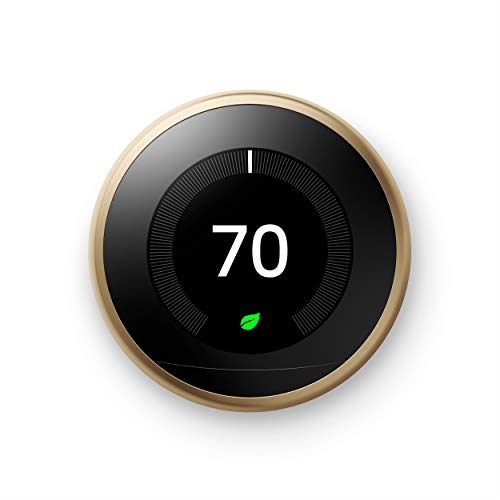
Google Nest Learning Thermostat - Programmable Smart Thermostat for Home - 3rd Generation Nest Thermostat - Works with Alexa - Brass



Key features
- •Auto-Schedule: No more confusing programming. It learns the temperatures you like and programs itself.
- •Wi-Fi Thermostat: Connect the Nest Thermostat to Wi-Fi to change the temperature from your phone, tablet or laptop.
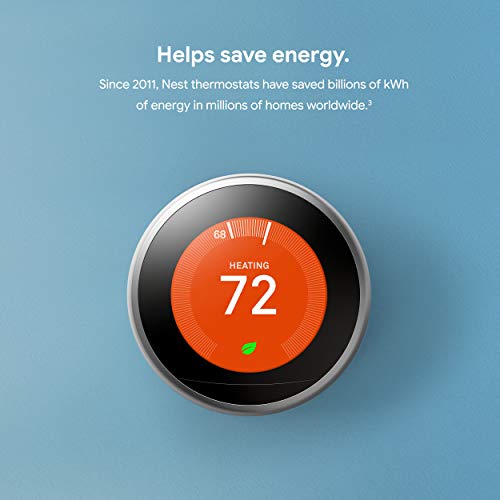
- •Energy Saving: You'll see the Nest Leaf when you choose a temperature that saves energy. It guides you in the right direction.
- •Smart Thermostat: Early-On Nest learns how your home warms up and keeps an eye on the weather to get you the temperature you want when you want it.
- •Home/Away Assist: The Nest Thermostat automatically turns itself down when you're away to avoid heating or cooling an empty home.
Google Nest Learning Thermostat - Programmable Smart Thermostat for Home - 3rd Generation Nest Thermostat - Works with Alexa - Brass
List Price: $276.44$248.80DEALYou Save: $27.64 (10%)
Free shippingFree Returns – 30 daysFree Order CancellationSecure Payment2–3 Days DeliveryGet It October 24, 2026In Stock (1)No marketing spamNo account requiredFulfilment by FedEx / Amazon / UPS / ShipwirePayPal / Card Buyer Protection
Customer Reviews
Reviews sourced from verified Amazon purchasers4.5
out of 5
Based on 10 reviews
5★
90%
4★
10%
3★
0%
2★
0%
1★
0%
LOVE THIS COLOR FOR THE NEST!!
Amazon Customer✓ Verified Purchase•February 12, 2024
Love the brass google nest with the additional gold wall plate. It looks stunning with our iron ore wall color!! Very easy to set up-it took maybe 15 minutes or so.
Great thermostat
Harry ✓ Verified Purchase•January 26, 2024
The Google Nest Learning Thermostat, 3rd Generation, has truly transformed the way I manage my home's climate. The sleek black design adds a modern touch to my living space. The learning capabilities are impressive "“ it quickly adapts to my preferences and creates an efficient schedule that maximizes energy savings. The compatibility with Alexa enhances the overall smart home experience. The intuitive interface and ease of programming make it user-friendly. The energy usage reports provide valuable insights. If you're looking for a programmable smart thermostat that combines style, efficiency, and smart home integration, the Google Nest Learning Thermostat is an excellent investment for both comfort and energy savings.
Great Product
Karen✓ Verified Purchase•January 25, 2024
Initial Review, 15 May 2023:
I installed this product on the 13th of May 2023. I have a two-wire, heat-only system, white (W1) and red (Rh). Prior to purchasing this product I read reviews and searched online for the best smart thermostat for a two-wire system. The Google Nest Thermostat was at the top of every search. Many reviews on Amazon state that this thermostat, if in a two-wire system, will only charge and get power while the furnace is operating. I found this to be inaccurate information. I found that, once connected, the two wires will keep the thermostat powered and the battery charged (I think it is really only one of the two wires keeping the system charged but ask an HVAC tech if you want to know). It seems that the purpose of the battery is in the case of power loss to your home. In this instance, the battery will provide power to the thermostat for a period of time. I am not a HVAC tech; if you want to know how this actually works, find an HVAC tech to provide accurate information.
I did have an issue the first day. I set the thermostat up (connected to the two-wire heat-only system and set-up with the app) and everything worked great. Maybe an hour later, the thermostat would not connect to WIFI or the phone app. I found, in the thermostat, that the cause was a low battery. I took the thermostat off of the wall twice and charged it with the charging port. This worked, only temporarily. When I went to bed the night of install, the thermostat was connected to the app and working well. When I woke up in the morning, the thermostat was no longer connected to the phone due to low battery. This time, I did not take the thermostat off of the wall to charge. Instead I just let it remain disconnected. At some point in the afternoon, the thermostat connected to the app and seems to have plenty of power now. I am unsure of what caused the issue but it did work itself out (for now). I'll update after a few months of use or if I have issues before then.
Pros:
-Easy set-up (I mean this! Set-up could not have been easier. Impressive.)
-Nice thermostat interface
-Nice phone app interface
-Great sensors (the nest has a motion sensor, this allows the thermostat to light up when you walk by to show you the current temperature or open the adjust options if you stand in front of the thermostat)
-I dropped this thing and it still works great! Very durable.
Cons:
-The schedule in the Nest app could have more features and be easier to use
-I have Amazon smart-home devices (Alexa) rather than Google. I feel that this thermostat does not integrate well with the Amazon products. You can change the temperature with the Amazon Echo devices. However, I wanted to use this as a temperature sensor for a routine (if temperature is this then run that routine). Unfortunately, the Echo will not recognize this thermostat in the routines to begin the routine. You can adjust the thermostat with a routine though. I would say this is an issue with the Amazon Echo and how Amazon has their routines set-up (this is not an issue with the Nest Thermostat).
I installed this product on the 13th of May 2023. I have a two-wire, heat-only system, white (W1) and red (Rh). Prior to purchasing this product I read reviews and searched online for the best smart thermostat for a two-wire system. The Google Nest Thermostat was at the top of every search. Many reviews on Amazon state that this thermostat, if in a two-wire system, will only charge and get power while the furnace is operating. I found this to be inaccurate information. I found that, once connected, the two wires will keep the thermostat powered and the battery charged (I think it is really only one of the two wires keeping the system charged but ask an HVAC tech if you want to know). It seems that the purpose of the battery is in the case of power loss to your home. In this instance, the battery will provide power to the thermostat for a period of time. I am not a HVAC tech; if you want to know how this actually works, find an HVAC tech to provide accurate information.
I did have an issue the first day. I set the thermostat up (connected to the two-wire heat-only system and set-up with the app) and everything worked great. Maybe an hour later, the thermostat would not connect to WIFI or the phone app. I found, in the thermostat, that the cause was a low battery. I took the thermostat off of the wall twice and charged it with the charging port. This worked, only temporarily. When I went to bed the night of install, the thermostat was connected to the app and working well. When I woke up in the morning, the thermostat was no longer connected to the phone due to low battery. This time, I did not take the thermostat off of the wall to charge. Instead I just let it remain disconnected. At some point in the afternoon, the thermostat connected to the app and seems to have plenty of power now. I am unsure of what caused the issue but it did work itself out (for now). I'll update after a few months of use or if I have issues before then.
Pros:
-Easy set-up (I mean this! Set-up could not have been easier. Impressive.)
-Nice thermostat interface
-Nice phone app interface
-Great sensors (the nest has a motion sensor, this allows the thermostat to light up when you walk by to show you the current temperature or open the adjust options if you stand in front of the thermostat)
-I dropped this thing and it still works great! Very durable.
Cons:
-The schedule in the Nest app could have more features and be easier to use
-I have Amazon smart-home devices (Alexa) rather than Google. I feel that this thermostat does not integrate well with the Amazon products. You can change the temperature with the Amazon Echo devices. However, I wanted to use this as a temperature sensor for a routine (if temperature is this then run that routine). Unfortunately, the Echo will not recognize this thermostat in the routines to begin the routine. You can adjust the thermostat with a routine though. I would say this is an issue with the Amazon Echo and how Amazon has their routines set-up (this is not an issue with the Nest Thermostat).
Nice
Matthew L.✓ Verified Purchase•January 15, 2024
Really like the ability to adjust the temp away from home.
Very good thermostat
DeepThought✓ Verified Purchase•November 28, 2023
PROS:
â–ªï¸Control online from anywhere
â–ªï¸Intuitive interface
â–ªï¸Very flexible and detailed scheduling
â–ªï¸Easy installation (*also see CONS) using a well thought out labeled wire bracket mount and pop off front bezel
â–ªï¸Unobtrusive small ring design is easy to handle and control
â–ªï¸Feels very hefty and durable
CONS:
â–ªï¸Home/Away Assist is not very good. By default, it's on, and lacking any other Nest product, the only sensor it can use is the thermostat's proximity sensor. If nobody walks directly in front of the thermostat for 2 hours, it automatically sets it to Away mode. Well, in our house the thermostat is tucked away in the living room, which doesn't get much daily foot traffic, so it set it to Away mode like 6 to as many as 9 times a day, every day. I had to turn it completely off by going into the app settings, Home/Away Assist, What decides if you're home, and set the thermostat to No. I don't use our phones geo-location either, because there's 4 of us, and sometimes the kids won't even take their phones with them, plus I don't want yet another of my dozens of apps on my phone draining my battery constantly. I don't even keep the app on my phone, only on my tablet.
â–ªï¸* Installation was easy from a mounting standpoint but very hard from a compatible wiring standpoint - it seems I have a proprietary HVAC system that was using ABCD (i.e. carrier) wiring, but it was still labeled Y1 G Rc W and C at the thermostat (no doubt because of a lazy installer). Since Nest encourages you to go by the wire labeling (and not by the HVAC system), their compatibility tester led me very far astray. On a support call, even though I gave them the exact brand and model of both my furnace and A/C and pics of both the control board and the wiring diagram in the manual, they insisted on sending out a Nest Pro to do my installation. They will NOT advise on wiring over the phone, no doubt for liability reasons. The so called "pro" showed up without being prepared, despite being informed ahead of time of the brand and model, so he spent hours reading my HVAC owners guide and left with not only the job unfinished but without even hooking up my old thermostat so we could have heat. He was scheduled to return several days later, but I canceled on him. I read the HVAC manual myself, and it shows quite clearly the difference between the carrier wiring method (i.e. proprietary controller) and the traditional standard 24V wiring. I had 5 wires to the thermostat, but only 4 (for the ABCD method) in use, and because I have a 2-stage furnace, I needed a sixth (W2) wire added to have Y1 G Rc W1 W2 and C, so I bought an 8-wire bundle (just in case) and ran new wiring. Once I read through the owners manual, all I had to do was move the wires from the ABCD terminals on the HVAC controller board to the bus terminals detailed below. To also include the A/C in the wiring, I had to read through its manual and trace the wires to a controller board in the outside condenser unit to get the correct colors (the A/C has green/yellow but the previous installers used red/white wires). It now works, but I had to do the research and wiring myself. I had to overcome the shortcomings of both their inadequate compatibility system and their so called "pro".
Note, Bryant is a VERY proprietary brand, and they pay installers to push the proprietary "carrier" wiring system controllers, because they cost extra and are only sold by Bryant, locking you into their system. But, if you're lucky, you may have a compatible controller board and you may still have the owners manual, like me, and you may be able to break free from their proprietary vise grip and do it yourself. In my experience, any installer that pushes a Bryant system on you is receiving kickbacks not only for the HVAC unit itself but also for the proprietary thermostat control system. They want to make you believe that you can only use a Bryant thermostat with a Bryant unit, and I believed them for several years, but that's false. In fact, I remember asking the Bryant installer if I could install my own thermostat, and he flat out told me NO and I should only buy Bryant products, which for the WiFi enabled version is $600. He also told me that because it's a 2-stage unit, no other thermostat would be compatible. What a load of horse pucky.
I included a pic of my Bryant controller board. The green terminals are where the old ABCD wires went. The bus board below that is for the standard wiring for Nest and other thermostats. The hard part for me was how to wire in both the A/C and the condensation overflow cutoff (SAFE-T-SWITCH) which uses black/black wires. For me it went...
â–ªï¸A/C C terminal with green wire then spliced to red wire to HVAC COM
â–ªï¸A/C Y1 terminal with yellow wire spliced to white wire to HVAC Y/Y2 (not a typo)
â–ªï¸Nest W2 AUX, orange wire, to HVAC W2
â–ªï¸Nest G, green wire, to HVAC G
â–ªï¸Nest C, blue wire, to HVAC COM
â–ªï¸Nest W1, white wire, to HVAC W/W1
â–ªï¸Nest Y1, yellow wire, to HVAC Y/Y2 (not a typo)
â–ªï¸Nest Rc, red wire, to cutoff switch black wire #1
🔹cutoff switch black wire #2 to HVAC R
My furnace is a Bryant 987MA (Product# 987MA66100V21A-B, Model# 987MA66100V21, Series B)
My A/C is a Bryant 187BNA (Product# 187BNA048000DBAA, Model# 187BNA048-B)
(Geez, could they make those numbers any more confusing? Sheesh!)
â–ªï¸Control online from anywhere
â–ªï¸Intuitive interface
â–ªï¸Very flexible and detailed scheduling
â–ªï¸Easy installation (*also see CONS) using a well thought out labeled wire bracket mount and pop off front bezel
â–ªï¸Unobtrusive small ring design is easy to handle and control
â–ªï¸Feels very hefty and durable
CONS:
â–ªï¸Home/Away Assist is not very good. By default, it's on, and lacking any other Nest product, the only sensor it can use is the thermostat's proximity sensor. If nobody walks directly in front of the thermostat for 2 hours, it automatically sets it to Away mode. Well, in our house the thermostat is tucked away in the living room, which doesn't get much daily foot traffic, so it set it to Away mode like 6 to as many as 9 times a day, every day. I had to turn it completely off by going into the app settings, Home/Away Assist, What decides if you're home, and set the thermostat to No. I don't use our phones geo-location either, because there's 4 of us, and sometimes the kids won't even take their phones with them, plus I don't want yet another of my dozens of apps on my phone draining my battery constantly. I don't even keep the app on my phone, only on my tablet.
â–ªï¸* Installation was easy from a mounting standpoint but very hard from a compatible wiring standpoint - it seems I have a proprietary HVAC system that was using ABCD (i.e. carrier) wiring, but it was still labeled Y1 G Rc W and C at the thermostat (no doubt because of a lazy installer). Since Nest encourages you to go by the wire labeling (and not by the HVAC system), their compatibility tester led me very far astray. On a support call, even though I gave them the exact brand and model of both my furnace and A/C and pics of both the control board and the wiring diagram in the manual, they insisted on sending out a Nest Pro to do my installation. They will NOT advise on wiring over the phone, no doubt for liability reasons. The so called "pro" showed up without being prepared, despite being informed ahead of time of the brand and model, so he spent hours reading my HVAC owners guide and left with not only the job unfinished but without even hooking up my old thermostat so we could have heat. He was scheduled to return several days later, but I canceled on him. I read the HVAC manual myself, and it shows quite clearly the difference between the carrier wiring method (i.e. proprietary controller) and the traditional standard 24V wiring. I had 5 wires to the thermostat, but only 4 (for the ABCD method) in use, and because I have a 2-stage furnace, I needed a sixth (W2) wire added to have Y1 G Rc W1 W2 and C, so I bought an 8-wire bundle (just in case) and ran new wiring. Once I read through the owners manual, all I had to do was move the wires from the ABCD terminals on the HVAC controller board to the bus terminals detailed below. To also include the A/C in the wiring, I had to read through its manual and trace the wires to a controller board in the outside condenser unit to get the correct colors (the A/C has green/yellow but the previous installers used red/white wires). It now works, but I had to do the research and wiring myself. I had to overcome the shortcomings of both their inadequate compatibility system and their so called "pro".
Note, Bryant is a VERY proprietary brand, and they pay installers to push the proprietary "carrier" wiring system controllers, because they cost extra and are only sold by Bryant, locking you into their system. But, if you're lucky, you may have a compatible controller board and you may still have the owners manual, like me, and you may be able to break free from their proprietary vise grip and do it yourself. In my experience, any installer that pushes a Bryant system on you is receiving kickbacks not only for the HVAC unit itself but also for the proprietary thermostat control system. They want to make you believe that you can only use a Bryant thermostat with a Bryant unit, and I believed them for several years, but that's false. In fact, I remember asking the Bryant installer if I could install my own thermostat, and he flat out told me NO and I should only buy Bryant products, which for the WiFi enabled version is $600. He also told me that because it's a 2-stage unit, no other thermostat would be compatible. What a load of horse pucky.
I included a pic of my Bryant controller board. The green terminals are where the old ABCD wires went. The bus board below that is for the standard wiring for Nest and other thermostats. The hard part for me was how to wire in both the A/C and the condensation overflow cutoff (SAFE-T-SWITCH) which uses black/black wires. For me it went...
â–ªï¸A/C C terminal with green wire then spliced to red wire to HVAC COM
â–ªï¸A/C Y1 terminal with yellow wire spliced to white wire to HVAC Y/Y2 (not a typo)
â–ªï¸Nest W2 AUX, orange wire, to HVAC W2
â–ªï¸Nest G, green wire, to HVAC G
â–ªï¸Nest C, blue wire, to HVAC COM
â–ªï¸Nest W1, white wire, to HVAC W/W1
â–ªï¸Nest Y1, yellow wire, to HVAC Y/Y2 (not a typo)
â–ªï¸Nest Rc, red wire, to cutoff switch black wire #1
🔹cutoff switch black wire #2 to HVAC R
My furnace is a Bryant 987MA (Product# 987MA66100V21A-B, Model# 987MA66100V21, Series B)
My A/C is a Bryant 187BNA (Product# 187BNA048000DBAA, Model# 187BNA048-B)
(Geez, could they make those numbers any more confusing? Sheesh!)
Page 1 of 2