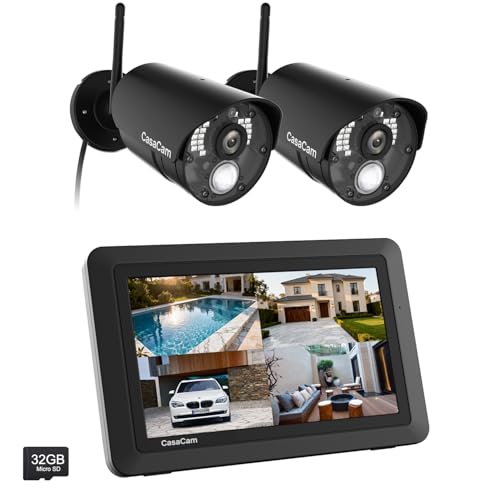
CasaCam GuardianCam Air | Wireless Security Camera System with 7" Touchscreen Monitor and 2 720p Cameras | AC Powered, Two-Way Audio, Free APP, 32GB SD Card and Battery Installed, Model VS802




Key features
- •See, hear and speak to people on your property from your 7" monitor, phone or tablet. Keep track of your property from anywhere at any time. Free App and NO monthly fees.
- •True DIY DVR system with monitor. Simply connect the camera to a power supply and experience peace of mind! User friendly interface, no complicated settings. It has never been so easy to operate a DVR like this!
- •Portable 7" touchscreen monitor with auto, manual and scheduled recording modes. Five seconds pre-record period ensures the event is fully captured. Rechargeable battery and 8GB SD card are included.
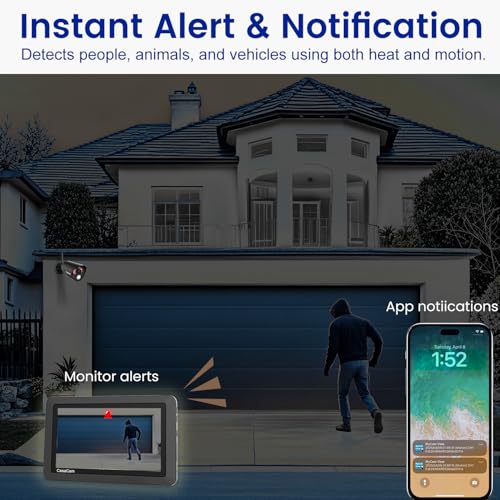
- •Smart motion detection uses dual sensors (heat and video motion) to minimize false alarms. Systems supports up to 1000ft wireless range in open area and up to 100ft night vision.
- •System supports up to 4 cameras with single, split or quad display. Also compatible with CasaCam Spotlight Camera (SKU#VC1000). You can expand your system with add-on VC1000 Spotlight Camera to gain a useful security light feature!
CasaCam GuardianCam Air | Wireless Security Camera System with 7" Touchscreen Monitor and 2 720p Cameras | AC Powered, Two-Way Audio, Free APP, 32GB SD Card and Battery Installed, Model VS802
List Price: $276.44$248.80DEALYou Save: $27.64 (10%)
Free shippingFree Returns – 30 daysFree Order CancellationSecure Payment2–3 Days DeliveryGet It October 26, 2026In Stock (30)No marketing spamNo account requiredFulfilment by FedEx / Amazon / UPS / ShipwirePayPal / Card Buyer Protection
Customer Reviews
Reviews sourced from verified Amazon purchasers4.4
out of 5
Based on 10 reviews
5★
40%
4★
60%
3★
0%
2★
0%
1★
0%
Great system but the App Sucks!
Action Jack✓ Verified Purchase•October 23, 2023
I've had this system for over 6 months and works great. The only drawback is the App. It's not good at all. Very sluggish to see recordings and only displays a few recordings on top of that. 5 Stars if they improve the App.
Worked instantly — way outside in my barn!
Errin✓ Verified Purchase•September 29, 2023
I was expecting a lengthy troubleshooting session, so I just hung up one camera in one of my stalls. The screen is in the house about 200 feet away and the barn has metal siding. I was very pleased and surprised when I saw the screen in the house . Great picture. Great sound. I've had several barn cams over the years, but nothing this good.
Return policy and app are questionable
Amy Velez✓ Verified Purchase•August 21, 2023
Cameron's worked well absolutely love them the monitor 7-in monitor that came with it was great except for the fact that it kept wanting to Reese set itself and restart every couple of seconds and instead of just sending me a new one they wanted me to return and buy again so I said no I was not doing that so I returned it the app sucks doesn't have very good features can't modify a lot.
Good budget security system ðŸ‘
Kristen Stephens ✓ Verified Purchase•August 13, 2023
Camera quality-
These are not heavy duty cameras. They are light weight and easy to carry around when you're going to mount them, which is great if your hanging them on vinyl siding since you don't have to worry about them tearing up the vinyl, but some strong wind could knock it out of place if not tightened down securely. Everything about the camera looks solid and we'll made. However my biggest complaint, however, is that you have to decide when you mount the camera,
do you want the ability to move the camera up and down, or left and right."
Since the camera only has one rotatable setting and one tilt adjust setting. Unfortunately you can only pick one when you install it, so be careful when you install to set it at the angle you want, because you will only get up and down or left and right.
Monitor quality-
The monitor is very well built, has two antennas and decent range. I started losing signal at the far end of my house opposite from the cameras but thankfully my router is close to the cameras locations. The stand on the back is solid, but like others say, one drop could potentially break it, so don't place it at child level. Also the monitor comes with a very long Ethernet cable so you can put it up somewhere out of the way and still have it hooked into the router. The touchscreen of the monitor is not the greatest, you have to push harder than you would expect for a touchscreen.
Night vision-
wonderful, no complaints
Tracking and recording-
This is where the camera has some real ups and downs. So the first thing you want to do is setup masking, so your camera isn't recording every car that passes by. good side is it's easy, bad side is you can only choose from a square grid which can cut into what you want to actually record. Another down side is the recording process doesn't start until about 3 seconds after detecting motion. So most of the time, if someone is walking quickly, you will only catch a glimpse of the person walking by the camera. Another thing that can happen is in the first 3 seconds the pixels can tear/warp together until the camera refreshes, after the refresh it will be smooth but the frame rates can be very slow at times. This could be due to having the camera on the higher resolution setting. Other than these issues the cameras keep a nice smooth image throughout the day.
Remote access-
The camera system is very easy to setup for remote viewing, use the Ethernet cable provided, plug it into the back of the touchscreen monitor and into your router/modem. Download the mycam viewer app and scan the QR code on the back, put in the default password and change it when you login "make sure to change the password so unauthorized users cannot login to your cameras". The app is easy to use but I recommend changing the network settings from dhcp to static to prevent disconnects.
Overall-
A good budget cameras for those wanting security but not enough money to purchase a $300+ system. You can also add two cameras later. It has some annoying things but just play around with the settings or move the camera to a new location and it will start working like you want it too.
These are not heavy duty cameras. They are light weight and easy to carry around when you're going to mount them, which is great if your hanging them on vinyl siding since you don't have to worry about them tearing up the vinyl, but some strong wind could knock it out of place if not tightened down securely. Everything about the camera looks solid and we'll made. However my biggest complaint, however, is that you have to decide when you mount the camera,
do you want the ability to move the camera up and down, or left and right."
Since the camera only has one rotatable setting and one tilt adjust setting. Unfortunately you can only pick one when you install it, so be careful when you install to set it at the angle you want, because you will only get up and down or left and right.
Monitor quality-
The monitor is very well built, has two antennas and decent range. I started losing signal at the far end of my house opposite from the cameras but thankfully my router is close to the cameras locations. The stand on the back is solid, but like others say, one drop could potentially break it, so don't place it at child level. Also the monitor comes with a very long Ethernet cable so you can put it up somewhere out of the way and still have it hooked into the router. The touchscreen of the monitor is not the greatest, you have to push harder than you would expect for a touchscreen.
Night vision-
wonderful, no complaints
Tracking and recording-
This is where the camera has some real ups and downs. So the first thing you want to do is setup masking, so your camera isn't recording every car that passes by. good side is it's easy, bad side is you can only choose from a square grid which can cut into what you want to actually record. Another down side is the recording process doesn't start until about 3 seconds after detecting motion. So most of the time, if someone is walking quickly, you will only catch a glimpse of the person walking by the camera. Another thing that can happen is in the first 3 seconds the pixels can tear/warp together until the camera refreshes, after the refresh it will be smooth but the frame rates can be very slow at times. This could be due to having the camera on the higher resolution setting. Other than these issues the cameras keep a nice smooth image throughout the day.
Remote access-
The camera system is very easy to setup for remote viewing, use the Ethernet cable provided, plug it into the back of the touchscreen monitor and into your router/modem. Download the mycam viewer app and scan the QR code on the back, put in the default password and change it when you login "make sure to change the password so unauthorized users cannot login to your cameras". The app is easy to use but I recommend changing the network settings from dhcp to static to prevent disconnects.
Overall-
A good budget cameras for those wanting security but not enough money to purchase a $300+ system. You can also add two cameras later. It has some annoying things but just play around with the settings or move the camera to a new location and it will start working like you want it too.
ease of setup
penny peterson✓ Verified Purchase•August 13, 2023
works great
Page 1 of 2