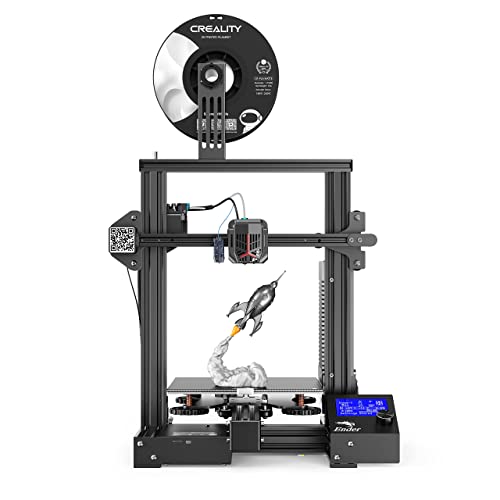
LONGER LK4 3D Printer 90% Pre-Assembled with 2.8" Full Color Touch Screen, Resume Printing, Filament Detector, Built-in Safety Power Supply 220x220x250mm


Key features
- •【2.8" Full Color Touch Screen】Easy to operate, brand new friendly UI to preview model and printing process on screen, offline printing.
- •【Recover Printing Function】Resume printing after power loss; filament detection sensor system, automatically suspend printing when the filament runs out to save time and filament.
- •【Built-in Safe Power Supply】This 3d printer is hidden designed, power supply placed under the flatbed to ensure users safety.
- •【Unique Tempered Glass Design】LONGER LK4 3D printer comes with a tempered glass plate on the heated bed, greatly resolving warped bed issues.
- •【Warranty and Support】LONGER devoted to developing all kinds of 3d printers, we have a professional tech and after-sale team and provide 12 months warranty and 24hrs technical support.
LONGER LK4 3D Printer 90% Pre-Assembled with 2.8" Full Color Touch Screen, Resume Printing, Filament Detector, Built-in Safety Power Supply 220x220x250mm
List Price: $597.32$537.59DEALYou Save: $59.73 (10%)
Free shippingFree Returns – 30 daysFree Order CancellationSecure Payment2–3 Days DeliveryGet It October 26, 2026In Stock (1)No marketing spamNo account requiredFulfilment by FedEx / Amazon / UPS / ShipwirePayPal / Card Buyer Protection
Customer Reviews
Reviews sourced from verified Amazon purchasers4.1
out of 5
Based on 10 reviews
5★
70%
4★
30%
3★
0%
2★
0%
1★
0%
BE CAREFUL, there are exposed contacts, our printer shorted out and died!
E. Sure✓ Verified Purchase•October 12, 2023
First, overall this is a great printer for the price. My son absolutely loves it and was printing on it non-stop until the thing went up with a pop and a whiff of blue smoke.
The issue is that on the underside of the build plate, the contacts between the jack, where the cord for the plate plugs in, and the heated plate itself are exposed. This NORMALLY would not be an issue - EXCEPT - to attach the build plate to the heated aluminum bed, which are two separate pieces, Longer includes some binder clips. The black triangle shaped metal clips, with the chrome metal arms that can flip back so that you can squeeze/open the clip, and then swing forward out of the way. (If my description is confusing, google 'binder clip' to see what I'm talking about).
The problem with this design flaw is that my son had a hard time removing a print from the print surface, and not wanting to screw up the leveling by trying to pry it off while it was still attached to the heated bed, he removed the clips, and removed the print surface from the heated bed. After prying the print off the surface, he popped it back on the printer, reattached the binder clips that hold the print surface in place, and flipped the clip arms back under the bed. POP!
The metal arms from one of the clips hit the contacts for the heated bed and shorted the ENTIRE printer out. It seems the printer does not contain ANY fuses. Smoke came from the touchscreen. Peeking into the control box we could see scorch marks on one of the chips on the main board. The SD card that was in the printer at the time was dead. The short blew out every component. If the printer HAD used fuses, a simple fuse swap would have saved the printer. As it was, without them, the entire thing went up in smoke and had to be returned.
User error? Sort of? My son was only reattaching the print surface to the heated bed using the clips that Longer provided for that very purpose, and an arm from one of those clips caused a short on the exposed terminals which are located really close to a corner of the bed, where you'd clip the print surface into place.
I attached a pic of the underside of the bed, showing the exposed terminals. You can see scratches from where the clips were attached and removed, and a scorch mark by some of the terminals where the arm of the clip touched them.
It's a good printer, it just has a safety-related design flaw that buyers should be aware of.
I did buy a new printer to replace the dead one, and returned the dead printer. The flaw is just something to be aware of, not anything that kept me from replacing it with the same model.
The issue is that on the underside of the build plate, the contacts between the jack, where the cord for the plate plugs in, and the heated plate itself are exposed. This NORMALLY would not be an issue - EXCEPT - to attach the build plate to the heated aluminum bed, which are two separate pieces, Longer includes some binder clips. The black triangle shaped metal clips, with the chrome metal arms that can flip back so that you can squeeze/open the clip, and then swing forward out of the way. (If my description is confusing, google 'binder clip' to see what I'm talking about).
The problem with this design flaw is that my son had a hard time removing a print from the print surface, and not wanting to screw up the leveling by trying to pry it off while it was still attached to the heated bed, he removed the clips, and removed the print surface from the heated bed. After prying the print off the surface, he popped it back on the printer, reattached the binder clips that hold the print surface in place, and flipped the clip arms back under the bed. POP!
The metal arms from one of the clips hit the contacts for the heated bed and shorted the ENTIRE printer out. It seems the printer does not contain ANY fuses. Smoke came from the touchscreen. Peeking into the control box we could see scorch marks on one of the chips on the main board. The SD card that was in the printer at the time was dead. The short blew out every component. If the printer HAD used fuses, a simple fuse swap would have saved the printer. As it was, without them, the entire thing went up in smoke and had to be returned.
User error? Sort of? My son was only reattaching the print surface to the heated bed using the clips that Longer provided for that very purpose, and an arm from one of those clips caused a short on the exposed terminals which are located really close to a corner of the bed, where you'd clip the print surface into place.
I attached a pic of the underside of the bed, showing the exposed terminals. You can see scratches from where the clips were attached and removed, and a scorch mark by some of the terminals where the arm of the clip touched them.
It's a good printer, it just has a safety-related design flaw that buyers should be aware of.
I did buy a new printer to replace the dead one, and returned the dead printer. The flaw is just something to be aware of, not anything that kept me from replacing it with the same model.
Great for the price
Review✓ Verified Purchase•September 2, 2023
It is very hard to get set up. The instructions just show pictures. It is better to look up on youtube how other people put them together. I found out afterward that their is a manual and video on the SD card. It was a bit better but still youtube was a much bigger help. Like other have said it comes with an old version of Cura software with a profile. I downloaded the newest software and it is a big learning curve without a profile to go off of. The old profile doesn't import into the new Cura. The SD card has some errors which windows fixed. I am not sure if I lost any data form the card. I have problems with the touch screen all the time. I had it working through the USB cord for printing but it suddenly stopped. I am not sure if it is the software,driver or machine. It prints reliably through the sd card, which I wish was on the front. I am tempted to take the touch screen an attach it to the back so I can easily access the sd card.
That said I still think it is a great value for the money. I got this for $160. The performance when printing is good. I had some issues with profiles and printing options but that has nothing to do with the machine itself. I printed a few miniatures for testing and the detail is dissent. I ordered some nozzles and hope it will get better with a finer one.
That said I still think it is a great value for the money. I got this for $160. The performance when printing is good. I had some issues with profiles and printing options but that has nothing to do with the machine itself. I printed a few miniatures for testing and the detail is dissent. I ordered some nozzles and hope it will get better with a finer one.
Does a great job if I do my part right!
Dan Reilly✓ Verified Purchase•August 31, 2023
After reading reviews of both the Ender 3 pro and the LK4, I went with LK4. The biggest selling point was the lack of issues being mentioned in other reviews, like a warped bed out of the box. This printer has been great. I watched a LOT of 3d printer videos and read a LOT of articles before assembly. Honestly, didn't use the instructions so I can't comment on them. Bed leveling was tedious in the beginning. 2 weeks later, getting easier and quicker. Print right away was fairly easy, though the filament that came with the printer wasn't long enough to finish the "Bird" file on the card. What did get printed was amazing for a first print! Follow up prints have been hit or miss as I am a beginner. You have to adjust settings both on the printer (Temp, leveling, etc) and settings in the slicer (There are a lot to set up if you are particular like me). The best lesson so far, failed prints are learning opportunities! Don't give up on printing after a fail or two. This machine is very capable of doing its job and doing it well. You just have to have patience and don't be afraid to try changing things. Overall, I'm thinking about getting another one!
Second printer, WELL WORTH IT
MasterEash✓ Verified Purchase•August 19, 2023
I bought this solely for printing ABS and while I admit there's still some kinks to work out the issues are strictly with my software. I'm actually in the process of copying the default setting from the provided slicer into my Cura software just to have everything all in one.
First off, assembly is QUICK. Literally 7 steps and you're done. The only annoying thing is trying to properly attach the Z axis stop but that's it. If you've assembled a printer before it's all very self explanatory. If not, everything is labeled and laid out very neatly. I had some trouble getting the LCD screen to work but that was my fault (I messed up the alignment of the wires but nothing was damaged). It has an assisted leveling feature and it's excellent, makes calibration SO much easier.
I printed the whistle as a test (already on the SD card) and it printed BEAUTIFULLY. Barely visible layer lines and the thing actually makes a really loud noise. That was from PLA so if that's your primary material you're set, well worth the money.
PLA needed no assist with adhesion, the ABS of course had problems but much like how I get PLA to stick to my bargain printer, just add a swipe of a glue stick or some mod podge and it's all set. I was scared of printing with ABS before but it's really not scary when you figure out a system.
The printer is relatively quiet, I'd say the noise is 3/10 with 10 being loud. Default software works well with the printer and the presets are pretty on point. The included filament bar is SO CONVENIENT. I never would have known had I not had a printer without one. A very nice large build volume, perfect for printing props or masks or even figures, I love it.
All in all I'd give it a 9.5/10. Excellent features that I haven't even completely explored yet. The only reason it's not a perfect score I would say is the heated bed. It's slightly textured (which is great for PLA) and it makes ABS printing tougher. I would've preferred a smooth metal surface but I think that's partly because it's what I'm used to.
If you're familiar with 3D printing, get this. It's a wonderful investment. If you're not then it's still a fantastic starting machine with industry level possibilities.
First off, assembly is QUICK. Literally 7 steps and you're done. The only annoying thing is trying to properly attach the Z axis stop but that's it. If you've assembled a printer before it's all very self explanatory. If not, everything is labeled and laid out very neatly. I had some trouble getting the LCD screen to work but that was my fault (I messed up the alignment of the wires but nothing was damaged). It has an assisted leveling feature and it's excellent, makes calibration SO much easier.
I printed the whistle as a test (already on the SD card) and it printed BEAUTIFULLY. Barely visible layer lines and the thing actually makes a really loud noise. That was from PLA so if that's your primary material you're set, well worth the money.
PLA needed no assist with adhesion, the ABS of course had problems but much like how I get PLA to stick to my bargain printer, just add a swipe of a glue stick or some mod podge and it's all set. I was scared of printing with ABS before but it's really not scary when you figure out a system.
The printer is relatively quiet, I'd say the noise is 3/10 with 10 being loud. Default software works well with the printer and the presets are pretty on point. The included filament bar is SO CONVENIENT. I never would have known had I not had a printer without one. A very nice large build volume, perfect for printing props or masks or even figures, I love it.
All in all I'd give it a 9.5/10. Excellent features that I haven't even completely explored yet. The only reason it's not a perfect score I would say is the heated bed. It's slightly textured (which is great for PLA) and it makes ABS printing tougher. I would've preferred a smooth metal surface but I think that's partly because it's what I'm used to.
If you're familiar with 3D printing, get this. It's a wonderful investment. If you're not then it's still a fantastic starting machine with industry level possibilities.
I was excited for this printer, but it arrived with a broken touch screen
Kindle Customer✓ Verified Purchase•August 19, 2023
Update 12-4-2019:
After the delay of receiving the new touchscreen, and updating the firmware, the printer seems to be functioning perfectly. I am a 3d printing noob, but after watching a few youtube videos on the 3d printing, and Cura specifically, I am off to a good, and problem free start.
I plan on adding Octopi to the printer fr more monitoring and control functionality, but the printer if finally working as described.
Longer tech support was responsive and prompt to resolve the issues I had.
I am changing this review from 1 to 4 stars. My only real complaint on this entry level printer is the assembly instructions were not clear at all. However, I found a "how to assemble" for the printer on youtube that helped greatly and walked me through the process.
Old review begins here:
I will update this when my touch screen is replaced and I've actually been able to use the printer. I have opened a support case with Longer.
So disappointed.
So, the saga continues. See below for my email to Longer:
Good afternoon,
Thank you for sending the new touchscreen, but it still has an issue. The buttons are not mapped correctly. For instance, the "back" arrow, does not work on any screen at all, so the only way I can get to the main menu, is to turn off the printer and turn it back on. Also, almost all of the buttons either do not work, or you touch one button, and a different button highlights. For instance, on the leveling screen, if i push the upper left corner, it works and levels the upper left corner.
However, if I press the lower left corner, the "lock x-y" button shows as bring pressed. If I press the Lock x-y button, the lower left button highlights like I touched that button instead and it goes through the lower left level process. The other 3 buttons (upper right, lower right and center leveling buttons) do not work at all. As I said before, the back button also does not work on this screen, or any other screen
Can you PLEASE help me?! This is my 1st 3d printer, and I am ABSOLUTELY unimpressed and ready to ship it back and get an Ender 3.
After the delay of receiving the new touchscreen, and updating the firmware, the printer seems to be functioning perfectly. I am a 3d printing noob, but after watching a few youtube videos on the 3d printing, and Cura specifically, I am off to a good, and problem free start.
I plan on adding Octopi to the printer fr more monitoring and control functionality, but the printer if finally working as described.
Longer tech support was responsive and prompt to resolve the issues I had.
I am changing this review from 1 to 4 stars. My only real complaint on this entry level printer is the assembly instructions were not clear at all. However, I found a "how to assemble" for the printer on youtube that helped greatly and walked me through the process.
Old review begins here:
I will update this when my touch screen is replaced and I've actually been able to use the printer. I have opened a support case with Longer.
So disappointed.
So, the saga continues. See below for my email to Longer:
Good afternoon,
Thank you for sending the new touchscreen, but it still has an issue. The buttons are not mapped correctly. For instance, the "back" arrow, does not work on any screen at all, so the only way I can get to the main menu, is to turn off the printer and turn it back on. Also, almost all of the buttons either do not work, or you touch one button, and a different button highlights. For instance, on the leveling screen, if i push the upper left corner, it works and levels the upper left corner.
However, if I press the lower left corner, the "lock x-y" button shows as bring pressed. If I press the Lock x-y button, the lower left button highlights like I touched that button instead and it goes through the lower left level process. The other 3 buttons (upper right, lower right and center leveling buttons) do not work at all. As I said before, the back button also does not work on this screen, or any other screen
Can you PLEASE help me?! This is my 1st 3d printer, and I am ABSOLUTELY unimpressed and ready to ship it back and get an Ender 3.
Page 1 of 2