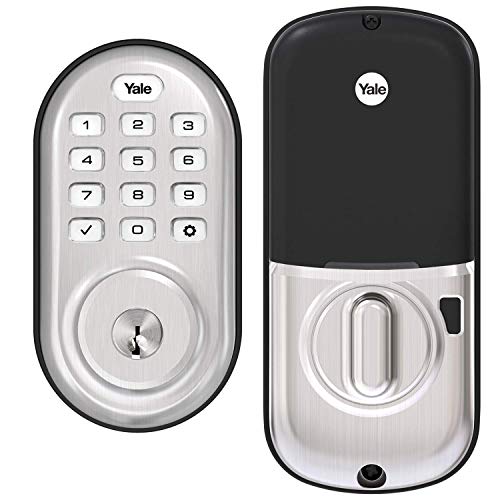
Yale Assure Lock - Wi-Fi Keypad Smart Lock - Satin Nickel



Key features
- •Lose your keys, for good: Hands full. Have your door unlock for you with Auto-Unlock. Or unlock using the keypad, or Yale Access app on your smartphone or Apple Watch. Enjoy key-free access and leave the bulky keychain behind.
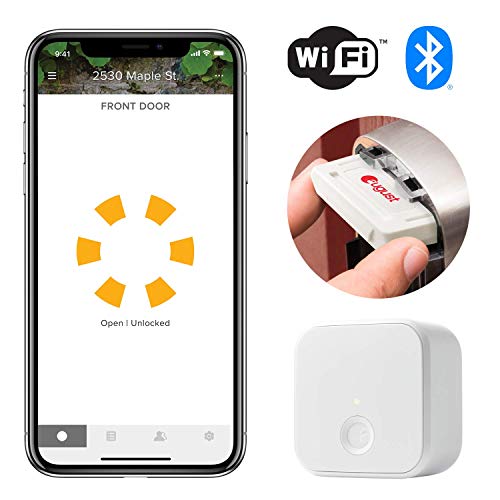
- •Expand your smart home: Connect your lock to your favorite voice assistant or smart home system. Works with Amazon Alexa, Hey Google, Airbnb, Philips Hue, Apple HomeKit, and more. Includes the Wi-Fi Connect Bridge so there's no additional hub needed.
- •Auto-Locks and Unlocks: Your Assure Lock will Auto-Unlock as you get home for totally hands-free unlocking. With Auto-Lock and DoorSense, your home automatically secures once your door is closed, or after a set amount of time.
- •Easy to install on any door: Not so handy Not a problem. Yale Assure locks are super easy to install and are guaranteed to fit standard doors (doors 1-¾" to 2-¼" thick. Doors under 1-⅜" require thin door kit).
- •Stop sharing keys: Digital keys are the new hide-a-key. Quickly and easily share permanent, temporary or scheduled access with friends, family, and people you trust, and never hide a key under the doormat again.
BrandYale
CategoryDeadbolts
SizeKeypad - With Key
ColorSatin Nickel
WarrantyLifetime limited warranty on Finish and Mechanical. One year on Electronics
Yale Assure Lock - Wi-Fi Keypad Smart Lock - Satin Nickel
List Price: $318.03$286.23DEALYou Save: $31.80 (10%)
Free shippingFree Returns – 30 daysFree Order CancellationSecure Payment2–3 Days DeliveryGet It October 25, 2026In Stock (1)No marketing spamNo account requiredFulfilment by FedEx / Amazon / UPS / ShipwirePayPal / Card Buyer Protection
Customer Reviews
Reviews sourced from verified Amazon purchasers4.1
out of 5
Based on 10 reviews
5★
60%
4★
40%
3★
0%
2★
0%
1★
0%
Great lock but install instructions could be better to avoid pitfalls
Rick✓ Verified Purchase•December 20, 2023
I put this on a remote rental property and liked it so much that I purchased a secondo for home. The first one was flawless, but the second one I ran into strange issues. First of all, when you install the connectivity software, it displays 5 options of locks ie 2nd Generation, 3rd Generation, 4th Generation etc. But NOWHERE could I find out WHAT GENERATION was this lock!!! I figured it was the latest so I chose 4th Generation. It then gets you to scan the QR code on the lock, so I guess that is really the important part. However when I finished installing I had a weird issue, where the lock would NOT unlock and the screen showing the big circle was not filled in, just a "broken circle" with the words below in "lock/unclock". Then the lock with continually engage and make a noise every 30 seconds. I was puzzled and could not figure out what was wrong. It also would not UNLOCK using the app. Trouble shooting, I noticed that if the door was open I could unlock and lock using the phone with no issues and that the normal full filled in circle would show GREEN and RED for unlock and locked. I thought maybe the software was wrong so I reset to factory and reinstalled. Same issue. then I though maybe the "sensing" module was not set correctly and screwed around with that!!! Now Im getting REALLY frustrated cause its getting late and i cant get this to work. I look at the TROUBLE SHOOTING section and NOWHERE does it describe this problem. Finally EUREKA!!! I realize that when the door is open and it works perfectly, then compare that to the door shut and it does not.....I notice that the manual close knob is EVER SO SLIGHTLY not fully turned to the right for full lock....and I'm talking about only a 1/4" or less difference in position. So I figure out that the DEPTH of the hole for the dead BOLT to go into is SLIGHTLY not deep enough, thereby causing the lock to think that it is NOT LOCKED. HOLY COW!!!! You'd think a message would come up and tell you that, but there is NO INDICATION or any NOTES I could find describing this simple issue.
So drilled it out a bit more, and BINGO!!!! Everything works like a charm.
Summary, make sure your deadbolt enters the hole perfectly and completely!!!
Aside from that a few minor bugs, like after the connection is made to the network it tests the signal strength and every time it comes back BAD SIGNAL. Again...figured out that the reason is, the Connectivity module is STILL RESETTING and this Test is TOO SOON...just RETEST and its good!
Overall I am super impressed, I turned on the Bluetooth auto entry mode and will test that tonight, will be nice to walk up to the door and its unlocked.
Still TRYING TO FIGURE OUT how to REMOTELY CHANGE/ADD/DELETE codes. I had read this can be done but have not found out how yet.
Hope all this helps someone
So drilled it out a bit more, and BINGO!!!! Everything works like a charm.
Summary, make sure your deadbolt enters the hole perfectly and completely!!!
Aside from that a few minor bugs, like after the connection is made to the network it tests the signal strength and every time it comes back BAD SIGNAL. Again...figured out that the reason is, the Connectivity module is STILL RESETTING and this Test is TOO SOON...just RETEST and its good!
Overall I am super impressed, I turned on the Bluetooth auto entry mode and will test that tonight, will be nice to walk up to the door and its unlocked.
Still TRYING TO FIGURE OUT how to REMOTELY CHANGE/ADD/DELETE codes. I had read this can be done but have not found out how yet.
Hope all this helps someone
Love the lock, fiddly August Connect
Ntombi A. Peters✓ Verified Purchase•December 13, 2023
Update after three years of ownership:
My biggest update is that the app now tells you when the battery needs to be replaced, which is very helpful.
I've recommended this lock to everyone, because it's got all the features I think make a great smart lock. One of these days I'll connect it to HomeKit, but it's doing just fine as is.
~~~~~~~~~~~~~~
Update after six months of ownership:
I LOVE this lock. I just had to replace the batteries, so I thought I'd give an update.
It's not perfect, but its imperfections are not deal-breakers for me.
Cons:
*I don't have it connected to my HomeKit or any other smart home system, so I didn't realize when the batteries were dying until they did. Now that I know the signs, I'll be more prepared.
*When the batteries do die, the lock stops communicating with August Connect. That means no real-time status, no up-to-date activity log, no unlock via Wi-Fi, and no automatic unlock when you come home. If you start seeing them fail, replace the batteries.
*Automatic unlock is only about 75% effective, even with good batteries. I'll come home and get the notification that my home is being unlocked, only to get another notification that unlocking failed, due to a "communication error." Annoying, but not a dealbreaker. I can still unlock with a code, my phone, Apple Watch, or the key.
*The August Connect loses Wi-Fi signal more often than it should. Now, that's still only every few days for 3-10 minutes, on average, but I think that's too often. I bought a Wi-Fi extender shortly after installation, and it helped, but it's still happening more often than it should, IMO. The good thing is that it reconnects automatically, and nothing is lost, but come on.
Pros
* They upgraded the Apple Watch app, making it slightly better than useless! It's now barely useful! I'm being funny (I hope), but it's true. It now works much more reasonably, giving the actual status of the lock, and reliably locking/unlocking when within Bluetooth range.
*it locks/unlocks via the app over Wi-Fi very quickly and reliably. I can unlock the door for a pickup/delivery from upstairs or in the next country (when will this pandemic be over???), when it doesn't make sense to ask someone to download the app, or waste a temp code on them.
The app codes are still weird vs the manually entered codes, but both work just fine. I love getting a notification when so-and-so has unlocked the door.
*Being able to set parameters for different people/codes is wonderful, as is the data about who came in when. A dog walker or carer should be able to come in when necessary, but you should feel safe from surprises!
For all the rest, see below. Everything else stands.
I have recommended this lock to several people in the last several months, and will continue to do so!
I love this lock!
~~~*~~~*~~~*~~~*~~~*~~~*~~~*~~~*~~~*~~~
I only installed this lock a few days ago, so I'll update in a few months, but at first use, I'm very happy with the lock, and satisfied with the Connected by August component.
I bought this to replace a Kwikset keypad (dumb) lock that finally gave up the ghost after about seven years.
I did a lot of research, and had several requirements: geofencing, WiFi connectivity with a robust iOS app, and a key backup were at the top of the list. This lock checked all the boxes. The fact that it was made by Yale, which has been in the lock-making business for over 100 years, was a bonus. Part of what I didn't like about the Kwikset was that the lock itself didn't feel well made, and in fact became difficult to turn after a few years (yes I tried troubleshooting several times; it was just not a great lock).
It took me twice as long to remove the old lock than it did to install this Yale lock. This thing was a breeze, and I have wrist and hand problems that nowadays make this work a challenge. The instructions were very clear, and everything fit together beautifully.
Adding a master code and manually adding user codes was also very quick and easy, thanks to the instructions and the voice prompts.
Connecting the Connect (the plug-in WiFi bridge) was a different story. That thing was fiddly as all get out. I had to reboot, disconnect, and reconnect it about four times before it finally connected to both the WiFi and the Bluetooth at the same time. Ridiculously annoying. I also wish it connected to both 2.4gH and 5gH, rather rhan 2.4 only, but I knew that when I bought it.
Also weirdly, though the lock itself allows manually added user codes between 4-8 digits, the August app only allows codes between 4-6! That's a huge difference, and less secure.
The iOS app overall is okay, but the Apple Watch app is comically bad. They really shouldn't have bothered. It not only doesn't tell you the door status, it almost never works to lock/unlock, even when next to the phone, which works immediately.
If your WiFi signal is at all weak near your door, I strongly recommend an extender. They're inexpensive and can make life a lot easier.
My biggest update is that the app now tells you when the battery needs to be replaced, which is very helpful.
I've recommended this lock to everyone, because it's got all the features I think make a great smart lock. One of these days I'll connect it to HomeKit, but it's doing just fine as is.
~~~~~~~~~~~~~~
Update after six months of ownership:
I LOVE this lock. I just had to replace the batteries, so I thought I'd give an update.
It's not perfect, but its imperfections are not deal-breakers for me.
Cons:
*I don't have it connected to my HomeKit or any other smart home system, so I didn't realize when the batteries were dying until they did. Now that I know the signs, I'll be more prepared.
*When the batteries do die, the lock stops communicating with August Connect. That means no real-time status, no up-to-date activity log, no unlock via Wi-Fi, and no automatic unlock when you come home. If you start seeing them fail, replace the batteries.
*Automatic unlock is only about 75% effective, even with good batteries. I'll come home and get the notification that my home is being unlocked, only to get another notification that unlocking failed, due to a "communication error." Annoying, but not a dealbreaker. I can still unlock with a code, my phone, Apple Watch, or the key.
*The August Connect loses Wi-Fi signal more often than it should. Now, that's still only every few days for 3-10 minutes, on average, but I think that's too often. I bought a Wi-Fi extender shortly after installation, and it helped, but it's still happening more often than it should, IMO. The good thing is that it reconnects automatically, and nothing is lost, but come on.
Pros
* They upgraded the Apple Watch app, making it slightly better than useless! It's now barely useful! I'm being funny (I hope), but it's true. It now works much more reasonably, giving the actual status of the lock, and reliably locking/unlocking when within Bluetooth range.
*it locks/unlocks via the app over Wi-Fi very quickly and reliably. I can unlock the door for a pickup/delivery from upstairs or in the next country (when will this pandemic be over???), when it doesn't make sense to ask someone to download the app, or waste a temp code on them.
The app codes are still weird vs the manually entered codes, but both work just fine. I love getting a notification when so-and-so has unlocked the door.
*Being able to set parameters for different people/codes is wonderful, as is the data about who came in when. A dog walker or carer should be able to come in when necessary, but you should feel safe from surprises!
For all the rest, see below. Everything else stands.
I have recommended this lock to several people in the last several months, and will continue to do so!
I love this lock!
~~~*~~~*~~~*~~~*~~~*~~~*~~~*~~~*~~~*~~~
I only installed this lock a few days ago, so I'll update in a few months, but at first use, I'm very happy with the lock, and satisfied with the Connected by August component.
I bought this to replace a Kwikset keypad (dumb) lock that finally gave up the ghost after about seven years.
I did a lot of research, and had several requirements: geofencing, WiFi connectivity with a robust iOS app, and a key backup were at the top of the list. This lock checked all the boxes. The fact that it was made by Yale, which has been in the lock-making business for over 100 years, was a bonus. Part of what I didn't like about the Kwikset was that the lock itself didn't feel well made, and in fact became difficult to turn after a few years (yes I tried troubleshooting several times; it was just not a great lock).
It took me twice as long to remove the old lock than it did to install this Yale lock. This thing was a breeze, and I have wrist and hand problems that nowadays make this work a challenge. The instructions were very clear, and everything fit together beautifully.
Adding a master code and manually adding user codes was also very quick and easy, thanks to the instructions and the voice prompts.
Connecting the Connect (the plug-in WiFi bridge) was a different story. That thing was fiddly as all get out. I had to reboot, disconnect, and reconnect it about four times before it finally connected to both the WiFi and the Bluetooth at the same time. Ridiculously annoying. I also wish it connected to both 2.4gH and 5gH, rather rhan 2.4 only, but I knew that when I bought it.
Also weirdly, though the lock itself allows manually added user codes between 4-8 digits, the August app only allows codes between 4-6! That's a huge difference, and less secure.
The iOS app overall is okay, but the Apple Watch app is comically bad. They really shouldn't have bothered. It not only doesn't tell you the door status, it almost never works to lock/unlock, even when next to the phone, which works immediately.
If your WiFi signal is at all weak near your door, I strongly recommend an extender. They're inexpensive and can make life a lot easier.
Customer Service is AMAZING!
Jacquie Woods✓ Verified Purchase•December 4, 2023
This product is very good. However what makes it amazing is Yale's customer service. I had a difficult with the install because I fat fingered my master code. They walked me through resetting and every step to set it up. They also told me I should have the opening the bolt goes in drilled a bit deeper or it will burn up the motor. I think that is why my last lock failed. It works so well!
The seller is great
M. Nolan✓ Verified Purchase•November 29, 2023
I had an issue and this company is very good. They are truly a Customer service company.
Yale/August Integration Initial Configuration is a Hassle...Otherwise A Great Smart Lock
dlinds✓ Verified Purchase•November 25, 2023
For the August/Yale integration the initial setup appears to be designed by someone who said let's make this as confusing as possible.
TLDR: Instructions reference 3 different apps (Bilt, Yale Access, August), setup requires ignoring picture from August app and scrolling down. App freezes during setup on iPhone 12 Pro Max multiple times. Eventually setup is complete and the lock works great. App is fine for daily use after setup.
My backstory: I live in a smart home mostly with iOS devices and using HomeKit natively and homebridge for everything else. We have a smart oven, robot vacuums, robot mop, smart locks, MyQ garage door, lights/switches (lutron, hue, brilliant smart home), TVs, sprinkler system, shades, etc... Most are relatively simple to get going with the more difficult requiring some tinkering with network stuff. Yale/August was different and not in a good way.
Yale Hardware: We're replacing a Kwikset Premis that after a few years in the Florida humidity started eating through batteries in days (ended up being corroded on the inside). The hardware of Yale feels substantial, clearly this isn't their first time designing a lock. They have well thought out seals to prevent moisture from getting in and the mechanical motion is just smoother. Feels more metal than plastic. Also unlike Kwikset (thankfully), to change the batteries doesn't require me removing 3 screws and the entire decorative backplate...brilliant.
Yale/August Install: The initial install of the hardware itself is okay. No instructions are provided other than asking you to download the Bilt app (or using a PDF on the website). That works well enough and soon the lock is installed and working as a non-smart keypad lock. Here's where it goes south. Yale actually has a smart design, they have the base lock and small modules/cartridges that plug into the lock to enable other features (WiFi, Z-Wave, or Zigbee). Think Nintendo Gameboy cartridges but slightly smaller. For August they include an August module for the lock and a August Connect plug in unit. However the labels on the boxes are confusing (remember no documentation is included and neither Bilt or the PDF on the website that you can search to find on the product page has instructions for this). The Yale stuff says use the Yale Access App (August app clone) and the August stuff says to use the August app. So that's 3 apps they're asking you to use Bilt, Yale Access, and August. In reality ditch the Yale Access and go right for August. Let my suffering clear that up for you.
Once you navigate to the August app to make the non-smart lock...smart that's where it comes unhinged. After setting up an account in August you'll see a "Set Up a Connect" button...you'll think oh that's what I have. Click that and it'll walk you through how to set up connect and then tell you that you don't have a supported lock. Try to call August...they don't answer. It's chat or email only with them. Turns out that despite no clear indication in the app and no instructions presented that you can actually scroll down. Seriously no scroll bar (hidden until swiping) and the buttons are spaced in a way that appears to fill up the screen without presenting a hint of options below. Once the user scrolls down the last option is "Set Up a Lock Connected By August". It doesn't really look like a button and it seems to imply to use the above but you can actually press it. Doing so allows the user to pair the August module/cartridge with the lock...great. Except it freezes after the firmware update. But no worries after closing and relaunching the app all is good and I can connect to the lock via Bluetooth. Now the user can go back to set up a device and select the "Set Up a Connect" button and pair the plug in August Connect. That also locked up during set up after it was trying to connect to WiFi. Additionally the app reported both wifi and Bluetooth to the lock signals were weak or non-existent when testing (they weren't the app later shows excellent/good signal for both after a force quit). After that August is intuitive and basically anyone can figure out how to change the settings on the lock. It's easy going from that point onwards. Except one thing that annoys me. Yale allows an 8 digit code for the lock...August only allows a maximum of 6. Oh well, life goes on.
Features/Use: The lock responds almost instantly to commands, settings are easily accessed in the August app, and it's overall reliable in my few days of use. Even the exterior keypad is fast and easily readable in sunlight. Aside from the poor install experience I'm happy with the feature set and day to day use.
Actual Install Instructions for Yale/August:
1. Install the Yale lock using the PDF from the website or the Bilt app. Set the master code on the lock.
2. Install the August app.
3. Create your August account and then when adding a new device scroll down to "Set Up a Lock Connected By August". Pair the August cartridge/module to the lock as instructed. Update firmware, etc... as instructed during the install. Complete that process for Bluetooth access to the lock. This pairs the cartridge that fits in the lock with the lock itself.
4. For the module that plugs into the wall go to set up a new device and "Set Up a Connect". Follow the steps and don't despair if it locks/freezes during setup. Just reattempt or see if it worked even if it gave an error. That should complete the install.
TLDR: Instructions reference 3 different apps (Bilt, Yale Access, August), setup requires ignoring picture from August app and scrolling down. App freezes during setup on iPhone 12 Pro Max multiple times. Eventually setup is complete and the lock works great. App is fine for daily use after setup.
My backstory: I live in a smart home mostly with iOS devices and using HomeKit natively and homebridge for everything else. We have a smart oven, robot vacuums, robot mop, smart locks, MyQ garage door, lights/switches (lutron, hue, brilliant smart home), TVs, sprinkler system, shades, etc... Most are relatively simple to get going with the more difficult requiring some tinkering with network stuff. Yale/August was different and not in a good way.
Yale Hardware: We're replacing a Kwikset Premis that after a few years in the Florida humidity started eating through batteries in days (ended up being corroded on the inside). The hardware of Yale feels substantial, clearly this isn't their first time designing a lock. They have well thought out seals to prevent moisture from getting in and the mechanical motion is just smoother. Feels more metal than plastic. Also unlike Kwikset (thankfully), to change the batteries doesn't require me removing 3 screws and the entire decorative backplate...brilliant.
Yale/August Install: The initial install of the hardware itself is okay. No instructions are provided other than asking you to download the Bilt app (or using a PDF on the website). That works well enough and soon the lock is installed and working as a non-smart keypad lock. Here's where it goes south. Yale actually has a smart design, they have the base lock and small modules/cartridges that plug into the lock to enable other features (WiFi, Z-Wave, or Zigbee). Think Nintendo Gameboy cartridges but slightly smaller. For August they include an August module for the lock and a August Connect plug in unit. However the labels on the boxes are confusing (remember no documentation is included and neither Bilt or the PDF on the website that you can search to find on the product page has instructions for this). The Yale stuff says use the Yale Access App (August app clone) and the August stuff says to use the August app. So that's 3 apps they're asking you to use Bilt, Yale Access, and August. In reality ditch the Yale Access and go right for August. Let my suffering clear that up for you.
Once you navigate to the August app to make the non-smart lock...smart that's where it comes unhinged. After setting up an account in August you'll see a "Set Up a Connect" button...you'll think oh that's what I have. Click that and it'll walk you through how to set up connect and then tell you that you don't have a supported lock. Try to call August...they don't answer. It's chat or email only with them. Turns out that despite no clear indication in the app and no instructions presented that you can actually scroll down. Seriously no scroll bar (hidden until swiping) and the buttons are spaced in a way that appears to fill up the screen without presenting a hint of options below. Once the user scrolls down the last option is "Set Up a Lock Connected By August". It doesn't really look like a button and it seems to imply to use the above but you can actually press it. Doing so allows the user to pair the August module/cartridge with the lock...great. Except it freezes after the firmware update. But no worries after closing and relaunching the app all is good and I can connect to the lock via Bluetooth. Now the user can go back to set up a device and select the "Set Up a Connect" button and pair the plug in August Connect. That also locked up during set up after it was trying to connect to WiFi. Additionally the app reported both wifi and Bluetooth to the lock signals were weak or non-existent when testing (they weren't the app later shows excellent/good signal for both after a force quit). After that August is intuitive and basically anyone can figure out how to change the settings on the lock. It's easy going from that point onwards. Except one thing that annoys me. Yale allows an 8 digit code for the lock...August only allows a maximum of 6. Oh well, life goes on.
Features/Use: The lock responds almost instantly to commands, settings are easily accessed in the August app, and it's overall reliable in my few days of use. Even the exterior keypad is fast and easily readable in sunlight. Aside from the poor install experience I'm happy with the feature set and day to day use.
Actual Install Instructions for Yale/August:
1. Install the Yale lock using the PDF from the website or the Bilt app. Set the master code on the lock.
2. Install the August app.
3. Create your August account and then when adding a new device scroll down to "Set Up a Lock Connected By August". Pair the August cartridge/module to the lock as instructed. Update firmware, etc... as instructed during the install. Complete that process for Bluetooth access to the lock. This pairs the cartridge that fits in the lock with the lock itself.
4. For the module that plugs into the wall go to set up a new device and "Set Up a Connect". Follow the steps and don't despair if it locks/freezes during setup. Just reattempt or see if it worked even if it gave an error. That should complete the install.
Page 1 of 2