Microsoft Ergonomic Keyboard - Black. Wired, Comfortable, Ergonomic Keyboard with Cushioned Wrist and Palm Support. Split Keyboard. Dedicated Office Key.


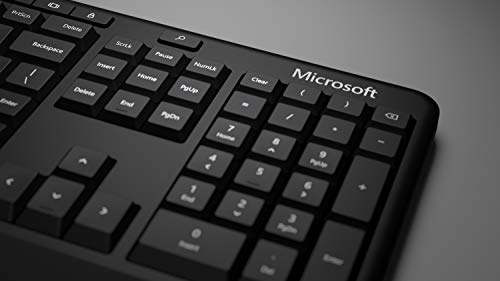


Key features
- •Exceptional comfort. Work all day, with reduced risk of fatigue and injury, on our Ergonomist-approved design.
- •Excellent support. Improved cushion and ergonomically tested palm rest covered in premium fabric provides all-day comfort and promotes a neutral wrist posture.
- •Be more productive with built-in shortcuts, including dedicated keys for office 365, emojis, search, easy access to media controls, and more.
- •Designed to last — Wired for reliable speed and accuracy.
- •Crunch numbers Fast, with a dedicated integrated pad.
- •Compatibility: Microsoft Windows 10, Limited functionality Windows 8.1/7 (Office and Emoji keys have no function)
Microsoft Ergonomic Keyboard - Black. Wired, Comfortable, Ergonomic Keyboard with Cushioned Wrist and Palm Support. Split Keyboard. Dedicated Office Key.
List Price: $96.83$87.15DEALYou Save: $9.68 (10%)
Free shippingFree Returns – 30 daysFree Order CancellationSecure Payment2–3 Days DeliveryGet It October 24, 2026In Stock (2)No marketing spamNo account requiredFulfilment by FedEx / Amazon / UPS / ShipwirePayPal / Card Buyer Protection
Customer Reviews
Reviews sourced from verified Amazon purchasers4.5
out of 5
Based on 10 reviews
5★
60%
4★
40%
3★
0%
2★
0%
1★
0%
Comfortable typing, but annoying "extra" keys and hard-to-reach top row
RosieDog's Mom✓ Verified Purchase•August 28, 2023
I've been using this keyboard for about 6 months. My work requires a lot of typing, and I had begun to experience stiffness and pain in my hands when using the flat keyboard that came with my HP computer.
Pros:
- Cuts down on hand discomfort
- Large, well-spaced raised keys -- My old keyboard's keys were about 1/8 inch above the surface, very close together, and did not create much resistance when pressed. These factors, combined with the fact that the bump on the F and J "home" keys had worn down, made it easy to misplace my fingers and hands and to mistype. I can type really fast on the central area of the ergonomic keyboard without many mistakes.
- Cushioned resting area for wrists when not typing.
- Feel of the keys when using them --
Cons:
- There are two "extra" keys between th Ctrl and Alt keys on both sides of the keyboard -- on the left, the "windows" key and the "application" key; on the right, the "Microsoft Office on the Web" key and the "emoji" key. My work requires frequent use of hotkeys combining Alt and/or Ctrl, and it's just too easy to accidentally hit one of these extra keys (especially if you have relatively small hands like me), which I have little use for.
The keyboard is advertised as "customizable," but Microsoft's downloadable app for the keyboard only allows you to disable or enable a few of the keys, not the whole keyboard. It's also confusing -- supposedly, the app doesn't work with Windows 10 (which doesn't make much sense, as Windows 10 is the latest version -- unless they mean without the updates?), which I have, but I was able to use it to disable the application key -- better, but I would rather be able to remap it to be an additional Ctrl key, since that's what I'm usually going for when I accidentally hit it. The emoji key can only be reassigned as another application key, not disabled, but that's not as big a problem, since I rarely accidentally hit that one. You're supposed to be able to customize for specific apps, but when I tried to disable the app key only for Word, it didn't work. I had to disable it for the basic keyboard (which is fine, because there are plenty of other ways to get to my apps).
Additionally, the shape of the keyboard makes it easy to hit the wrong keys on the numbers/symbols row. Again, this is partly because I have smaller hands, so it's a long reach up to that row, especially when I need to type a symbol, since that requires using both a shift key and a number key -- I have to move my whole hand to get to those keys, which increased the likelihood that I will mistype the letters that come afterward.
Overall, I like the design of this keyboard, and it's far better than the one I was using before. But it needs improvement. The app, windows, Office on the Web, and emoji keys should either be moved to a different location on the keyboard, fully customizable, or eliminated completely. I'm not sure what could be done about my problem with the numbers row -- perhaps this is unique to people with small hands and couldn't be solved without reducing the size of the other keys, which I like.
Pros:
- Cuts down on hand discomfort
- Large, well-spaced raised keys -- My old keyboard's keys were about 1/8 inch above the surface, very close together, and did not create much resistance when pressed. These factors, combined with the fact that the bump on the F and J "home" keys had worn down, made it easy to misplace my fingers and hands and to mistype. I can type really fast on the central area of the ergonomic keyboard without many mistakes.
- Cushioned resting area for wrists when not typing.
- Feel of the keys when using them --
Cons:
- There are two "extra" keys between th Ctrl and Alt keys on both sides of the keyboard -- on the left, the "windows" key and the "application" key; on the right, the "Microsoft Office on the Web" key and the "emoji" key. My work requires frequent use of hotkeys combining Alt and/or Ctrl, and it's just too easy to accidentally hit one of these extra keys (especially if you have relatively small hands like me), which I have little use for.
The keyboard is advertised as "customizable," but Microsoft's downloadable app for the keyboard only allows you to disable or enable a few of the keys, not the whole keyboard. It's also confusing -- supposedly, the app doesn't work with Windows 10 (which doesn't make much sense, as Windows 10 is the latest version -- unless they mean without the updates?), which I have, but I was able to use it to disable the application key -- better, but I would rather be able to remap it to be an additional Ctrl key, since that's what I'm usually going for when I accidentally hit it. The emoji key can only be reassigned as another application key, not disabled, but that's not as big a problem, since I rarely accidentally hit that one. You're supposed to be able to customize for specific apps, but when I tried to disable the app key only for Word, it didn't work. I had to disable it for the basic keyboard (which is fine, because there are plenty of other ways to get to my apps).
Additionally, the shape of the keyboard makes it easy to hit the wrong keys on the numbers/symbols row. Again, this is partly because I have smaller hands, so it's a long reach up to that row, especially when I need to type a symbol, since that requires using both a shift key and a number key -- I have to move my whole hand to get to those keys, which increased the likelihood that I will mistype the letters that come afterward.
Overall, I like the design of this keyboard, and it's far better than the one I was using before. But it needs improvement. The app, windows, Office on the Web, and emoji keys should either be moved to a different location on the keyboard, fully customizable, or eliminated completely. I'm not sure what could be done about my problem with the numbers row -- perhaps this is unique to people with small hands and couldn't be solved without reducing the size of the other keys, which I like.
Great for office workers
Pamenator✓ Verified Purchase•August 22, 2023
My daughter works online from her home and has having trouble with her wrists hurting and thought she might have carpal tunnel. I ordered her this Microsoft Ergonomic Keyboard and just after a week her wrists had both stopped hurting. She has had no more pain or complaints. It seems to be very well made and for Microsoft the price was very reasonable.
Curved and ergonomic, great price, reliable
Shah✓ Verified Purchase•July 25, 2023
I love the keyboards, but to understand why I need to walk through a story...
When I type for several hours in a row (writing a paper, writing code, responding to excessive quantities of emails...), my wrists and hands get sore. Two products help reduce this effect - wearing padded wrist gaurds (such as the elbow sleeves sold for sports, but wearing them more forward than they're designed), and I don't need any medication. My previous keyboards (at work and at home) were Logitech K860 that I liked had great ergonomics and aesthetics. However, those keyboards lagged every now and then. Early on, this could be solved by turning the keyboards on and off. The lag condition became worse after several months, to the point where the keyboards couldn't be fixed by restarting, rendering them un-usable. I have since replaced both with this Microsoft keyboard, and haven't regretted it one bit. I can quickly type on this keyboard for hours without muscle fatigue. The one way I'd improve the keyboard is to make the keypress less force and also less distance, but that's just moving the keyboard from an A to A+.
I will also say, the ~$50 price is incredible, to the point where I'll keep one at every place I type significantly (home, work, parents' house) for the forseeable future.
When I type for several hours in a row (writing a paper, writing code, responding to excessive quantities of emails...), my wrists and hands get sore. Two products help reduce this effect - wearing padded wrist gaurds (such as the elbow sleeves sold for sports, but wearing them more forward than they're designed), and I don't need any medication. My previous keyboards (at work and at home) were Logitech K860 that I liked had great ergonomics and aesthetics. However, those keyboards lagged every now and then. Early on, this could be solved by turning the keyboards on and off. The lag condition became worse after several months, to the point where the keyboards couldn't be fixed by restarting, rendering them un-usable. I have since replaced both with this Microsoft keyboard, and haven't regretted it one bit. I can quickly type on this keyboard for hours without muscle fatigue. The one way I'd improve the keyboard is to make the keypress less force and also less distance, but that's just moving the keyboard from an A to A+.
I will also say, the ~$50 price is incredible, to the point where I'll keep one at every place I type significantly (home, work, parents' house) for the forseeable future.
Good keyboard, but unfortunately MS decided to add and moved around some keys
Asuka✓ Verified Purchase•July 19, 2023
Solid keyboard, feels nice to use for the cost. The issue I have is that they added a random extra key, that few people will ever use, in between the Windows and Alt key in the lower left.
[CTRL] [NEW_KEY] [WIN] [ALT]
All this new key does is Right Click btw.
So, if you're like me and you alt+tab or use the alt or Windows keys for any shortcuts, then you will never press the correct key without looking at the keyboard. I use several different keyboards throughout the day, so changing my muscle memory isn't an option. Why, if they wanted to add new keys to a layout that 99.7% of all keyboards have had for 4 decades , didn't they just add it to right of the alt key? Like so:
[CTRL] [WIN] [ALT] [NEW_KEY]
They also shifted over an entire row to add a new buttons "Clear" and an extra Delete key (there are 2 now). So pressing the PrtScn button (which I do frequently from memory) now activates "ScrLk".
It's a good keyboard but I wish they wouldn't deviate from the norm when designing the layout.
[CTRL] [NEW_KEY] [WIN] [ALT]
All this new key does is Right Click btw.
So, if you're like me and you alt+tab or use the alt or Windows keys for any shortcuts, then you will never press the correct key without looking at the keyboard. I use several different keyboards throughout the day, so changing my muscle memory isn't an option. Why, if they wanted to add new keys to a layout that 99.7% of all keyboards have had for 4 decades , didn't they just add it to right of the alt key? Like so:
[CTRL] [WIN] [ALT] [NEW_KEY]
They also shifted over an entire row to add a new buttons "Clear" and an extra Delete key (there are 2 now). So pressing the PrtScn button (which I do frequently from memory) now activates "ScrLk".
It's a good keyboard but I wish they wouldn't deviate from the norm when designing the layout.
Loooove!!
Michelle Jenniges✓ Verified Purchase•July 4, 2023
So happy with this purchase!! The curve makes standing at my computer a lot of the time during the day so much more comfortable! Takes slight getting used to. Much prefer this one with the number keys attached than one ergonomic keyboard I tried that had a separate number keypad
Page 1 of 2