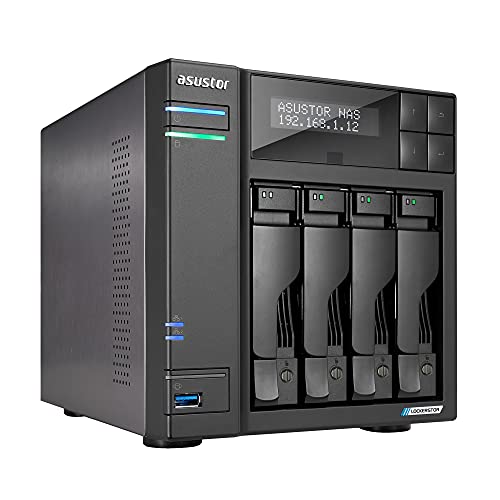
Asustor Lockerstor 4 AS6604T - 4 Bay NAS, Quad-Core 2.0GHz CPU, 2 2.5GbE Ports, 4GB RAM DDR4, 2 M.2 SSD Slots, Network Attached Storage (Diskless)



Key features
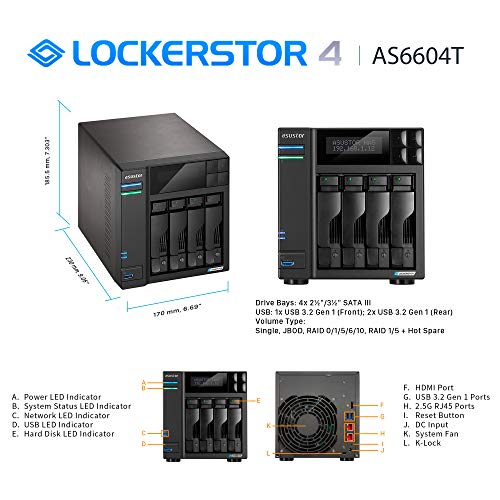
- •TIER – Power / business user 4-bay NAS for storage and multimedia with 2.0GHz Quad-Core processor and 4GB DDR4 RAM, able to handle as virtual storage machine. This NAS packs a power performance with two built-in 2.5GbE ports and three 3.2USB ports.
- •FEATURES – Asustor Backup Plan allows you to automatically schedule a backup of your data from any PC or MAC to your NAS. Asustor EZ-Connect allows you to connect to your NAS remotely from any computer or mobile phone. Asustor EZ-Sync turns your NAS into a real-time file syncing personal cloud space with file versioning.
- •APPS – Over 200+ free unique apps for any home or business use. The apps offered cover a wide range of utility and features such as: server backup, cloud backup, anti-virus, media server, photo syncing, music and video streaming.
- •FREE – Asustor offers 4 free IP camera licenses with all their NAS products. IP camera licenses can be used to setup IP cameras on your NAS for your home or business NVR / surveillance center without having to pay any service or monthly fees.
- •WARRANTY – Asustor offers the best 3-year NAS warranty in the market. Asustor will repair or replace any unit that is hardware damaged during the 3-year period so you can feel worry free when using any Asustor product.
Asustor Lockerstor 4 AS6604T - 4 Bay NAS, Quad-Core 2.0GHz CPU, 2 2.5GbE Ports, 4GB RAM DDR4, 2 M.2 SSD Slots, Network Attached Storage (Diskless)
List Price: $798.80$718.92DEALYou Save: $79.88 (10%)
Free shippingFree Returns – 30 daysFree Order CancellationSecure Payment2–3 Days DeliveryGet It October 25, 2026In Stock (12)No marketing spamNo account requiredFulfilment by FedEx / Amazon / UPS / ShipwirePayPal / Card Buyer Protection
Customer Reviews
Reviews sourced from verified Amazon purchasers4.3
out of 5
Based on 10 reviews
5★
60%
4★
40%
3★
0%
2★
0%
1★
0%
Not perfect but great value, very solid
JohnR✓ Verified Purchase•August 2, 2023
I am an IT professional of over 25 years so I will review from this perspective. Overall this unit provides great specs for the price. Immediately upgraded RAM to 16GB. Not difficult but you need to disassemble the unit to get at the motherboard. Any good set of DDR4 SODIMMs should do the trick. Strongly recommend a UPS for any NAS. These file systems do not like ungraceful shutdowns. I was pleasantly surprised when it immediately recognized my UPS when I plugged it in to a USB port. I set it to shut down after 5 min of power loss. I recommend just one SSD for read cache. Write cache needs 2, is overkill for most and a really great way to corrupt your file system. If you do write cache, a UPS is a must. I've installed a few apps including surveillance center which works great. Use the smartphone app for playback. I have external access disabled, many ransomware attacks for the EZ services. Don't enable them if you like your data. A VPN on your router with clients on your mobile devices is the right solution for remote access. I have not set this up yet. Waiting on a newer router to do this. Use Raid 5 or 1. You are asking for trouble with Raid 0 as you have no redundancy. I used older hard drives and already had 1 fail. This is inevitable with hard drives. When not if they fail.
Some critiques:
1. Asus advertises 10g network support. To get this you have to replace the SSD card with a 10g NIC. They could really use a second slot.
2. Could use more sound insulation. Depending on your hard drives the unit can be a bit noisy.
3. App library is not as comprehensive as Synology or QNAP. Hopefully this improves as more of these units are sold.
4. Advertised camera support for Surveillance Center is poor, and mostly older models. I had to try a couple brands before I settled on Amcrest. These work great and are easy to set up. 4 camera licenses are included which is nice.
5. Unit is set to DHCP (dynamic IP assignment). You should use static IP assignments or reservations for the NAS and cameras otherwise the IP could change on reboot which you don't want.
Some critiques:
1. Asus advertises 10g network support. To get this you have to replace the SSD card with a 10g NIC. They could really use a second slot.
2. Could use more sound insulation. Depending on your hard drives the unit can be a bit noisy.
3. App library is not as comprehensive as Synology or QNAP. Hopefully this improves as more of these units are sold.
4. Advertised camera support for Surveillance Center is poor, and mostly older models. I had to try a couple brands before I settled on Amcrest. These work great and are easy to set up. 4 camera licenses are included which is nice.
5. Unit is set to DHCP (dynamic IP assignment). You should use static IP assignments or reservations for the NAS and cameras otherwise the IP could change on reboot which you don't want.
Perhaps the most feature rich NAS available for home or small business use
JLouisIII✓ Verified Purchase•July 15, 2023
I have been a long time user of a competitors product. I needed to add another NAS to my home/small business office network. I do a lot of photo editing and some video editing and need to back up my work to a very reliable NAS. After careful research I concluded that the ASUSTOR Lockerstor 2 Gen2 AS6702T (2-bay unit) was the best NAS to meet my needs. The unit received high reviews from third parties and it lived up to the hype.
PROS-
Fast file transfers (much faster than my older NAS)
Dual multi-gig LAN ports (but of not value to me since my LAN supports 1000mbs only)
Four slots for M.2 NVMe SSDs (for storage or caching but not both)
Expandable
Large catalog of apps both from the manufacturer and third parties
CONS-
Expensive
Expanding RAM to 16GB requires disassembling the unit (although the manufacturer has a step-by-step video to guide you through the process, and I did upgrade to 16GB and found the video helpful)
Setup was easy (except for the memory upgrade installation which took about an hour). I installed 2 10TB HDDs and was up and running in less than 15 minutes. File transfers from my desktop were speedy.
Besides my desktop I use an apple laptop as well as a windows laptop on my LAN and they have no problems accessing and using the NAS.
I strongly recommend using a UPS with this unit.
I would not recommend enabling remote access to the ASUSTOR from the internet unless you are very well versed in the security issues involved, especially using VPNs.
I have been using the unit for over a week and so far I am very pleased with its performance. Recommended.
PROS-
Fast file transfers (much faster than my older NAS)
Dual multi-gig LAN ports (but of not value to me since my LAN supports 1000mbs only)
Four slots for M.2 NVMe SSDs (for storage or caching but not both)
Expandable
Large catalog of apps both from the manufacturer and third parties
CONS-
Expensive
Expanding RAM to 16GB requires disassembling the unit (although the manufacturer has a step-by-step video to guide you through the process, and I did upgrade to 16GB and found the video helpful)
Setup was easy (except for the memory upgrade installation which took about an hour). I installed 2 10TB HDDs and was up and running in less than 15 minutes. File transfers from my desktop were speedy.
Besides my desktop I use an apple laptop as well as a windows laptop on my LAN and they have no problems accessing and using the NAS.
I strongly recommend using a UPS with this unit.
I would not recommend enabling remote access to the ASUSTOR from the internet unless you are very well versed in the security issues involved, especially using VPNs.
I have been using the unit for over a week and so far I am very pleased with its performance. Recommended.
Asustor Lockerstor 2 Gen2 AS6702T is perfect for Emby server
Lee Maiden✓ Verified Purchase•July 12, 2023
I have 2- 8TB 7200rpm HGST in RAID 1 running, I upgraded the RAM to 16GB, I added 2- 1TB Silicon Power M.2 NVMe drives for read/write cache. This thing runs fantastic. Fast, responsive, no buffering, smooth as silk.
I submitted the HGST drives and the Silicon Power M.2 NVMe's to Asustor's compatible list because They didn't have them on there.
I submitted the HGST drives and the Silicon Power M.2 NVMe's to Asustor's compatible list because They didn't have them on there.
Very nice NAS
Simon✓ Verified Purchase•July 8, 2023
I bought this a few weeks ago, and really struggled to find reviews of the device, so here's my attempt to help others out...
Overall:
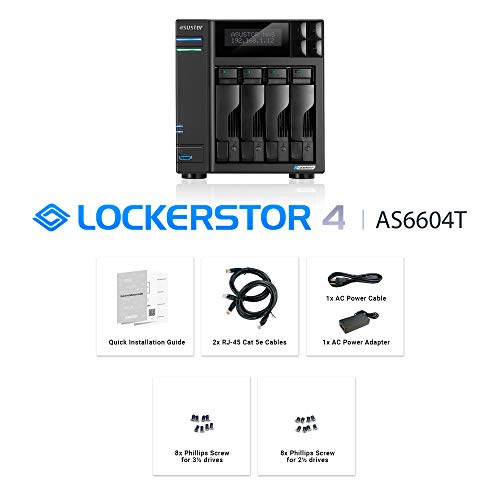
The machine arrived well-packed, with everything you need. The drive-trays are metal, not plastic, and they're pre-drilled for both 3.5" and 2.5" drives. The machine looks very nice, and comes with a utility to find it on the network.
User interface:
This is really nice. The screen presents as a windowed-desktop in the browser, and some real effort has gone into making it a pleasure to use. See the screenshots of login, desktop, and window-showing-disks.
Speed:
I have mine loaded up with 10x16TB drives in RAID5, and 2x1TB SSDs for caching. It absolutely screams over the 10G interface. It's faster than the USB-3-attached SSD RAID array.
Features:
It supports everything I've tried throwing at it thus far
- NFS for linux mounts, SMB for Mac/Windows machines, iSCSI for linux,
- Apps for, well, everything (and a free developer environment to make your own if you want).
- It has temperature and SMART monitoring for all the spinning rust, temperature monitoring for the SSDs and CPU, access monitoring.
- It has a display on the front that actually displays the IP address (!) as well as the name of the box.
I mean, really, it does everything...
Upgrades:
It comes with 8GB of RAM, but has two DDR4 DIMM slots. The Asus store will sell you mind-numbingly expensive DIMMS for the machine, but I went with two of the HX426S15IB2/16 Kingston DIMMs which work well, and are about 1/6 the price. It's fairly simple to get into the device - screw removal and standard DIMM insertion. It's also simple to add SSDs for the cache, and it comes with thumbscrews rather than tiny-screwdriver abominations which makes life a lot easier.
Support:
I got in touch with Asustore to ask about multi-homing a network interface (see caveats, below) and got a prompt response with further prompt followups. They couldn't do as I asked (the firmware doesn't support it, yet (?) ) but they were as helpful as I could have possibly hoped, which bodes well for any other technical support.
Caveats:
- You can't multi-home a network interface, each network interface gets one IP and that's it. You can set up a VLAN if your switch supports it, but my 10G switch (being unmanaged) doesn't.
- It took a *long* time to make a 130TB RAID out of 10 16TB drives. As in 3 or 4 days. Not sure if I'm being fair here, since 160TB is a lot of disk space :)
- It reports *real* disk space rather than "manufacturer" disk-space, so my 16TB drive is reported as 14.55TB (ie: it uses powers of 2 rather than powers of 10). This isn't a problem, but it shows how Seagate sell their disks duplicitously. Those ten 16TB drives provide 145TB of space. Yeah... Lose one for the raid-5 array, and you're down to ~130TB. Which is still a lot, to be fair...
Overall I couldn't be happier with it. It was expensive (especially loaded up with drives) but it seems very well engineered and performs flawlessly so far. For what it offers (the dual 10G network interface is pretty darn cool for this price point) it's still a bargain.
[aside]
Writing this review, I'm asked to rate on a scale of 1..5 stars these three criteria 'Easy To Use', 'Thickness' and 'Sheerness'. "Thickness" and "Sheerness" ? Really ?
[/aside]
Overall:
The machine arrived well-packed, with everything you need. The drive-trays are metal, not plastic, and they're pre-drilled for both 3.5" and 2.5" drives. The machine looks very nice, and comes with a utility to find it on the network.
User interface:
This is really nice. The screen presents as a windowed-desktop in the browser, and some real effort has gone into making it a pleasure to use. See the screenshots of login, desktop, and window-showing-disks.
Speed:
I have mine loaded up with 10x16TB drives in RAID5, and 2x1TB SSDs for caching. It absolutely screams over the 10G interface. It's faster than the USB-3-attached SSD RAID array.
Features:
It supports everything I've tried throwing at it thus far
- NFS for linux mounts, SMB for Mac/Windows machines, iSCSI for linux,
- Apps for, well, everything (and a free developer environment to make your own if you want).
- It has temperature and SMART monitoring for all the spinning rust, temperature monitoring for the SSDs and CPU, access monitoring.
- It has a display on the front that actually displays the IP address (!) as well as the name of the box.
I mean, really, it does everything...
Upgrades:
It comes with 8GB of RAM, but has two DDR4 DIMM slots. The Asus store will sell you mind-numbingly expensive DIMMS for the machine, but I went with two of the HX426S15IB2/16 Kingston DIMMs which work well, and are about 1/6 the price. It's fairly simple to get into the device - screw removal and standard DIMM insertion. It's also simple to add SSDs for the cache, and it comes with thumbscrews rather than tiny-screwdriver abominations which makes life a lot easier.
Support:
I got in touch with Asustore to ask about multi-homing a network interface (see caveats, below) and got a prompt response with further prompt followups. They couldn't do as I asked (the firmware doesn't support it, yet (?) ) but they were as helpful as I could have possibly hoped, which bodes well for any other technical support.
Caveats:
- You can't multi-home a network interface, each network interface gets one IP and that's it. You can set up a VLAN if your switch supports it, but my 10G switch (being unmanaged) doesn't.
- It took a *long* time to make a 130TB RAID out of 10 16TB drives. As in 3 or 4 days. Not sure if I'm being fair here, since 160TB is a lot of disk space :)
- It reports *real* disk space rather than "manufacturer" disk-space, so my 16TB drive is reported as 14.55TB (ie: it uses powers of 2 rather than powers of 10). This isn't a problem, but it shows how Seagate sell their disks duplicitously. Those ten 16TB drives provide 145TB of space. Yeah... Lose one for the raid-5 array, and you're down to ~130TB. Which is still a lot, to be fair...
Overall I couldn't be happier with it. It was expensive (especially loaded up with drives) but it seems very well engineered and performs flawlessly so far. For what it offers (the dual 10G network interface is pretty darn cool for this price point) it's still a bargain.
[aside]
Writing this review, I'm asked to rate on a scale of 1..5 stars these three criteria 'Easy To Use', 'Thickness' and 'Sheerness'. "Thickness" and "Sheerness" ? Really ?
[/aside]
Perfect replacement for my failed ASUS AS5002T NAS
Mitchman✓ Verified Purchase•July 7, 2023
I chose the ASUS AS6702T as a replacement for my failed ASUS AS5002T (seven years old). To my extreme pleasure, once I moved the old SSDs (maintaining the drive sled order) and powered on the unit, the new unit behaved exactly like the old one including the server identity! All of my files and settings were retained. The new unit got a new IP Address from my router, so I had to login to the MFP and edit the address book settings to use the new IP Address and, after testing, proved that both the SMB file share and FTP file share were populated from a scan. Concerned about the remaining lifespan of the SSDs (seven years old too), I bought and installed two 1 TB NVMe SSD sticks (Samsung 970 EVO Plus). I could find no way to migrate the volume from the old drives to the new ones and I tried every suggestion in the online tutorials plus some of my own. I submitted a query to ASUSTOR Tech Support and received a response the same day. After creating a new volume with the two new NVME drives and backing up the volume and exporting the settings, I powered off the unit, removed the drive sleds with the old SSDs, and then powered the unit back on. This forced a fresh system initialization process which, when finished, permitted me to import the system settings I has previously exported and copy the files from the export media. This was about a 90% recovery. I had to manually recreate the SMB file share, reconfigure the FTP service, and point the service to the correct folder. I had to alter the LED brightness to restore minimal visibility. I had to disable the power savings settings so that the NAS didn't go to sleep when not being accessed. Restoration complete! The network access speed increased to nearly equal that of a drive direct-attached to my PC!
Page 1 of 2