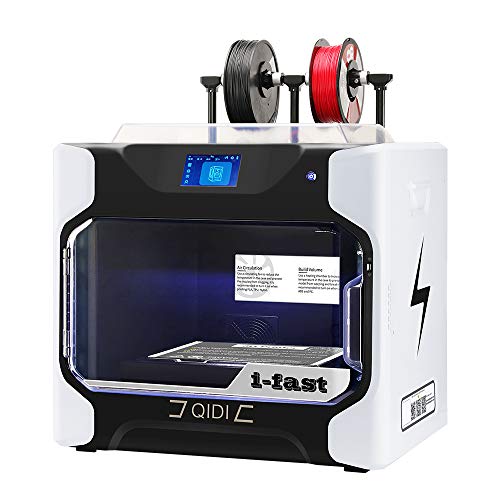
R QIDI TECHNOLOGY i Fast 3D Printer, Industrial Grade Structure, with Dual Extruder for Fast Printing, Super Large Printing Size 330×250×320mm



Key features
- •Faster printing . Fully industrial-grade structure, using the second-generation Qidi dual Z-axis structure, all of the original motion structure is upgraded to linear guides, with the high temp extruder, the filament extruding is faster and smoother, the printing accuracy is higher .The printing speed is increased by 20%, it is set to print easily at 100cc per hour.
- •Freedom in the choice of the filament: Qidi iFast can print almost all kinds of filaments which suitable for FDM 3D printers on the market, such as PLA ,PLA+ ,ABS ,PETG, NYLON,etc. The iFast 3d printer equipped with a heated chamber, which can be heated to 60°C. The excellent mechanical structure can produce more robust manufacturing-grade parts.
- •Freedom in manufacturing of the complex parts . Qidi iFast is equipped with automatic dual extruder, which can automatically adjust the left and right extruder up and down according to the software. With the PVA (water-soluble) support, it is very suitable for printing manufacturing-level parts with complex structures and realizing precision manufacturing.
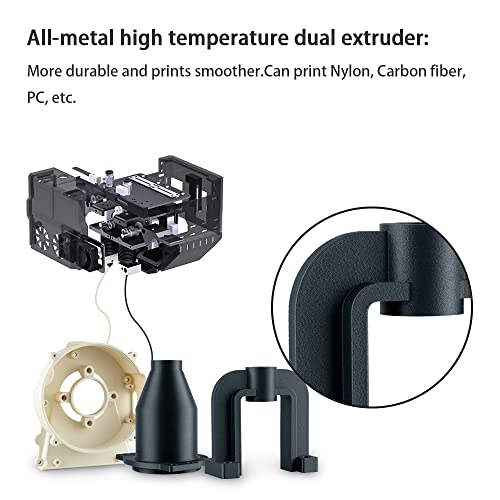
- •All metal high temp extruder. Compared with the normal brass nozzles which on the market, it is more durable and prints smoother. The iFast 3d printer is pre-installed with dual extruder, and the print size is 330×250×320mm.
- •Excellent user experience, friendly UI interface.It's equipped with self-developed QIDI slicing software, two modes can be selected: normal mode and expert mode. The normal mode is suitable for novices, the parameter system has been intelligently set, no other operations are required, it is very simple. Expert mode is suitable for experienced users, who can deeply participate in modifying parameters and personalized printing models.
R QIDI TECHNOLOGY i Fast 3D Printer, Industrial Grade Structure, with Dual Extruder for Fast Printing, Super Large Printing Size 330×250×320mm
List Price: $2908.55$2617.70DEALYou Save: $290.85 (10%)
Free shippingFree Returns – 30 daysFree Order CancellationSecure Payment2–3 Days DeliveryGet It October 25, 2026In Stock (1)No marketing spamNo account requiredFulfilment by FedEx / Amazon / UPS / ShipwirePayPal / Card Buyer Protection
Customer Reviews
Reviews sourced from verified Amazon purchasers4.6
out of 5
Based on 10 reviews
5★
90%
4★
10%
3★
0%
2★
0%
1★
0%
Amazing performance for the price (see details). Highly Recommended
C. Okamuro✓ Verified Purchase•February 9, 2024
The QIDI TECHNOLOGY i-Fast isn't my first 3D printer. At $2499 (at the time of this review), it's pretty much the same price as the Ultimaker 2 (since upgraded to a 2+) I bought in 2014! Even further back than that, though, my journey started in 2011 with a Mendel RepRap. If you aren't familiar with that particular unit, it was pretty much the early adopter DIY choice - and unless you wanted to get a commercial FDM printer, it was the only option available. Between materials that were not ideal, marginal build quality, immature hardware control, and the bad quality of early slicers, personal FDM was cool, but not for the faint of heart... and certainly not for the plug-and-play crowd. In the years since, the market has developed more consumer-friendly devices - even on the low end.
While the Ultimaker 2+ was good for its time, I wanted to explore the "prosumer" chasm between hobbyist and commercial FDM printers. The features I wanted were dual extruders, the ability to print ABS with fewer problems, high dimensional accuracy, the ability to use higher temp materials, and large print volume. The dual extruder requirement narrows the field immediately, and while I didn't want or need dual INDEPENDENT extruders, I desperately wanted to be able to print with PVA. My previous experience with Ultimaker had me check there first, but I was not cool with the prospect of spending $5000 to $9000 on a printer. Obviously, YMMV if you have commercial aspirations for your prints, but it didn't make sense to me. QIDI kept showing up as a vendor of interest for me... the printers were financially feasible, appeared to be made well, and had mostly good reviews. It was really down to the QIDI i-Fast or the Raise3D Pro2 (the shorter one).
The i-Fast arrived a few days after I placed the order. The shipping box was MASSIVE. I got the box into the house and decided to uncrate it right in the front hallway. Since the box was essentially the same width as the door leading down to my basement, I didn't really have a choice. The upside to the unboxing was that the printer is marginally lighter to carry down by itself. However, it's still 90 pounds and awkwardly shaped - fortunately it has molded carrying "dents" on the sides of the printer. The unit was extremely well packed, and nothing was damaged in shipping. Conveniently, the printer arrives almost entirely assembled. I looked for the spool holding hardware, power cord, etc. and immediately felt dread - I had pieces missing! The instructions clearly show where the extra hardware goes in to one of the styrofoam cutouts - and I didn't have anything there. The crisis was averted 5 minutes later when I realized that those parts were stuffed into a filament box. I had naively assumed that the filament box contained, you know... filament (like the other included filament box did). Yeesh. Once everything was together, I looked the unit over. Notably, it completely dwarfs my old Ultimaker 2+. It also has a much more professional look to its build quality, aside from the cheesy "i-Fast" sticker. It definitely looks more expensive than it is.
It's nice that the i-Fast LOOKS good, but that's not really why you get an expensive FDM printer, is it? First, I dialed in the Z gap. Then I loaded the included red PLA plastic and tried a test print. Finally, I loaded some of my own plastic into the other extruder and tried the extruder alignment print. I ended up doing it twice, since I had to confirm the offset. With that done I was less than 30 minutes from having unboxed the printer, and I was ready for my first real print on the i-Fast. I used PLA, TPU, and PETG without any issues. In fact, printing with the i-Fast was everything that I'd HOPED the Ultimaker 2+ would be year prior. It's truly plug-and-play. Prints are amazing, even when using .2mm layers. I had some issues with ABS and PVA, but that's only because I'm relatively unfamiliar with the temperatures and speeds. Once I got that figured out, those were perfect, too.
The whole experience taught me quite a bit. I don't really use PVA unless I need a COMPLETELY clean floating surface. My experience with supports on the i-Fast is completely different than with previous printers, as thin or tree supports release so well, that PVA is largely unnecessary (which is a weird admission after I wanted dual extruders so much). Using both extruders adds a LOT more time than I expected, and you will really want/need to use an ooze shield and/or prime tower. The layer start/stop point is very pronounced with this printer - it's not a complaint... just an observation.
Other observations? Well, the printer is pretty fast. That was a surprise to me, because I generally think of printing in terms of material flow rate, which is the same from printer to printer (assuming the same nozzle size, anyway). All that's left is the transit speed, right? Well, I just assumed that all printers were doing it at 100mm/s (or close). Nope. Also, the printer is pretty quiet. With the top cover on, which you are only supposed to use for specific materials, the printer is VERY quiet. Otherwise, it's still quiet, with most of the noise coming from the extruder head clunking around. Good vibration isolation, like larger neoprene or rubber pads under the unit can cut the noise further. The i-Fast was my first printer with a spring steel print bed (I've since gotten that feature on an Ender 3 S1, too). Wow. It's a massive quality-of-life improvement for print removal, and I recommend it to EVERYONE. The slicer just looks to be a rebranded Cura, but fortunately it's updated pretty frequently.
I like the i-Fast quite a bit, which makes the deficiencies stick out that much more. Initially, I noticed that the documentation didn't seem to be quite up to the high level of the build quality and packaging. There are also other attention to detail issues, like misspellings on the BUILD PLATE! Those aren't the end of the world, but they are small, unforced errors that detract from the credibility of the end product. The largest misstep, in my opinion, is the location of the USB port. It's RIGHT next to the door. It's so bad that I immediately bought a small USB extension cable that has a right angle at the male connector. That allows me to keep the thing as low-profile as possible, and relocate the plug-in location for the flash drive. The ergonomics of the touchscreen and device's UI are just ok... QIDI could really improve functionality here, including the ability to easily bring extruder temps up for loading and unloading of filament when not in a print job.
$2500 was a lot for me to spend on a piece of hobby equipment, and so I've been scrutinizing the value proposition since the i-Fast arrived. My opinion is that the QIDI i-Fast is an excellent FDM printer for anyone that wants to produce flawless prints without having to become an expert in FDM printing. Even though there's a camera on the unit, I know that I don't have to look at the thing throughout the first hour of the print to make sure that it doesn't detach from the base plate. I don't have to worry about coming downstairs and seeing the plastic Silly String of a failed print that continued ALL NIGHT. Instead, I know that I'll have a perfect print waiting for me. Highly Recommended
While the Ultimaker 2+ was good for its time, I wanted to explore the "prosumer" chasm between hobbyist and commercial FDM printers. The features I wanted were dual extruders, the ability to print ABS with fewer problems, high dimensional accuracy, the ability to use higher temp materials, and large print volume. The dual extruder requirement narrows the field immediately, and while I didn't want or need dual INDEPENDENT extruders, I desperately wanted to be able to print with PVA. My previous experience with Ultimaker had me check there first, but I was not cool with the prospect of spending $5000 to $9000 on a printer. Obviously, YMMV if you have commercial aspirations for your prints, but it didn't make sense to me. QIDI kept showing up as a vendor of interest for me... the printers were financially feasible, appeared to be made well, and had mostly good reviews. It was really down to the QIDI i-Fast or the Raise3D Pro2 (the shorter one).
The i-Fast arrived a few days after I placed the order. The shipping box was MASSIVE. I got the box into the house and decided to uncrate it right in the front hallway. Since the box was essentially the same width as the door leading down to my basement, I didn't really have a choice. The upside to the unboxing was that the printer is marginally lighter to carry down by itself. However, it's still 90 pounds and awkwardly shaped - fortunately it has molded carrying "dents" on the sides of the printer. The unit was extremely well packed, and nothing was damaged in shipping. Conveniently, the printer arrives almost entirely assembled. I looked for the spool holding hardware, power cord, etc. and immediately felt dread - I had pieces missing! The instructions clearly show where the extra hardware goes in to one of the styrofoam cutouts - and I didn't have anything there. The crisis was averted 5 minutes later when I realized that those parts were stuffed into a filament box. I had naively assumed that the filament box contained, you know... filament (like the other included filament box did). Yeesh. Once everything was together, I looked the unit over. Notably, it completely dwarfs my old Ultimaker 2+. It also has a much more professional look to its build quality, aside from the cheesy "i-Fast" sticker. It definitely looks more expensive than it is.
It's nice that the i-Fast LOOKS good, but that's not really why you get an expensive FDM printer, is it? First, I dialed in the Z gap. Then I loaded the included red PLA plastic and tried a test print. Finally, I loaded some of my own plastic into the other extruder and tried the extruder alignment print. I ended up doing it twice, since I had to confirm the offset. With that done I was less than 30 minutes from having unboxed the printer, and I was ready for my first real print on the i-Fast. I used PLA, TPU, and PETG without any issues. In fact, printing with the i-Fast was everything that I'd HOPED the Ultimaker 2+ would be year prior. It's truly plug-and-play. Prints are amazing, even when using .2mm layers. I had some issues with ABS and PVA, but that's only because I'm relatively unfamiliar with the temperatures and speeds. Once I got that figured out, those were perfect, too.
The whole experience taught me quite a bit. I don't really use PVA unless I need a COMPLETELY clean floating surface. My experience with supports on the i-Fast is completely different than with previous printers, as thin or tree supports release so well, that PVA is largely unnecessary (which is a weird admission after I wanted dual extruders so much). Using both extruders adds a LOT more time than I expected, and you will really want/need to use an ooze shield and/or prime tower. The layer start/stop point is very pronounced with this printer - it's not a complaint... just an observation.
Other observations? Well, the printer is pretty fast. That was a surprise to me, because I generally think of printing in terms of material flow rate, which is the same from printer to printer (assuming the same nozzle size, anyway). All that's left is the transit speed, right? Well, I just assumed that all printers were doing it at 100mm/s (or close). Nope. Also, the printer is pretty quiet. With the top cover on, which you are only supposed to use for specific materials, the printer is VERY quiet. Otherwise, it's still quiet, with most of the noise coming from the extruder head clunking around. Good vibration isolation, like larger neoprene or rubber pads under the unit can cut the noise further. The i-Fast was my first printer with a spring steel print bed (I've since gotten that feature on an Ender 3 S1, too). Wow. It's a massive quality-of-life improvement for print removal, and I recommend it to EVERYONE. The slicer just looks to be a rebranded Cura, but fortunately it's updated pretty frequently.
I like the i-Fast quite a bit, which makes the deficiencies stick out that much more. Initially, I noticed that the documentation didn't seem to be quite up to the high level of the build quality and packaging. There are also other attention to detail issues, like misspellings on the BUILD PLATE! Those aren't the end of the world, but they are small, unforced errors that detract from the credibility of the end product. The largest misstep, in my opinion, is the location of the USB port. It's RIGHT next to the door. It's so bad that I immediately bought a small USB extension cable that has a right angle at the male connector. That allows me to keep the thing as low-profile as possible, and relocate the plug-in location for the flash drive. The ergonomics of the touchscreen and device's UI are just ok... QIDI could really improve functionality here, including the ability to easily bring extruder temps up for loading and unloading of filament when not in a print job.
$2500 was a lot for me to spend on a piece of hobby equipment, and so I've been scrutinizing the value proposition since the i-Fast arrived. My opinion is that the QIDI i-Fast is an excellent FDM printer for anyone that wants to produce flawless prints without having to become an expert in FDM printing. Even though there's a camera on the unit, I know that I don't have to look at the thing throughout the first hour of the print to make sure that it doesn't detach from the base plate. I don't have to worry about coming downstairs and seeing the plastic Silly String of a failed print that continued ALL NIGHT. Instead, I know that I'll have a perfect print waiting for me. Highly Recommended
Excellent quality industrial/hobby printer
Amazon Customer✓ Verified Purchase•February 6, 2024
I wanted to provide some first impressions from the new iFast printer. Maybe more than most hobby printers need but a real bargain for the quality in an industrial system. The Qidi X-Max was my first printer not too long ago. However, once the ability to print was realized, 3D printing became much more valuable for my business. The simplicity of the X Max instrument and software package was extremely helpful getting me up and running quickly. The iFast added all the key elements missing from the XMax. Dual Extruder, faster, filament run out sensor, camera, chamber temperature regulation, wifi, and an improved user interface touch screen. It is more expensive, but getting even close to the functionality of the iFast will cost 4k from all the options I could find. I contacted Qidi support a couple times before ordering the iFast. They continue to exceed expectations and have been very responsive. This is a standout part of buying Qidi. Service and support are amazing.Â
Unboxing: This printer is not light or small. However it is clear that thought went into even the packaging used. It is easy to open and set up alone. Lifting onto a stand might be better with a partner to avoid back strain. As it is shipped, it is easy to uncrate and set up on the floor or wherever the shipping box is set.Â
Set up: Installing the software on a PC was simple. Updating to the most current version was also simple. Once loaded, the software has control functionality for the suite of Qidi printers. Being able to drive both the XMax and the iFast from the same software package is a nice bonus. It is possible to import a profile into Simplify 3D from the supplied USB. Like the XMax I assume Cura compatibility. However, I am sticking with the Qidi software (and what I can do with FusionDesk360.) Getting the instrument set up took about 20 minutes. I leveled the bed and was printing the Qidi supplied alignment pattern to ensure both print heads are aligned about 30 minutes after I opened the box. Â
First prints: The QIDI test prints are really simple and came out flawlessly. The level and alignment were both close to spot on from the factory. I moved on to printing Benchy and some other test patterns I have used to dial in different filaments. A friend of mine who works for a mechanical engineering firm here in San Diego printed the same design benchy on their 50k industrial 3d printing system. That benchy is my reference standard, and the iFast printing at regular speeds was almost indistinguishable using the supplied PLA. I was mainly interested in the dual extruder to print mixed material, TPU based flexible hinges, and using high and standard temp materials (CF High Temp Nylon and TPU). The software works simply from the start. To be fair I am not fa 3d printing software expert, but this helped me become a functional user immediately.Â
Follow up: Qidi supplies a single High Temp extruder. I have not used this yet and will update the review as soon as I spend some time with the high temp extruder and mixed high and standard temp prints. The construction of the extruder is very similar to the XMax. I modified my XMax high temp extruder (Chad mod and then my own shortcut version of this to use V6 hot end components (a titanium copper bi-metal heat break and/or the dragon hot) end for very high temp.  Â
I intend to modify the iFast to improve the functionality with higher temperature materials and lighter extruders. Specifically I plan on using 2 orbiter extruders and lighter steppers. I can print PEKK and CF PEKK with the modified XMax very well. I expect the iFast will be very similar, maybe better. It seems like the chamber and build plate temps should be right on par with what that material required to print optimally. These materials are true game changers for prototyping. The materials are not cheap, but the fact that this is even possible opens lots of interesting areas for development. I will swap into the V6 hot end for easier access to less expensive parts and universal compatibility. I want to be able to easily change a nozzle when clogs happen. Although with good cooling hopefully that will be minimized. This is really the only criticism of the system I can offer. Equipping this from the iFast from the factory with V6 compatible parts would make higher temps would be helpful. Definitely not necessary though, if you plan to stick to the 300C limit of the high temp hot end. As it is though the mods are very easy. Maybe that is a good safety standard to set, if someone can't do the required mods maybe they shouldn't be printing at 400+ degrees C.Â
Will update this review and add some pictures with more use time. This is really an easy choice, if this has the feature set your projects require get one. I am very happy I did.Â
5/31/2021: Quick update. The printer continues to perform exceptionally in both single and dual extruder configurations. Resolution and reproducibility are very impressive, hard to believe at this price. Added some pictures of test fixtures for an engineering project. Produced functional prototypes and high quality final product. There is another picture of some random prints. Both skulls, one PLA and one TPU printed at the same time to see if it would work. With little modification this printer is very capable of running long term (12 hours at 375 C with PKK) and printing high temp nylon with carbon fiber at 320 C all the time. Your results are up to you if you mod, but success is very possible and the support team is still fantastic. I have an XMax printer also, and used the XMax print bed to show contrast through the exceptional resolution 1.1mm holes
Unboxing: This printer is not light or small. However it is clear that thought went into even the packaging used. It is easy to open and set up alone. Lifting onto a stand might be better with a partner to avoid back strain. As it is shipped, it is easy to uncrate and set up on the floor or wherever the shipping box is set.Â
Set up: Installing the software on a PC was simple. Updating to the most current version was also simple. Once loaded, the software has control functionality for the suite of Qidi printers. Being able to drive both the XMax and the iFast from the same software package is a nice bonus. It is possible to import a profile into Simplify 3D from the supplied USB. Like the XMax I assume Cura compatibility. However, I am sticking with the Qidi software (and what I can do with FusionDesk360.) Getting the instrument set up took about 20 minutes. I leveled the bed and was printing the Qidi supplied alignment pattern to ensure both print heads are aligned about 30 minutes after I opened the box. Â
First prints: The QIDI test prints are really simple and came out flawlessly. The level and alignment were both close to spot on from the factory. I moved on to printing Benchy and some other test patterns I have used to dial in different filaments. A friend of mine who works for a mechanical engineering firm here in San Diego printed the same design benchy on their 50k industrial 3d printing system. That benchy is my reference standard, and the iFast printing at regular speeds was almost indistinguishable using the supplied PLA. I was mainly interested in the dual extruder to print mixed material, TPU based flexible hinges, and using high and standard temp materials (CF High Temp Nylon and TPU). The software works simply from the start. To be fair I am not fa 3d printing software expert, but this helped me become a functional user immediately.Â
Follow up: Qidi supplies a single High Temp extruder. I have not used this yet and will update the review as soon as I spend some time with the high temp extruder and mixed high and standard temp prints. The construction of the extruder is very similar to the XMax. I modified my XMax high temp extruder (Chad mod and then my own shortcut version of this to use V6 hot end components (a titanium copper bi-metal heat break and/or the dragon hot) end for very high temp.  Â
I intend to modify the iFast to improve the functionality with higher temperature materials and lighter extruders. Specifically I plan on using 2 orbiter extruders and lighter steppers. I can print PEKK and CF PEKK with the modified XMax very well. I expect the iFast will be very similar, maybe better. It seems like the chamber and build plate temps should be right on par with what that material required to print optimally. These materials are true game changers for prototyping. The materials are not cheap, but the fact that this is even possible opens lots of interesting areas for development. I will swap into the V6 hot end for easier access to less expensive parts and universal compatibility. I want to be able to easily change a nozzle when clogs happen. Although with good cooling hopefully that will be minimized. This is really the only criticism of the system I can offer. Equipping this from the iFast from the factory with V6 compatible parts would make higher temps would be helpful. Definitely not necessary though, if you plan to stick to the 300C limit of the high temp hot end. As it is though the mods are very easy. Maybe that is a good safety standard to set, if someone can't do the required mods maybe they shouldn't be printing at 400+ degrees C.Â
Will update this review and add some pictures with more use time. This is really an easy choice, if this has the feature set your projects require get one. I am very happy I did.Â
5/31/2021: Quick update. The printer continues to perform exceptionally in both single and dual extruder configurations. Resolution and reproducibility are very impressive, hard to believe at this price. Added some pictures of test fixtures for an engineering project. Produced functional prototypes and high quality final product. There is another picture of some random prints. Both skulls, one PLA and one TPU printed at the same time to see if it would work. With little modification this printer is very capable of running long term (12 hours at 375 C with PKK) and printing high temp nylon with carbon fiber at 320 C all the time. Your results are up to you if you mod, but success is very possible and the support team is still fantastic. I have an XMax printer also, and used the XMax print bed to show contrast through the exceptional resolution 1.1mm holes
A true engineering grade printer for a great price!
Miller✓ Verified Purchase•January 31, 2024
I run a design consultancy and do a lot of 3D printing of prototypes for my clients. Most of which are "proof of concept" prototypes just to make sure everything is good with the design before I send the files off to manufacturing. I am giving this review not to rate this printer for making dragons and figures out of PLA and PETG. There are many hobbyist printers out there for that kind of work. I am reviewing this printer as a professional mechanical designer of two decades and its ability to serve my need for engineering grade prints.
ABS "“ After wasting many years playing around with PLA, PETG, and some of the other hobbyist filaments, I quickly realized that if you want 3D prints that behave like production parts, then you need to print out of ABS. It is strong, it bends, it does not crack, and it gives you a great representation of that an injection molded part in production will be like. After all, 90% of the plastic parts you see in this world are ABS. Why not use it as a prototype material? When printing ABS, you need a ventilation system and a fully enclosed chamber to prevent warping. This printer and it's little brother (the X-Max) both print perfectly in ABS. I have never had a corner peel up, I don't get the strange elephant foot problems, and it just works. Plain and simple. ABS is now my house filament. I purchase the 10lb. rolls and run hours of it on this printer and my X-Max.
CFNylon & Nylon "“ I would say the hottest filament available right now is carbon fiber Nylon. This is an amazing material to be able to use and supply at the prosumer level. You almost can't see the layer lines, it is strong as can be, and it looks really great! Just like ABS, after wasting years playing around with PETG (which was invented to replicate Nylon) I discovered the big boys print with actual Nylon, NylonX, and NylonG. All of these are amazing filaments, but again you need a fully enclosed printer. The heated build chamber on this printer makes these filaments work just that much better! The standard profile for Nylon in the Qidi software works great and I have not had to tweak one setting.
Dual Head Printing "“ I have been watching dual head printers come onto the scene for a while now. I am familiar with Idex printers, I know how Ultimaker does it, and I have seen many printers have problems and issues. Idex printers are fun if you want to make mirror image parts, or two parts at the same time. I have owned my consultancy since 2005 and can't really remember ever truly needing this feature. I prefer the way Qidi has approached the dual head design. One head lifts up about ¼ inch while the other one prints. It has a robust mechanical feature that handles this with a small push bar on the print head. This is exactly how Ultimater has done it for years, and they have a great track record of producing dual head machines. I like the two print nozzles as close together as possible, as it just makes leveling everything that much easier. Qidi now offers (for free) an optional two head metal hot end that reaches 300 celcius. This is HUGE because now you can print ABS, Nylon, and TPU with dissolvable supports. This is a game changer for me. Now I can print beautiful Nylon and ABS parts without all the post processing time of removing supports, worrying about support scars, print orientation and all the headaches that come with supports.
Quality Build vs. Bed Leveling "“ I hear a lot of people complaining about printers that do not have an automatic bed leveling routine or a BL-touch built in. Here is the thing. I learned this with my X-Max. If you truly have a rock solid well build machine like the I-fast or the X-Max, you really only need to level the bed once in a great while. To confirm my print beds are level, I print a test print that is 5 small boxes that are only one layer thick and on each corner of the build plate with one in the center. This is the best way to tell if the bed is truly level from one side to the other. With this printer and my X-Max. Once I got it set the first time, I have never had to worry about bed leveling. This is because the Qidi printers are bobust and bult like tanks inside. The I-fast has rail sliders like you would find in expensive CNC machines. It is not full of cheesy 3D printed parts like other printers out there. This has metal components, injection molded parts, clean wiring, and similar build quality to some of the super expensive machines like Stratasys. In my opinion, if you need to level your bed before every print, then your frame rail structure is likely not holding square and true. These kind of problems don't even exist on the Qidi machines.
TPU filament "“ I have been printing for 6 years and have had a lot of 3D printers. I had all but given up on printing TPU, as I just could not get good prints from any of my machines. With TPU they recommend a direct drive, and the slicer settings can be really tricky. The I-fast with the standard TPU slicer settings is amazing! I have printed flexible bottles, grips, over-molded parts, and have had amazing success.
Removable Build Plate, Wifi, and camera "“ What can I say, the removable build plate is amazing. You get two of them, so you can always have one at the ready and one that you can clean later. Not only does the Wifi work perfectly, but it works right out of the Qidi software. Just slice and hit the print button. You don't need to shell out to some crazy print que platform. It is a click away. I have no issues with it dropping off or trying to manually enter it with an IP address. It just works as it was intended. The camera, same thing. This was a surprise as I did not remember reading about it in the spec. sheet. There is an app for your smart phone and you can literally watch and monitor your prints from anywhere.
In conclusion; If you are a designer or mechanical engineer. If you have had your eye on the expensive high temp machines and just could not afford them, take another look at the I-Fast. It checks all the boxes for a commercial grade engineering grade 3D printer at a fraction of the price. This is my second Qidi printer. I purchased the X-Max two years ago and it is my favorite printer. When this one came out, I just bought it immediately as I knew it could only be that much better. I was correct in trusting Qidi. They have delivered an amazing printer and I plan to use it a lot!
ABS "“ After wasting many years playing around with PLA, PETG, and some of the other hobbyist filaments, I quickly realized that if you want 3D prints that behave like production parts, then you need to print out of ABS. It is strong, it bends, it does not crack, and it gives you a great representation of that an injection molded part in production will be like. After all, 90% of the plastic parts you see in this world are ABS. Why not use it as a prototype material? When printing ABS, you need a ventilation system and a fully enclosed chamber to prevent warping. This printer and it's little brother (the X-Max) both print perfectly in ABS. I have never had a corner peel up, I don't get the strange elephant foot problems, and it just works. Plain and simple. ABS is now my house filament. I purchase the 10lb. rolls and run hours of it on this printer and my X-Max.
CFNylon & Nylon "“ I would say the hottest filament available right now is carbon fiber Nylon. This is an amazing material to be able to use and supply at the prosumer level. You almost can't see the layer lines, it is strong as can be, and it looks really great! Just like ABS, after wasting years playing around with PETG (which was invented to replicate Nylon) I discovered the big boys print with actual Nylon, NylonX, and NylonG. All of these are amazing filaments, but again you need a fully enclosed printer. The heated build chamber on this printer makes these filaments work just that much better! The standard profile for Nylon in the Qidi software works great and I have not had to tweak one setting.
Dual Head Printing "“ I have been watching dual head printers come onto the scene for a while now. I am familiar with Idex printers, I know how Ultimaker does it, and I have seen many printers have problems and issues. Idex printers are fun if you want to make mirror image parts, or two parts at the same time. I have owned my consultancy since 2005 and can't really remember ever truly needing this feature. I prefer the way Qidi has approached the dual head design. One head lifts up about ¼ inch while the other one prints. It has a robust mechanical feature that handles this with a small push bar on the print head. This is exactly how Ultimater has done it for years, and they have a great track record of producing dual head machines. I like the two print nozzles as close together as possible, as it just makes leveling everything that much easier. Qidi now offers (for free) an optional two head metal hot end that reaches 300 celcius. This is HUGE because now you can print ABS, Nylon, and TPU with dissolvable supports. This is a game changer for me. Now I can print beautiful Nylon and ABS parts without all the post processing time of removing supports, worrying about support scars, print orientation and all the headaches that come with supports.
Quality Build vs. Bed Leveling "“ I hear a lot of people complaining about printers that do not have an automatic bed leveling routine or a BL-touch built in. Here is the thing. I learned this with my X-Max. If you truly have a rock solid well build machine like the I-fast or the X-Max, you really only need to level the bed once in a great while. To confirm my print beds are level, I print a test print that is 5 small boxes that are only one layer thick and on each corner of the build plate with one in the center. This is the best way to tell if the bed is truly level from one side to the other. With this printer and my X-Max. Once I got it set the first time, I have never had to worry about bed leveling. This is because the Qidi printers are bobust and bult like tanks inside. The I-fast has rail sliders like you would find in expensive CNC machines. It is not full of cheesy 3D printed parts like other printers out there. This has metal components, injection molded parts, clean wiring, and similar build quality to some of the super expensive machines like Stratasys. In my opinion, if you need to level your bed before every print, then your frame rail structure is likely not holding square and true. These kind of problems don't even exist on the Qidi machines.
TPU filament "“ I have been printing for 6 years and have had a lot of 3D printers. I had all but given up on printing TPU, as I just could not get good prints from any of my machines. With TPU they recommend a direct drive, and the slicer settings can be really tricky. The I-fast with the standard TPU slicer settings is amazing! I have printed flexible bottles, grips, over-molded parts, and have had amazing success.
Removable Build Plate, Wifi, and camera "“ What can I say, the removable build plate is amazing. You get two of them, so you can always have one at the ready and one that you can clean later. Not only does the Wifi work perfectly, but it works right out of the Qidi software. Just slice and hit the print button. You don't need to shell out to some crazy print que platform. It is a click away. I have no issues with it dropping off or trying to manually enter it with an IP address. It just works as it was intended. The camera, same thing. This was a surprise as I did not remember reading about it in the spec. sheet. There is an app for your smart phone and you can literally watch and monitor your prints from anywhere.
In conclusion; If you are a designer or mechanical engineer. If you have had your eye on the expensive high temp machines and just could not afford them, take another look at the I-Fast. It checks all the boxes for a commercial grade engineering grade 3D printer at a fraction of the price. This is my second Qidi printer. I purchased the X-Max two years ago and it is my favorite printer. When this one came out, I just bought it immediately as I knew it could only be that much better. I was correct in trusting Qidi. They have delivered an amazing printer and I plan to use it a lot!
Solid, reliably workhorse with great ease of use and support
Senter✓ Verified Purchase•January 27, 2024
I did a lot of research before buying my next 3D printer. It's a challenge because things have really advanced in the last few years and it is possible to get great, amazing quality from a very inexpensive printer. But... many of those printers require lots of patches, mods, or constant tweaking and maintenance. For me, 3D printing isn't so much a hobby as something I need to do for my business. I needed a solid, reliable, easy to use printer with great quality, great support, and one that would just work when I needed it. Also one that could handle a wide variety of materials without issue.
The i-Fast is a fantastic trade between lower dollar "it's my hobby" printers and very high dollar "I need a great tool for the job" printers. The enclosed and heated build environment makes for VERY stable prints, especially with ABS. It comes with a fantastic build plate that flips depending on needs. One side is for easy removing and typically requires gluesticks to get adhesion. The other side is super sticky and if anything, the challenge is getting the print off when done. It's magnetic and flexible so you can bend and work it off pretty well.
It has a dual head optimized for low temp, low abrasion materials. Filament detection on both extruders. It has a second head you get to chose... single ruby for high temp / high abrasion or dual hardened steel for the same. A simple email saying which you'd like gets you a quick reply and fast shipment of the alternate head. My dual hardened steel came with a nice new PEI build plate as a bonus to the two that came with the machine.
While I haven't really needed to use "support" I have written to them multiple times about the head choices and questions about other potential features. Return emails come fast and are always friendly. I get the feeling they are very proud of their product and want you to have a great experience.
The build area is great, visibility is great, the internals are well lit so you can easily see what's going on. There is a camera that I haven't had to use yet because the printer is very quiet and easy to watch from where I work. Leveling is super easy and not at all to be feared. Print quality has been wonderful with the half a dozen different material types I've run through the machine. Really no complaints or regrets. I'm really, really glad I didn't go with an open air sub-$1k printer and I'm really, really glad I didn't spend 2X the price for some of the more expensive options. This does everything I need and does it very well, when I need it, without hassle. If this type of machine is in your price range... just do it... it's a great machine that's well supported by the company. Very happy with mine.
The i-Fast is a fantastic trade between lower dollar "it's my hobby" printers and very high dollar "I need a great tool for the job" printers. The enclosed and heated build environment makes for VERY stable prints, especially with ABS. It comes with a fantastic build plate that flips depending on needs. One side is for easy removing and typically requires gluesticks to get adhesion. The other side is super sticky and if anything, the challenge is getting the print off when done. It's magnetic and flexible so you can bend and work it off pretty well.
It has a dual head optimized for low temp, low abrasion materials. Filament detection on both extruders. It has a second head you get to chose... single ruby for high temp / high abrasion or dual hardened steel for the same. A simple email saying which you'd like gets you a quick reply and fast shipment of the alternate head. My dual hardened steel came with a nice new PEI build plate as a bonus to the two that came with the machine.
While I haven't really needed to use "support" I have written to them multiple times about the head choices and questions about other potential features. Return emails come fast and are always friendly. I get the feeling they are very proud of their product and want you to have a great experience.
The build area is great, visibility is great, the internals are well lit so you can easily see what's going on. There is a camera that I haven't had to use yet because the printer is very quiet and easy to watch from where I work. Leveling is super easy and not at all to be feared. Print quality has been wonderful with the half a dozen different material types I've run through the machine. Really no complaints or regrets. I'm really, really glad I didn't go with an open air sub-$1k printer and I'm really, really glad I didn't spend 2X the price for some of the more expensive options. This does everything I need and does it very well, when I need it, without hassle. If this type of machine is in your price range... just do it... it's a great machine that's well supported by the company. Very happy with mine.
A truly excellent 3-D printer
Robert G Dennis✓ Verified Purchase•January 2, 2024
My first 3-D printer was a StrataSys TITAN, at a cost of $238,000 (USD) in 2004. I am old-skool, so I call it an "FDM" (fusion-deposition modeler). This was affordable on my DARPA research budget, It was the size of a large commercial double-door refrigerator. It had a huge build volume, could print in polycarbonate, and cost more than my home mortgage just to keep it fed. I used it extensively in the development of several biomedical devices, many of which have since become globally available products, with several additional products still in the pipeline. I mention this because I want to establish that (1) I am a serious FDM user, and (2) I have quite a different perspective than people who have recently developed their interest/expertise in this area.
I have since owned a few additional commercial-quality FDMs, I have purchased them for use in universities and private companies. I needed one at home for development of plastic components for my consulting and "hobby" consumer products, which usually end up getting transitioned into production tooling such as injection molds. I have enjoyed watching the quality and affordability of FDM systems converge on the products we have today.
So, with my intended use and experience, I chose the "R QIDI iFast 3D Printer", which is more expensive than the "toy" 3-D printers priced at a few hundred dollars, but I needed the extra quality.
Right out-of-the-box, I had it up and running. I need 945 individual components built (PLA), and they had to be of saleable and functional quality, not just trinkets. I ran the machine for 7 weeks continuously, day and night, with an alarm clock schedule for build changes at all times of day and night.
The FDM ran almost without a glitch, but I did have a learning curve. I will describe some of my experiences to help both the potential buyer and the manufacturer, to improve their excellent product.
- You need to use good filament. I use SUNLU PLA+
- You need to use their filament drier canisters to keep the filament dry while printing
- The force required to draw the filament from the canister is too high. I had to do a few modifications to get around this because it was causing filament breakage.
- You must also use the filament guide tubes since you really can't just run the filament from an open spool into the melt head because the draw force is too high and the filament rubs on the top cross beam of the X-Y gantry. Most of their instructional videos omit this and just show filament being fed from the spool directly into the melt head. But this leads to poor build quality and broken filaments.
To fix this problem and get perfect results every time, here is what I did:
I very lightly waxed the inside of the filament dryer canisters where the spool rubs against the inner cannister surfaces. This greatly reduces the rolling friction of the spool, which causes more problems when filament gets low due to the reduced torque applied by the filament to the spool because the line of action of the filament force on the spool is approaching the inner diameter of the spool (lower radius = less available torque to spin the spool = broken filaments). I am confident that the smart engineers at R QIDI TECHNOLOGY will fix this problem.
I also bypassed the broken filament sensor, which is a small hole/port that the filament is supposed to pass through right after it leaves the spool. I had to do this because their broken filament sensor was adding a lot of drag force to the filament (about 1/2 N!!!). This was preventing the filament from being drawn properly into the melt head. This is a very serious problem. It was happening on both sides (both spools), so I am inclined to think it is a design error, not just a manufacturing error for my system.
The broken filament detector should be an optical, NON-CONTACT, zero-drag apparatus, but it is not. R QIDI TECH definitely needs to fix this quite serious design problem, and I am confident that they will do so. Also, I will offer to give detailed design guidance to the company if they want my help to fix this design deficiency, because once fixed, their product will be very nearly flawless.
Finally, I would say they need to have transparent filament dryer boxes to allow the user to see the spool from all angles while in the drum/box.
Aside from these problems, all related to the filament feed system, their product is excellent. It is intuitive to use, with good quality components. The build results are excellent if you are willing to work around the few remaining design corrections they need to make.
I have since owned a few additional commercial-quality FDMs, I have purchased them for use in universities and private companies. I needed one at home for development of plastic components for my consulting and "hobby" consumer products, which usually end up getting transitioned into production tooling such as injection molds. I have enjoyed watching the quality and affordability of FDM systems converge on the products we have today.
So, with my intended use and experience, I chose the "R QIDI iFast 3D Printer", which is more expensive than the "toy" 3-D printers priced at a few hundred dollars, but I needed the extra quality.
Right out-of-the-box, I had it up and running. I need 945 individual components built (PLA), and they had to be of saleable and functional quality, not just trinkets. I ran the machine for 7 weeks continuously, day and night, with an alarm clock schedule for build changes at all times of day and night.
The FDM ran almost without a glitch, but I did have a learning curve. I will describe some of my experiences to help both the potential buyer and the manufacturer, to improve their excellent product.
- You need to use good filament. I use SUNLU PLA+
- You need to use their filament drier canisters to keep the filament dry while printing
- The force required to draw the filament from the canister is too high. I had to do a few modifications to get around this because it was causing filament breakage.
- You must also use the filament guide tubes since you really can't just run the filament from an open spool into the melt head because the draw force is too high and the filament rubs on the top cross beam of the X-Y gantry. Most of their instructional videos omit this and just show filament being fed from the spool directly into the melt head. But this leads to poor build quality and broken filaments.
To fix this problem and get perfect results every time, here is what I did:
I very lightly waxed the inside of the filament dryer canisters where the spool rubs against the inner cannister surfaces. This greatly reduces the rolling friction of the spool, which causes more problems when filament gets low due to the reduced torque applied by the filament to the spool because the line of action of the filament force on the spool is approaching the inner diameter of the spool (lower radius = less available torque to spin the spool = broken filaments). I am confident that the smart engineers at R QIDI TECHNOLOGY will fix this problem.
I also bypassed the broken filament sensor, which is a small hole/port that the filament is supposed to pass through right after it leaves the spool. I had to do this because their broken filament sensor was adding a lot of drag force to the filament (about 1/2 N!!!). This was preventing the filament from being drawn properly into the melt head. This is a very serious problem. It was happening on both sides (both spools), so I am inclined to think it is a design error, not just a manufacturing error for my system.
The broken filament detector should be an optical, NON-CONTACT, zero-drag apparatus, but it is not. R QIDI TECH definitely needs to fix this quite serious design problem, and I am confident that they will do so. Also, I will offer to give detailed design guidance to the company if they want my help to fix this design deficiency, because once fixed, their product will be very nearly flawless.
Finally, I would say they need to have transparent filament dryer boxes to allow the user to see the spool from all angles while in the drum/box.
Aside from these problems, all related to the filament feed system, their product is excellent. It is intuitive to use, with good quality components. The build results are excellent if you are willing to work around the few remaining design corrections they need to make.
Page 1 of 2