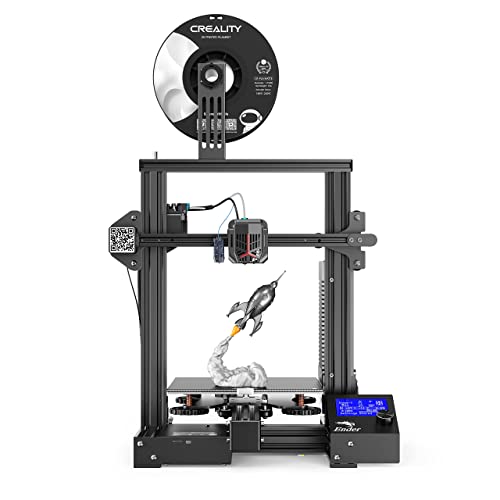
Voxelab Aquila X2 3D Printer with Full Alloy Frame, Removable Build Surface Plate, Fully Open Source, Resume Printing, Filaments Detection and Auto Filaments Feed/Return Function

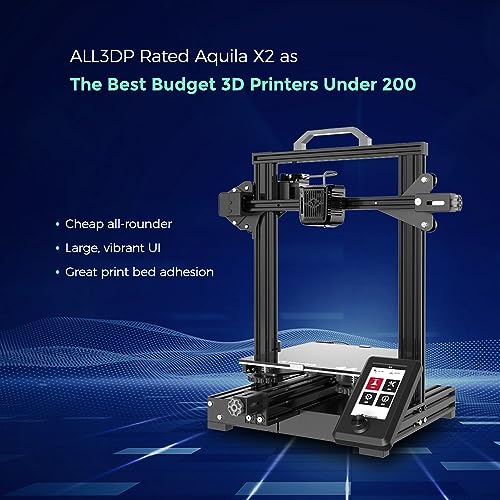


Key features
- •Upgrade Model: Ergonomic screen,support with filaments detection and auto filaments feed/return function,compatible with PLA, ABS, PETG filament.
- •Fast Heating and Silent Printing: The carbon crystal silicon glass plate provides a strong adhesion, heating in 5 mins, and the printing model will not easily become warped and the printing sounds is below 50 decibels.
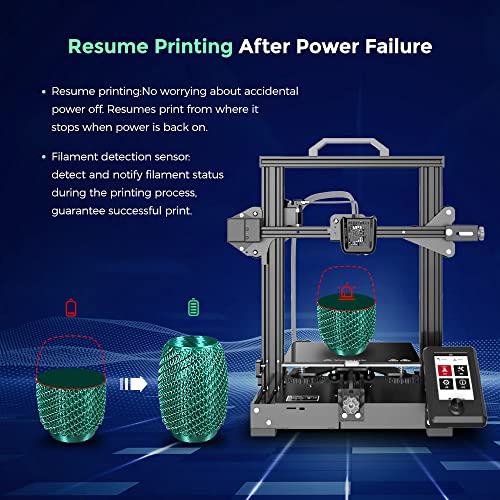
- •Intelligent and Smooth Printing: Aquila equipped with super quiet printing designing, with smooth adjustable pulley, and if power is accidentally cut off during printing, accurate printing can be continued after power is switched on.
- •Semi-Assembled Kit with Fully Open Source: The easy-to-setup kit comes partially assembled, also it comes with removable build surface plate. It allows for flexible upgrades and various modifications.
- •Warranty and Service: All Voxelab 3d printers are provided lifetime technical assistance and 12-months warranty.
Voxelab Aquila X2 3D Printer with Full Alloy Frame, Removable Build Surface Plate, Fully Open Source, Resume Printing, Filaments Detection and Auto Filaments Feed/Return Function
List Price: $216.80$195.12DEALYou Save: $21.68 (10%)
Free shippingFree Returns – 30 daysFree Order CancellationSecure Payment2–3 Days DeliveryGet It October 24, 2026In Stock (1)No marketing spamNo account requiredFulfilment by FedEx / Amazon / UPS / ShipwirePayPal / Card Buyer Protection
Customer Reviews
Reviews sourced from verified Amazon purchasers4.2
out of 5
Based on 10 reviews
5★
50%
4★
50%
3★
0%
2★
0%
1★
0%
GREAT BANG FOR YOUR BUCK
Cappy✓ Verified Purchase•September 4, 2023
I strongly recommend the Voxelab X2 to anyone wanting to get started into 3D printing. I purchased an Ender 3V2 for my first printer in July 2021. In Sept 2021 I purchased the Voxelab X2 . The X2 is almost identical to the Ender 3V2 and is $50 cheaper, plus it has some features the Ender 3V2 dosen't have. The Voxelab X2 comes with an automatic Filament Feeder and a Color Display . The Ender display is not color and it's harder to read if you are not directly in front of it. The Ender has a storage drawer for your tools that the Voxelab X2 doesn't have, but the Automatic Filament Feed & Extract feature on the Voxelab X2 far outweighs the storage drawer for me, and I really like the easier to read display on the Voxelab. The assembly of both printers is about the same. They both come about 80% assembled and both come with all the tools you need to complete the assembly. The assembly instructions require your attention and should be followed carefully. Look at the diagrams, read the instructions, and don't jump ahead of yourself or you will be disassembling and re-assembling. The Voxelab X2 came with a bag of EXTRA screws (labeled EXTRA Screws) plus there were additional extra screws in the individual bags labeled for each step of the instructions. Both printers came with a small amount of filament so I recommend you purchase additional filament when you purchase your printer.
I did my first print on the Voxelab X2 (see Photos) and it was the TEST print provided on the 8GB Micro SD card supplied with the printer. I spent about 15 to 20 minutes leveling the Bed, which is the key to a good print, and my first print on the Voxelab X2 came out GREAT. The automatic filament feeder works great, and I even tried the automatic filament extraction feature and was very pleased with the results. I really think that for the price the Voxelab X2 is a great way to get into 3D printing and would recommend it to anyone considering their initial forage into the 3d printing world. For the approximate $50 difference in price between the Ender 3 V2 and Voxleab X2 the Voxelab X2 is the winner by far. The quality of both printers is very good and they operate the same. It's hard to tell one from the other sitting side by side and the Voxelab X2 has additional features the Ender 3 V2 doesn't. Both printers provide you with extra 0.4mm print Nozzles and other items so there isn't a significant difference, other than the price, between the two. So, "Bang for your Buck" the Voxelab X2 is the way to go.
I did my first print on the Voxelab X2 (see Photos) and it was the TEST print provided on the 8GB Micro SD card supplied with the printer. I spent about 15 to 20 minutes leveling the Bed, which is the key to a good print, and my first print on the Voxelab X2 came out GREAT. The automatic filament feeder works great, and I even tried the automatic filament extraction feature and was very pleased with the results. I really think that for the price the Voxelab X2 is a great way to get into 3D printing and would recommend it to anyone considering their initial forage into the 3d printing world. For the approximate $50 difference in price between the Ender 3 V2 and Voxleab X2 the Voxelab X2 is the winner by far. The quality of both printers is very good and they operate the same. It's hard to tell one from the other sitting side by side and the Voxelab X2 has additional features the Ender 3 V2 doesn't. Both printers provide you with extra 0.4mm print Nozzles and other items so there isn't a significant difference, other than the price, between the two. So, "Bang for your Buck" the Voxelab X2 is the way to go.
Very good entry level FDM printer
jstollings✓ Verified Purchase•September 4, 2023
Very good printer. I would recommend upgrading the filament feed gear to a steal gear from the brass it comes with. This will save you problems in the future.
Other than that find your settings and stick to them and it will be a great printer!
Other than that find your settings and stick to them and it will be a great printer!
Unusually great customer support. Really nice starter 3D printer
David Hostetler✓ Verified Purchase•August 22, 2023
First things first, when you buy a 3D printer like this one, you are buying a KIT that YOU MUST ASSEMBLE. I have seen videos and read reviews of people crying they can't assemble this printer. They should have opted to not get a DIY 3D printer kit then.
Mine came in when expected, and it was well packaged, all the critical parts cushioned well, and lots, and I mean lots of screws and various other fasteners, including at least one of each fastener extra. As you assemble this you will find out why, these things like getting away from you sometimes!
Once I got it assembled I ran into a serious snag. The display had only 3 options and all were in Chinese. I reached out to Voxelab support late on a Friday night, and they actually responded QUICKLY, within an hour we figured out the mainboard and display did not get the proper firmware flash before leaving the factory, and they sent me the link to the files and procedure for getting it done. WIthin 30 minutes being super careful to do it right, I was up and running.
As the reviews saw the fans are loud, not horribly, but if you work in IT, you know the sound of server fans. These remidn me of server fans. I know there is an upgrade for them and I will likely do that.
Print quality is good, exactly what I expected, so no wierd lines or anything like that. Auto load and unload works great,
Levelling was okay although I did mess up and scratched the glass bed doing my levelling, I can live with that though. No impact really.
I am not sure this is all of them they are shipping, but my unit shipped with the highly desireable G32 chip / motherboard and does NOT have the problem prone H32. The H32 firmware allegedly fixes that problem though.
I have not tested with ABS yet, there is so much to do with PLA, and given that it is plant derived plastics, I will likely stick with this for a while.
This is allowing me to make some custom mounts for my Echo Dots, remotes etc... allowing me to truly customize home organization. I could be more thrilled, but it would take some work.
At the point I feel I have run out of capacity with this machine, I will likely add the Ender Extender upgrade which more or less doubles each dimension I think... That will allow me to build some crazy models, and work out some ideas I have for camping accessories...
Mine came in when expected, and it was well packaged, all the critical parts cushioned well, and lots, and I mean lots of screws and various other fasteners, including at least one of each fastener extra. As you assemble this you will find out why, these things like getting away from you sometimes!
Once I got it assembled I ran into a serious snag. The display had only 3 options and all were in Chinese. I reached out to Voxelab support late on a Friday night, and they actually responded QUICKLY, within an hour we figured out the mainboard and display did not get the proper firmware flash before leaving the factory, and they sent me the link to the files and procedure for getting it done. WIthin 30 minutes being super careful to do it right, I was up and running.
As the reviews saw the fans are loud, not horribly, but if you work in IT, you know the sound of server fans. These remidn me of server fans. I know there is an upgrade for them and I will likely do that.
Print quality is good, exactly what I expected, so no wierd lines or anything like that. Auto load and unload works great,
Levelling was okay although I did mess up and scratched the glass bed doing my levelling, I can live with that though. No impact really.
I am not sure this is all of them they are shipping, but my unit shipped with the highly desireable G32 chip / motherboard and does NOT have the problem prone H32. The H32 firmware allegedly fixes that problem though.
I have not tested with ABS yet, there is so much to do with PLA, and given that it is plant derived plastics, I will likely stick with this for a while.
This is allowing me to make some custom mounts for my Echo Dots, remotes etc... allowing me to truly customize home organization. I could be more thrilled, but it would take some work.
At the point I feel I have run out of capacity with this machine, I will likely add the Ender Extender upgrade which more or less doubles each dimension I think... That will allow me to build some crazy models, and work out some ideas I have for camping accessories...
An Excellent Alternative to the Creality Ender 3 Pro!!
THE 300LB GORILLA✓ Verified Purchase•August 21, 2023
UPDATE: 3-4-2023
The Glass Coated Print Bed no longer adheres to the part. The coating will not work. I have cleaned it. Washed it, used IPA, and nothing works except using some glue stick. I would recommend getting a PEI Spring Steel Sheet with magnetic bed kit. That is what I am going to do.
Okay, let me start off by saying that this is not a BASH on the Ender 3 Pro, it is a Good 3D Printer, but it is way over priced at $236.00 compared to the Aquila C2 at $165.00 for basically the same machine.
Aquila C2 Price: $165.00
The Good: (What I like)
It Comes with the following,
Glass print Bed Which has a coating on one side and plain glass on the other. I put a PEI Sheet on the glass side for when I really need good bed adhesion.
X Belt Tensioner
Y Belt Tensioner
Solid Power Supply
4040 Beam Construction for the base.
2040 for the Z Axis Uprights
202 Top Beam
Good selection of tools included, especially side cutters.
Hundreds of upgrade parts available on several sites.
Very easy to upgrade the mainboard case to something easier to open and use. And the Micro SD card will be right side up. The case opens from the top. Far easier to work on. I also added a Creality v4.2.7 with customized firmware.
The Bad: (What I do Not Like)
Did Not Like the Limited firmware upgrades. (Fixed when I upgraded the Control board case and added a v4.2.7 board)
Did not like the Non Silent Stepper Drivers (Very Noisy When Printing, hence the control board case and main board upgrade to a Creality v4.2.7 Silent Board)
Did not like Loud Fans (Stupidly loud) (Fixed when I upgraded mine to RGB WINSINN 40mm fans, much quieter)
Did not like the Flimsy Z Axis motor mounts (Fixed when I upgraded mine to CNC Machined Motor Mounts)
I also do NOT like single Z Axis Lead Screw (Fixed when I upgraded mine to Dual Z Axis Kit with top bearing blocks)
The print head stops right on the glass bed edge, making it hard to purge. (Fixed when I Upgraded to a shorted 3D Printed X Motor Cover and now the Nozzle is past the edge of the bed)
Did not like the poor wire management. (Fixed when I added 3D Printed clips to clean things up)
Did not like the issue with elephant footing on prints. (Fixed with a set of Backlash, Spring Loaded Nuts)
Did not like the fact it had no handle on top. (Fixed when I 3D Printed an excellent one)
Did not like the short feet it had. (Fixed when I 3D printed a set of 36mm High Feet)
Conclusion: Yes this is less money than the Ender 3 Pro, a nearly $71.00 difference in price.
If you like to tinker, and want to modify your 3D Printer, then this is a way better starting option. The Ender 3 Pro does not even come with a glass bed, or Y Belt tensioner, or an X Belt Tensioner, the Aquila C2 comes with these 3 important features. Yes, I spent some money on a Dual Z Axis Kit, a v4.2.7 Silent board, a Light Bar Kit, a Dual Gear Extruder, and lots of Yellow filament. My Aquila C2 runs circles around my friend's Ender 3 Pro in so many ways now that I have done some modifications. It is a good quality 3D Printer, and it has been so much fun modifying it. If you want to get into this hobby, and want to learn as you go, and you can, there are tons of videos online on how to modify it. The Aquila C2 is basically an Ender 3 Clone, but $71.00
cheaper for the base model. I spent roughly an additional $125+ dollars to get the Aquila C2 to where I wanted it. It is very close to what a Ender 3 S1 Pro would be, except the touch screen.
I recommend this 3D Printer because it was $71.00 less than the Ender 3 Pro, and it is a very solid platform to start you 3D Printer adventure, and you education in how to improve and modify it.
The Glass Coated Print Bed no longer adheres to the part. The coating will not work. I have cleaned it. Washed it, used IPA, and nothing works except using some glue stick. I would recommend getting a PEI Spring Steel Sheet with magnetic bed kit. That is what I am going to do.
Okay, let me start off by saying that this is not a BASH on the Ender 3 Pro, it is a Good 3D Printer, but it is way over priced at $236.00 compared to the Aquila C2 at $165.00 for basically the same machine.
Aquila C2 Price: $165.00
The Good: (What I like)
It Comes with the following,
Glass print Bed Which has a coating on one side and plain glass on the other. I put a PEI Sheet on the glass side for when I really need good bed adhesion.
X Belt Tensioner
Y Belt Tensioner
Solid Power Supply
4040 Beam Construction for the base.
2040 for the Z Axis Uprights
202 Top Beam
Good selection of tools included, especially side cutters.
Hundreds of upgrade parts available on several sites.
Very easy to upgrade the mainboard case to something easier to open and use. And the Micro SD card will be right side up. The case opens from the top. Far easier to work on. I also added a Creality v4.2.7 with customized firmware.
The Bad: (What I do Not Like)
Did Not Like the Limited firmware upgrades. (Fixed when I upgraded the Control board case and added a v4.2.7 board)
Did not like the Non Silent Stepper Drivers (Very Noisy When Printing, hence the control board case and main board upgrade to a Creality v4.2.7 Silent Board)
Did not like Loud Fans (Stupidly loud) (Fixed when I upgraded mine to RGB WINSINN 40mm fans, much quieter)
Did not like the Flimsy Z Axis motor mounts (Fixed when I upgraded mine to CNC Machined Motor Mounts)
I also do NOT like single Z Axis Lead Screw (Fixed when I upgraded mine to Dual Z Axis Kit with top bearing blocks)
The print head stops right on the glass bed edge, making it hard to purge. (Fixed when I Upgraded to a shorted 3D Printed X Motor Cover and now the Nozzle is past the edge of the bed)
Did not like the poor wire management. (Fixed when I added 3D Printed clips to clean things up)
Did not like the issue with elephant footing on prints. (Fixed with a set of Backlash, Spring Loaded Nuts)
Did not like the fact it had no handle on top. (Fixed when I 3D Printed an excellent one)
Did not like the short feet it had. (Fixed when I 3D printed a set of 36mm High Feet)
Conclusion: Yes this is less money than the Ender 3 Pro, a nearly $71.00 difference in price.
If you like to tinker, and want to modify your 3D Printer, then this is a way better starting option. The Ender 3 Pro does not even come with a glass bed, or Y Belt tensioner, or an X Belt Tensioner, the Aquila C2 comes with these 3 important features. Yes, I spent some money on a Dual Z Axis Kit, a v4.2.7 Silent board, a Light Bar Kit, a Dual Gear Extruder, and lots of Yellow filament. My Aquila C2 runs circles around my friend's Ender 3 Pro in so many ways now that I have done some modifications. It is a good quality 3D Printer, and it has been so much fun modifying it. If you want to get into this hobby, and want to learn as you go, and you can, there are tons of videos online on how to modify it. The Aquila C2 is basically an Ender 3 Clone, but $71.00
cheaper for the base model. I spent roughly an additional $125+ dollars to get the Aquila C2 to where I wanted it. It is very close to what a Ender 3 S1 Pro would be, except the touch screen.
I recommend this 3D Printer because it was $71.00 less than the Ender 3 Pro, and it is a very solid platform to start you 3D Printer adventure, and you education in how to improve and modify it.
Works great ... for a short while
Beth✓ Verified Purchase•August 20, 2023
My 19 yr old son has had this for about 9 months. It seemed sturdy making the trek from home to college to his dad's and back home. Unfortunately, it shot a couple small parts off into the nether in the middle of a print, regardless of every part of it being tightened and readjusted after every relocation. It is now a $300 paperweight, until we can find someone who makes replacement parts or sells OEM replacements.
Page 1 of 2