MAGIX Movie Studio Suite 2023 – For memories that last forever | Video editing software | Video editing program | for Windows 10/11 PC | 1 download license




Key features
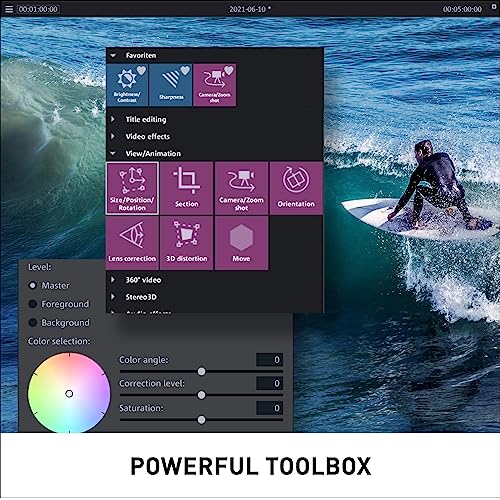
- •DISCOVER ALL THE BENEFITS OF THE SUITE VERSION: With a wide range of editing tools including multicam editing for 4 cameras, detailed color correction, up to 1,500 effects, titles, templates & transitions, automatic shot match, NewBlue Stylizers 5 Ultimate, and NewBlue Essentials 5 Ultimate.
- •EASY TO USE, FAST, PROFESSIONAL: Whether shot quickly with your cell phone or filmed professionally, turn your footage into stunning, high-quality movies in only a few minutes with Movie Studio.
- •EVERYTHING YOU NEED: With its wide range of cutting tools, the video editing program enables you to make each and every one of your ideas a reality – while benefiting from the latest technology. Work with detailed color correction, video stabilization and LUTs. The optimized high-speed timeline allows you to navigate projects smoothly and gives you full overview and control even of large amounts of material.
- •MAGIX TRAVEL MAPS: Create custom animations of your travel routes in seconds with this video editing software. Now with brand-new features like fly-in animations, filter view and GPX elevation profiles.
- •MADE IN GERMANY: Get the MAGIX video editing program, developed directly by the German manufacturer.
MAGIX Movie Studio Suite 2023 – For memories that last forever | Video editing software | Video editing program | for Windows 10/11 PC | 1 download license
List Price: $96.83$87.15DEALYou Save: $9.68 (10%)
Free shippingFree Returns – 30 daysFree Order CancellationSecure Payment2–3 Days DeliveryGet It October 25, 2026In Stock (1)No marketing spamNo account requiredFulfilment by FedEx / Amazon / UPS / ShipwirePayPal / Card Buyer Protection
Customer Reviews
Reviews sourced from verified Amazon purchasers3.5
out of 5
Based on 10 reviews
5★
30%
4★
70%
3★
0%
2★
0%
1★
0%
Best for beginners and those on a tight budget
Cassandra Strand✓ Verified Purchase•October 6, 2023
I generally only edit video as a hobby for my personal use, mostly home video. As such, I don't have the need or budget for very expensive video editing options.
I have used Adobe Premier Pro which is an excellent program with great features, but unfortunately it's subscription based. If you only have a limited time to work on your videos here and there it can take a long time and those subscription fees can really add up. For me Adobe Premier Pro is only viable if I know I can finish up the video in less than a month in which case it's possible that it's worth paying for 1 month of access to finish the video, but it still adds up if you have to do multiple videos over the course of a few years and every time you pay for one month of access.
My next favorite editor is Cyberlink's Power Director which is a perpetual license (though they do offer a 365 subscription version too). The upfront cost is a bit pricey but offer many of the same advanced features of Adobe Premier Pro. It's not quite as intuitive or easy to use as Adobe's software, but there are many tutorials and help files both in-app and on-line. The program is a powerful editing tool and is appropriately priced.
I've also tried a number of free versions of other video editors. Many higher end video editor offer a free version that gives access to more basic features while locking the more advanced ones behind subscriptions or perpetual licenses that will cost you significantly more money.
This program is somewhere between the free versions of other editors and Cyberlink Power Director. It comes at a much lower price point half the price of Cyberlink's lower priced editor. It is a perpetual license so you don't have to worry about subscriptions and will always be able to use it as long as your machine meets the minimum requirements (which are actually pretty low). Most video editors have some similar features and UI setups, but all of them require a little time to learn their specifics and differences. This UI is no different, if you want to use it properly you'll need to spend some time learning it. Unfortunately there are far fewer tutorials and help and I found the UI to be less intuitive than most programs I've used. Feature-wise this is a pretty robust program offering a lot more advanced features than most of the free editors, but you won't get all the features you would in Adobe or Cyberlink's editors. One thing that makes this not as good for me is that your output options are far more limited than Adobe or Cyberlink. It's basic formats only.
This program does seem to take a very long time to download and install,plan on the process taking about half an hour. I didn't have any problems while using the program, it ran smoothly and I didn't encounter any errors or glitches. However, I do recommend making frequent and multiple saves of videos and cut video files because the undo option is sometimes not able to undo certain actions and you may need to scrap it and start working with the clip again from a previous point. You will need to clip videos into smaller segments to apply multiple effects and edits to specific parts as opposed to the whole video which is a little annoying but workable.
To me this is a happy medium for beginners to get into editing with some more robust features if they are willing to put in the time to learn the program and don't need to save in or handle lots of video formats. It's good for those who want to have a perpetual license as opposed to a subscription as well. Its also good in terms of features vs cost and if a much lower price point than most editors offering as many editing features as this does.
I have used Adobe Premier Pro which is an excellent program with great features, but unfortunately it's subscription based. If you only have a limited time to work on your videos here and there it can take a long time and those subscription fees can really add up. For me Adobe Premier Pro is only viable if I know I can finish up the video in less than a month in which case it's possible that it's worth paying for 1 month of access to finish the video, but it still adds up if you have to do multiple videos over the course of a few years and every time you pay for one month of access.
My next favorite editor is Cyberlink's Power Director which is a perpetual license (though they do offer a 365 subscription version too). The upfront cost is a bit pricey but offer many of the same advanced features of Adobe Premier Pro. It's not quite as intuitive or easy to use as Adobe's software, but there are many tutorials and help files both in-app and on-line. The program is a powerful editing tool and is appropriately priced.
I've also tried a number of free versions of other video editors. Many higher end video editor offer a free version that gives access to more basic features while locking the more advanced ones behind subscriptions or perpetual licenses that will cost you significantly more money.
This program is somewhere between the free versions of other editors and Cyberlink Power Director. It comes at a much lower price point half the price of Cyberlink's lower priced editor. It is a perpetual license so you don't have to worry about subscriptions and will always be able to use it as long as your machine meets the minimum requirements (which are actually pretty low). Most video editors have some similar features and UI setups, but all of them require a little time to learn their specifics and differences. This UI is no different, if you want to use it properly you'll need to spend some time learning it. Unfortunately there are far fewer tutorials and help and I found the UI to be less intuitive than most programs I've used. Feature-wise this is a pretty robust program offering a lot more advanced features than most of the free editors, but you won't get all the features you would in Adobe or Cyberlink's editors. One thing that makes this not as good for me is that your output options are far more limited than Adobe or Cyberlink. It's basic formats only.
This program does seem to take a very long time to download and install,plan on the process taking about half an hour. I didn't have any problems while using the program, it ran smoothly and I didn't encounter any errors or glitches. However, I do recommend making frequent and multiple saves of videos and cut video files because the undo option is sometimes not able to undo certain actions and you may need to scrap it and start working with the clip again from a previous point. You will need to clip videos into smaller segments to apply multiple effects and edits to specific parts as opposed to the whole video which is a little annoying but workable.
To me this is a happy medium for beginners to get into editing with some more robust features if they are willing to put in the time to learn the program and don't need to save in or handle lots of video formats. It's good for those who want to have a perpetual license as opposed to a subscription as well. Its also good in terms of features vs cost and if a much lower price point than most editors offering as many editing features as this does.
I like this software!
Tony Velasquez✓ Verified Purchase•October 5, 2023
I already had an earlier version of this software. I find it very accessible, easy to use and easy to pick up. I have been using it for quite awhile so I am very familiar with it. I've used it for YouTube videos, personal projects, and editing pre-existing videos. Although I am not a video professional, I have not found anything that I wish I could do that this software cannot do. Very high quality.
My only complaint is that the most recent version of this software does come along with some pretty intrusive ad-ware advertising the company's other projects. You can turn it off and even us Windows to block it, but its a pain to even do that.
My only complaint is that the most recent version of this software does come along with some pretty intrusive ad-ware advertising the company's other projects. You can turn it off and even us Windows to block it, but its a pain to even do that.
Decent software for the beginner easy to use
Sandy Moose✓ Verified Purchase•August 10, 2023
Easy enough to use for beginners, may lack a lot of the exciting plugins as the fancier software but if your looking for an easy home solution it's good.
An Affordable Option for Video Editing
J. Lewis✓ Verified Purchase•August 3, 2023
I've used a number of video editing programs over the last several years. This one has good instructions and tutorials but is pretty intuitive so its learning curve is not too steep. Installation can be done via a accompanying DVD or through a downloadable .exe. I opted for the former method, using a USB-C external DVD drive I keep handy to pair with the laptop I use for such projects. Note that this software will perform at its most optimum when used on a device with sufficient ram and other internal specs. The software has a a considerable variety of features able to give all kinds of effects. Video editing software can be quite expensive so retail price of this one is an exceptional bargain and should count as one of its most important features. Beginners in particular should give this really close consideration due to its ease of use.
Cheap and easy to use
RR✓ Verified Purchase•July 22, 2023
I am not a "content creator" but rather just someone who likes to save vacation photos and video in an easy to watch format. Been messing around with varying stitching programs for years for MP4s and did not realize Magix made this program until a few days ago. I have previously been using an Magix photostory 7 for putting photos into a video slideshow that we can stream to our TVs or phones from our NAS. As we are getting ready to go on a cruise for a milestone anniversary, I wanted to get an updated version of that program. That is where I saw this one for video.
It is pretty much the same interface with some video editing tools and it was cheap enough to give it a try. Just made a couple of quick clips from some test videos and it was pretty simple to work with.
Got this and photostory 2023 the complete versions and both are very similar to work with.
It is pretty much the same interface with some video editing tools and it was cheap enough to give it a try. Just made a couple of quick clips from some test videos and it was pretty simple to work with.
Got this and photostory 2023 the complete versions and both are very similar to work with.
Page 1 of 2
![CyberLink PowerDirector 21 Ultra - Easy Video Editing | Easy-to-Use Video Editing Software With Thousands of Visual Effects | Slideshow Maker | Screen Recorder [Retail Box with Download Card]](https://m.media-amazon.com/images/I/41rlUK8ZpbL._SL500_.jpg)
![Corel VideoStudio Pro 2020 | Video Editing Suite [PC Download][OLD VERSION]](https://m.media-amazon.com/images/I/412CmYubm-L._SL500_.jpg)

![[Old Version] Pinnacle Studio 25 Plus | Powerful Video Editing & Screen Recording Software [PC Download]](https://m.media-amazon.com/images/I/41PDlyq+ARL._SL500_.jpg)
![Pinnacle Studio 24 Ultimate | Advanced Video Editing and Screen Recording Software [PC Download] [Old Version]](https://m.media-amazon.com/images/I/41wlerjy82L._SL500_.jpg)
![Movie Edit Pro 2020 Premium [PC Download]](https://m.media-amazon.com/images/I/51DkwWuWI+L._SL500_.jpg)

![VideoStudio Pro 2021 | Video Editing Software | Slideshow Maker, Screen Recorder, DVD Burner [PC Download] [Old Version]](https://m.media-amazon.com/images/I/41ZSgUdDFGL._SL500_.jpg)